
podpuller
A simple python app to sync your podcasts with RSS feeds and transfer to an external MP3 player


Quick Start
pip install podpuller- Copy
feeds.example.confto~/.config/podpuller/feeds.conf - Put in URLs of RSS feeds, using a unique section name for each feed. No need to put in title.
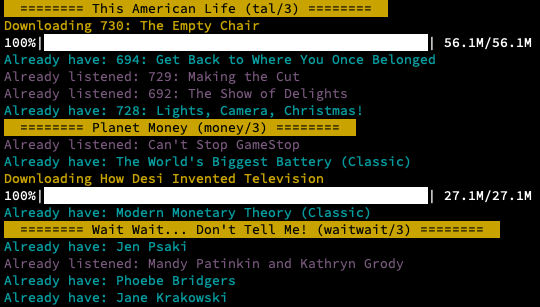
- You can now use the command
podpuller
Motivation
After giving up my smartphone and buying a cheapo MP3 player I wanted a way to keep my feeds synced.
There are many great programs for this out there, like Greg, but it didn't really fit my workflow, which was having a certain number of the newest episodes of each podcast, and manually marking the ones I have already listened to.
This is that app. It was heavily inspired (and liberally copied) from the excellent upodder which is no longer maintained.
Workflow
Config: ~/.config/podpuller/feeds.conf
- Choose your RSS feeds
- Specify how many episodes you want (can be 'all')
- Choose serial (oldest first) or regular + optional start date
Run: podpuller [opt:single_feed]
- Mark the ones you listened to (or skip with "quick mode")
- Wait for sync (only syncs single feed if specified)
- Optionally, transfer to external drive
Config
The config file is read from ~/.config/podpuller/feeds.conf and you have an example here. It is pretty straightforward:
Global Configs
data directory: Where to store the SQL database of downloaded and listened episodes.download directory: Where to download the podcasts to.mp3 player directory: Where to sync the download directory to.
Feed Configs
- Every feed goes into a directory named by its config file section (e.g.,
talin the sample conf file). - The
serialconfig gets episodes from oldest to newest. start dateignores everything before that date (useful forserialpodcasts).- There's no need to provide a name for the feed, just a URL, the name will be auto-filled from the RSS feed.
Notes
- Sync both transfers and deletes files. It basically does an exact copy.
- All defaults, including
rsyncflags, are for MacOS but can probably be easily changed for UN*X systems.
Rant
RSS is a long-standing open standard for updated feeds. Your podcast success is built on the shoulders of many open-source and open-format developers who poured their heart into it. Please stop making your podcast available only through proprietary channels like Spotify, iTunes, etc. Give back by also publishing your RSS feed. Thanks!
Roadmap
Tag MP3 files with info from feedPut project on PyPIUI improvementsHandle "oldest-first" workflow for serial podcasts
1 maintainer

Metadata
1 maintainer
Release files for podpuller 1.4.6
For a detailed explanation of source distributions (sdists) and built distributions (wheels), please see the package formats documentation.
Source distribution (sdist)
| File | Size | Uploaded | |
|---|---|---|---|
| podpuller-1.4.6.tar.gz | 10.7 kB | Details |
Built distribution (wheel)
| File | Interpreter | ABI | Platform | Reset |
|---|---|---|---|---|
| podpuller-1.4.6-py3-none-any.whl | Python 3 | none | any | Details |
Total release size: 21.3 kB
Release files / podpuller-1.4.6.tar.gz
| Download URL | podpuller-1.4.6.tar.gz |
|---|---|
| Size | 10.7 kB |
| Tags | Source |
|
SHA-256 checksum How to use checksums |
d70ccd8e37010c37792d12c186fbb61c1c71cef93c9a9a5c306ff75a2bfed71b
|
|
BLAKE2b-256 checksum How to use checksums |
35b1f7ec57e16d4164d7d6825648825438edd08c0ad7cf955624d084ecf32753
|
| Upload date | |
|
Uploaded using Trusted Publishing? What is trusted publishing? |
No |
| Uploaded via |
twine/5.1.1 CPython/3.12.4
|
Release files / podpuller-1.4.6-py3-none-any.whl
| Download URL | podpuller-1.4.6-py3-none-any.whl |
|---|---|
| Size | 10.7 kB |
| Tags | Python 3 |
|
SHA-256 checksum How to use checksums |
5748c6e1f2de32c18277e71984f0a3dd7f12cff40b3c42c9b0ba92eafca63ddc
|
|
BLAKE2b-256 checksum How to use checksums |
97728028551475466ffe78c20812b93ef14120021c178fc6dfda0da509f5bcae
|
| Upload date | |
|
Uploaded using Trusted Publishing? What is trusted publishing? |
No |
| Uploaded via |
twine/5.1.1 CPython/3.12.4
|














