
 poetry-plugin-dotenv




Overview
poetry-plugin-dotenv loads environment variables from a dotenv file into the environment before any poetry command runs.
It also adds new poetry commands:
poetry activate- loads environment variables from a dotenv file and activates the virtual environment
Features
- Fully type-safe
- No external dependencies required
- Brings back beloved
activatecommand with extended functionality - Supports templates and variable interpolation using POSIX variable expansions
- Supports
--directory, which allows setting the working directory for thepoetrycommand - Supports multiple configuration sources
- Provides configuration auto-completion and validation in IDEs like Visual Studio Code or PyCharm (via JSON Schema Store)
- Supports both
poetry v1.5+andpoetry v2+
Installation
poetry self add poetry-plugin-dotenv@latest
Usage and Configuration
By default, the plugin will load the .env file from the current working directory or any higher-level directories.
ignore
Type: str
Default: false
Allowed values (as True): y / yes / t / on / 1 / true
Allowed values (as False): n / no / f / off / 0 / false
Prevents poetry from loading the dotenv file.
location
Type: str
Default: .env
If your dotenv file is located elsewhere or has a different name, you can set this parameter.
Configuration Via TOML File
The plugin can read project-specific default values for its options from a pyproject.toml file.
By default, poetry-plugin-dotenv looks for a pyproject.toml file that includes either a [tool.dotenv] or [tool.poetry.plugins.dotenv] section.
Example pyproject.toml:
[tool.dotenv]
ignore = "false"
location = ".env.dev"

[tool.poetry.plugins.dotenv]
ignore = "false"
location = ".env.dev"
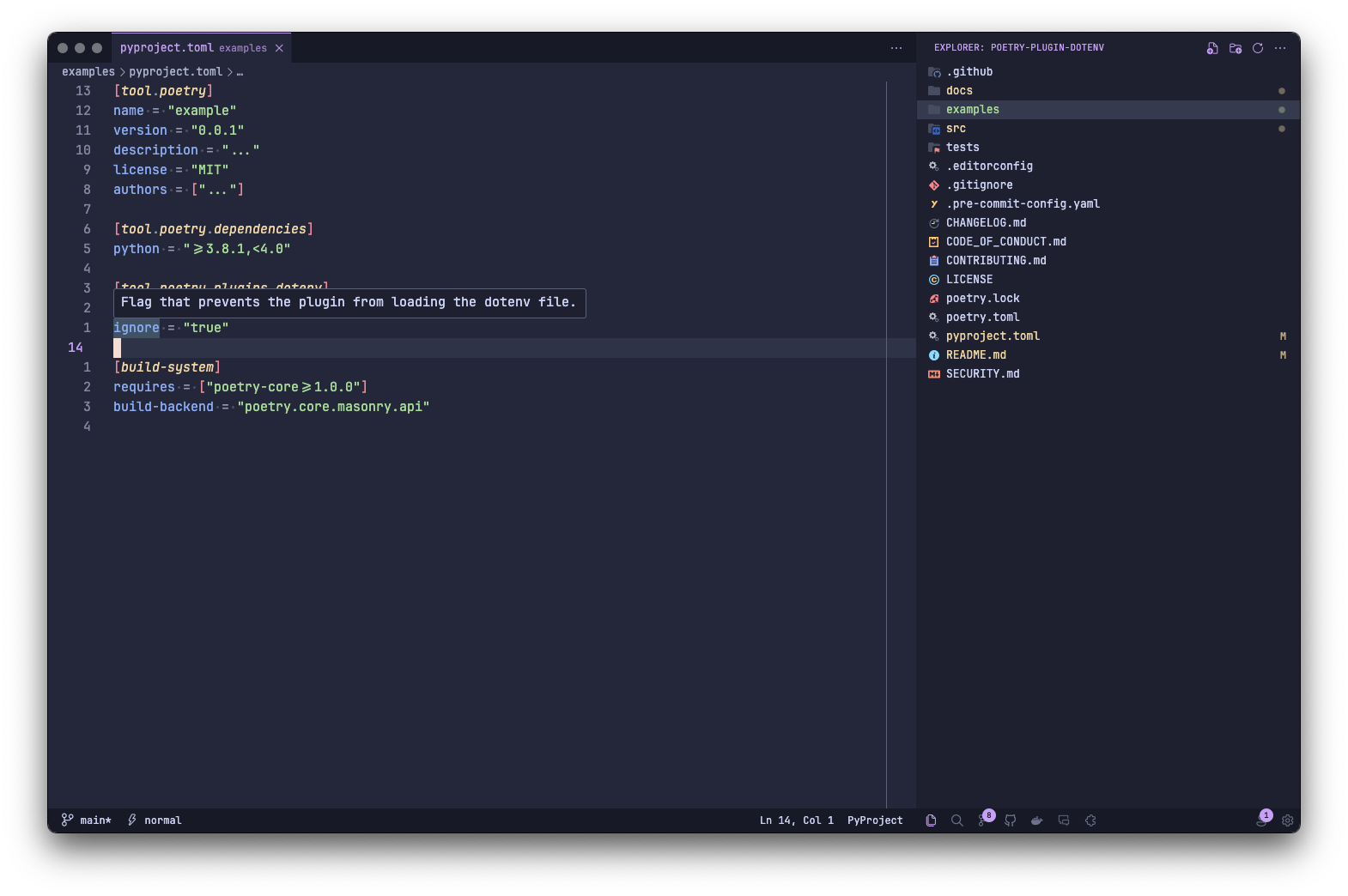
The configuration schema is part of the JSON Schema Store, so IDEs like Visual Studio Code and PyCharm offer auto-completion and validation for it.
Configuration Via Environment Variables
poetry-plugin-dotenv supports the following configuration options via environment variables:
POETRY_PLUGIN_DOTENV_LOCATIONPOETRY_PLUGIN_DOTENV_IGNORE
Lookup Hierarchy
A pyproject.toml file can override default values. Environment variables override both.
Examples
Using the activate command:
# .env
DB__HOST=localhost
DB__DBNAME=local_lakehouse
DB__USER=volodymyr
DB__PASSWORD=super_secret_password
DB__ENGINE=postgresql://${DB__USER}:${DB__PASSWORD}@${DB__HOST}/${DB__DBNAME}
poetry activate -v
# Using virtualenv: ...
# Loading environment variables: .../.env

# Reloads shell within the environment with loaded environment variables
Using the run command:
# .env
DB__HOST=localhost
DB__DBNAME=local_lakehouse
DB__USER=volodymyr
DB__PASSWORD=super_secret_password
DB__ENGINE=postgresql://${DB__USER}:${DB__PASSWORD}@${DB__HOST}/${DB__DBNAME}
# .env.dev
DB__HOST=dev.host
DB__DBNAME=dev_lakehouse
DB__USER=svc_team
DB__PASSWORD=super_secret_password
DB__ENGINE=postgresql://${DB__USER}:${DB__PASSWORD}@${DB__HOST}/${DB__DBNAME}
# pyproject.toml
[tool.dotenv]
location = ".env.dev"
# main.py
from __future__ import annotations

import os


if __name__ == "__main__":
    try:
        print(f"Host: {os.environ['DB__HOST']!r}")
        print(f"Name: {os.environ['DB__DBNAME']!r}")
        print(f"Username: {os.environ['DB__USER']!r}")
        print(f"Password: {os.environ['DB__PASSWORD']!r}")
        print(f"Engine: {os.environ['DB__ENGINE']!r}")

    except KeyError:
        print("Environment variables not set!")
poetry run -vvv python main.py
# Loading environment variables: .env
# Host: 'localhost'
# Name: 'local_lakehouse'
# Username: 'volodymyr'
# Password: 'super_secret_password'
# Engine: 'postgresql://volodymyr:super_secret_password@localhost/local_lakehouse'

# Set location section in pyproject.toml
poetry run -vvv python main.py
# Loading environment variables: .env.dev
# Host: 'dev.host'
# Name: 'dev_lakehouse'
# Username: 'svc_team'
# Password: 'super_secret_password'
# Engine: 'postgresql://svc_team:super_secret_password@dev.host/dev_lakehouse'

# Set ignore = "true" in pyproject.toml
poetry run -vvv python main.py
# Not loading environment variables. Ignored by configuration
# Environment variables not set!

export POETRY_PLUGIN_DOTENV_LOCATION=.env.dev && poetry run -vvv python main.py
# Loading environment variables: .env.dev
# Host: 'dev.host'
# Name: 'dev_lakehouse'
# Username: 'svc_team'
# Password: 'super_secret_password'
# Engine: 'postgresql://svc_team:super_secret_password@dev.host/dev_lakehouse'

export POETRY_PLUGIN_DOTENV_IGNORE=true && poetry run -vvv python main.py
# Not loading environment variables. Ignored by configuration
# Environment variables not set!
1 maintainer

Metadata
1 maintainer
Release files for poetry-plugin-dotenv 3.3.4
For a detailed explanation of source distributions (sdists) and built distributions (wheels), please see the package formats documentation.
Source distribution (sdist)
| File | Size | Uploaded | |
|---|---|---|---|
| poetry_plugin_dotenv-3.3.4.tar.gz | 14.2 kB | Details |
Built distribution (wheel)
| File | Interpreter | ABI | Platform | Reset |
|---|---|---|---|---|
| poetry_plugin_dotenv-3.3.4-py3-none-any.whl | Python 3 | none | any | Details |
Total release size: 30.6 kB
Release files / poetry_plugin_dotenv-3.3.4.tar.gz
| Download URL | poetry_plugin_dotenv-3.3.4.tar.gz |
|---|---|
| Size | 14.2 kB |
| Tags | Source |
|
SHA-256 checksum How to use checksums |
84c93d6dc49e62da6552268979c734024f4063fc93e13378c5850bfe460ae187
|
|
BLAKE2b-256 checksum How to use checksums |
d59cbeacab05f2d7520787c9258319c3480c7b362baca6758fab8c766f0df55d
|
| Upload date | |
|
Uploaded using Trusted Publishing? What is trusted publishing? |
Yes |
| Uploaded via |
uv/0.12.17 {"installer":{"name":"uv","version":"0.12.17","subcommand":["publish"]},"python":null,"implementation":{"name":null,"version":null},"distro":{"name":"Ubuntu","version":"24.04","id":"noble","libc":null},"system":{"name":null,"release":null},"cpu":null,"openssl_version":null,"setuptools_version":null,"rustc_version":null,"ci":true}
|
Release files / poetry_plugin_dotenv-3.3.4-py3-none-any.whl
| Download URL | poetry_plugin_dotenv-3.3.4-py3-none-any.whl |
|---|---|
| Size | 16.4 kB |
| Tags | Python 3 |
|
SHA-256 checksum How to use checksums |
bfcc5fda57f04576aecb91b56005b4071f6079bb343d0dd543314ee0ca9b1ab6
|
|
BLAKE2b-256 checksum How to use checksums |
b3b9b4a79193e245fcd85fdb7a7fc3f64a5179418b044e04712435b37321f156
|
| Upload date | |
|
Uploaded using Trusted Publishing? What is trusted publishing? |
Yes |
| Uploaded via |
uv/0.12.17 {"installer":{"name":"uv","version":"0.12.17","subcommand":["publish"]},"python":null,"implementation":{"name":null,"version":null},"distro":{"name":"Ubuntu","version":"24.04","id":"noble","libc":null},"system":{"name":null,"release":null},"cpu":null,"openssl_version":null,"setuptools_version":null,"rustc_version":null,"ci":true}
|














