
Po Excel Tool (PET)
I created this command line utility to speed up my own translating process using Excel xlsx file.
It can be basically used for:
- adding multiple PO files to one sheet in Excel file
- extract required locale(s) from xlsx sheet to PO file(s)
As I often use Babel for extracting traslated strings which generates POT file it is possible:
Workflow is as minimal as possible, you need only two commands:
pet toxlsandpet fromxls- it uses all po files in actual directory and default name for Excel table is messages.xlsx
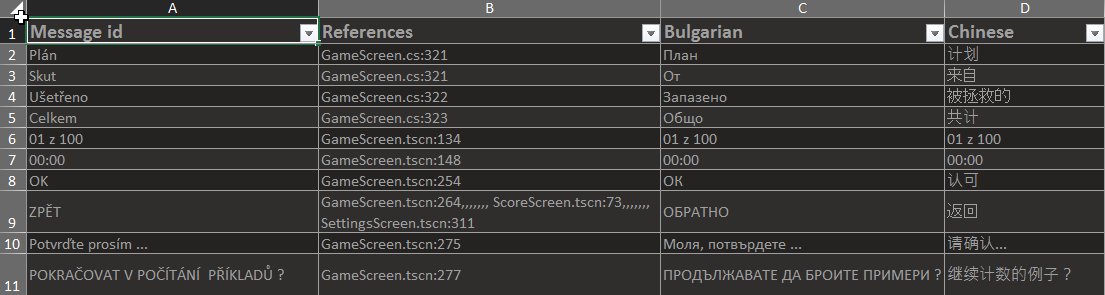
Ouput table is hopefully :slightly_smiling_face: beautifully formatted and columns´ length is adjusted:
Using
pet toxls -h
Usage: pet toxls [OPTIONS] CATALOG

  Convert .PO files to an XLSX file.

  guessing locale for PO files:
      1. "Language" key in the PO metadata,
      2. filename.
  manual locale specification:
      pet toxls cs=basedir/czech/mydomain.po

  pet toxls en.po Bulgarian.po
  - add files en.po and bg.po as en and bg locale to messages.xlsx

  pet toxls en=British.po cs=Czech.po
  - add files British.po and Czech.po as en and cs locale to messages.xlsx

  pet toxls
  - add all po files from current dir to messages.xlsx

Options:
  -c, --comments [translator|extracted|reference|all]
                                  Comments to include in the spreadsheet
  -o, --output FILENAME           Output file  [default: messages.xlsx]
  -m, --msgmerge                  flag for update(merge) from pot file
  -h, --help                      Show this message and exit.
pet fromxls -h
Usage: pet fromxls [OPTIONS] [LOCALE]...

   Convert a XLS(X) file to a .PO file

    pet fromxls en cs
    - create en.po and cs.po files from messages.xlsx

    pet fromxls en=British.po cs=Czech.po
    - create British.po and Czech.po from message.xlsx

   pet fromxls
   - extract all locales from messages.xlsx to appropriate po files
     in current directory


Options:
  -is, --ignoresheet TEXT  Ignore sheets with specific names.
  -od, --outdir DIRECTORY  output directory for po file  [default: .]
  -if, --inputfile PATH    input xlsx file  [default: messages.xlsx]
  -h, --help               Show this message and exit.
Instalation
pip install git+https://github.com/zbyna/po-excel-tool.git#egg=poexceltool
or
pip install poexceltool
As a base for this project was https://github.com/wichert/po-xls used. Thank you!
1 maintainer

Metadata
1 maintainer
Release files for poexceltool 0.1.0
For a detailed explanation of source distributions (sdists) and built distributions (wheels), please see the package formats documentation.
Source distribution (sdist)
| File | Size | Uploaded | |
|---|---|---|---|
| poexceltool-0.1.0.tar.gz | 9.6 kB | Details |
Built distribution (wheel)
| File | Interpreter | ABI | Platform | Reset |
|---|---|---|---|---|
| poexceltool-0.1.0-py2.py3-none-any.whl | Python 2, Python 3 | none | any | Details |
Total release size: 19.1 kB
Release files / poexceltool-0.1.0.tar.gz
| Download URL | poexceltool-0.1.0.tar.gz |
|---|---|
| Size | 9.6 kB |
| Tags | Source |
|
SHA-256 checksum How to use checksums |
cab0141adbe1b1611a8dfbc744a298aef24c3e73210855f9207a310859475c50
|
|
BLAKE2b-256 checksum How to use checksums |
2006be6785833613fed11754b220fc3ac680a0ed5d6f77f20341a1ac104fe054
|
| Upload date | |
|
Uploaded using Trusted Publishing? What is trusted publishing? |
No |
| Uploaded via |
twine/4.0.1 CPython/3.8.10
|
Release files / poexceltool-0.1.0-py2.py3-none-any.whl
| Download URL | poexceltool-0.1.0-py2.py3-none-any.whl |
|---|---|
| Size | 9.4 kB |
| Tags | Python 2 Python 3 |
|
SHA-256 checksum How to use checksums |
8230223b45a3536f012f64e8fa5aa1bd73474b74656232022925d7d38a13e1a0
|
|
BLAKE2b-256 checksum How to use checksums |
de7c3a5a604ef9883609134b0869f7b2b60ee509488fece31a383c36c4990e75
|
| Upload date | |
|
Uploaded using Trusted Publishing? What is trusted publishing? |
No |
| Uploaded via |
twine/4.0.1 CPython/3.8.10
|














