
Find out if your data is what you think it is.

Project description

Data validation made beautiful and powerful













What is Pointblank?
Pointblank is a powerful, yet elegant data validation framework for Python that transforms how you ensure data quality. With its intuitive, chainable API, you can quickly validate your data against comprehensive quality checks and visualize results through stunning, interactive reports that make data issues immediately actionable.
Whether you're a data scientist, data engineer, or analyst, Pointblank helps you catch data quality issues before they impact your analyses or downstream systems.
Getting Started in 30 Seconds
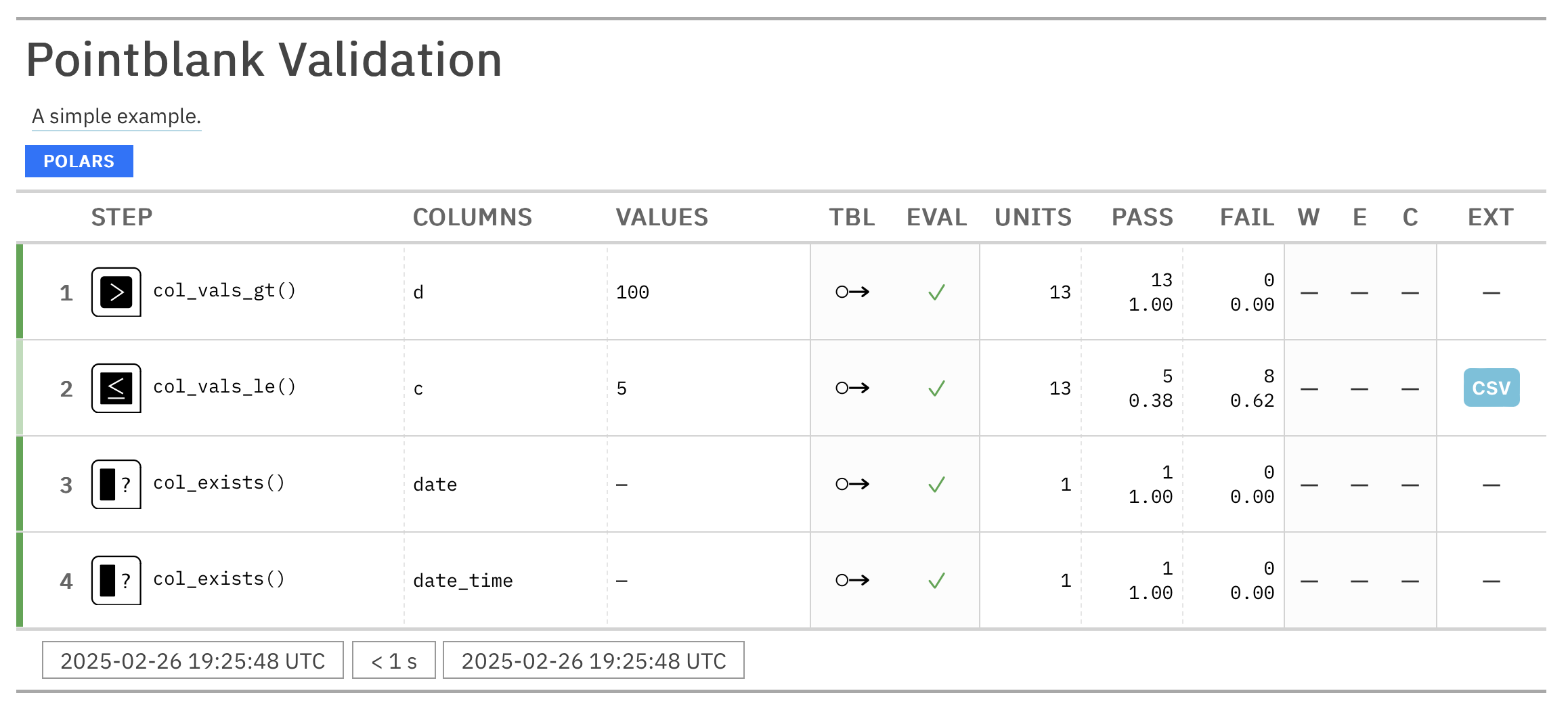
import pointblank as pb

validation = (
   pb.Validate(data=pb.load_dataset(dataset="small_table"))
   .col_vals_gt(columns="d", value=100)             # Validate values > 100
   .col_vals_le(columns="c", value=5)               # Validate values <= 5
   .col_exists(columns=["date", "date_time"])       # Check columns exist
   .interrogate()                                   # Execute and collect results
)

# Get the validation report from the REPL with:
validation.get_tabular_report().show()

# From a notebook simply use:
validation
Why Choose Pointblank?
- Works with your existing stack: Seamlessly integrates with Polars, Pandas, DuckDB, MySQL, PostgreSQL, SQLite, Parquet, PySpark, Snowflake, and more!
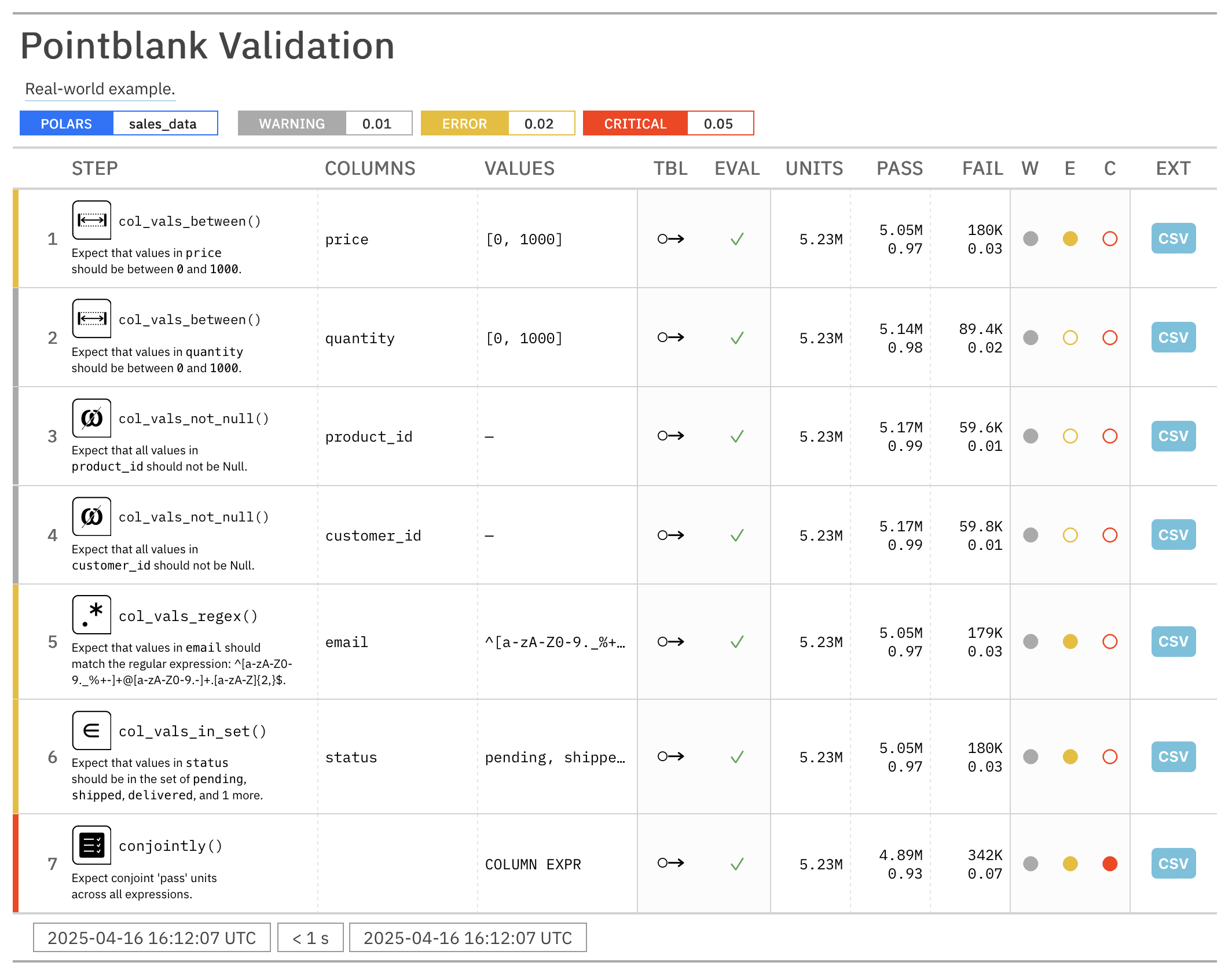
- Beautiful, interactive reports: Crystal-clear validation results that highlight issues and help communicate data quality
- Composable validation pipeline: Chain validation steps into a complete data quality workflow
- Threshold-based alerts: Set 'warning', 'error', and 'critical' thresholds with custom actions
- Practical outputs: Use validation results to filter tables, extract problematic data, or trigger downstream processes
Real-World Example
import pointblank as pb
import polars as pl

# Load your data
sales_data = pl.read_csv("sales_data.csv")

# Create a comprehensive validation
validation = (
   pb.Validate(
      data=sales_data,
      tbl_name="sales_data",           # Name of the table for reporting
      label="Real-world example.",     # Label for the validation, appears in reports
      thresholds=(0.01, 0.02, 0.05),   # Set thresholds for warnings, errors, and critical issues
      actions=pb.Actions(              # Define actions for any threshold exceedance
         critical="Major data quality issue found in step {step} ({time})."
      ),
      final_actions=pb.FinalActions(   # Define final actions for the entire validation
         pb.send_slack_notification(
            webhook_url="https://hooks.slack.com/services/your/webhook/url"
         )
      ),
      brief=True,                      # Add automatically-generated briefs for each step
   )
   .col_vals_between(            # Check numeric ranges with precision
      columns=["price", "quantity"],
      left=0, right=1000
   )
   .col_vals_not_null(           # Ensure that columns ending with '_id' don't have null values
      columns=pb.ends_with("_id")
   )
   .col_vals_regex(              # Validate patterns with regex
      columns="email",
      pattern="^[a-zA-Z0-9._%+-]+@[a-zA-Z0-9.-]+\\.[a-zA-Z]{2,}$"
   )
   .col_vals_in_set(             # Check categorical values
      columns="status",
      set=["pending", "shipped", "delivered", "returned"]
   )
   .conjointly(                  # Combine multiple conditions
      lambda df: pb.expr_col("revenue") == pb.expr_col("price") * pb.expr_col("quantity"),
      lambda df: pb.expr_col("tax") >= pb.expr_col("revenue") * 0.05
   )
   .interrogate()
)
Major data quality issue found in step 7 (2025-04-16 15:03:04.685612+00:00).
# Get an HTML report you can share with your team
validation.get_tabular_report().show("browser")
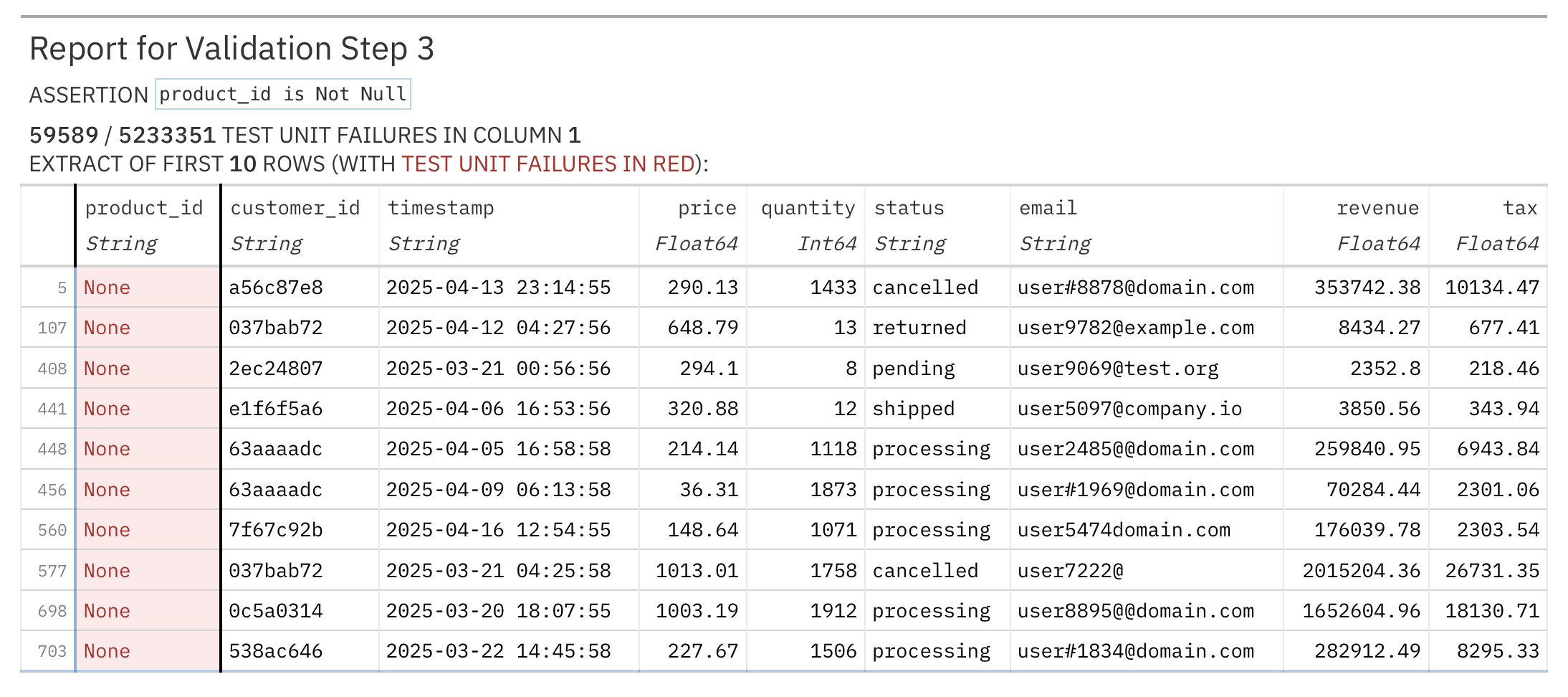
# Get a report of failing records from a specific step
validation.get_step_report(i=3).show("browser")  # Get failing records from step 3
Command Line Interface (CLI)
Pointblank includes a powerful CLI utility called pb that lets you run data validation workflows directly from the command line. Perfect for CI/CD pipelines, scheduled data quality checks, or quick validation tasks.

Explore Your Data
# Get a quick preview of your data
pb preview small_table

# Preview data from GitHub URLs
pb preview "https://github.com/user/repo/blob/main/data.csv"

# Check for missing values in Parquet files
pb missing data.parquet

# Generate column summaries from database connections
pb scan "duckdb:///data/sales.ddb::customers"
Run Essential Validations
# Check for duplicate rows
pb validate small_table --check rows-distinct

# Validate data directly from GitHub
pb validate "https://github.com/user/repo/blob/main/sales.csv" --check col-vals-not-null --column customer_id

# Verify no null values in Parquet datasets
pb validate "data/*.parquet" --check col-vals-not-null --column a

# Extract failing data for debugging
pb validate small_table --check col-vals-gt --column a --value 5 --show-extract
Integrate with CI/CD
# Use exit codes for automation (0 = pass, 1 = fail)
pb validate small_table --check rows-distinct --exit-code
Click the following headings to see some video demonstrations of the CLI:
Getting Started with the Pointblank CLI

Doing Some Data Exploration

Validating Data with the CLI

Using Polars in the CLI

Integrating Pointblank with CI/CD

Features That Set Pointblank Apart
- Complete validation workflow: From data access to validation to reporting in a single pipeline
- Built for collaboration: Share results with colleagues through beautiful interactive reports
- Practical outputs: Get exactly what you need: counts, extracts, summaries, or full reports
- Flexible deployment: Use in notebooks, scripts, or data pipelines
- Customizable: Tailor validation steps and reporting to your specific needs
- Internationalization: Reports can be generated in over 20 languages, including English, Spanish, French, and German
Documentation and Examples
Visit our documentation site for:
Join the Community
We'd love to hear from you! Connect with us:
- GitHub Issues for bug reports and feature requests
- Discord server for discussions and help
- Contributing guidelines if you'd like to help improve Pointblank
Installation
You can install Pointblank using pip:
pip install pointblank
You can also install Pointblank from Conda-Forge by using:
conda install conda-forge::pointblank
If you don't have Polars or Pandas installed, you'll need to install one of them to use Pointblank.
pip install "pointblank[pl]" # Install Pointblank with Polars
pip install "pointblank[pd]" # Install Pointblank with Pandas
To use Pointblank with DuckDB, MySQL, PostgreSQL, or SQLite, install Ibis with the appropriate backend:
pip install "pointblank[duckdb]"   # Install Pointblank with Ibis + DuckDB
pip install "pointblank[mysql]"    # Install Pointblank with Ibis + MySQL
pip install "pointblank[postgres]" # Install Pointblank with Ibis + PostgreSQL
pip install "pointblank[sqlite]"   # Install Pointblank with Ibis + SQLite
Technical Details
Pointblank uses Narwhals to work with Polars and Pandas DataFrames, and integrates with Ibis for database and file format support. This architecture provides a consistent API for validating tabular data from various sources.
Contributing to Pointblank
There are many ways to contribute to the ongoing development of Pointblank. Some contributions can be simple (like fixing typos, improving documentation, filing issues for feature requests or problems, etc.) and others might take more time and care (like answering questions and submitting PRs with code changes). Just know that anything you can do to help would be very much appreciated!
Please read over the contributing guidelines for information on how to get started.
Pointblank for R
There's also a version of Pointblank for R, which has been around since 2017 and is widely used in the R community. You can find it at https://github.com/rstudio/pointblank.
Roadmap
We're actively working on enhancing Pointblank with:
- Additional validation methods for comprehensive data quality checks
- Advanced logging capabilities
- Messaging actions (Slack, email) for threshold exceedances
- LLM-powered validation suggestions and data dictionary generation
- JSON/YAML configuration for pipeline portability
- CLI utility for validation from the command line
- Expanded backend support and certification
- High-quality documentation and examples
If you have any ideas for features or improvements, don't hesitate to share them with us! We are always looking for ways to make Pointblank better.
Code of Conduct
Please note that the Pointblank project is released with a contributor code of conduct.
By participating in this project you agree to abide by its terms.
📄 License
Pointblank is licensed under the MIT license.
© Posit Software, PBC.
🏛️ Governance
This project is primarily maintained by Rich Iannone. Other authors may occasionally assist with some of these duties.
Release history Release notifications | RSS feed


Download files
Download the file for your platform. If you're not sure which to choose, learn more about installing packages.
Source Distribution
Built Distribution
Filter files by name, interpreter, ABI, and platform.
If you're not sure about the file name format, learn more about wheel file names.
Copy a direct link to the current filters
File details
Details for the file pointblank-0.11.5.tar.gz.
File metadata
- Download URL: pointblank-0.11.5.tar.gz
- Upload date:
- Size: 54.8 MB
- Tags: Source
- Uploaded using Trusted Publishing? No
- Uploaded via: twine/6.1.0 CPython/3.12.9
File hashes
| Algorithm | Hash digest | |
|---|---|---|
| SHA256 |
bc485ad69fc4d4799b4399c5e141f4697e366139e3d79d0d4dbca04c39a75a36
|
|
| MD5 |
134d66495378b91a49e4f5d78df1955e
|
|
| BLAKE2b-256 |
94ba653c610894cb75d6e4bf5b75ef198ed35ff11b4076fcfef6ca83efbb9cc9
|
File details
Details for the file pointblank-0.11.5-py3-none-any.whl.
File metadata
- Download URL: pointblank-0.11.5-py3-none-any.whl
- Upload date:
- Size: 17.1 MB
- Tags: Python 3
- Uploaded using Trusted Publishing? No
- Uploaded via: twine/6.1.0 CPython/3.12.9
File hashes
| Algorithm | Hash digest | |
|---|---|---|
| SHA256 |
045d046ebc95d1091c0f02d048a55afa586c572e8121b80e1ebc715a44e70a9b
|
|
| MD5 |
1790a4eb0bda65e3992ef14b450b5cf1
|
|
| BLAKE2b-256 |
119bf73aaaa66086041247c26c6291c1ea49b20d41722c06785b355b476a20eb
|






