










Political elections, appointment, analysis and visualization in Python
poli-sci-kit is a Python package for political science appointment and election analysis. The goal is to provide a comprehensive tool for all methods needed to analyze and simulate election results. See the documentation for a full outline of the package including algorithms and visualization techniques.
Contents
Maintenance
poli-sci-kit is maintained at codeberg.org/andrewtavis/poli-sci-kit. Please visit this remote repository for issues and pull requests.
Installation
poli-sci-kit is available for installation via uv (recommended) or pip.
For Users
# Using uv (recommended - fast, Rust-based installer):
uv pip install poli-sci-kit

# Or using pip:
pip install poli-sci-kit
For Development Build
git clone https://codeberg.org/andrewtavis/poli-sci-kit.git
# git clone https://codeberg.org/<your-username>/poli-sci-kit.git
cd poli-sci-kit

# With uv (recommended):
uv sync --all-groups  # install all dependencies
source .venv/bin/activate  # activate venv (macOS/Linux)
# .venv\Scripts\activate  # activate venv (Windows)

# Or with pip:
python -m venv .venv  # create virtual environment
source .venv/bin/activate  # activate venv (macOS/Linux)
# .venv\Scripts\activate  # activate venv (Windows)
pip install -e .
import poli_sci_kit
Appointment
appointment.methods includes functions to allocate parliamentary seats based on population or vote shares. Included methods are:
Largest Remainder: Hare, Droop, Hagenbach–Bischoff (incl Hamilton, Vinton, Hare–Niemeyer)
Highest Averages: Jefferson, Webster, Huntington-Hill
Arguments to allow allocation thresholds, minimum allocations per group, tie break conditions, and other election features are also provided. Along with deriving results for visualization and reporting, these functions allow the user to analyze outcomes given systematic or situational changes. The appointment.metrics module further provides diagnostics to analyze the results of elections, apportionments, and other political science scenarios.
A basic example of political appointment using poli-sci-kit is:
from poli_sci_kit import appointment

vote_counts = [2700, 900, 3300, 1300, 2150, 500]
seats_to_allocate = 50

# Huntington-Hill is the method used to allocate House of Representatives seats to US states.
ha_allocations = appointment.methods.highest_averages(
    averaging_style="Huntington-Hill",
    shares=vote_counts,
    total_allocation=seats_to_allocate,
    allocation_threshold=None,
    min_alloc=1,
    tie_break="majority",
    majority_bonus=False,
    modifier=None,
)

ha_allocations
# [26, 9, 37, 12, 23, 5]
We can then compute various metrics to derive disproportionality:
# The Gallagher method is a measure of absolute difference similar to summing square residuals.
disproportionality = appointment.metrics.disproportionality_index(
    shares=vote_counts, allocations=ha_allocations, metric_type="Gallagher"
)

disproportionality
# 0.01002
We can also check that the allocations pass the quota condition:
passes_qc = appointment.checks.quota_condition(shares=vote_counts, seats=ha_allocations)

passes_qc
# True
Allocation consistency can further be checked using dataframes of shares and seats given electoral settings. See appointment.checks and the documentation for explanations of method checks.
Plotting
poli-sci-kit provides Python only implementations of common electoral plots.
Visualizing the above results:
import matplotlib.pyplot as plt
import poli_sci_kit

# German political parties.
parties = ["CDU/CSU", "FDP", "Greens", "Die Linke", "SPD", "AfD"]
party_colors = ["#000000", "#ffed00", "#64a12d", "#be3075", "#eb001f", "#009ee0"]
Parliament Plots
poli_sci_kit provides implementations of both rectangular and semicircle parliament plots:
fig, (ax1, ax2) = plt.subplots(nrows=1, ncols=2)

ax1 = poli_sci_kit.plot.parliament_plot(
    allocations=seat_allocations,
    labels=parties,
    colors=party_colors,
    style="rectangle",
    num_rows=4,
    marker_size=300,
    speaker=True,
    axis=ax1,
)

ax2 = poli_sci_kit.plot.parliament_plot(
    allocations=seat_allocations,
    labels=parties,
    colors=party_colors,
    style="semicircle",
    num_rows=4,
    marker_size=175,
    speaker=False,
    axis=ax2,
)

plt.show()


Disproportionality Bar Plot
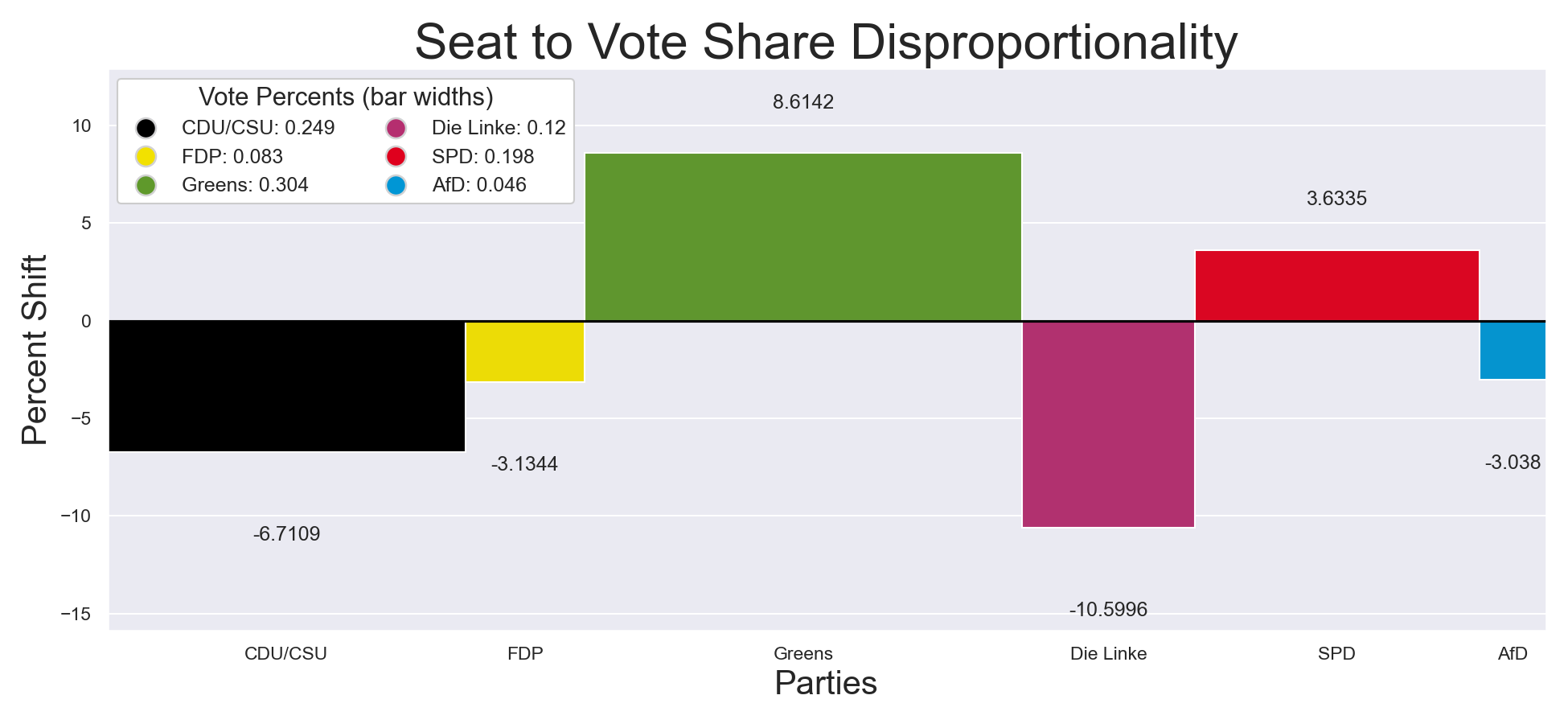
A novel addition to social science analysis is the disproportionality bar plot, which graphically depicts the disproportionality between expected and realized results. Bar widths are the proportion of shares (ex: votes received), and heights are the difference or relative difference between shares and allocations (ex: parliament seats received).
An example follows:
import pltviz

ax = poli_sci_kit.plot.disproportionality_bar_plot(
    shares=votes,
    allocations=ha_allocations,
    labels=parties,
    colors=party_colors,
    total_shares=None,
    total_allocation=None,
    percent=True,
    axis=None,
)

handles, labels = pltviz.plot.legend.gen_elements(
    counts=[round(v / sum(votes), 4) for v in votes],
    labels=parties,
    colors=party_colors,
    size=11,
    marker="o",
    padding_indexes=None,
    order=None,
)

ax.legend(
    handles=handles,
    labels=labels,
    title="Vote Percents (bar widths)",
    title_fontsize=15,
    fontsize=11,
    ncol=2,
    loc="upper left",
    bbox_to_anchor=(0, 1),
    frameon=True,
    facecolor="#FFFFFF",
    framealpha=1,
)

ax.axes.set_title("Seat to Vote Share Disproportionality", fontsize=30)
ax.set_xlabel("Parties", fontsize=20)
ax.set_ylabel("Percent Shift", fontsize=20)

plt.show()
Examples
Examples in poli-sci-kit use publicly available Wikidata statistics sourced via the Python package wikirepo. Current examples include:
-
- Allocates seats to a version of the US House of Representatives that includes all US territories and Washington DC given census data, with this further being used to derive relative vote strengths of state citizens in the US presidential election
-
Global Parliament (Open in Colab)
- Analyzes the allocation of seats in a hypothetical global parliament given the prevalence of certain countries and organizations, the distribution of seats based on Freedom House indexes, as well as disproportionality metrics
Development environment
Please follow the steps below to set up your development environment for poli-sci-kit contributions.
Clone repository
# Clone your fork of the repo into the current directory.
git clone https://codeberg.org/<your-username>/poli-sci-kit.git
# Navigate to the newly cloned directory.
cd poli-sci-kit
# Assign the original repo to a remote called "upstream".
git remote add upstream https://codeberg.org/andrewtavis/poli-sci-kit.git
- Now, if you run
git remote -vyou should see two remote repositories named:origin(forked repository)upstream(poli-sci-kit repository)
Environment
Create a virtual environment for poli-sci-kit (Python >=3.12), activate it and install dependencies.
uv venv
uv sync --all-groups  # create .venv and install all dependencies from uv.lock

# Unix or macOS:
source .venv/bin/activate

# Windows:
.venv\Scripts\activate.bat # .venv\Scripts\activate.ps1 (PowerShell)
Conda
Download Anaconda if you don't have it installed already.
conda env create --file environment.yaml
conda activate poli-sci-kit-dev
uv pip install -r <(uv export --format requirements-txt)  # install all dependencies from uv.lock
pre-commit
After activating the virtual environment, set up prek for pre-commit hooks by running:
# In the project root:
prek install

# Then test the pre-commit hooks to see how it works:
uv run prek run --all-files
To-Do
Please see the contribution guidelines if you are interested in contributing to this project. Work that is in progress or could be implemented includes:
-
Adding the Adams method to appointment.methods.highest_averages (see issue)
-
Deriving further needed arguments to assure that all current and historic appointment systems can be simulated using poli-sci-kit (see issue)
-
Potentially indexing preset versions of appointment.methods that coincide with the systems used by governments around the world
- This would allow quick comparisons of actual systems with variations
-
Adding methods such as quadratic voting to poli-sci-kit to allow for preference based simulations
-
Creating, improving and sharing examples
References
Full list of references
-
Balinski, M. L., and Young, H. P. (1982). Fair Representation: Meeting the Ideal of One Man, One Vote. New Haven, London: Yale University Press.
-
Karpov, A. (2008). "Measurement of disproportionality in proportional representation systems". Mathematical and Computer Modelling, Vol. 48, pp. 1421-1438. URL: https://www.sciencedirect.com/science/article/pii/S0895717708001933.
-
Kohler, U., and Zeh, J. (2012). “Apportionment methods”. The Stata Journal, Vol. 12, No. 3, pp. 375–392. URL: https://journals.sagepub.com/doi/pdf/10.1177/1536867X1201200303.
-
Taagepera, R., and Grofman, B. (2003). "Mapping the Indices of Seats-Votes Disproportionality and Inter-Election Volatility". Party Politics, Vol. 9, No. 6, pp. 659–677. URL: https://escholarship.org/content/qt0m9912ff/qt0m9912ff.pdf.
1 maintainer

Metadata
1 maintainer
Release files for poli-sci-kit 2.0.5
For a detailed explanation of source distributions (sdists) and built distributions (wheels), please see the package formats documentation.
Source distribution (sdist)
| File | Size | Uploaded | |
|---|---|---|---|
| poli_sci_kit-2.0.5.tar.gz | 33.1 kB | Details |
Built distribution (wheel)
| File | Interpreter | ABI | Platform | Reset |
|---|---|---|---|---|
| poli_sci_kit-2.0.5-py3-none-any.whl | Python 3 | none | any | Details |
Total release size: 63.1 kB
Release files / poli_sci_kit-2.0.5.tar.gz
| Download URL | poli_sci_kit-2.0.5.tar.gz |
|---|---|
| Size | 33.1 kB |
| Tags | Source |
|
SHA-256 checksum How to use checksums |
0927afd3a15e8a2f1baa6bf0d5f21809449884512acf8c6862285115b4a9325f
|
|
BLAKE2b-256 checksum How to use checksums |
43c4d98e21b16a0881410db9fc56f3413896ad50dafd6ead330087b8d1394c64
|
| Upload date | |
|
Uploaded using Trusted Publishing? What is trusted publishing? |
No |
| Uploaded via |
uv/0.12.2 {"installer":{"name":"uv","version":"0.12.2","subcommand":["publish"]},"python":null,"implementation":{"name":null,"version":null},"distro":{"name":"macOS","version":null,"id":null,"libc":null},"system":{"name":null,"release":null},"cpu":null,"openssl_version":null,"setuptools_version":null,"rustc_version":null,"ci":null}
|
Release files / poli_sci_kit-2.0.5-py3-none-any.whl
| Download URL | poli_sci_kit-2.0.5-py3-none-any.whl |
|---|---|
| Size | 30.0 kB |
| Tags | Python 3 |
|
SHA-256 checksum How to use checksums |
e6055ab52d13e6414782abed098a016b007858d5203009ad3a0e2aa7775f2ec8
|
|
BLAKE2b-256 checksum How to use checksums |
8e869459476eb28c00b3bdcc60b60f5d1d2d0f275b94216e04405a413f3b008f
|
| Upload date | |
|
Uploaded using Trusted Publishing? What is trusted publishing? |
No |
| Uploaded via |
uv/0.12.2 {"installer":{"name":"uv","version":"0.12.2","subcommand":["publish"]},"python":null,"implementation":{"name":null,"version":null},"distro":{"name":"macOS","version":null,"id":null,"libc":null},"system":{"name":null,"release":null},"cpu":null,"openssl_version":null,"setuptools_version":null,"rustc_version":null,"ci":null}
|














