
Policy Weaver for Microsoft Fabric
Verified details
These details have been verified by PyPIProject links
GitHub Statistics
Maintainers


Project description





Policy Weaver: synchronizes data access policies across platforms
A Python-based accelerator designed to automate the synchronization of security policies from different source catalogs with OneLake Security roles. While mirroring is only synchronizing the data, Policy Weaver is adding the missing piece which is mirroring data access policies to ensure consistent security across data platforms.
:rocket: Features
- Microsoft Fabric Support: Direct integration with Fabric Mirrored Databases/Catalogs and OneLake Security.
- Runs anywhere: It can be run within Fabric Notebook or from anywhere with a Python runtime.
- Effective Policies: Resolves effective read privileges automatically, traversing nested groups and roles as required.
- Pluggable Framework: Supports Azure Databricks and Snowflake policies, with more connectors planned.
- Secure: Can use Azure Key Vault to securely manage sensitive information like Service Principal credentials and API tokens.
:pushpin: Note: Row-level and column-level security extraction will be implemented in the next version, once these features become available in OneLake Security.
:hammer_and_wrench: Installation
Make sure your Python version is greater or equal than 3.11. Then, install the library:
$ pip install policy-weaver
:rocket: Getting Started
Follow the General Prerequisites and Installation steps below here. Then, depending on your source catalog, follow the specific setup instructions for either Databricks or Snowflake.
:clipboard: General Prerequisites
Before installing and running this solution, ensure you have:
- Azure Service Principal with the following Microsoft Graph API permissions (This is not mandatory in every case but recommended, please check the specific source catalog requirements and limitations):
User.Read.Allas application permissions
- A client secret for the Service Principal
- Added the Service Principal as Contributor on the Fabric Workspace containing the mirrored database/catalog.
:pushpin: Note: Every source catalog has additional pre-requisites
:thread: Databricks specific setup
Azure Databricks Configuration
We assume you have an Entra ID integrated Unity Catalog in your Azure Databricks workspace. To set up Entra ID SCIM for Unity Catalog, please follow the steps in Configure Entra ID SCIM for Unity Catalog.
:clipboard: Note that we only sync groups, users and service principals on account level, i.e. specifically no legacy "local" workspace groups. If you still use local workspace groups, please migrate them: Link to Documentation
We also assume you already have a mirrored catalog in Microsoft Fabric. If not, please follow the steps in Create a mirrored catalog in Microsoft Fabric. You need to enable One Lake Security by opening the Item in the Fabric UI and click on "Manage OneLake data access".
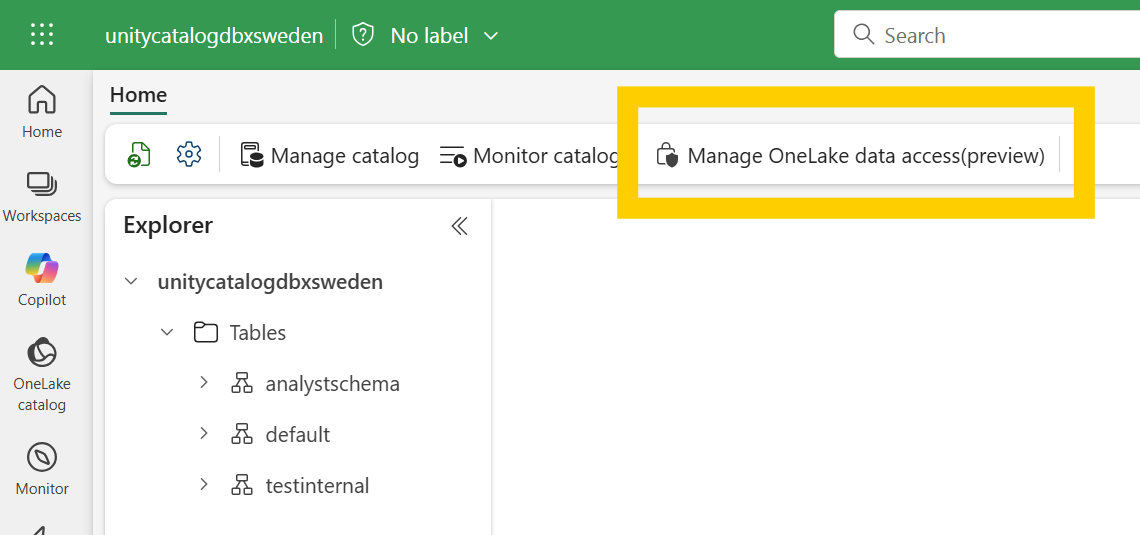
To allow Policy Weaver to read the Unity Catalog metadata and access policies, you need to assign the following roles to your Azure Service Principal:
- Go to the Account Admin Console (https://accounts.azuredatabricks.net/) :arrow_right: User Management :arrow_right: Add your Azure Service Principal.
- Click on the Service Principal and go to the Roles tab :arrow_right: Assign the role "Account Admin"
- Go to the "Credentials & Secrets" tab :arrow_right: Generate an OAuth Secret. Save the secret, you will need it in your config.yaml file as the
account_api_token.
Update your Configuration file
Download this config.yaml file template and update it based on your environment.
In general, you should fill the config file as described here: Config File values.
For Databricks specifically, you will need to provide:
- workspace_url: https://adb-xxxxxxxxxxx.azuredatabricks.net/
- account_id: your databricks account id (You can find it in the URL when you are in the Account Admin Console: https://accounts.azuredatabricks.net/?account_id=<account_id>)
- account_api_token: Depending on the keyvault setting: the keyvault secret name or your databricks secret
Run the Weaver!
This is all the code you need. Just make sure Policy Weaver can access your YAML configuration file.
#import the PolicyWeaver library
from policyweaver.weaver import WeaverAgent
from policyweaver.plugins.databricks.model import DatabricksSourceMap

#Load config
config = DatabricksSourceMap.from_yaml("path_to_your_config.yaml")

#run the PolicyWeaver
await WeaverAgent.run(config)
All done! You can now check your Microsoft Fabric Mirrored Azure Databricks catalog´s new One Lake Security policies.
https://github.com/user-attachments/assets/4bacb45f-c019-4389-a711-974ffb550884
:thread: Snowflake specific setup
Snowflake Configuration
We assume you have an Entra ID integrated Snowflake workspace, i.e. users in Snowflake have the same login e-mail as in Entra ID and Fabric, ideally imported through a SCIM process. We also assume you already have a mirrored snowflake database in Microsoft Fabric. If not, please follow the steps in Create a mirrored Snowflake Datawarehouse in Microsoft Fabric. You need to enable One Lake Security by opening the Item in the Fabric UI and click on "Manage OneLake data access".
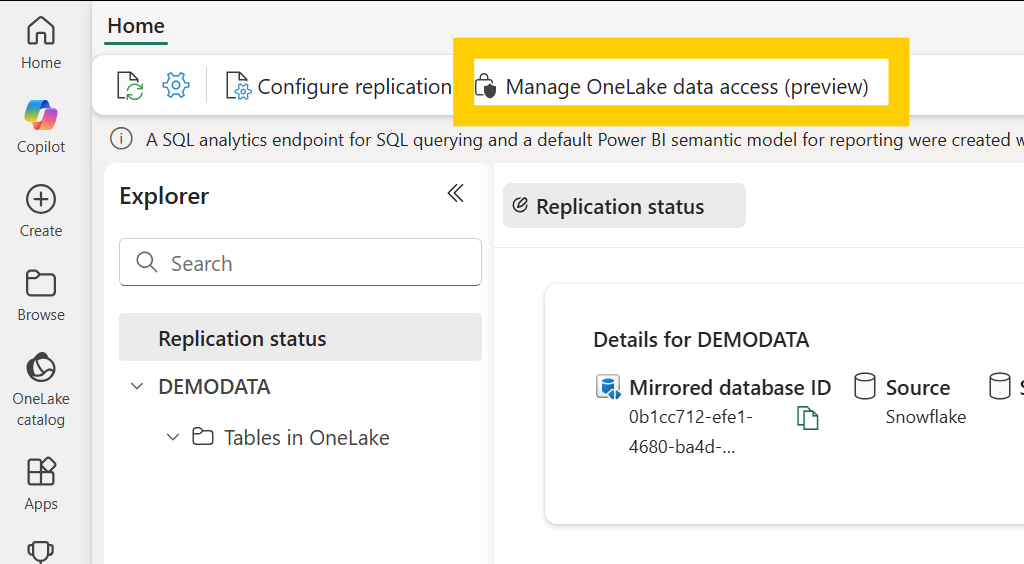
For the Snowflake setup the Service Principal is required to have User.Read.All permissions for the Graph API to look up the Entra ID object id for each user.
To allow Policy Weaver to read the Snowflake metadata and access policies, you need to create a Snowflake user and role and assign the following privileges. Follow the following steps:
- Create a new technical user in Snowflake, e.g. with the name POLICYWEAVER. (Optionally, but recommended: setup key-pair authentication for this user with an encrypted key as described here)
- Create a new role e.g. ACCOUNT_USAGE and assign the following privileges to this role:
- IMPORTED PRIVILEGES on the SNOWFLAKE database
- USAGE on the WAREHOUSE you want to use to run the queries (e.g. COMPUTE_WH)
- Assign the ACCOUNT_USAGE role to the POLICYWEAVER user
You can use the following SQL statements. Replace the role, user and warehouse names as required.
CREATE ROLE "ACCOUNT_USAGE";
GRANT IMPORTED PRIVILEGES ON DATABASE SNOWFLAKE TO ROLE ACCOUNT_USAGE;
GRANT USAGE ON WAREHOUSE COMPUTE_WH TO ROLE ACCOUNT_USAGE;
GRANT ROLE ACCOUNT_USAGE to USER "POLICYWEAVER";
Update your Configuration file
Download this config.yaml file template and update it based on your environment.
In general, you should fill the config file as described here: Config File values.
For Snowflake specifically, you will need to provide:
- account_name: your snowflake account name (e.g. KWADKA-AK8207) OR the secret name in the keyvault if you use keyvault
- user_name: the snowflake user name you created for Policy Weaver (e.g. POLICYWEAVER) OR the secret name in the keyvault if you use keyvault
- private_key_file: the path to your private key file if you are using key-pair authentication (e.g. ./builtin/rsa_policyweaver_key.p8)
- password: the password of the snowflake user if you are using password authentication OR the passphrase of your private key if you are using key-pair authentication OR the secret name in the keyvault if you use keyvault
- warehouse: the snowflake warehouse you want to use to run the queries (e.g. COMPUTE_WH)
Run the Weaver!
This is all the code you need. Just make sure Policy Weaver can access your YAML configuration file.
#import the PolicyWeaver library
from policyweaver.weaver import WeaverAgent
from policyweaver.plugins.snowflake.model import SnowflakeSourceMap

#Load config
config = SnowflakeSourceMap.from_yaml("path_to_your_config.yaml")

#run the PolicyWeaver
await WeaverAgent.run(config)
All done! You can now check your Microsoft Fabric Mirrored Snowflake Warehouse´s new One Lake Security policies.
https://github.com/user-attachments/assets/4de93aa3-e6c2-4c5b-b220-b30f6bfafd2f
:books: Config File values
Here ´s how the config.yaml should be adjusted to your environment:
-
keyvault:
- use_key_vault: true/false (true if you want to use keyvault to store secrets, false if you want to store secrets directly in the config file)
- name: your keyvault name (only required if use_key_vault is true)
- authentication_method: azure_cli / fabric_notebook (only required if use_key_vault is true) :right_arrow: use fabric_notebook if you run it in a fabric notebook, otherwise use azure_cli and login with
az loginbefore running the weaver
-
fabric:
- mirror_id: the item id of the mirrored catalog/database/warehouse (you can find it in the URL when you open the workload item in the Fabric UI)
- mirror_name: the name of the item in Fabric
- workspace_id: your fabric workspace id (you can find it in the URL when you are in the Fabric workspace)
- tenant_id: your fabric tenant id (you can find it in the URL "help" -> "about Fabric" section of the Fabric UI)
- fabric_role_suffix: suffix for the fabric roles created by Policy Weaver (default: PW)
- fabric_role_prefix: prefix for the fabric roles created by Policy Weaver (default: PW)
- delete_default_reader_role: true/false (if true, the DefaultReader role created by Fabric will be deleted, if false it will be kept, default: true)
- policy_mapping: table_based / role_based (table_based: create one role per table, role_based: create one role per role/group, default: table_based)
-
service_principal:
- client_id: the client id of the service principal mentioned under general prerequisites OR the corresponding secret name in the keyvault if you use keyvault
- client_secret: the client secret of the service principal mentioned under general prerequisites OR the corresponding secret name in the keyvault if you use keyvault
- tenant_id: the tenant id of the service principal mentioned under general prerequisites OR the corresponding secret name in the keyvault if you use keyvault
-
source:
- name of the unity catalog or snowflake database
- schemas: list of schemas to include. If not set, all schemas are included. For each schema you can give a list of tables which should be included. If not set all tables are included (see examples below)
-
type: either 'UNITY_CATALOG' for databricks or 'SNOWFLAKE' for snowflake
Here is an example config.yaml NOT using keyvault:
keyvault:
  use_key_vault: false
  name: notapplicable
  authentication_method: notapplicable
fabric:
  mirror_id: 845464654646adfasdf45567
  mirror_name: salescatalog
  workspace_id: 9d556498489465asdf7c
  tenant_id: 3494545asdfs7e2885
  fabric_role_suffix: PW
  fabric_role_prefix: PW
  delete_default_reader_role: true
  policy_mapping: role_based
service_principal:
  client_id: 89ac5a4sd894as9df4sad89f
  client_secret: 1234556dsad4848129
  tenant_id: 3494545asdfs7e2885
source:
  name: dbxsalescatalog
  schemas: <---- optional, if not provided all schemas will be scanned
  - name: analystschema
    tables: <---- optional, if not provided all tables will be scanned
    - subsubanalysttable
type: UNITY_CATALOG
databricks:
  workspace_url: https://adb-6a5s4df9sd4fasdf.0.azuredatabricks.net/
  account_id: 085a54s65a4sfa6565asdff
  account_api_token: 74adsf84ad8f4a8sd4f8asdf
snowflake:
  account_name: KAIJOIWA-DUAK8207
  user_name: POLICYWEAVER
  private_key_file: rsa_key.p8
  password: ODFJo12io1212
  warehouse: COMPUTE_WH
Here is an example config.yaml using keyvault.
:clipboard: Note that in this case, the user running the weaver needs to have access to the keyvault and the secrets.
keyvault:
  use_key_vault: true
  name: policyweaver20250912
  authentication_method: fabric_notebook
fabric:
  mirror_id: 845464654646adfasdf45567
  mirror_name: SFDEMODATA
  workspace_id: 9d556498489465asdf7c
  tenant_id: 3494545asdfs7e2885
  fabric_role_suffix: PW
  fabric_role_prefix: PW
  delete_default_reader_role: true
  policy_mapping: role_based
service_principal:
  client_id: kv-service-principal-client-id
  client_secret: kv-service-principal-client-secret
  tenant_id: kv-service-principal-tenant-id
source:
  name: SFDEMODATA
  schemas: <---- optional, if not provided all schemas will be scanned
  - name: analystschema
    tables: <---- optional, if not provided all tables will be scanned
    - subsubanalysttable
type: SNOWFLAKE
databricks:
  workspace_url: https://adb-1441751476278720.0.azuredatabricks.net/
  account_id: 085f281e-a7ef-4faa-9063-325e1db8e45f
  account_api_token: kv-databricks-account-api-token
snowflake:
  account_name: kv-sfaccountname
  user_name: kv-sfusername
  private_key_file: rsa_key.p8
  password: kv-sfpassword
  warehouse: COMPUTE_WH
:raising_hand: Contributing
This project welcomes contributions and suggestions. Most contributions require you to agree to a Contributor License Agreement (CLA) declaring that you have the right to, and actually do, grant us the rights to use your contribution. For details, visit https://cla.opensource.microsoft.com.
When you submit a pull request, a CLA bot will automatically determine whether you need to provide a CLA and decorate the PR appropriately (e.g., status check, comment). Simply follow the instructions provided by the bot. You will only need to do this once across all repos using our CLA.
This project has adopted the Microsoft Open Source Code of Conduct. For more information see the Code of Conduct FAQ or contact opencode@microsoft.com with any additional questions or comments.
:scroll: License
This project is licensed under the MIT License - see the LICENSE file for details.
:shield: Trademarks
This project may contain trademarks or logos for projects, products, or services. Authorized use of Microsoft trademarks or logos is subject to and must follow Microsoft's Trademark & Brand Guidelines. Use of Microsoft trademarks or logos in modified versions of this project must not cause confusion or imply Microsoft sponsorship. Any use of third-party trademarks or logos are subject to those third-party's policies.
Project details
Verified details
These details have been verified by PyPIProject links
GitHub Statistics
Maintainers
Release history Release notifications | RSS feed


Download files
Download the file for your platform. If you're not sure which to choose, learn more about installing packages.
Source Distribution
Built Distribution
Filter files by name, interpreter, ABI, and platform.
If you're not sure about the file name format, learn more about wheel file names.
Copy a direct link to the current filters
File details
Details for the file policy_weaver-0.3.0.tar.gz.
File metadata
- Download URL: policy_weaver-0.3.0.tar.gz
- Upload date:
- Size: 45.2 kB
- Tags: Source
- Uploaded using Trusted Publishing? Yes
- Uploaded via: twine/6.1.0 CPython/3.13.7
File hashes
| Algorithm | Hash digest | |
|---|---|---|
| SHA256 |
57e1ade13c56b17e9c1f745e72b33eb6c9f7a55062cf88d7bf73b551ad708f07
|
|
| MD5 |
136e4e0ad14aea999c3381d2a4970d9c
|
|
| BLAKE2b-256 |
6b6f0803a5667f7067a4bcc6da25184e6bef991a251463d0463228be30645517
|
Provenance
The following attestation bundles were made for policy_weaver-0.3.0.tar.gz:
Publisher:
python-publish.yml on microsoft/Policy-Weaver
-
Statement:
-
Statement type:
https://in-toto.io/Statement/v1 -
Predicate type:
https://docs.pypi.org/attestations/publish/v1 -
Subject name:
policy_weaver-0.3.0.tar.gz -
Subject digest:
57e1ade13c56b17e9c1f745e72b33eb6c9f7a55062cf88d7bf73b551ad708f07 - Sigstore transparency entry: 533529182
- Sigstore integration time:
-
Permalink:
microsoft/Policy-Weaver@7e54cb5403c766925f59cc0f532fd061f8328c22 -
Branch / Tag:
refs/tags/0.3.0 - Owner: https://github.com/microsoft
-
Access:
public
-
Token Issuer:
https://token.actions.githubusercontent.com -
Runner Environment:
github-hosted -
Publication workflow:
python-publish.yml@7e54cb5403c766925f59cc0f532fd061f8328c22 -
Trigger Event:
release
-
Statement type:
File details
Details for the file policy_weaver-0.3.0-py3-none-any.whl.
File metadata
- Download URL: policy_weaver-0.3.0-py3-none-any.whl
- Upload date:
- Size: 52.0 kB
- Tags: Python 3
- Uploaded using Trusted Publishing? Yes
- Uploaded via: twine/6.1.0 CPython/3.13.7
File hashes
| Algorithm | Hash digest | |
|---|---|---|
| SHA256 |
676aec5faca5becedf4e372dbbb7da080dc4e73c51403ab127cbf5f4314885a3
|
|
| MD5 |
584f701909ffb29e1ea8ec0bf51b3b92
|
|
| BLAKE2b-256 |
944de19eb83da5e65e4107a574fef11650982be6dbd62dedf853ebafc692d88e
|
Provenance
The following attestation bundles were made for policy_weaver-0.3.0-py3-none-any.whl:
Publisher:
python-publish.yml on microsoft/Policy-Weaver
-
Statement:
-
Statement type:
https://in-toto.io/Statement/v1 -
Predicate type:
https://docs.pypi.org/attestations/publish/v1 -
Subject name:
policy_weaver-0.3.0-py3-none-any.whl -
Subject digest:
676aec5faca5becedf4e372dbbb7da080dc4e73c51403ab127cbf5f4314885a3 - Sigstore transparency entry: 533529188
- Sigstore integration time:
-
Permalink:
microsoft/Policy-Weaver@7e54cb5403c766925f59cc0f532fd061f8328c22 -
Branch / Tag:
refs/tags/0.3.0 - Owner: https://github.com/microsoft
-
Access:
public
-
Token Issuer:
https://token.actions.githubusercontent.com -
Runner Environment:
github-hosted -
Publication workflow:
python-publish.yml@7e54cb5403c766925f59cc0f532fd061f8328c22 -
Trigger Event:
release
-
Statement type:






