
PoliSciPy


PoliSciPy is an open-source Python library that makes it easy to generate electoral maps and explore political data with just a few lines of code. The library is designed for fast experimentation, clear visualizations, and flexible customization, whether you’re analyzing results, presenting findings, or exploring historical trends.
Key Features
- Visualize Electoral Maps: Create U.S. electoral college maps with state labels, electoral votes, and party colors.
- Customize Plots: Adjust figure size, title, edge colors, label colors, and other visual elements for customized plots.
- Flexible Data Handling: Easily merge your own election results (current, historical, or hypothetical) with the map data for visualization.
Installation
PoliSciPy requires Python 3.x and can be installed using pip:
pip install poliscipy
PoliSciPy is also available on conda via:
conda install -c conda-forge poliscipy
Dependencies: Note that PoliSciPy requires GeoPandas, matplotlib, and Pandas
Quickstart and Example
Creating electoral college maps using PoliSciPy can be done in only three simple steps:
- Load the GeoDataFrame that contains the electoral college geospatial data
- Load and merge the specific data you'd like to plot with the GeoDataFrame
- Call the
plot_electoral_map()function, passing in your GeoDataFrame and the target column for plotting
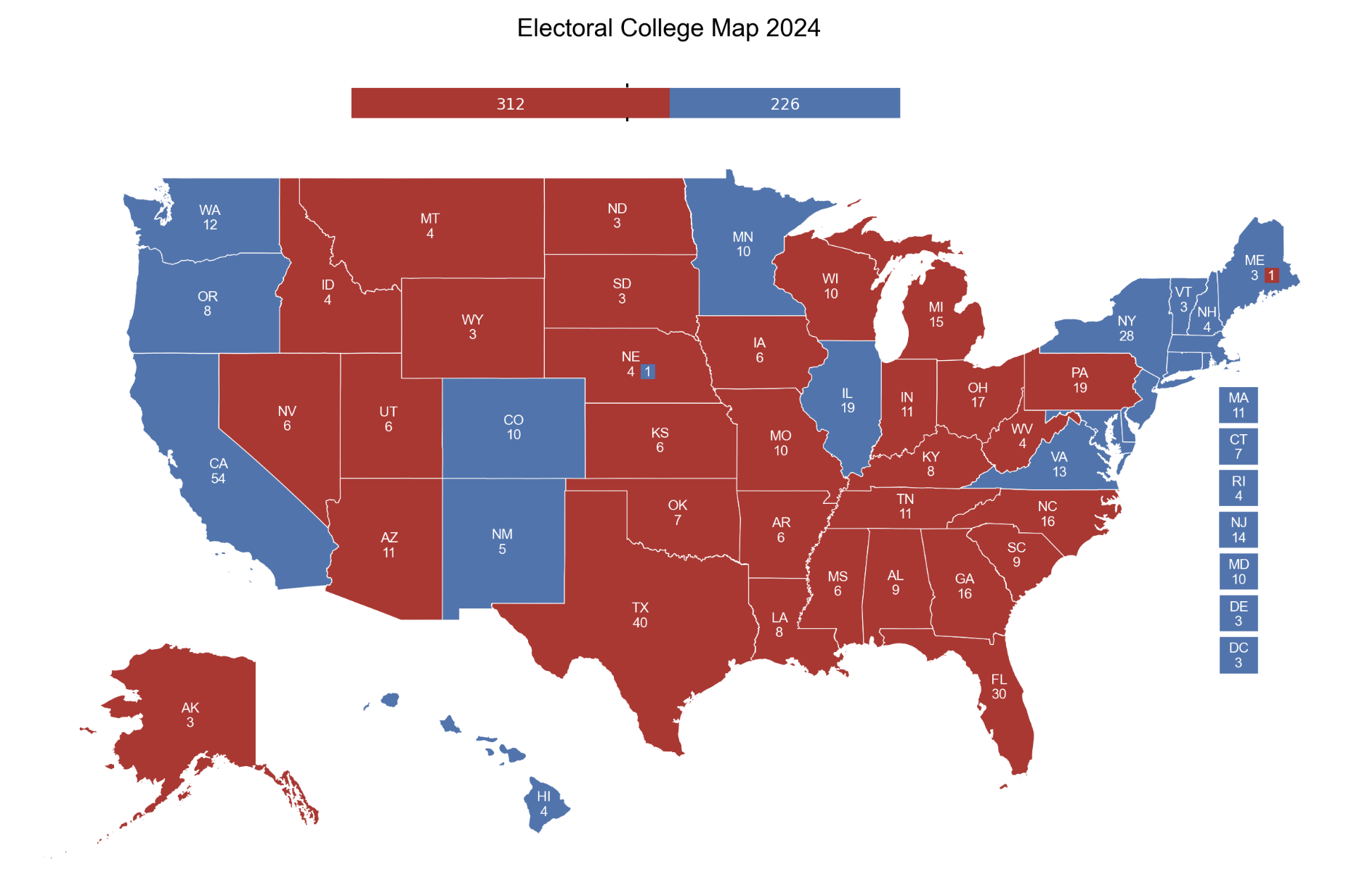
Below is an example of how to use PoliSciPy to visualize the 2024 U.S. electoral college map shown above.
import poliscipy

from poliscipy.shapefile_utils import load_shapefile
from poliscipy.plot import plot_electoral_map

# Load in GeoDataFrame containing U.S. electoral college geospatial data
gdf = load_shapefile()

# Create a dictionary with the data to plot
winning_party = {
    'AL': 'Republican','AK': 'Republican','AZ': 'Republican','AR': 'Republican', ...
}

# Merge your data with the gdf and fill any missing data with 'No Data'
gdf['winning_party'] = gdf['STUSPS'].map(winning_party).fillna('No Data')

# Add the number of electors that voted for the other candidate
gdf.loc[38, 'defectors'] = 1 # maine
gdf.loc[10, 'defectors'] = 1 # nebraska

# Set the political party for each of the congressional district winners
gdf.loc[38, 'defector_party'] = 'Republican'
gdf.loc[10, 'defector_party'] = 'Democrat'

# Plot the electoral college map for the year 2024
plot_electoral_map(gdf, column='winning_party', title='2024 U.S. Electoral College Map')
Documentation
Complete documentation for PoliSciPy can be found here.
Contributing
PoliSciPy welcomes contributions! Please see the CONTRIBUTING.md for guidelines on how to get involved.
Citation
If you find PoliSciPy useful in your research, academic projects, or software, please cite it using the CITATION.cff file located in the root directory of this repository.
1 maintainer

Metadata
1 maintainer
Release files for poliscipy 0.1.0
For a detailed explanation of source distributions (sdists) and built distributions (wheels), please see the package formats documentation.
Source distribution (sdist)
| File | Size | Uploaded | Provenance | Actions |
|---|---|---|---|---|
| poliscipy-0.1.0.tar.gz | 3.3 MB | Without provenance | Details for poliscipy-0.1.0.tar.gz |
Built distribution (wheel)
| File | Interpreter | ABI | Platform | Actions Reset |
|---|---|---|---|---|
| poliscipy-0.1.0-py3-none-any.whl | Python 3 | none | any | Details for poliscipy-0.1.0-py3-none-any.whl |
Total release size: 6.7 MB
Release files / poliscipy-0.1.0.tar.gz
| Download URL | poliscipy-0.1.0.tar.gz |
|---|---|
| Size | 3.3 MB |
| Tags | Source |
|
SHA-256 checksum How to use checksums |
d2ff7f6b09dd1a7721e945633f362c28fbd2b42406ccb3ec6d9179b024c95c3b
|
|
BLAKE2b-256 checksum How to use checksums |
ed150ab0dff9a1c950eb72b76fb7b45cb2fc64cdf2a2541079ee23bdb1d8ca50
|
| Upload date | |
|
Uploaded using Trusted Publishing? What is trusted publishing? |
No |
| Uploaded via |
twine/6.2.0 CPython/3.9.6
|
Release files / poliscipy-0.1.0-py3-none-any.whl
| Download URL | poliscipy-0.1.0-py3-none-any.whl |
|---|---|
| Size | 3.3 MB |
| Tags | Python 3 |
|
SHA-256 checksum How to use checksums |
9500ee81a0fd36eabb460bac207085bd554ae1bd90390eb88619f8294cf9febe
|
|
BLAKE2b-256 checksum How to use checksums |
35b125342cd581276b6e0492bb5263364ee789f5608b83c6554cc84ba2745627
|
| Upload date | |
|
Uploaded using Trusted Publishing? What is trusted publishing? |
No |
| Uploaded via |
twine/6.2.0 CPython/3.9.6
|
Security for poliscipy 0.1.0
Provenance
Provenance describes where a file came from. On PyPI, provenance is shared via attestations, which provide a verifiable record of the build or publishing details. View details, limitations and caveats.
No provenance found
None of the files in this release were uploaded with provenance metadata.
A note on package security
PyPI is a repository for distributing packages, not a service for auditing them. While third-party security researchers and our staff do their best to detect and remove malicious packages, PyPI cannot guarantee the quality, security or suitability of any given package.
To learn more about protecting yourself from malicious actors, visit our package security documentation.













