
A Python DSL to create Pollination recipes and plugins.

Project description
pollination-dsl
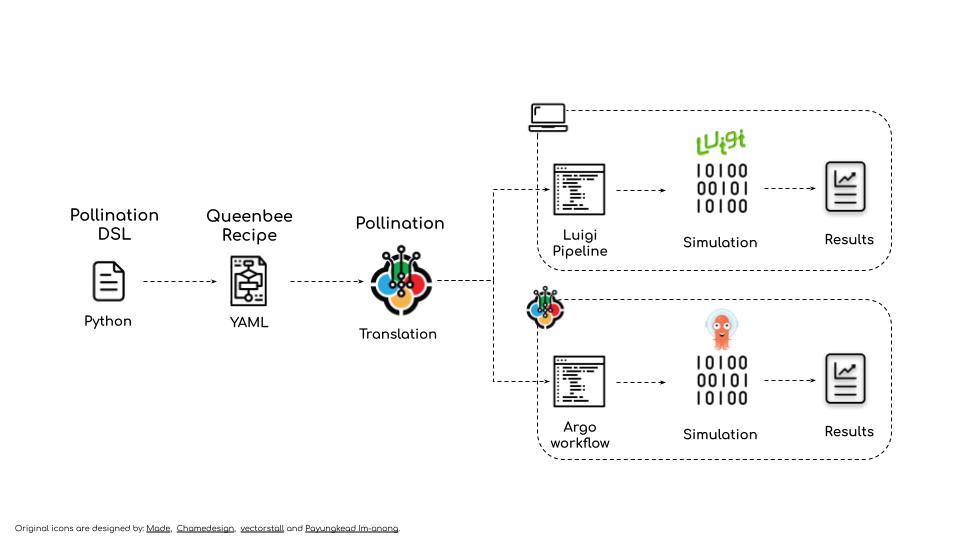
A Python Domain Specific Language (DSL) to create Pollination Plugins and Recipes.
Pollination uses Queenbee as its workflow language. Pollination-dsl makes it easy to create Queenbee object without the need to learn Queenbee.
API docs
Requirements
Python >=3.7
Installation
Using pip:
pip install pollination-dsl
For local development:
- Clone this repository.
- Change directory to root folder of the repository.
pip install -e .
Function
from dataclasses import dataclass
from pollination_dsl.function import Function, command, Inputs, Outputs


@dataclass
class CreateOctreeWithSky(Function):
    """Generate an octree from a Radiance folder and sky!"""

    # inputs
    include_aperture = Inputs.str(
        default='include',
        description='A value to indicate if the static aperture should be included in '
        'octree. Valid values are include and exclude. Default is include.',
        spec={'type': 'string', 'enum': ['include', 'exclude']}
    )

    black_out = Inputs.str(
        default='default',
        description='A value to indicate if the black material should be used. Valid '
        'values are default and black. Default value is default.',
        spec={'type': 'string', 'enum': ['black', 'default']}
    )

    model = Inputs.folder(description='Path to Radiance model folder.', path='model')

    sky = Inputs.file(description='Path to sky file.', path='sky.sky')

    @command
    def create_octree(self):
        return 'honeybee-radiance octree from-folder model --output scene.oct ' \
            '--{{self.include_aperture}}-aperture --{{self.black_out}} ' \
            '--add-before sky.sky'

    # outputs
    scene_file = Outputs.file(description='Output octree file.', path='scene.oct')
If you want to access the Queenbee objects you can use queenbee property. For example
try print(CreateOctreeWithSky().queenbee.yaml()) and you should see the full Queenbee
definition:
type: Function
annotations: {}
inputs:
- type: FunctionStringInput
  annotations: {}
  name: black-out
  description: A value to indicate if the black material should be used. Valid values
    are default and black. Default value is default.
  default: default
  alias: []
  required: false
  spec:
    type: string
    enum:
    - black
    - default
- type: FunctionStringInput
  annotations: {}
  name: include-aperture
  description: A value to indicate if the static aperture should be included in octree.
    Valid values are include and exclude. Default is include.
  default: include
  alias: []
  required: false
  spec:
    type: string
    enum:
    - include
    - exclude
- type: FunctionFolderInput
  annotations: {}
  name: model
  description: Path to Radiance model folder.
  default: null
  alias: []
  required: true
  spec: null
  path: model
- type: FunctionFileInput
  annotations: {}
  name: sky
  description: Path to sky file.
  default: null
  alias: []
  required: true
  spec: null
  path: sky.sky
  extensions: null
outputs:
- type: FunctionFileOutput
  annotations: {}
  name: scene-file
  description: Output octree file.
  path: scene.oct
name: create-octree-with-sky
description: Generate an octree from a Radiance folder and sky!
command: honeybee-radiance octree from-folder model --output scene.oct --{{inputs.include-aperture}}-aperture
  --{{inputs.black-out}} --add-before sky.sky
Since the functions are standard Python classes you can also subclass them from one
another as long as you use the same name for the @command method. Otherwise it will
create an invalid function with two commands.
Plugin
To create a Pollination plugin use the functions to create a standard Python module.
The only change is that you need to provide the information for Pollination plugin in
the __init__.py file as dictionary assigned to __pollination__ variable.
Follow the standard way to install a Python package. Once the package is installed you
can use pollination-dsl to load the package or write it to a folder.
from pollination_dsl.package import load, write

# name of the pollination package
python_package = 'pollination_honeybee_radiance'

# load this package as Pollination Plugin
plugin = load(python_package)

# or write the package as a Pollination plugin to a folder directly
write(python_package, './pollination-honeybee-radiance')
Here are two real world examples of Pollination plugins:
Recipe
Recipe is a collection of DAGs. Each DAG is a collection of interrelated tasks.
You can use pollination-dsl to create complex recipes with minimum code by reusing the
functions as templates for each task.
Packaging a plugin is exactly the same as packaging a plugin.
from pollination_dsl.package import load, translate

# name of the pollination package
python_package = 'daylight-factor'

# load this package as Pollination Recipe
recipe = load(python_package, baked=True)

# or translate and write the package as a Pollination plugin to a folder directly
translate(python_package, './daylight-factor')
Here are number of real world examples of Pollination recipes:
How to create a pollination-dsl package
Pollination-dsl uses Python's standard packaging to package pollination plugins and recipes.
It parses most of the data from inputs in setup.py file and some Pollination specific
information from __init__.py file. Below is an example of how these file should look
like.
By taking advantage of Python's native namespace packaging
we keep all the packages under the pollination namespace.
setup.py
Here is an example setup.py file. You can see the latest version of the file here.
#!/usr/bin/env python
import setuptools

with open("README.md", "r") as fh:
    long_description = fh.read()

with open('requirements.txt') as f:
    requirements = f.read().splitlines()

setuptools.setup(
    name='pollination-honeybee-radiance',                                   # required - will be used for package name
    author='ladybug-tools',                                                 # required - author must match the owner account name on Pollination
    author_email='info@ladybug.tools',
    packages=setuptools.find_namespace_packages(include=['pollination.*']), # required - that's how pollination find the package
    version='0.1.0',                                                        # required - will be used as package tag. you can also use semantic versioning
    install_requires=requirements,
    url='https://github.com/pollination/pollination-honeybee-radiance',     # optional - will be translated to home
    project_urls={
        'icon': 'https://raw.githubusercontent.com/ladybug-tools/artwork/master/icons_bugs/grasshopper_tabs/HB-Radiance.png',                    # optional but strongly encouraged - link to package icon
    },
    description='Honeybee Radiance plugin for Pollination.',                # optional - will be used as package description
    long_description=long_description,                                      # optional - will be translated to ReadMe content on Pollination
    long_description_content_type="text/markdown",
    maintainer='maintainer_1, maintainer_2',                                # optional - will be translated to maintainers. For multiple maintainers
    maintainer_email='maintainer_1@example.come, maintainer_2@example.com', # use comma inside the string.
    keywords='honeybee, radiance, ladybug-tools, daylight',                 # optional - will be used as keywords
    license='PolyForm Shield License 1.0.0, https://polyformproject.org/wp-content/uploads/2020/06/PolyForm-Shield-1.0.0.txt',  # optional - the license link should be separated by a comma
    zip_safe=False                                                         # required - set to False to ensure the packaging will always work
)
init.py
Here is an example __init__.py for a plugin. The latest version of the file is
accessible here.
"""Honeybee Radiance plugin for Pollination."""
from pollination_dsl.common import get_docker_image_from_dependency

# set the version for docker image dynamically based on honeybee-radiance version
# in dependencies
image_id = get_docker_image_from_dependency(
    __package__, 'honeybee-radiance', 'ladybugtools'
)

__pollination__ = {
    'app_version': '5.4',  # optional - tag for version of Radiance
    'config': {
        'docker': {
            'image': image_id,
            'workdir': '/home/ladybugbot/run'
        }
    }
}
Here is an example __init__.py for a recipe. The latest version of the file is
accessible here.
from .entry import AnnualDaylightEntryPoint

__pollination__ = {
    'entry_point': AnnualDaylightEntryPoint
}
Release history Release notifications | RSS feed


Download files
Download the file for your platform. If you're not sure which to choose, learn more about installing packages.
Source Distribution
Built Distribution
Filter files by name, interpreter, ABI, and platform.
If you're not sure about the file name format, learn more about wheel file names.
Copy a direct link to the current filters
File details
Details for the file pollination_dsl-1.0.0.tar.gz.
File metadata
- Download URL: pollination_dsl-1.0.0.tar.gz
- Upload date:
- Size: 39.9 kB
- Tags: Source
- Uploaded using Trusted Publishing? No
- Uploaded via: twine/6.1.0 CPython/3.12.12
File hashes
| Algorithm | Hash digest | |
|---|---|---|
| SHA256 |
c12c7f33b65b30e1aa646b9b8ff23fdb6c4f83b55241c5b427d5ecf3766f379f
|
|
| MD5 |
b856cf742c46b69aed35d76cf240783e
|
|
| BLAKE2b-256 |
7c7f332b51bca5a956cca9be7c3aee0d3380ffc017af728214a6387121615c72
|
File details
Details for the file pollination_dsl-1.0.0-py2.py3-none-any.whl.
File metadata
- Download URL: pollination_dsl-1.0.0-py2.py3-none-any.whl
- Upload date:
- Size: 39.0 kB
- Tags: Python 2, Python 3
- Uploaded using Trusted Publishing? No
- Uploaded via: twine/6.1.0 CPython/3.12.12
File hashes
| Algorithm | Hash digest | |
|---|---|---|
| SHA256 |
651adca3420335c49452ef14bf35b73ad066ede58f271cf63cc619c49b0e9683
|
|
| MD5 |
47055d82332be5ec7e53be61e907dac9
|
|
| BLAKE2b-256 |
ecdb9a7190092c9db041af16c53f453300ba3c481c526afca19f98ce2cecf3d0
|






