
App downloader from Google Play and App Store

Automate the download of mobile applications.
Download apps from most popular markets automatically
This script is designed to integrate mobile applications' download in the continuous development process (CI / CD).
Install options
From PyPi
It is possible to install a package using pip:
pip install poly_app_downloader
With this method, it is possible to start scanning without specifying the python interpreter using the poly_app_downloader command, for example:
poly_app_downloader -h
All examples below will use exactly this approach.
Source
It also supports launching by loading source files and launching the main script directly:
python3 mdast_cli/mdast_scan.py -h
With this method of launching, you must additionally install the packages specified in requirements.txt
Launch options
Currently, several launch options are supported:
- Applications from Appstore
- Applications from Google Play
AppStore
To download application from AppStore you need to know application_id or bundle and have iTunes account and credentials for it: email and password with 2FA code.
You need to select the --distribution_system appstore and specify mandatory parameters.
To successfully sign in to iTunes, you will need to obtain and save the 2fa code for later use.
When you run the script for the first time, use your email and password, you will get a login error in the console and at this point a two-factor authentication code will come to your device
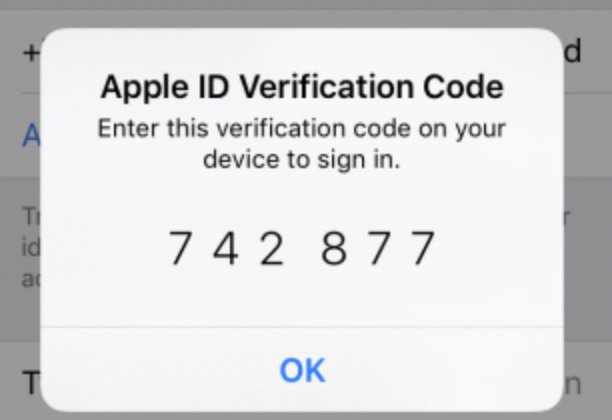
For the subsequent work of the script without repeating the step with the manual receipt of 2fa code you need to remember the received code, the session with it will be active for 6 months. After that, try to repeat the login with password and 2FA, formatting it like password2FA. You do not need to get new 2fa codes later, this parameter will work for 6 months.
For example, password is P@ssword and 2FA is 742877, so your parameter --appstore_password2FA P@ssword742877.
To get the app_id, go to the app page in the AppStore in your browser, you can extract the required parameter from the url:

appstore_app_id 398129933 in this example.
Also, you need to select the distribution_system appstore and specify the following mandatory parameters:
appstore_app_id- Application id from AppStore, you can get it on app page from url,
format: apps.apple.com/app/id{appstore_app_id}appstore_bundle_id- same as app_idappstore_apple_id- Your email for iTunes login.appstore_password2FA- Your password and 2FA code for iTunes login, format: password2FA_code
You can specify downloaded app file name with an optional parameter
appstore_file_name- file name for app to be saved with
Google play
To download application from Google Play Store you need temporary account with 2fa authentication disabled.
You should specify the package name of the application you want to download, you can get it directly from the Google Play app page or any other way.
Also, you need to select the distribution_system google_play.
During the initial launch of the script you should specify the mandatory parameters: email + password, after that the application will not be downloaded and the scan will not run, but you will receive gsfid and token for google authentication, which you should use later on for the successful Google Play application scan.
google_play_package_name- package name of application you want to downloadgoogle_play_email- email of your Google account for first login onlygoogle_play_password- password of your Google account for login only
You can download app while logging in by email and password with an optional parameter:
google_play_download_with_creds- app will be downloaded during initial login
At the initial run of the script you will get the gsfId and auth token in the script logs, copy and save them. You will need them for a stable and successful execution of the script afterwards

Using these parameters you will have all parameters for successful downloading applications from Google Play Store:
google_play_package_name- package name of application you want to downloadgoogle_play_gsfid- The Google Services Framework Identifier (GSF ID)google_play_auth_token- Google auth token for access to Google Play API
You can also specify downloaded app file name with an optional parameter
google_play_file_name- file name for app to be saved with
You should use either email + pass ("--google_play_email" + "--google_play_password") or gsfid + token ("--google_play_gsfid" + "google_play_auth_token") arguments for mdast_cli script. For the continuous process you need only gsfid and token.
AppStore launch example
To download application from AppStore, you need to run the following command:
python mdast_cli/mdast_scan.py --distribution_system appstore --appstore_app_id 564177498 --appstore_apple_id ubet******@icloud.com --appstore_password2FA pass*******31******454 --appstore_file_name my_b3st_4pp
As a result in the downloaded_apps repository will be application with name my_b3st_4pp.ipa and manual scan will be started.
Google Play launch example
To start the initial login for Google Play, you need to run the following command:
python mdast_cli/mdast_scan.py --distribution_system google_play --google_play_package_name com.instagram.android --google_play_email download*******ly@gmail.com --google_play_password Paaswoord
To download app[] from Google Play, you need to run the following command:
python mdast_cli/mdast_scan.py --google_play_package_name com.instagram.android --google_play_gsfid 432******************43 --google_play_auth_token JAgw_2h*************************************8KRaYQ. --google_play_file_name best_apk_d0wnl04d3r
As a result in the downloaded_apps repository will be application with name best_apk_d0wnl04d3r.apk and manual scan will be started.
1 maintainer

Metadata
1 maintainer
Release files for poly-app-downloader 1.3.14
For a detailed explanation of source distributions (sdists) and built distributions (wheels), please see the package formats documentation.
Source distribution (sdist)
| File | Size | Uploaded | |
|---|---|---|---|
| poly_app_downloader-1.3.14.tar.gz | 96.4 kB | Details |
Built distribution (wheel)
| File | Interpreter | ABI | Platform | Reset |
|---|---|---|---|---|
| poly_app_downloader-1.3.14-py3-none-any.whl | Python 3 | none | any | Details |
Total release size: 196.3 kB
Release files / poly_app_downloader-1.3.14.tar.gz
| Download URL | poly_app_downloader-1.3.14.tar.gz |
|---|---|
| Size | 96.4 kB |
| Tags | Source |
|
SHA-256 checksum How to use checksums |
7fbe9acf162be67ee4af9faac11254ab9a0d2905d7cf110c7bf452e4b484e8cd
|
|
BLAKE2b-256 checksum How to use checksums |
db3b1c89c19737087ba8e785b8f6018029ddf1744ab3b2b313390fe7e294def2
|
| Upload date | |
|
Uploaded using Trusted Publishing? What is trusted publishing? |
No |
| Uploaded via |
twine/4.0.0 CPython/3.9.13
|
Release files / poly_app_downloader-1.3.14-py3-none-any.whl
| Download URL | poly_app_downloader-1.3.14-py3-none-any.whl |
|---|---|
| Size | 100.0 kB |
| Tags | Python 3 |
|
SHA-256 checksum How to use checksums |
661054b558ce284f144b85b6dd675c8dd195ae78375768f2b3044fc7ecbba578
|
|
BLAKE2b-256 checksum How to use checksums |
c9877bfee3d585a9aece9562edca43875d78ae42977a2c29493e8ce3fe92b5bd
|
| Upload date | |
|
Uploaded using Trusted Publishing? What is trusted publishing? |
No |
| Uploaded via |
twine/4.0.0 CPython/3.9.13
|














