
polybench


Multivariate polynomial arithmetic benchmark tests.
Many scientific and engineering applications utilise multivariate polynomial arithmetic in their algorithms and solutions. Here we provide a set of benchmark tests for often-used operations in multivariate polynomial arithmetic:
- Greatest common divisor
- Factorisation
Requirements
- Python >= 3.6.1
You also need at least one tool to be benchmarked. They are (in alphabetical order):
- Fermat:
uses
fer64onPATHby default; setFERMAT_COMMANDto specify a different executable. - FLINT: automatically downloaded and built via vcpkg (requires CMake >= 3.15, a C compiler and the Make utility; see also vcpkg dependencies).
- FORM:
uses
formonPATHby default, downloading a release binary if not found; setFORM_COMMANDto specify a different executable. - Mathematica:
Free Wolfram Engine for Developers is sufficient to run.
Uses
wolframscriptonPATHby default; setWOLFRAMSCRIPT_COMMANDto specify a different WolframScript executable. - Poly Mojo:
--polymojomeasures ordinary integer GCD and factorisation;--polymojocertifiedincludes certificate construction in the measured operation and verifies each certificate, but excludes verification time from the reported measurement. Poly Mojo and its matching Mojo compiler are automatically downloaded via Pixi (required onPATH); the included configuration targets Linux x86-64. To use existing precompiled packages instead of this setup, setPOLY_MOJO_PATHto an absolute directory containingpoly.mojoc,polynomials.mojoc, andapn_mojo.mojoc. In this case the matching compiler defaults tomojoonPATHand can be selected withMOJO_COMMAND. In either case, a polybench benchmark program is built using the packages. - reFORM: automatically downloaded and built (requires Rust >= 1.36).
- Rings: automatically downloaded; the benchmark program is built (requires JDK >= 8).
- Singular:
uses
SingularonPATHby default; setSINGULAR_COMMANDto specify a different executable. - Symbolica:
automatically downloaded and built
(requires Rust >= 1.96),
running in restricted mode.
Built with optimization level 3, full link-time optimization, one codegen unit,
and
target-cpu=native, with Symbolica's default faster allocator and GMP backend. The executable is optimized for the build machine; rebuild it on each benchmark machine. SetRUSTFLAGSto override the CPU settings when needed.
Getting started
Clone this repository and try to run the run.sh script:
git clone https://github.com/tueda/polybench.git
cd polybench
./run.sh --all
When starting the script for the first time, it automatically sets up a virtual environment for required Python packages so that it will not dirty your environment. Some of the tools are provided as libraries registered in public package registries, so the first run takes some time to download, compile and link them with test binaries. After testing, a CSV file and comparison plots will be generated.
For practical benchmarking, configuration parameters should be set adequately. See the help message shown by
./run.sh --help
You can also use pip,
pipx,
Poetry
or Docker with this repository.
Installation with pip(x) install or poetry install makes a command
polybench available, which acts as the run.sh script described above.
pip install polybench
polybench --all
python -m polybench --all  # alternative way to launch
pipx install polybench
polybench --all
git clone https://github.com/tueda/polybench.git
cd polybench
poetry install
poetry run polybench --all
Docker
The Dockerfile supports only linux/amd64/v3.
Build the image:
docker build --platform linux/amd64/v3 -t polybench .
Containers start in /work. Run with results kept inside the disposable
container:
docker run --rm polybench --all
To save results in the current directory on the host, mount it at /work and
use your UID/GID:
docker run --rm --user "$(id -u):$(id -g)" -v "$PWD:/work" polybench --all
To start a shell with the same environment, use either:
docker run --rm -it polybench bash

docker run --rm -it --user "$(id -u):$(id -g)" -v "$PWD:/work" polybench bash
The image includes prepared solvers and Poly Mojo's 5- and 8-variable drivers; other variable counts compile offline when first used in a container.
Fermat and Mathematica/Wolfram Engine are not included.
Fermat
To use a host installation of Fermat, mount its directory and set
FERMAT_COMMAND. For example:
docker run --rm \
  -v /path/to/fermat-installation:/opt/fermat:ro \
  -e FERMAT_COMMAND=/opt/fermat/fer64 \
  polybench --fermat
Wolfram Engine
To use a host installation of Wolfram Engine, mount WolframScript and the Engine, and retain a separate directory for the container's license. Use your host UID/GID for both activation and subsequent runs so that the license files remain accessible. For example, with Wolfram Engine 15.0:
mkdir -p wolfram-license

docker run --rm -it --user "$(id -u):$(id -g)" \
  -v /opt/Wolfram/WolframScript:/opt/Wolfram/WolframScript:ro \
  -v /usr/local/Wolfram/WolframEngine/15.0:/usr/local/Wolfram/WolframEngine/15.0:ro \
  -v "$PWD/wolfram-license:/home/polybench/.WolframEngine/Licensing" \
  -e WOLFRAMSCRIPT_KERNELPATH=/usr/local/Wolfram/WolframEngine/15.0/Executables/WolframKernel \
  polybench /opt/Wolfram/WolframScript/bin/wolframscript -activate

docker run --rm --user "$(id -u):$(id -g)" \
  -v /opt/Wolfram/WolframScript:/opt/Wolfram/WolframScript:ro \
  -v /usr/local/Wolfram/WolframEngine/15.0:/usr/local/Wolfram/WolframEngine/15.0:ro \
  -v "$PWD/wolfram-license:/home/polybench/.WolframEngine/Licensing" \
  -e WOLFRAMSCRIPT_KERNELPATH=/usr/local/Wolfram/WolframEngine/15.0/Executables/WolframKernel \
  -e WOLFRAMSCRIPT_COMMAND=/opt/Wolfram/WolframScript/bin/wolframscript \
  polybench --mathematica
See Wolfram's official Docker instructions for activation and licensing details.
Example
| platform | Linux-5.15.0-84-generic-x86_64-with-glibc2.39 (in Docker) |
| os_description | Ubuntu 24.04.4 LTS |
| python_version | 3.12.3.final.0 (64 bit) |
| cpu_brand | 12th Gen Intel(R) Core(TM) i9-12900 |
| cpu_count | 16 (logical: 24) |
| total_memory | 62.6GB |
| FLINT | flint 3.6.0, cc (GNU) 13.3.0 |
| FORM | FORM 5.0.2 (Sep 16 2026, v5.0.2) |
| Mathematica | 15.0.0 for Linux x86 (64-bit) (May 26, 2026) |
| PolyMojo | Poly Mojo build 234ff4d0ac6c; Mojo 1.2.0 (2016d0cd); plain |
| reFORM | 0.1.0-fix-serialize, rustc 1.99.1 (58cf8f9c3 2026-10-13) |
| Rings | 2.5.8, JVM: 21.0.12.1 (Ubuntu 21.0.12.1+1-1-24.04.4-Ubuntu) |
| Singular | Singular for x86_64-Linux version 4.4.1 (44105, 64 bit) Jan 20 2025 11:50:12 |
| Symbolica | 3.0.1, rustc 1.99.1 (58cf8f9c3 2026-10-13) |
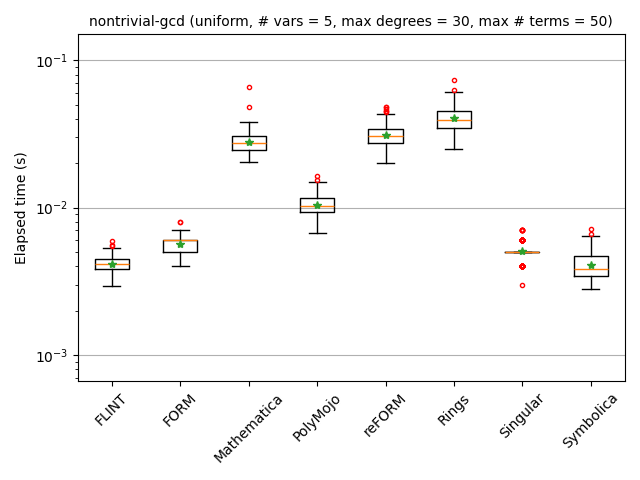
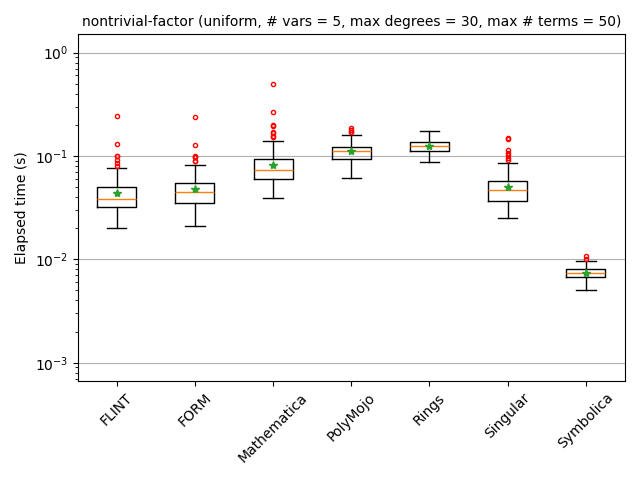
Additional benchmark results are available here.
Development
# Initialisation
poetry install
poetry run pre-commit install

# Linting and testing
poetry run pre-commit run --all-files
poetry run pytest

# Linting and testing for Cargo subproject
cd path/to/project
cargo fmt
cargo clippy
cargo test

# Linting and testing for Gradle subproject
cd path/to/project
./gradlew spotlessApply
./gradlew check

# Test run
./run.sh <options>  # for example, --all

# Release a new version
./scripts/make-release.sh <new_version>  # for example, 0.3.0rc1
License
1 maintainer

Metadata
1 maintainer
Release files for polybench 0.5.0
For a detailed explanation of source distributions (sdists) and built distributions (wheels), please see the package formats documentation.
Source distribution (sdist)
| File | Size | Uploaded | Provenance | Actions |
|---|---|---|---|---|
| polybench-0.5.0.tar.gz | 108.8 kB | Without provenance | Details for polybench-0.5.0.tar.gz |
Built distribution (wheel)
| File | Interpreter | ABI | Platform | Actions Reset |
|---|---|---|---|---|
| polybench-0.5.0-py3-none-any.whl | Python 3 | none | any | Details for polybench-0.5.0-py3-none-any.whl |
Total release size: 225.0 kB
Release files / polybench-0.5.0.tar.gz
| Download URL | polybench-0.5.0.tar.gz |
|---|---|
| Size | 108.8 kB |
| Tags | Source |
|
SHA-256 checksum How to use checksums |
e7852bc5a0eda35e24f54a0a0670ba9c422833fe343ab83e252285ddea65bf48
|
|
BLAKE2b-256 checksum How to use checksums |
7544078393b2ca48235d2c519da83a4ab9b267bc06997cab2dcf34c345c2d4f6
|
| Upload date | |
|
Uploaded using Trusted Publishing? What is trusted publishing? |
No |
| Uploaded via |
poetry/2.5.1 CPython/3.12.3 Linux/7.0.0-1017-azure
|
Release files / polybench-0.5.0-py3-none-any.whl
| Download URL | polybench-0.5.0-py3-none-any.whl |
|---|---|
| Size | 116.3 kB |
| Tags | Python 3 |
|
SHA-256 checksum How to use checksums |
ea182c44af9162291d464fd282b16b8c8548f5f52dd6d6412b416a73478b0094
|
|
BLAKE2b-256 checksum How to use checksums |
b619c35f835c4a18a163ad23010d1c27b4ba14ddecc7efae202817f8fb7af023
|
| Upload date | |
|
Uploaded using Trusted Publishing? What is trusted publishing? |
No |
| Uploaded via |
poetry/2.5.1 CPython/3.12.3 Linux/7.0.0-1017-azure
|
Security for polybench 0.5.0
Provenance
Provenance describes where a file came from. On PyPI, provenance is shared via attestations, which provide a verifiable record of the build or publishing details. View details, limitations and caveats.
No provenance found
None of the files in this release were uploaded with provenance metadata.
A note on package security
PyPI is a repository for distributing packages, not a service for auditing them. While third-party security researchers and our staff do their best to detect and remove malicious packages, PyPI cannot guarantee the quality, security or suitability of any given package.
To learn more about protecting yourself from malicious actors, visit our package security documentation.














