
Fast, keyboard-driven terminal client for Polymarket
Verified details
These details have been verified by PyPIProject links
GitHub Statistics
Maintainers

Project description
polymarket-tui
A fast, keyboard-driven terminal client for Polymarket: browse markets, watch live order books and trades, chart prices, track your portfolio and P&L, follow traders, and place orders - without leaving the terminal.


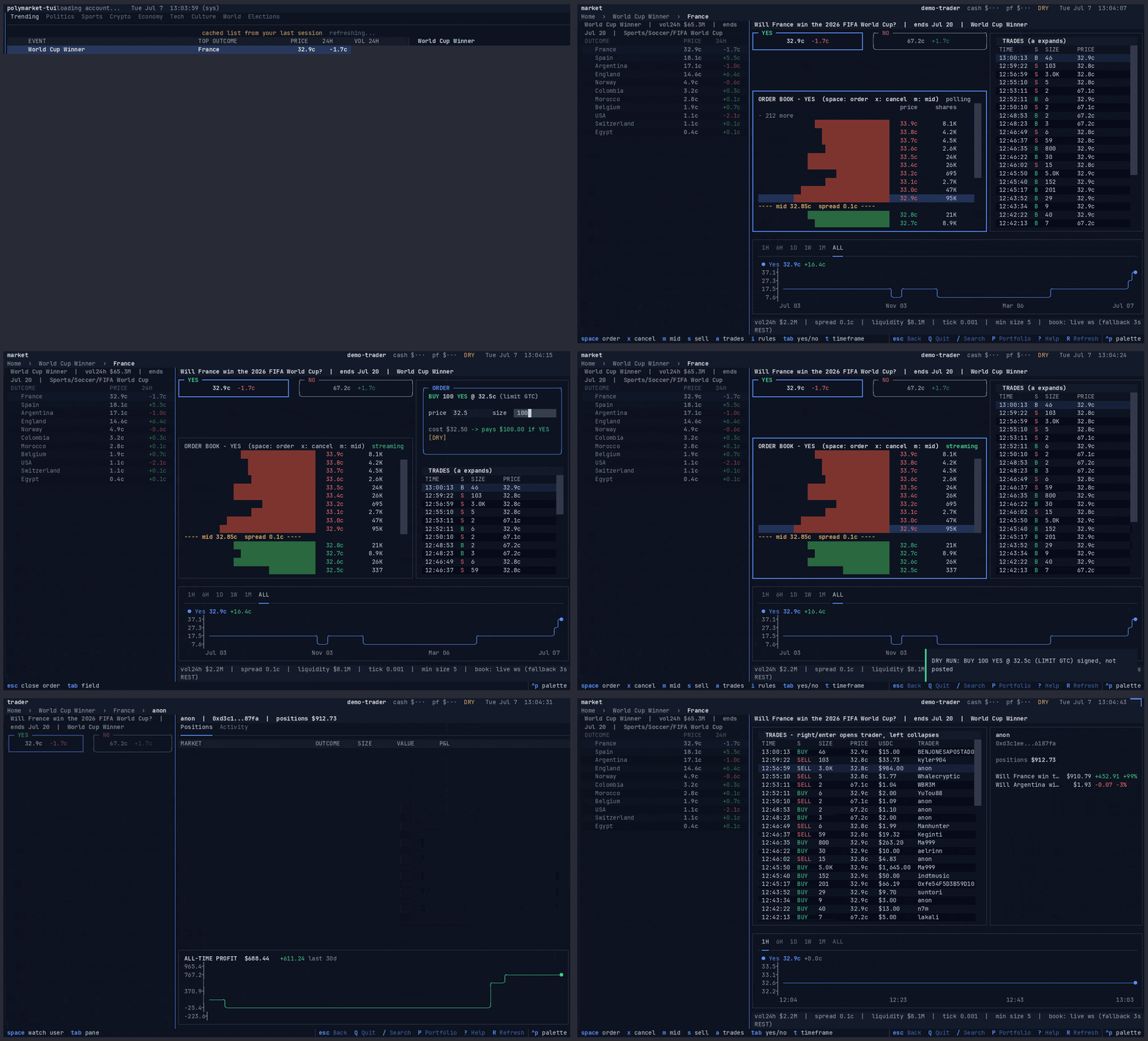
▶ Watch the interactive demo - browse markets, open a live book, chart, search.
Built with Python 3.12 and Textual.
Install
PyPI (installs the CLI in an isolated environment):
uv tool install polymarket-tui # or: pipx install polymarket-tui / pip install polymarket-tui
One-line install (installs uv if missing,
then installs polymarket-tui as a uv tool):
curl -sSL https://raw.githubusercontent.com/byronxlg/polymarket-tui/main/install.sh | bash
Homebrew (one command - auto-taps and installs):
brew install byronxlg/tap/polymarket-tui
Add --HEAD to track main instead of the latest release.
From source (for development):
git clone https://github.com/byronxlg/polymarket-tui
cd polymarket-tui
uv sync
uv run polymarket-tui
Then run polymarket-tui.
No credentials needed to browse: markets, books, charts, trades, comments, and any trader's public positions all work read-only.
Landing page
A static landing page lives in site/ and deploys to GitHub Pages
(https://byronxlg.github.io/polymarket-tui/). Its hero plays a recorded
asciinema demo of the TUI - browse markets, open one, cursor the live book,
chart, search. Preview it locally with python3 -m http.server -d site 8000,
and regenerate the demo with bash scripts/record_demo.sh. See
site/README.md.
Account setup
Press A in the app (a pop-out - esc drops you back where you were):
-
Funder address only -> observer mode: your positions, P&L, activity. This is the wallet address shown on your polymarket.com profile (also your USDC deposit address).
-
Funder + private key -> trading mode. Where the key comes from depends on how you log in to Polymarket:
- email/Magic login: polymarket.com -> Settings -> Export Private Key (signature type 1, the default)
- browser wallet: export the key from the wallet itself, e.g. MetaMask account details (signature type 2)
- trading straight from your own wallet with no Polymarket proxy: that wallet's key, funder = the same address (signature type 0)
Applied credentials are saved to
~/.config/polymarket-tui/credentials.toml(chmod 600, plaintext - treat the file like the key itself).POLYMARKET_*env vars override the file.Note: accounts created since Polymarket switched to Privy embedded wallets export only a threshold-key share; the trading API (and therefore this client) does not support them yet.
Orders are dry-run until you go live: fully validated and signed but
never posted. Live posting requires the L toggle (confirmed) or
POLYMARKET_EXECUTION_LIVE=1; the choice persists across sessions and a
LIVE start is announced.
Every placed/cancelled order is appended to
~/.local/share/polymarket-tui/orders.jsonl.
Deposits, withdrawals, token approvals, and redemption of resolved positions are on-chain operations this client does not perform - use the website.
Keys
One scheme everywhere - press ? in the app for the full reference:
- arrows move;
up/downflow into adjacent panels (category bar, chart inspect, search box);right/enteropen;left/escstep out one level (order panel -> expanded view -> screen -> previous screen) - tab cycles the screen's selector: category (home), chart timeframe (event/market), pane (portfolio), results mode (search)
- space is the contextual toggle: star an event, follow a trader, flip the YES/NO book, flip BUY/SELL while ordering, show rules
- Market pages:
b/sorder entry under the live book (price in cents, empty = market order, up/down = tick),y/nbook side,aexpand the inline trades to full width (right opens the trader),irules,ccomments,eparent event /search (markets and traders),pportfolio,wwatchlist,Aauth,Ltoggle DRY/LIVE for the session (going live asks for confirmation),qquit
Data sources
Public Polymarket APIs: gamma-api.polymarket.com (markets, events, search,
comments), clob.polymarket.com (order books, price history, orders),
data-api.polymarket.com (positions, trades, activity),
user-pnl-api.polymarket.com (profit history). Trading uses
py-clob-client-v2 for CLOB V2 order signing.
Docs
.claude/rules/design-principles.md- the UX/code principles this app followsdocs/architecture.md- layers, async model, cachingdocs/api-reference.md- the four API surfaces, verified shapes, quirksdocs/trading.md- the money path: validation, confirmation, auditdocs/config-and-auth.md- credentials, capability modes
Remaining work is tracked in GitHub issues.
Disclaimer
Unofficial client, not affiliated with Polymarket. It can place real orders with real money when you explicitly enable LIVE mode; you are responsible for your trades. No warranty.
Project details
Verified details
These details have been verified by PyPIProject links
GitHub Statistics
Maintainers
Release history Release notifications | RSS feed


Download files
Download the file for your platform. If you're not sure which to choose, learn more about installing packages.
Source Distribution
Built Distribution
Filter files by name, interpreter, ABI, and platform.
If you're not sure about the file name format, learn more about wheel file names.
Copy a direct link to the current filters
File details
Details for the file polymarket_tui-0.1.1.tar.gz.
File metadata
- Download URL: polymarket_tui-0.1.1.tar.gz
- Upload date:
- Size: 118.2 kB
- Tags: Source
- Uploaded using Trusted Publishing? Yes
- Uploaded via: twine/6.1.0 CPython/3.13.12
File hashes
| Algorithm | Hash digest | |
|---|---|---|
| SHA256 |
3cc7540c5319a5da713ad56ae85699bb1506e05fc0067f50d328c65252df0c62
|
|
| MD5 |
fc7e6e775607bf663352f45637846d93
|
|
| BLAKE2b-256 |
86f111f5f1943d5b7b853b5d973be0bd9ab112665c227e22cd6c718269122e24
|
Provenance
The following attestation bundles were made for polymarket_tui-0.1.1.tar.gz:
Publisher:
publish.yml on byronxlg/polymarket-tui
-
Statement:
-
Statement type:
https://in-toto.io/Statement/v1 -
Predicate type:
https://docs.pypi.org/attestations/publish/v1 -
Subject name:
polymarket_tui-0.1.1.tar.gz -
Subject digest:
3cc7540c5319a5da713ad56ae85699bb1506e05fc0067f50d328c65252df0c62 - Sigstore transparency entry: 2089531298
- Sigstore integration time:
-
Permalink:
byronxlg/polymarket-tui@2e27487d325b95b14fc1f5350f40b03ee82a8901 -
Branch / Tag:
refs/tags/v0.1.1 - Owner: https://github.com/byronxlg
-
Access:
public
-
Token Issuer:
https://token.actions.githubusercontent.com -
Runner Environment:
github-hosted -
Publication workflow:
publish.yml@2e27487d325b95b14fc1f5350f40b03ee82a8901 -
Trigger Event:
release
-
Statement type:
File details
Details for the file polymarket_tui-0.1.1-py3-none-any.whl.
File metadata
- Download URL: polymarket_tui-0.1.1-py3-none-any.whl
- Upload date:
- Size: 151.6 kB
- Tags: Python 3
- Uploaded using Trusted Publishing? Yes
- Uploaded via: twine/6.1.0 CPython/3.13.12
File hashes
| Algorithm | Hash digest | |
|---|---|---|
| SHA256 |
8a5e12096f6860efc7c16a56b32f860c11c4022be90eed8bd4d611597e0d324d
|
|
| MD5 |
54468d9375e094d445748540e70ff320
|
|
| BLAKE2b-256 |
4525673e4e93fab038c7df9a938f6551696b42f9ef571d534067ed9e98c1b831
|
Provenance
The following attestation bundles were made for polymarket_tui-0.1.1-py3-none-any.whl:
Publisher:
publish.yml on byronxlg/polymarket-tui
-
Statement:
-
Statement type:
https://in-toto.io/Statement/v1 -
Predicate type:
https://docs.pypi.org/attestations/publish/v1 -
Subject name:
polymarket_tui-0.1.1-py3-none-any.whl -
Subject digest:
8a5e12096f6860efc7c16a56b32f860c11c4022be90eed8bd4d611597e0d324d - Sigstore transparency entry: 2089531468
- Sigstore integration time:
-
Permalink:
byronxlg/polymarket-tui@2e27487d325b95b14fc1f5350f40b03ee82a8901 -
Branch / Tag:
refs/tags/v0.1.1 - Owner: https://github.com/byronxlg
-
Access:
public
-
Token Issuer:
https://token.actions.githubusercontent.com -
Runner Environment:
github-hosted -
Publication workflow:
publish.yml@2e27487d325b95b14fc1f5350f40b03ee82a8901 -
Trigger Event:
release
-
Statement type:






