

Polyphon AI
Local, Identity-Aware Transcription & Diarization Engine
Turning multi-speaker conversational audio into structured, named intelligence — 100% offline.




Architecture • Features • Polyphon Studio (Web UI) • Quick Start • CLI Usage • Local LLM • VoiceDB & Identity • Python API • API Reference • Hardware Acceleration
⚡ The Problem & The Vision
State-of-the-art open models like faster-whisper (ASR) and pyannote (diarization) are phenomenal, but standard pipelines (including tools like WhisperX) leave critical problems unsolved:
- Reconciliation Failures: Naive timestamp overlap breaks when speakers interrupt, talk over each other, or use short backchannels ("Yeah", "Right").
- Identity Amnesia: Every file starts from scratch as
SPEAKER_00,SPEAKER_01. There is no persistent voice memory across meetings. - Multilingual & Code-Switching Desync: Monolingual forced alignment models fail when speakers naturally mix languages (e.g., English-Mandarin, Singlish, dialects).
- Fragile Orchestration: Juggling PyTorch versions, Hugging Face tokens, FFmpeg quirks, and GPU runtimes makes deployment in homelabs or local microservices painful.
Polyphon bridges this gap. It does not reinvent foundational weights; it provides a unified, identity-aware reconciliation and structuring engine that runs locally on commodity hardware, high-VRAM GPUs, and unified-memory APUs.
🏗️ Architecture
                    ┌────────────────────────┐
 Audio / Video ────►│   Audio Preprocessor   │ (16kHz Mono, VAD Chunking)
                    └───────────┬────────────┘
                                │
                 ┌──────────────┴──────────────┐
                 │                             │
                 ▼                             ▼
          ┌──────────────┐              ┌──────────────┐
          │     ASR      │              │ Diarization  │
          │ faster-whisper│             │ pyannote /   │
          │ (Word Tokens)│              │ NeMo Sortform│
          └──────┬───────┘              └──────┬───────┘
                 │                             │
                 │ [t_start, t_end]            │ [Speaker Intervals]
                 └──────────────┬──────────────┘
                                ▼
                 ┌─────────────────────────────┐
                 │    Reconciliation Engine    │◄─── Audio-Embedding
                 │  - Exclusive anchor windows │     Fallback for
                 │  - Overlap disambiguation   │     Boundary Clashes
                 └──────────────┬──────────────┘
                                ▼
                 ┌─────────────────────────────┐
                 │     VoiceDB (Identity)      │◄─── Local Enrollment
                 │  - Cosine Sim + AS-Norm     │     Embeddings
                 │  - SPEAKER_00 ➔ "Alice"     │     (Zero Telemetry)
                 └──────────────┬──────────────┘
                                ▼
                 ┌─────────────────────────────┐
                 │    Semantic / LLM Layer     │◄─── Local LLM
                 │  - Meeting summary & topics │     (llama.cpp / vLLM)
                 │  - Action items & decisions │
                 └──────────────┬──────────────┘
                                ▼
                 ┌─────────────────────────────┐
                 │   Structured Intelligence   │ (JSON / Markdown / SRT)
                 └─────────────────────────────┘
✨ Key Features
- ⚡ Robust Timestamp Reconciliation: Multi-scale boundary alignment that assigns ambiguous or overlapping words using acoustic embedding proximity rather than simplistic box overlapping.
- 👤 VoiceDB (Persistent Identity): Enroll local speaker voiceprints.
SPEAKER_00andSPEAKER_01automatically becomeAliceandBobacross past and future recordings. - ✨ One-Click VoiceDB Enrollment from Transcript: Turn unknown clusters into named identities directly while listening to the meeting in Polyphon Studio, extracting multi-segment voice embeddings and auto-updating all past turns.
- 🎙️+💻 Dual Audio Capture (Mic & Meeting): Record both your microphone (you) and remote meeting participants (Google Meet, Zoom, Teams, Webex) in the browser via Web Audio API mixing without meeting bots or virtual audio cables.
- ⚖️ Side-by-Side Comparative Benchmarking: Compare real-time edge streaming transcription against offline multi-speaker diarization and executive intelligence with dual synchronized columns and KPI cards.
- 🌏 Multilingual & Code-Switching Native: Designed to handle real-world conversations where speakers switch languages mid-sentence (e.g. English + Mandarin, Singlish, Malay) without forced-alignment phonetic breakdown.
- 🧠 Local Structured Extraction: Seamlessly pipelines reconciled speaker transcripts into local LLMs (via
llama.cpp, Ollama, or vLLM) to output actionable summaries, decisions, and speaker talk-time metrics. - 🎙️ Polyphon Studio (Modular Web UI): High-performance 4-tab web workspace (Studio, Live Stream, Archive, VoiceDB) with synchronized media playback, word-level karaoke glow, deterministic auto-scrolling, live SSE progress, and clean zero-build modular static assets.
- ✨ Clean Verbatim Mode (Zero Timing Drift): Intelligently detects and filters vocal disfluencies ("um", "uh", "er", "ah", "hmm") with zero millisecond timing impact. All word-level timestamps, audio scrubbing, and karaoke illumination remain frame-accurate.
- 🔴 Real-Time Streaming & Neural Diarization: Low-latency live streaming speech recognition and NVIDIA NeMo Sortformer end-to-end neural diarization (EEND) with speculative/committed token reconciliation, CLI live streaming (
polyphon stream), and browser WebSocket (/api/stream/ws). - 🔒 100% Offline & Private: Zero telemetry, no cloud API dependencies, and no remote data leakage. Ideal for confidential meetings, medical/legal notes, and homelab setups.
🚀 Quick Start
Prerequisites
-
FFmpeg: Required for audio decoding, format conversion, and 16 kHz mono resampling.
# Debian / Ubuntu / Raspberry Pi OS
sudo apt update && sudo apt install -y ffmpeg

# macOS (Homebrew)
brew install ffmpeg

# Arch Linux
sudo pacman -S ffmpeg

# Windows (winget - Recommended)
# NOTE: must be the *shared* build - see the warning below
winget install Gyan.FFmpeg.Shared
⚠️ Windows: you need a
sharedFFmpeg build. Speaker diarization decodes audio throughtorchcodec, which loads FFmpeg's DLLs (avcodec-*.dll,avformat-*.dll,avutil-*.dll) at runtime rather than shelling out toffmpeg.exe. The default Windows packages -winget install Gyan.FFmpeg,choco install ffmpeg, andscoop install ffmpeg- are static builds that ship only the.exefiles and no DLLs. With one of those,ffmpeg -versionworks fine but--diarizefails withRuntimeError: Could not load libtorchcodec.Install a shared build (above), or download
ffmpeg-release-full-shared.7zfrom gyan.dev/ffmpeg/builds and add itsbindirectory to yourPATH.You can verify this once the environment is set up — see Step 1.
-
uv (Recommended): High-performance Python package and environment manager.
# Linux & macOS
curl -LsSf https://astral.sh/uv/install.sh | sh

# Windows (PowerShell)
powershell -ExecutionPolicy ByPass -c "irm https://astral.sh/uv/install.ps1 | iex"
# or via winget: winget install --id=astral-sh.uv
-
Hugging Face Access Token (Required for Diarization): Speaker diarization uses
pyannote.audiomodels which are gated on Hugging Face:- Accept user agreements on hf.co/pyannote/speaker-diarization-3.1
- Accept user agreements on hf.co/pyannote/segmentation-3.0
- Export your User Access Token in your terminal:
# Linux / macOS (bash / zsh)
export HF_TOKEN="hf_xxxxxxxxxxxxxxxxxxxxxxxxxxxxxxxxx"

# Windows (PowerShell)
$env:HF_TOKEN="hf_xxxxxxxxxxxxxxxxxxxxxxxxxxxxxxxxx"

# Windows (Command Prompt)
set HF_TOKEN=hf_xxxxxxxxxxxxxxxxxxxxxxxxxxxxxxxxx
(Or authenticate viauv run hf auth login)
Step-by-Step Installation Guide
Option A: Install from PyPI (Recommended for Users)
# Recommended: Install the complete package (ASR + Pyannote Diarization + Studio WebUI + Meeting Bot)
pip install "polyphon-ai[all]"

# Or install as an isolated global CLI via pipx or uv tool:
pipx install "polyphon-ai[all]"
uv tool install "polyphon-ai[all]"

# Check runtime dependencies (FFmpeg shared libraries, needed for --diarize)
polyphon doctor
[!TIP] Selective Installation Extras:
polyphon-ai: Core CLI & reconciliation engine (lightweight, zero heavy PyTorch dependencies).polyphon-ai[asr]: Speech recognition only (faster-whisper).polyphon-ai[diarization]: Neural speaker diarization (pyannote.audio+torch).polyphon-ai[server]: WebUI dashboard & REST/WebSocket server (fastapi+uvicorn).polyphon-ai[bot]: Automated meeting bot attendee (playwright).polyphon-ai[all]: Complete offline meeting intelligence pipeline.
Option B: Clone & Run from Source (Recommended for Contributors)
uv automatically downloads the designated Python toolchain (Python 3.12) and creates an isolated virtual environment (.venv):
# 1. Clone repository
git clone https://github.com/seehiong/polyphon-ai.git
cd polyphon

# 2. Sync all dependencies into isolated virtual environment (.venv)
uv sync --all-extras

# 3. Verify installation
uv run polyphon --help

# 4. Check runtime dependencies (FFmpeg shared libraries, needed for --diarize)
uv run polyphon doctor
doctor encodes and decodes a short audio buffer, so it fails when FFmpeg's shared
libraries are missing and exits non-zero — usable as a CI gate. It reports the ffmpeg
executable separately from the shared libraries, since a working ffmpeg -version does
not imply the libraries are loadable.
[!IMPORTANT] When running from a source clone, run commands through
uv run(or activate.venv), not a barepython/polyphonthat might resolve to a different Python environment.Do not verify with
python -c "from torchcodec.decoders import AudioDecoder". That passes on a broken install:import torchcodecdeliberately swallows the FFmpeg load error to keep its image decoders usable, and the failure only surfaces when you actually decode.If
doctorreports the shared libraries as unloadable, see the FFmpeg note in Prerequisites.
Windows: FFmpeg installed correctly but still not found
DLL resolution follows PATH, and a shell only picks up PATH changes when it
starts — so a terminal opened before you installed FFmpeg keeps the old value. Open a
new terminal and re-run uv run polyphon doctor (or polyphon doctor).
If it still fails, copy the FFmpeg DLLs next to the library that loads them. Windows
searches a DLL's own directory before PATH, so this works regardless of PATH:
Copy-Item "C:\path\to\ffmpeg-shared\bin\av*.dll", "C:\path\to\ffmpeg-shared\bin\sw*.dll" `
  -Destination ".venv\Lib\site-packages\torchcodec\"
This is a workaround, not a fix: uv sync reinstalls torchcodec and removes the
copied DLLs, so prefer getting PATH right. Re-run the copy if diarization breaks
again after a sync.
Step 2: Set Hugging Face Token
export HF_TOKEN="your_huggingface_token"
Step 3 (Optional): Start Local LLM Server (for --summarize)
For meeting intelligence and action item extraction, run your local model server:
llama-server-rocm \
  --model ~/models/Qwen3.8-27B-Q4_K_M.gguf \
  --alias qwen3.8-27b \
  --n-gpu-layers 99 \
  --ctx-size 131072 \
  --parallel 1 \
  --flash-attn on \
  --jinja \
  --temp 0.7 --top-p 0.8 --top-k 20 --min-p 0 \
  --spec-type draft-mtp --spec-draft-n-max 2 \
  --kv-unified --fit off \
  --host 0.0.0.0 --port 8080
(See Local LLM Serving for hardware tuning details).
Any OpenAI-compatible server works — llama-server, vLLM, Ollama, or
LM Studio. With Ollama, ollama serve already exposes an
OpenAI-compatible API on port 11434; just point Polyphon at it (note the /v1 suffix):
POLYPHON_LLM_ENDPOINT=http://127.0.0.1:11434/v1
POLYPHON_LLM_MODEL=qwen2.5:7b
Pointing at a different machine (e.g. Remote Ollama, llama-server, vLLM)
You can run Polyphon on one machine (e.g. your laptop or lightweight client) while hosting Ollama or llama-server on a dedicated GPU machine on your local network (e.g. 192.168.1.50):
┌──────────────────────────────────────┐          HTTP / LAN          ┌──────────────────────────────────────┐
│       Machine A (Polyphon)           │─────────────────────────────►│         Machine B (Ollama)           │
│  - pip install "polyphon-ai[all]"    │  POST http://192.168.1.50:   │  - OLLAMA_HOST=0.0.0.0               │
│  - ~/.polyphon/.env                  │       11434/v1/chat/...      │  - qwen2.5-16k (num_ctx 16384)       │
└──────────────────────────────────────┘                              └──────────────────────────────────────┘
Polyphon resolves its configuration in the following order:
-
User Global Config (
~/.polyphon/.envor~/.config/polyphon/.env) — Best for PyPI Users: Save your settings once in your home directory so Polyphon connects to your remote LLM from any folder without needing a.envin every directory:mkdir -p ~/.polyphon cat << 'EOF' > ~/.polyphon/.env POLYPHON_LLM_ENDPOINT=http://192.168.1.50:11434/v1 POLYPHON_LLM_MODEL=qwen2.5:7b POLYPHON_LLM_TIMEOUT=1800 EOF
-
Project-Level
.env(Current Directory): Copy.env.exampleto.envin your project folder. Polyphon walks up from the current working directory to find it. Local.envfiles take precedence over~/.polyphon/.env. -
Shell Environment Variables (
export): Real environment variables take precedence over all.envfiles:export POLYPHON_LLM_ENDPOINT="http://192.168.1.50:11434/v1" export POLYPHON_LLM_MODEL="qwen2.5:7b"
-
Command-Line Flags (
--llm-endpoint,--llm-model): Override the LLM endpoint for a single command:polyphon transcribe meeting.mp4 --summarize --llm-endpoint http://192.168.1.50:11434/v1 --llm-model qwen2.5:7b
-
Explicit Environment File: Point at any custom env file:
POLYPHON_ENV_FILE=/path/to/custom.env polyphon transcribe ....
[!IMPORTANT] Checklist for Machine B (The Ollama Host):
- Bind to LAN (
OLLAMA_HOST=0.0.0.0): By default, Ollama only listens on127.0.0.1:11434(rejecting external connections).
- Linux (systemd): Run
sudo systemctl edit ollama.serviceand add[Service]\nEnvironment="OLLAMA_HOST=0.0.0.0". Thensudo systemctl daemon-reload && sudo systemctl restart ollama.- macOS:
launchctl setenv OLLAMA_HOST "0.0.0.0"and restart the Ollama application.- Windows: Add
OLLAMA_HOST=0.0.0.0to System Environment Variables and restart Ollama.- Specify the
/v1Endpoint Suffix: Polyphon speaks standard OpenAI-compatible API. The endpoint must end in/v1(e.g.http://192.168.1.50:11434/v1).- Firewall: Verify port
11434is open on Machine B (e.g.sudo ufw allow 11434/tcp).
[!WARNING] Ollama defaults to a 4096-token context and ignores
max_tokensover its OpenAI-compatible endpoint. A long meeting fills that budget with the prompt alone, so the model returns empty content and the summary reads "Failed to parse structured insights". Raise the context on the model itself:
- Create a
Modelfilecontaining:FROM qwen2.5:7b PARAMETER num_ctx 16384(Or create it via command line:
• Linux / macOS:printf 'FROM qwen2.5:7b\nPARAMETER num_ctx 16384' > Modelfile
• Windows PowerShell:"FROM qwen2.5:7bnPARAMETER num_ctx 16384" | Out-File -Encoding ascii Modelfile`)
- Build the model in Ollama:
ollama create qwen2.5-16k -f Modelfile
- Set
POLYPHON_LLM_MODEL=qwen2.5-16kin your.env.Summarising a long meeting on CPU or a small GPU can also exceed the 900s request timeout — raise it with
POLYPHON_LLM_TIMEOUT.
Step 4: Obtain Sample Media
Run the included helper script to fetch test meeting audio and auto-generate MP4 video files into the examples/ directory:
# Standard 2-Speaker Benchmark (~87s dialogue: Lex Fridman & Mark Zuckerberg)
uv run python scripts/download_sample.py

# 🔥 Challenging 4-Speaker Stress Test (AMI Meeting Corpus ES2004a: ~17.5m multi-party design meeting)
uv run python scripts/download_sample.py --challenging
(Saved cleanly into examples/; the --challenging option also creates examples/meeting_challenging_3min.mp4 for rapid stress testing).
Step 5: Run Polyphon
On first execution, model weights for Whisper large-v3 (~3 GB) and Pyannote are downloaded and cached automatically in ~/.cache/huggingface/hub:
# Transcribe + Diarize
uv run polyphon transcribe examples/meeting.mp4 --diarize

# Full Pipeline: Transcribe + Diarize + Identify + Summarize
uv run polyphon transcribe examples/meeting.mp4 \
  --diarize \
  --identify \
  --summarize \
  --format markdown \
  --output meeting_summary.md
Step 6: Verify Environment with Tests
uv run pytest -v
Alternative: Using standard venv + pip
# Clone the repository
git clone https://github.com/seehiong/polyphon-ai.git
cd polyphon

# Create and activate virtual environment (Python 3.10+)
python3 -m venv .venv
source .venv/bin/activate

# Install Polyphon in editable mode with all extras
pip install -e ".[all,dev]"
💻 CLI Usage
If installed from PyPI (pip install "polyphon-ai[all]"), execute polyphon <command> directly. When developing from a source clone with uv, prefix commands with uv run polyphon <command> or activate the environment with source .venv/bin/activate.
Guided Walkthrough
Run these in order for a complete end-to-end tour. Each step builds on the previous one's
output, and every command uses the same meeting_challenging recording throughout.
# 0. Fetch the sample media (creates examples/meeting_challenging.mp4)
uv run python scripts/download_sample.py --challenging

# 1. Transcribe to a JSON manifest -- the machine-readable file later steps edit
uv run polyphon transcribe examples/meeting_challenging.mp4 --diarize --format json

# 2. Put real names on the acoustic clusters, and enroll their voiceprints
uv run polyphon assign outputs/meeting_challenging.json \
  --map SPEAKER_00="Marcus Vance" \
  --map SPEAKER_01="David (UI Designer)" \
  --enroll \
  --summarize

# 3. Any future meeting now recognises those voices automatically
uv run polyphon transcribe examples/meeting_challenging_3min.mp4 \
  --diarize --identify --summarize --format html
--summarize in step 2 needs a local LLM server (see
Step 3); drop the flag if you
have not started one — everything else works without it.
The sections below are a reference — independent examples of individual flags, not a sequence. Mixing them out of order can reference files an earlier example never created.
[!TIP] Two distinct concepts, easy to conflate:
--format jsonwrites a manifest: the structured recordassignreads and rewrites.--format html/markdown/srtwrite reports for humans, regenerated from the manifest.Transcribe with
--format jsonwhenever you intend to runassignafterwards.
1. Basic Transcription & Diarization
uv run polyphon transcribe examples/meeting.mp4 --diarize
2. Full Pipeline: Transcribe + Diarize + Speaker Identification + LLM Summary
uv run polyphon transcribe examples/meeting.mp4 \
  --diarize \
  --identify \
  --summarize \
  --format html \
  --output meeting_report.html
(Available --format options: markdown, json, srt, html)
3. Clean Verbatim Transcription (--clean-fillers)
Professional transcription often demands removing vocal disfluencies ("um", "uh", "er", "ah", "hmm") to produce publication-ready text. Polyphon provides Clean Verbatim with 0ms timing impact: filler tokens are tagged at the word level, preserving every millisecond timestamp for audio scrubbing and karaoke sync while producing clean text outputs:
# Transcribe and export clean verbatim text (removes filler words from reports):
uv run polyphon transcribe examples/meeting_challenging.mp4 \
  --diarize \
  --clean-fillers \
  --format html

# Batch process an entire directory with clean verbatim enabled:
uv run polyphon batch ./recordings/ --clean-fillers --diarize --summarize --format all
[!TIP] Customizing Filler Words: Polyphon uses a standardized dictionary of Tier 1 involuntary vocal disfluencies (e.g. um, uh, er, ah, hmm, mhm, uh-huh, mm-hmm). You can extend this with domain-specific phrases or conversational fillers (e.g., "like", "you know", "basically") by setting
POLYPHON_CUSTOM_FILLERS="you know,basically,like"in your.envfile or environment.
4. Interactive Standalone HTML Reports (--format html)
Export a self-contained, offline-ready HTML report featuring:
- Interactive Talk-Time Visualizer: Proportional multi-speaker progress bar with color-coded badges.
- Instant Keyword Search: Real-time search box filtering dialogue turns.
- Speaker Isolation Tabs: Click on any speaker to filter the conversation to their turns only.
- Clean Verbatim Toggle (
✨ Clean Verbatim): Interactive in-report button allowing viewers to switch instantly between verbatim and clean text in their browser. - Checkable Action Items: Interactive checklists with assignee badges.
uv run polyphon transcribe examples/meeting_challenging_3min.mp4 --diarize --summarize --format html
# Open meeting_challenging_3min.html directly in any browser!
5. Speaker Voiceprint Enrollment (polyphon enroll)
Enroll a speaker voiceprint into the local VoiceDB so Polyphon automatically replaces SPEAKER_XX with their actual name in all future meetings:
# Enroll from a clean standalone sample audio:
uv run polyphon enroll --name "Lex Fridman" --audio lex_sample.wav

# Or enroll directly from a speaker cluster in an existing meeting:
uv run polyphon enroll --name "Sarah (PM)" --audio examples/meeting_challenging.mp4 --speaker SPEAKER_00
[!TIP] Continuous Learning (70/30 Centroid Adaptation): Enrolling additional audio for an existing speaker does not erase their profile or require full re-training. VoiceDB uses an online exponential running centroid average: $$\mathbf{v}{\text{combined}} = \text{norm}(0.7 \times \mathbf{v}{\text{existing}} + 0.3 \times \mathbf{v}_{\text{new}})$$ This smoothly blends new voice samples into their profile, adapting to natural variations in pitch, microphone distance, or room acoustics over time while preserving identity stability.
6. In-Context Verbal Speaker Identification & Auto-Enrollment (--infer-names, --auto-enroll)
Even without pre-enrolling speakers, Polyphon can automatically discover who is speaking from verbal introductions in the dialogue (e.g., "Hello everybody, I'm Sarah, project manager...", "My name is David", "Lex here"):
--infer-names(Enabled by default): Scans opening turns and renamesSPEAKER_XXdirectly from self-introductions or conversational address.--auto-enroll: Automatically extracts the speaker's 256-dimensional acoustic embedding from that meeting and saves it into localVoiceDB. In all future meetings, Polyphon will recognize their voice biometrically—even if they never say their name again!
# Zero-touch transcription: Inactive VoiceDB -> Discovers Sarah -> Auto-enrolls her permanently!
uv run polyphon transcribe examples/meeting_challenging_3min.mp4 \
  --diarize \
  --infer-names \
  --auto-enroll \
  --summarize \
  --format html
7. Batch Speaker Assignment & VoiceDB Registration (polyphon assign)
Assign real speaker identities to acoustic clusters (SPEAKER_00, SPEAKER_01) in an existing meeting manifest in a single command, enroll their voiceprints permanently into VoiceDB, and regenerate executive summaries and reports.
[!IMPORTANT]
assignedits an existing JSON manifest, so you must transcribe with--format jsonfirst. Other formats (markdown,html,srt) are reports, not manifests — runningassignwithout the JSON fails withMeeting manifest not found.
# Step 1 — transcribe to a JSON manifest (writes outputs/meeting_challenging.json)
uv run polyphon transcribe examples/meeting_challenging.mp4 --diarize --format json

# Step 2 — assign real identities, extract voiceprints into VoiceDB, regenerate reports
uv run polyphon assign outputs/meeting_challenging.json \
  --map SPEAKER_00="Marcus Vance" \
  --map SPEAKER_01="David (UI Designer)" \
  --enroll \
  --summarize
Step 2 rewrites the manifest in place and regenerates the HTML/MD/SRT reports beside it, so there is no need to transcribe again after assigning.
[!NOTE]
--enrollextracts each speaker's voiceprint from the original media, which it locates by matching the manifest's filename stem (meeting_challenging.json→examples/meeting_challenging.mp4). Keep that pairing intact, or enrollment is skipped while the name assignment still succeeds. A speaker with too little clean speech in the recording may also be skipped — expected on short clips, and reported per speaker in the command's output.
(You can also use shorthand numbers like --map 0="Marcus Vance" --map 1="David" or comma-separated pairs -m "0=Marcus,1=David").
Direct Assignment During Transcription (--speaker-map)
You can also specify known speaker identities up-front when transcribing:
uv run polyphon transcribe examples/meeting_challenging.mp4 \
  --diarize \
  --speaker-map "SPEAKER_00=Marcus Vance,SPEAKER_01=David (UI Designer)" \
  --auto-enroll \
  --summarize
Merging Multiple Clusters into One Speaker (Solo Recordings)
If unsupervised diarization splits a single speaker into multiple clusters (e.g. SPEAKER_00 and SPEAKER_01) due to head movement, vocal inflection, or microphone distance, mapping both clusters to the same name automatically consolidates them:
uv run polyphon assign outputs/meeting.json \
  --map SPEAKER_00="Alice" \
  --map SPEAKER_01="Alice" \
  --enroll
All dialogue turns, talk-time statistics, and reports combine into 1 single speaker (100% talk time), and their voice embeddings are unified into a single VoiceDB entry.
Alternatively, you can constrain diarization up-front when processing solo recordings, podcasts, or voice notes:
uv run polyphon transcribe solo_session.wav --num-speakers 1
8. VoiceDB Speaker Management
# List all enrolled speaker profiles in local VoiceDB
uv run polyphon speakers list

# Remove an enrolled speaker profile
uv run polyphon speakers remove "Lex Fridman"
9. Batch Processing Directory Mode (polyphon batch)
Process an entire folder of recordings sequentially with multi-task queue tracking:
uv run polyphon batch ./recordings/ \
  --output-dir ./transcripts/ \
  --diarize \
  --identify \
  --summarize \
  --format all \
  --recursive
(Generates .md, .json, .srt, and .html for each meeting, plus a central batch_index.md executive dashboard and batch_index.json manifest).
10. Polyphon Studio Web Dashboard (polyphon serve)
Launch the interactive web workspace to process recordings, visualize meetings, live-stream audio, and manage VoiceDB profiles from any device on your network:
# Recommended for local LAN access (enables HTTPS & microphone permissions across devices):
uv run polyphon serve --self-signed --host 0.0.0.0 --port 7860

# Or plain HTTP (localhost only):
uv run polyphon serve --host 0.0.0.0 --port 7860
11. Real-Time Audio Streaming & Simulation (polyphon stream)
Capture live microphone audio with real-time speech recognition and neural diarization, or simulate real-time streaming from existing files:
# Live microphone capture with NeMo Sortformer neural diarization:
uv run polyphon stream --mic --diarizer sortformer --identify

# Real-time streaming simulation from an audio file:
uv run polyphon stream examples/meeting.mp4 --simulate --speed 1.0
12. Automated Meeting Bot (polyphon bot)
Deploy a headless virtual attendee powered by Playwright to join open WebRTC video meetings (such as Jitsi Meet) and stream audio directly to Polyphon's real-time engine:
# Join a Jitsi meeting room as an automated notetaker:
uv run polyphon bot https://meet.jit.si/my-project-room --name "Polyphon Notetaker"
[!TIP] Recording Google Meet, Zoom, Teams, or Webex: Proprietary platforms enforce mandatory Google/corporate account sign-ins, captchas, and anti-bot verification against automated headless browsers. To record Google Meet, Zoom, or Teams sessions with zero hassle, use Polyphon Studio's
🎙️+💻 Mic & Meeting(Dual Capture) feature in the web dashboard: it records meeting audio directly from your authenticated browser tab via the Web Audio API without virtual bots, logins, or virtual cables!
🎙️ Polyphon Studio (Web UI)
Polyphon Studio provides an elegant, 100% local web workspace for your meetings. Run the server on your primary GPU/APU machine (such as an AMD Strix Halo or NVIDIA desktop) and interact with it from your laptop, tablet, or phone over your local network:
# Launch with self-signed HTTPS (Recommended for LAN access & microphone capture):
uv run polyphon serve --self-signed --host 0.0.0.0 --port 7860

# Access in your browser:
# • Local:   https://localhost:7860
# • Network: https://<your-lan-ip>:7860
[!TIP] Why
--self-signedis Recommended for Local Network Surfing: Modern web browsers (Chrome, Edge, Safari, Firefox) restrict WebRTC and microphone APIs (navigator.mediaDevices.getUserMedia) strictly to Secure Contexts (HTTPS). When accessing Polyphon from other devices on your home or office network (http://192.168.x.x:7860), browsers treat plain HTTP as insecure and will block microphone recording.Passing
--self-signed(or--ssl, or settingPOLYPHON_SELF_SIGNED=1in.env) automatically generates local SSL certificates and serves over HTTPS.First-Time Browser Notice: On your first visit, your browser will display a standard self-signed certificate notice ("Your connection is not private"). Simply click Advanced → Proceed to
<lan-ip>(unsafe). WebRTC microphone capture and live streaming will then work immediately across all your LAN devices!(You can also provide custom certificates with
--ssl-certfile cert.pem --ssl-keyfile key.pem).
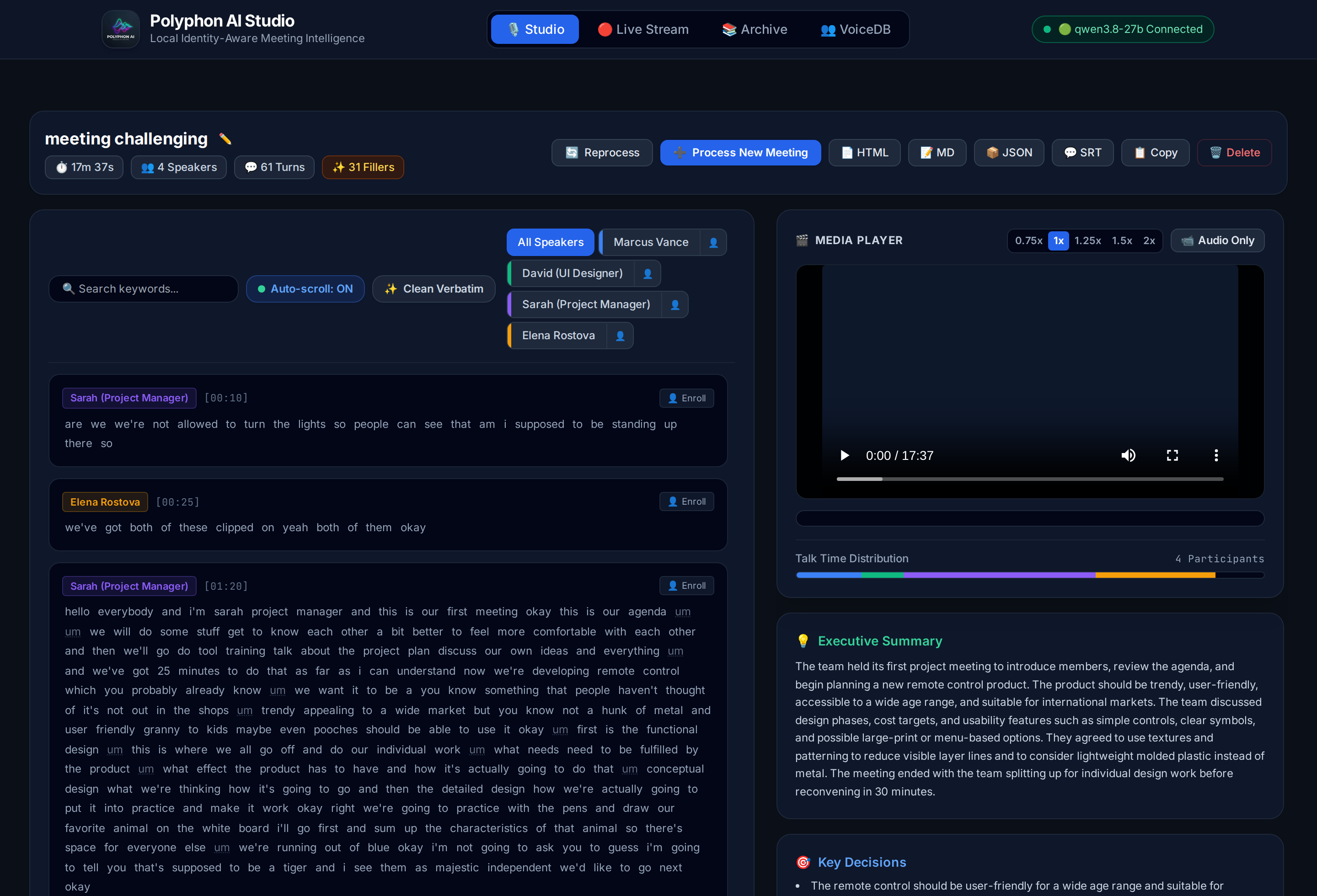
Core Tabs & Capabilities:
1. 🎙️ Studio Workspace ([🎙️ Studio])
- 2-Column Synchronized Workspace:
- Left Column (Dialogue Transcript): Scrollable dialogue feed with instant keyword search (
🔍 Search keywords...), speaker filter chips with inline👤enroll buttons, auto-scroll toggle, Clean Verbatim toggle (✨ Clean Verbatim), and word-level karaoke glow (.k-word.current) that illuminates words in real-time as spoken. - Right Column (Media & Intelligence): Unified HTML5 audio/video player (supporting MP4, WebM, WAV, MP3, M4A, FLAC, MKV), proportional multi-speaker talk time distribution bar, Executive Summary, Key Decisions, checkable Action Items with assignee badges, and Topics cloud.
- Left Column (Dialogue Transcript): Scrollable dialogue feed with instant keyword search (
- Clean Verbatim Toggle & Filler Disfluency Filtering (
✨ Clean Verbatim):- Instant one-click toggle in the transcript toolbar between Full Verbatim (vocal disfluencies shown with a subtle dotted underline) and Clean Verbatim (fillers hidden via CSS).
- Zero Timing Drift: Filler filtering preserves all underlying word tokens and exact millisecond start/end timestamps. Audio scrubbing, word-level seeking, and karaoke illumination remain 100% frame-accurate.
- Clickable Filler Metrics Badge (
✨ X Fillers): Prominently displays the total number of vocal disfluencies detected in the header; clicking the badge toggles Clean Verbatim mode. - Clipboard Awareness (
📋 Copy): One-click copy automatically exports clean text when Clean Verbatim is active, or full verbatim text when off. - Upload Modal Option: Toggle
[x] Clean Verbatim (Remove filler words like um, uh, er)directly during file upload.
- Playback Speed Control (
0.75x,1x,1.25x,1.5x,2x):- One-click playback speed pills in the Media Player header allow reviewing 30–60 minute recordings in half the time while word-level karaoke synchronization stays locked.
- Interactive Action Items & Quick Copy (
📋 Copy Tasks):- Check action items directly in the UI to mark tasks complete with visual strikethrough. Click Copy Tasks to copy the formatted Markdown checklist (
- [ ] task (@assignee)) straight to Slack, Jira, or Notion.
- Check action items directly in the UI to mark tasks complete with visual strikethrough. Click Copy Tasks to copy the formatted Markdown checklist (
- One-Click Transcript Copy (
📋 Copy):- Copy the full dialogue transcript with clean speaker names and timestamps (
[MM:SS] Speaker: Text) directly to clipboard.
- Copy the full dialogue transcript with clean speaker names and timestamps (
- Click-to-Seek & Bi-directional Navigation:
- Click any turn card or individual word in the transcript to jump audio/video playback directly to that exact second.
- Deterministic Auto-Scrolling:
- Automatically centers the active speaker's card smoothly once per speaker turn without interrupting ongoing speech or shifting the main page viewport.
- Live SSE Progress Tracking:
- Streaming progress bar with stage-by-stage diagnostics (Whisper transcription seconds, Pyannote diarization chunks, VoiceDB identity matching, local LLM intelligence extraction).
- On-Demand Multi-Format Exports:
- Every meeting can be exported or downloaded on the fly in 4 distinct formats:
- 📄 HTML: Standalone, self-contained interactive web report with dark mode, collapsible search, speaker analytics charts, and interactive Clean Verbatim toggle button.
- 📝 Markdown (MD): Clean meeting notes with timestamps and action item checklists (
- [ ] task (assignee)) for Notion, Obsidian, Jira, and GitHub. - 📦 JSON: Full raw manifest with millisecond timestamps and word alignments for pipelines and APIs.
- 💬 SubRip (SRT): Standard closed caption subtitle file with speaker tags for VLC, YouTube, or video editing.
- Every meeting can be exported or downloaded on the fly in 4 distinct formats:
2. 🔴 Live Stream & Dual Audio Capture ([🔴 Live Stream])
- Three Audio Ingestion Modes:
🎙️ Mic Only: Stream live directly from your physical microphone.🎙️+💻 Mic & Meeting(Dual Capture): Simultaneously captures your local microphone (you) AND remote meeting audio (Google Meet, Zoom web, Microsoft Teams, Webex, YouTube) directly in the browser via Web Audio API mixing. Zero third-party cloud bots (Fireflies/Otter), zero virtual audio cables, and zero privacy leakage. Includes step-by-step guidance modal and tab audio verification.📁 File Simulation: Decodes and resamples benchmark samples (meeting.mp4,meeting_challenging_3min.mp4) or any uploaded recording in-browser via Web AudioOfflineAudioContext, allowing real-time streaming over WebSocket (/api/stream/ws) even over plain HTTP without microphone hardware.
- Speaking Stats HUD (Real-Time Metrics):
- Displays live session telemetry above the transcript feed: total words spoken, speaking speed in Words Per Minute (WPM), and active speaker tag.
- Real-Time Diarization & Metrics:
- Spoken words and speaker turns stream into the transcript feed with real-time NVIDIA NeMo Sortformer neural diarization, live audio VU meter, talk-time distribution, and recording session timer.
- Automated Archiving:
- Automatically saves finalized audio (
.wav) and structured JSON manifests to the Archive upon clicking Stop & Finalize.
- Automatically saves finalized audio (
3. 📚 Meeting Archive & Comparison ([📚 Archive])
- Real-Time Archive Search & Filter:
- Instant client-side search bar (
🔍 Filter meetings by title, speaker...) to search through dozens of past meetings by participant name, meeting title, or summary keywords with zero latency.
- Instant client-side search bar (
- Archive Grid: Browse past meetings with duration, speakers, and turns metadata.
- Live vs Processed Badges:
🔴 Live Only: Session captured in real-time streaming; ready for one-click full AI processing.⚖️ Compared: Session has both live edge stream and offline deep AI pipeline data.
- Actions per Meeting:
▶️ Play in Studio: Open the meeting directly in the 2-column Studio player.🚀 Process: Run full offline AI pipeline (Whisper large-v3 + Pyannote 3.1 + VoiceDB + LLM) on live recordings.⚖️ Compare: Open the side-by-side comparative benchmarking modal.View Report(HTML),JSON,🗑️ Delete(safely removes audio, manifest, and reports).
4. 👥 VoiceDB Biometric Profiles ([👥 VoiceDB])
- Biometric Profile Grid: View enrolled speaker voiceprints, inspect audio sample sources, and manage identities visually.
- Audio Preview Player: Listen to sliced voice samples (
sample_<slug>.wav) for each enrolled speaker. - Profile Management: Delete outdated profiles or refresh the voice catalog.
Interactive Modals:
- 👤 One-Click VoiceDB Enrollment Modal (
#modal-enroll-speaker):- Click
[👤 Enroll]directly on any dialogue turn card or speaker filter chip while listening to a recording. - Displays the candidate speaker cluster tag (
SPEAKER_00), dialogue turn count, and full name input. - Extracts multi-segment voice embeddings across the cleanest turns using Pyannote, unit-normalizes the vector, and saves it into VoiceDB.
- Automatically slices a clean 1–5 second preview audio clip via
ffmpeg(outputs/samples/sample_<slug>.wav). - In-place DOM update instantly renames all dialogue cards and filter chips across the meeting, updates
outputs/{id}.json, and regenerates HTML/MD/SRT reports.
- Click
- ⚖️ Comparative Benchmarking Modal (
#modal-compare):- Evaluates real-time edge streaming transcription against offline multi-speaker diarization and executive intelligence.
- Four KPI summary cards: Dialogue Turns, Word Count, Speakers, and Intelligence status.
- Dual synchronized scrolling columns: Live Stream Transcript (real-time Whisper) vs AI Processed Pipeline (large-v3 + Pyannote 3.1 + LLM).
- 🎙️ Microphone & LAN Security Guide (
#modal-mic-help):- Comprehensive instructions for Chrome/Edge flags, HTTPS configuration, and step-by-step guidance for selecting meeting tabs and ensuring "Also share tab audio" is enabled.
Modular Static Frontend Architecture:
The Polyphon Studio web frontend is cleanly structured with zero build tooling (no Node.js/NPM/bundler needed), served directly by FastAPI:
src/polyphon/server/static/
├── index.html         (Pure semantic layout & modals — 761 lines)
├── css/
│   └── app.css        (Custom typography, karaoke glow, scrollbars)
└── js/
    ├── state.js       (Shared global state & constants)
    ├── utils.js       (escapeHtml, hashString, toast alerts)
    ├── navigation.js  (Tab switching & system health checks)
    ├── stream.js      (Live stream, dual audio capture, Web Audio mixer, VU meter)
    ├── studio.js      (Upload dropzone, SSE progress, karaoke player, filtering)
    ├── archive.js     (Archive cards, batch processing, delete, open in Studio)
    ├── compare.js     (Side-by-side benchmark modal: live vs processed)
    ├── voicedb.js     (VoiceDB profile cards & sample audio preview)
    ├── enroll.js      (One-click voicedb enrollment modal & in-place DOM updates)
    └── main.js        (DOMContentLoaded bootstrap & recurring timers)
🧠 Local LLM Serving (ROCm / Strix Halo)
For the Semantic & LLM Layer (--summarize), Polyphon interfaces with an OpenAI-compatible local server. On AMD Strix Halo APUs (128 GB unified memory), you can run a hardware-accelerated local server using llama-server-rocm with speculative decoding (MTP) and unified memory optimization:
llama-server-rocm \
  --model ~/models/Qwen3.8-27B-Q4_K_M.gguf \
  --alias qwen3.8-27b \
  --n-gpu-layers 99 \
  --ctx-size 131072 \
  --parallel 1 \
  --flash-attn on \
  --jinja \
  --temp 0.7 --top-p 0.8 --top-k 20 --min-p 0 \
  --spec-type draft-mtp --spec-draft-n-max 2 \
  --kv-unified --fit off \
  --host 0.0.0.0 --port 8080
[!TIP] Selecting the Best Context Size (
--ctx-size):
131072(128K tokens) — Recommended Sweet Spot: The native context window for Qwen. It uses ~17 GB for model weights + ~17 GB for KV cache (~34 GB total), leaving ~94 GB of unified memory completely free for Whisper ASR and Pyannote Diarization. It comfortably accommodates up to ~8–10 hours of transcribed meeting dialogue in a single pass with maximum prefill speed.262144(256K tokens) — Ultra-Long / Marathon Sessions: For all-day multi-session symposiums or marathon recordings. Consumes ~34 GB for KV cache + 17 GB weights (~51 GB total), which fits easily within Strix Halo's 128 GB APU budget.
Key Optimizations for Polyphon:
--spec-type draft-mtp --spec-draft-n-max 2: Uses Qwen's Multi-Token Prediction heads for up to 1.8× faster token generation.--kv-unified --fit off: Specifically targets AMD APU unified memory architecture and preventsllama.cppfrom defensively truncating context or memory allocation.--flash-attn on: Ensures high throughput during the prompt prefill stage when processing long transcripts.- OpenAI-Compatible Endpoint: Exposes standard endpoints at
http://localhost:8080/v1for Polyphon's extraction pipeline.
🧪 Development & Testing
Run all quality checks and tests seamlessly using uv:
# Run unit and integration tests (clean warning-free output via pyproject.toml filterwarnings)
uv run pytest -v

# Run tests with short traceback on failures
uv run pytest -q --tb=short

# Code linting and style checking
uv run ruff check .
uv run black --check .

# Auto-fix linting and format code
uv run ruff check --fix .
uv run black .

# Build distribution wheel and source tarball
uv build
🐍 Python API
Offline Batch & File Pipeline
from polyphon import PolyphonEngine

# Initialize engine (supports CPU, CUDA, and ROCm)
engine = PolyphonEngine(asr_model="large-v3", diarizer="pyannote", device="auto")

# Process audio or video file
result = engine.process("executive_sync.mp4", diarize=True, identify_speakers=True, summarize=True)

# Access structured output
print(f"Duration: {result.duration:.1f}s")
for segment in result.segments:
    print(f"[{segment.start:.2f}s - {segment.end:.2f}s] {segment.speaker_name}: {segment.text}")

# Extract structured insights (if summarize=True)
if result.insights:
    print("\n--- Action Items ---")
    for item in result.insights.action_items:
        print(f"- [{item.assignee}] {item.task}")
Real-Time Streaming Pipeline
from polyphon import StreamingPolyphonEngine, SortformerDiarizer

# Initialize streaming engine with low-latency NeMo Sortformer neural diarizer
stream_engine = StreamingPolyphonEngine(diarizer=SortformerDiarizer(), chunk_duration=1.5)
stream_engine.start_stream()

# Feed incremental audio chunks (16kHz float32 or int16 PCM bytes)
stream_engine.feed_audio(audio_chunk)

# Process step and receive real-time event
event = stream_engine.process_step()
if event and event.text:
    print(f"[{event.stream_time:.1f}s] {event.active_speaker}: {event.text}")

# Finalize meeting recording and generate full result
result = stream_engine.stop_stream(session_name="live_standup")
Output Schema (JSON)
{
  "duration": 1420.5,
  "language": "en",
  "speakers": [
    { "id": "spk_001", "name": "Alice", "confidence": 0.94 },
    { "id": "spk_002", "name": "Bob", "confidence": 0.89 }
  ],
  "segments": [
    {
      "start": 12.42,
      "end": 17.80,
      "speaker_id": "spk_001",
      "speaker_name": "Alice",
      "text": "Let's review the quarterly infrastructure spend.",
      "words": [
        { "word": "Let's", "start": 12.42, "end": 12.65, "score": 0.98 },
        { "word": "review", "start": 12.68, "end": 13.05, "score": 0.96 }
      ]
    }
  ],
  "insights": {
    "summary": "The team reviewed infrastructure costs and approved migration plans.",
    "topics": ["infrastructure", "budget", "hardware"],
    "decisions": ["Proceed with local ROCm deployment"],
    "action_items": [
      { "task": "Benchmark ROCm execution on Strix Halo", "assignee": "Bob", "due_date": null }
    ],
    "speaker_stats": {
      "Alice": { "talk_time_seconds": 820.2, "percentage": 57.7, "segment_count": 14 },
      "Bob": { "talk_time_seconds": 600.3, "percentage": 42.3, "segment_count": 9 }
    }
  }
}
👤 VoiceDB & Speaker Identity
Unlike conventional tools that output arbitrary labels (SPEAKER_00), Polyphon maintains a persistent local biometric vector catalog:
- Acoustic Profiling: Stores normalized voice embedding centroids per enrolled identity.
- Continuous Learning (70/30 Running Centroid Adaptation): When updating or re-enrolling an existing identity, VoiceDB blends 70% of the existing centroid with 30% of the newly observed turn embeddings: $$\mathbf{v}{\text{combined}} = \text{norm}(0.7 \times \mathbf{v}{\text{existing}} + 0.3 \times \mathbf{v}_{\text{new}})$$ This online exponential adaptation prevents catastrophic forgetting while allowing the voice model to adapt to new microphones, vocal strain, laughter, and room acoustics over time.
- Multi-Cluster Resolution: When unsupervised diarization detects 2 or more clusters for a single speaker (common in solo recordings or phone calls), assigning or enrolling both to the same name merges all turns, combines talk-time statistics to 100%, and refines the speaker's VoiceDB profile.
- Adaptive Score Normalization (AS-Norm): Calibrates cross-session microphone and acoustic drift to prevent false-positive matches.
- Interactive One-Click Labeling: Directly in Polyphon Studio, users can click the 👤 badge next to any speaker to enroll them into VoiceDB or merge them with an existing profile in real time.
🌐 REST & WebSocket API Reference
When running polyphon serve, Polyphon exposes an asynchronous REST API and WebSocket gateway for browser frontends, local automations, and agentic workflows:
| Method | Endpoint | Description |
|---|---|---|
GET |
/ |
Serves the interactive Polyphon Studio web application |
GET |
/api/system |
Returns server health, model versions, local LLM status, and VoiceDB stats |
POST |
/api/upload |
Uploads an audio or video file for processing (multipart/form-data) |
POST |
/api/process |
Enqueues a full pipeline job (diarize, identify, infer_names, auto_enroll, summarize) |
GET |
/api/jobs/current |
Returns the current active background processing job state |
GET |
/api/jobs/{id} |
Retrieves status, percentage, stage, and errors for a specific job |
GET |
/api/jobs/{id}/events |
Real-time Server-Sent Events (SSE) stream for live progress tracking |
GET |
/api/meetings |
Lists all archived meetings with duration, speaker count, and comparison status |
GET |
/api/meetings/{id} |
Retrieves full meeting manifest, transcript segments, and live comparison data |
DELETE |
/api/meetings/{id} |
Permanently deletes an archived meeting and all associated report files |
POST |
/api/meetings/assign_speakers |
Batch assigns real speaker identities, updates transcript/stats, and optionally enrolls in VoiceDB |
GET |
/api/speakers |
Lists all enrolled speaker biometric profiles in VoiceDB |
DELETE |
/api/speakers/{id} |
Removes a speaker voiceprint profile from VoiceDB |
POST |
/api/speakers/enroll_from_meeting |
One-click VoiceDB enrollment from a meeting's dialogue turns (meeting_id, speaker_id, name) |
WS |
/api/stream/ws |
Real-time bidirectional WebSocket streaming audio input (PCM bytes) & Sortformer live events |
GET |
/reports/{filename} |
Serves or dynamically generates standalone HTML, Markdown, JSON, and SRT reports |
GET |
/media/{filename} |
Streams media files with HTTP range request (206 Partial Content) support |
⚙️ Hardware Targets
Polyphon is optimized for multi-platform local compute:
| Platform | Recommended Acceleration | Notes |
|---|---|---|
| AMD Ryzen AI Max / Strix Halo | CPU (AVX-512) + ROCm / DirectML | 128 GB Unified Memory allows Whisper Large + Diarizer + 32B/70B LLM simultaneously without VRAM swapping |
| NVIDIA RTX 30/40/A-series | CUDA (FP16 / BF16) | Peak throughput with flash-attention and batched inference |
| Apple Silicon (M-series) | MPS / Metal (mlx / llama.cpp) |
Efficient unified-memory execution |
| Modern x86_64 CPU | CTranslate2 + OpenVINO | Excellent baseline throughput using AVX-512 |
👤 Author
- seehiong (@seehiong)
📄 License
Polyphon is released under the Apache 2.0 License. Copyright © 2026 seehiong.
1 maintainer

Download files
Download the file for your platform. If you're not sure which to choose, learn more about installing packages.
Source Distribution
Built Distribution
Filter files by name, interpreter, ABI, and platform.
If you're not sure about the file name format, learn more about wheel file names.
Copy a direct link to the current filters
File details
Details for the file polyphon_ai-0.1.1.tar.gz.
File metadata
- Download URL: polyphon_ai-0.1.1.tar.gz
- Upload date:
- Size: 1.6 MB
- Tags: Source
- Uploaded using Trusted Publishing? No
- Uploaded via:
uv/0.5.26
File hashes
| Algorithm | Hash digest | |
|---|---|---|
| SHA256 |
94b73ec192e90eceb6ae0bfe63da447dd2da1061b948b0bd54aaf0eb5f5fe53d
|
|
| MD5 |
72ef082ea2121adff80acfd40429b7d3
|
|
| BLAKE2b-256 |
b29549fb8a8b945f4148c0b7c7946bbd3dc6ae77daf377a8070706f0574c95c9
|
File details
Details for the file polyphon_ai-0.1.1-py3-none-any.whl.
File metadata
- Download URL: polyphon_ai-0.1.1-py3-none-any.whl
- Upload date:
- Size: 497.8 kB
- Tags: Python 3
- Uploaded using Trusted Publishing? No
- Uploaded via:
uv/0.5.26
File hashes
| Algorithm | Hash digest | |
|---|---|---|
| SHA256 |
aab851219d55919b862ac499aabe0f499a7f83ecca5c18ede44f52f290b799f3
|
|
| MD5 |
314b9ad6fa29691045a19f5a81d704f2
|
|
| BLAKE2b-256 |
36c52518d518328350036be1881003a87535941df154c643bdc1561a98ef7b59
|














