

A self-hosted autonomous AI agent that pursues goals, learns from experience, and runs entirely on your own machine.


Quick Start · Docs · Examples · Comparison
POLYROB is a self-hosted autonomous AI agent that runs on your own machine. You give it a goal in plain language and it does the rest — planning the work into steps, browsing the web, reading and writing files, running code and shell commands, calling external tools and APIs, and recovering from its own errors until the goal is done. It works with every major LLM provider (OpenAI, Anthropic, Google, DeepSeek, OpenRouter, NVIDIA NIM, twenty more flat-rate and regional rows, six OAuth subscription plans, and any endpoint you declare) and fails over between them automatically, remembers what it learns across sessions, and reaches you wherever you are — your terminal, the web console, a REST API, or chat surfaces like Telegram and email. Switch it into personal-agent mode and it becomes durably autonomous: it keeps a backlog of goals that survives restarts, writes and curates its own skills from experience, wakes itself to follow up on unfinished work, and refines an evolving model of how you work.
Self-hosted, not a SaaS. POLYROB runs on your own machine or server. There is no hosted version — your keys, your data, your control. The core install is ~50 MB with zero cloud dependencies; everything beyond LLM calls stays on your box unless you opt in.
🎯 Give it a goal and walk away
POLYROB doesn't just answer — it works, and it keeps working when you're not watching.
- Durable goal board — a cross-session backlog in SQLite with atomic claims and a circuit breaker that survives process restarts, so long-running or unattended work isn't lost to a reboot.
- Cron in natural language — the agent schedules its own recurring runs (
"every monday 09:00","30m", cron syntax), and can deliver results out-of-band to Telegram, email, or X. - Self-wake — re-enters idle sessions to continue or follow up, with depth and backoff guards so it never loops.
- Background review + curator — a cheap aux model reviews what worked every few turns and can distill a new skill; unused skills are retired automatically and revived when relevant again.
- Parallel delegation —
delegate_taskspawns least-privilege sub-agents for concurrent workstreams (no money/comms/code-exec, can't re-delegate), sync or detached in the background.
🧬 It learns and gets better with use
Run POLYROB as your personal agent (POLYROB_LOCAL=true) and it turns experience into durable
capability instead of forgetting it when the task ends.
- Reflective, hierarchical memory — findings are organized into phases, consolidated by an LLM, and forgotten by importance (
recency + relevance + frequency), not just age. - Cross-session recall — SQLite FTS5 keyword search out of the box (zero extra deps), or optional hybrid keyword+vector recall (
sqlite-vec) that transparently degrades to keyword search if the extension can't load — the agent keeps working either way. - Episodic activity log — a durable "what happened last time" ledger bridges each new session so it never starts cold.
- Writes its own skills — authored through a scanned, quarantined pipeline; every self-modification is reviewed before it takes effect, so a background turn can never silently rewrite a skill or the agent's identity.
- Evolving identity — a per-user self-doc the agent updates (owner-gated) as it learns how you work.
- Named profiles — run several isolated bots on one machine (
polyrob -P scout), each with its own persona, memory, keys and daemons; export a profile or install one from a git repo. See docs/guide/profiles.md.
Skills use the open agentskills.io SKILL.md format — the same format as
Claude Code, discovered straight from ~/.agents/skills/ (and ~/.claude/skills/). Install from a local folder, a GitHub repo, or
a SKILL.md URL: polyrob skill install <spec> threat-scans, quarantines, and waits for your
explicit approval. See docs/guide/skills.md.
🛠️ A real toolbox
- Web, two ways — a lightweight
web_fetchreturns any URL as clean markdown with no browser install needed, or full Playwright automation (navigate/click/type/screenshot/DOM extract, anti-detection) when you need it. - MCP client — connect any Model Context Protocol server over STDIO, SSE, HTTP, or Streamable HTTP, with auto tool-discovery, per-server circuit breakers, encrypted secrets, and live resource subscriptions.
- Structured web data — the AnySite tool pulls structured data from 200+ sites and platforms; Perplexity-backed search; Twitter/X and Gmail tools.
- Code & files — file/CSV/JSON handling, built-in coding tools (
str_replace/apply_patch/run_tests/ grep), git & GitHub tools, and opt-in sandboxed code execution. - Vision — reasons over screenshots and images.
🔌 Use it from anywhere
One agent core, many front doors:
- Terminal — run
polyrobto talk to the agent: live tool transcripts, secret-scrubbed output, resumable sessions, and nearly sixty slash commands (/inbox,/goals,/model,/memory,/pause,/autonomy,/config; the full list is in docs/guide/cli.md). - Web console — five clear destinations for Chat, Inbox, Work, Money, and Agent. Watch live work, resolve approvals, manage standing jobs and apps, reconcile the agent's ledger, and change its capabilities from one owner surface.
- REST API + SSE streaming, plus a drop-in OpenAI-compatible
/v1endpoint — point any OpenAI SDK atlocalhost:9000/v1. - A2A protocol — Google's Agent-to-Agent standard (Agent Card discovery, JSON-RPC, SSE) so other agents can discover and delegate to yours.
- MCP server — expose polyrob to Claude Desktop, Cursor, or any MCP client as a read-only tool provider (
POST /mcp, off by default) — it's an MCP client and server. - Chat surfaces — Telegram (live incremental streaming + voice-note transcription), email (IMAP/SMTP), WhatsApp, Discord, Slack, Signal, and X (Twitter) DMs.
🖥️ One console for the whole agent
The POLYROB Console keeps conversation, unattended work, owner decisions, money, and agent policy in one place. It uses the same goal board, approval queue, wallet ledger, and configuration primitives as the CLI and API, so a decision made in one surface is visible in the others.
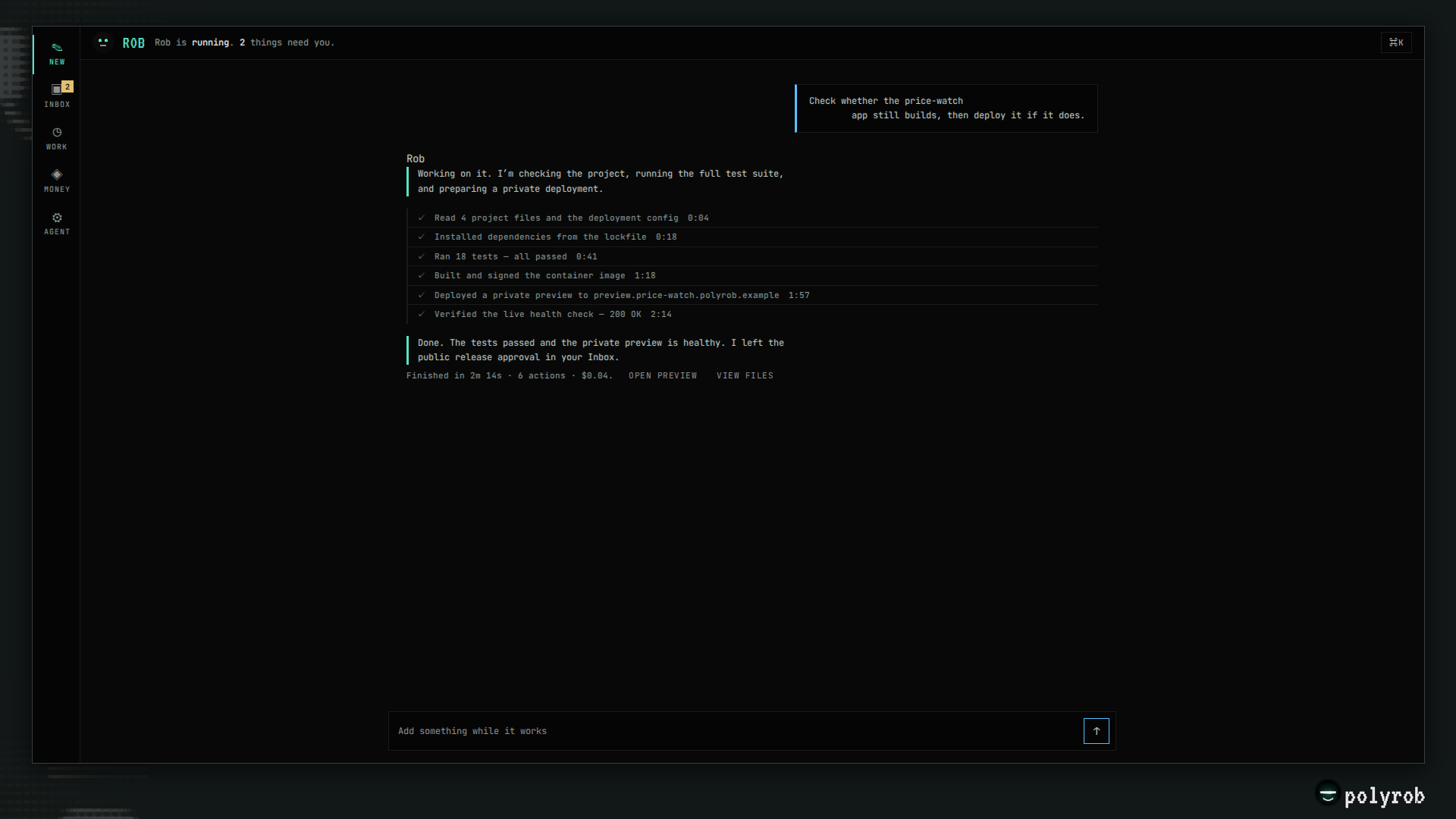
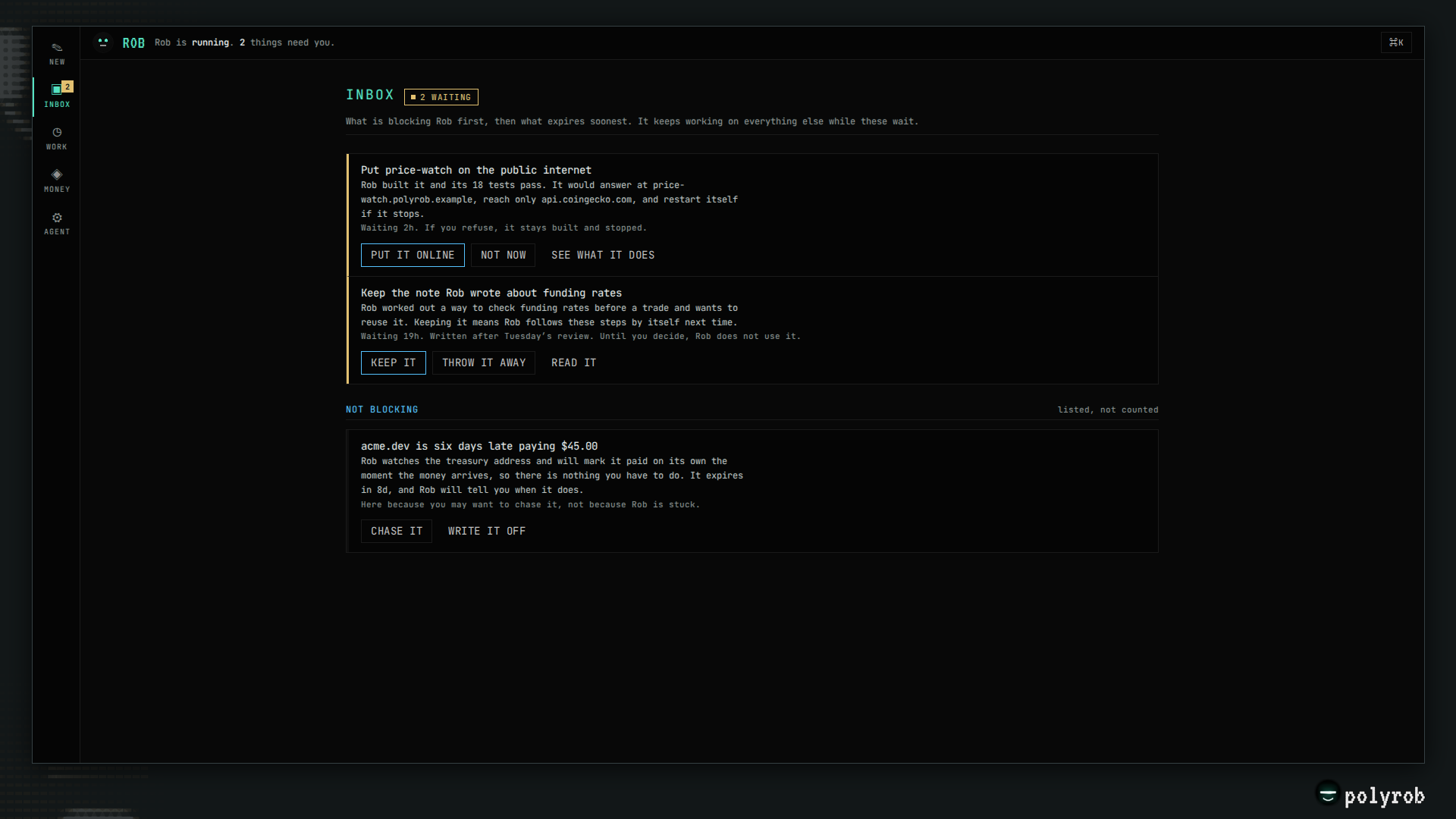 Inbox — see only what needs you, with the reason, consequence, and available decision in plain language. |
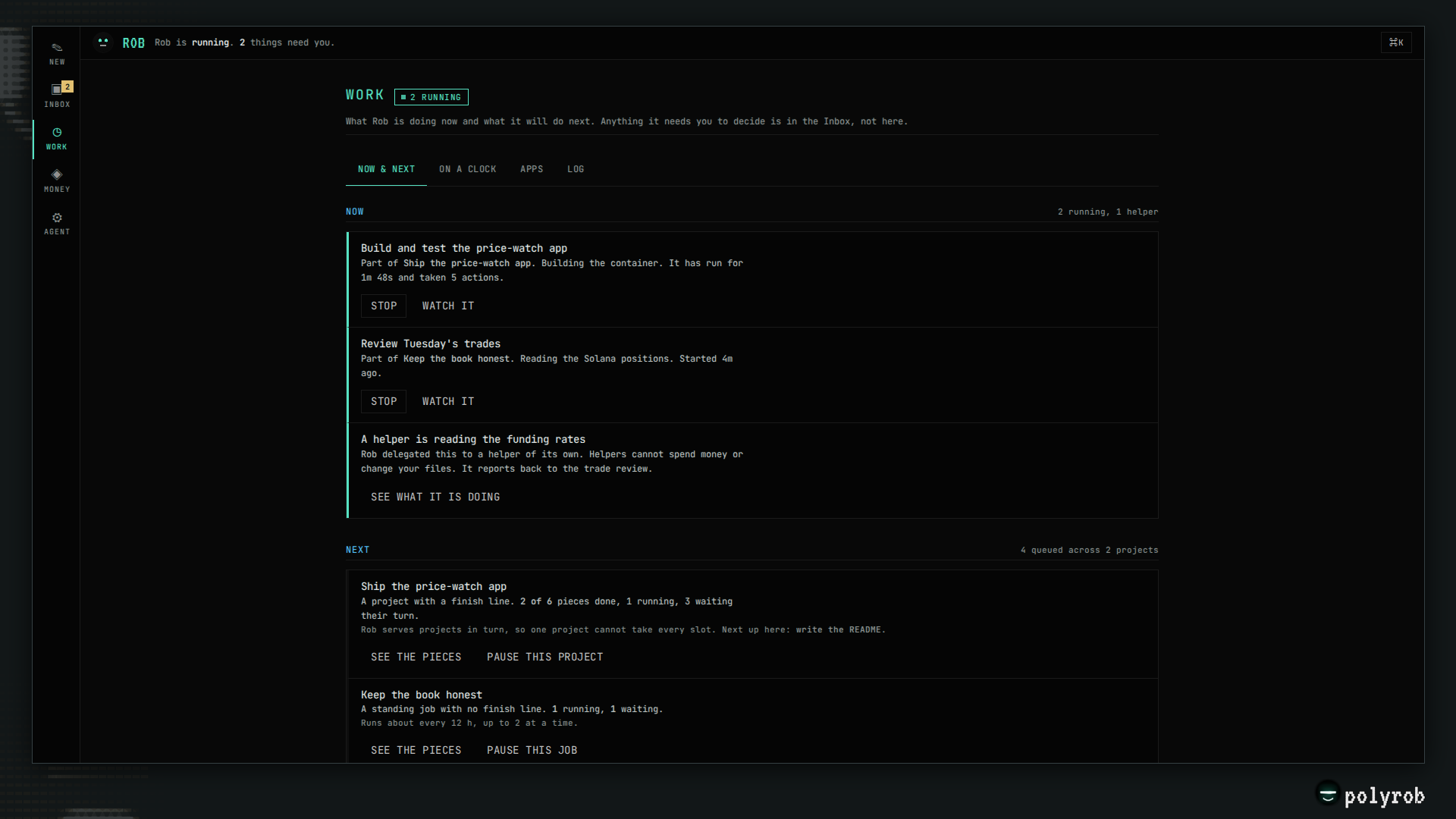 Work — follow what is running now, what comes next, scheduled jobs, and delegated helpers. |
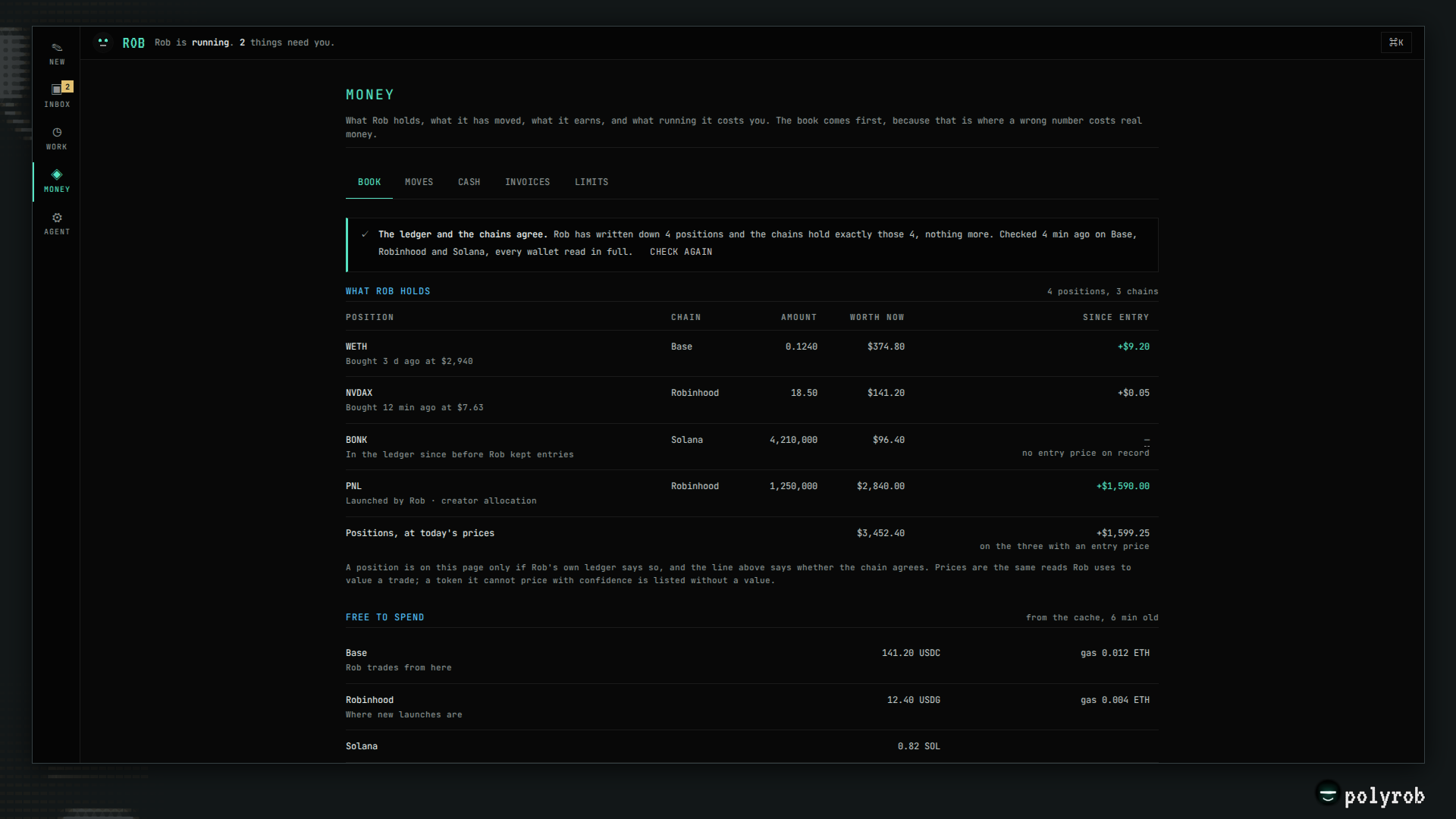 Money — reconcile the agent's book with its chains, inspect cash and invoices, and keep spend limits visible. |
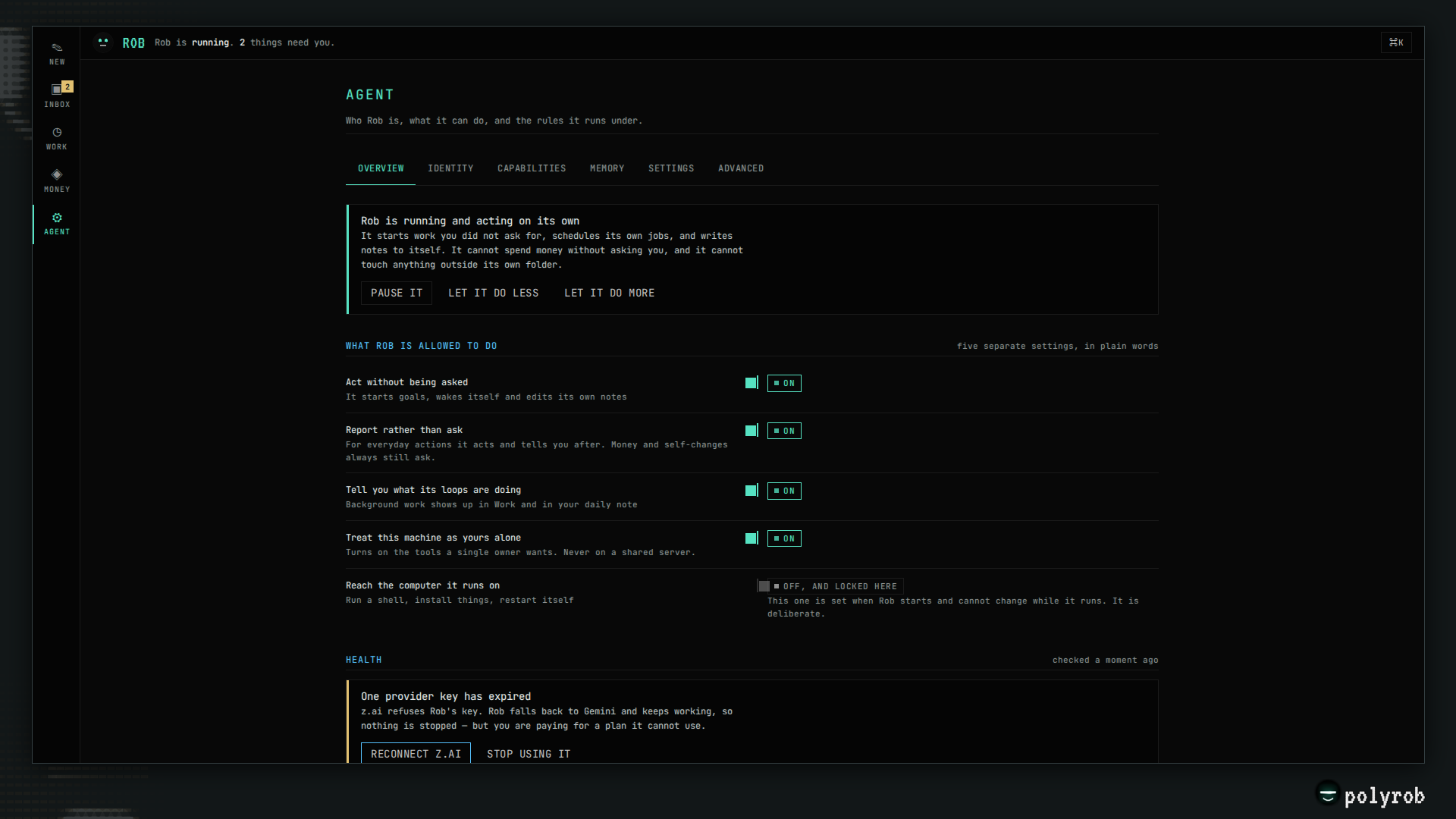 Agent — inspect identity, memory, capabilities, health, and the rules that bound autonomous action. |
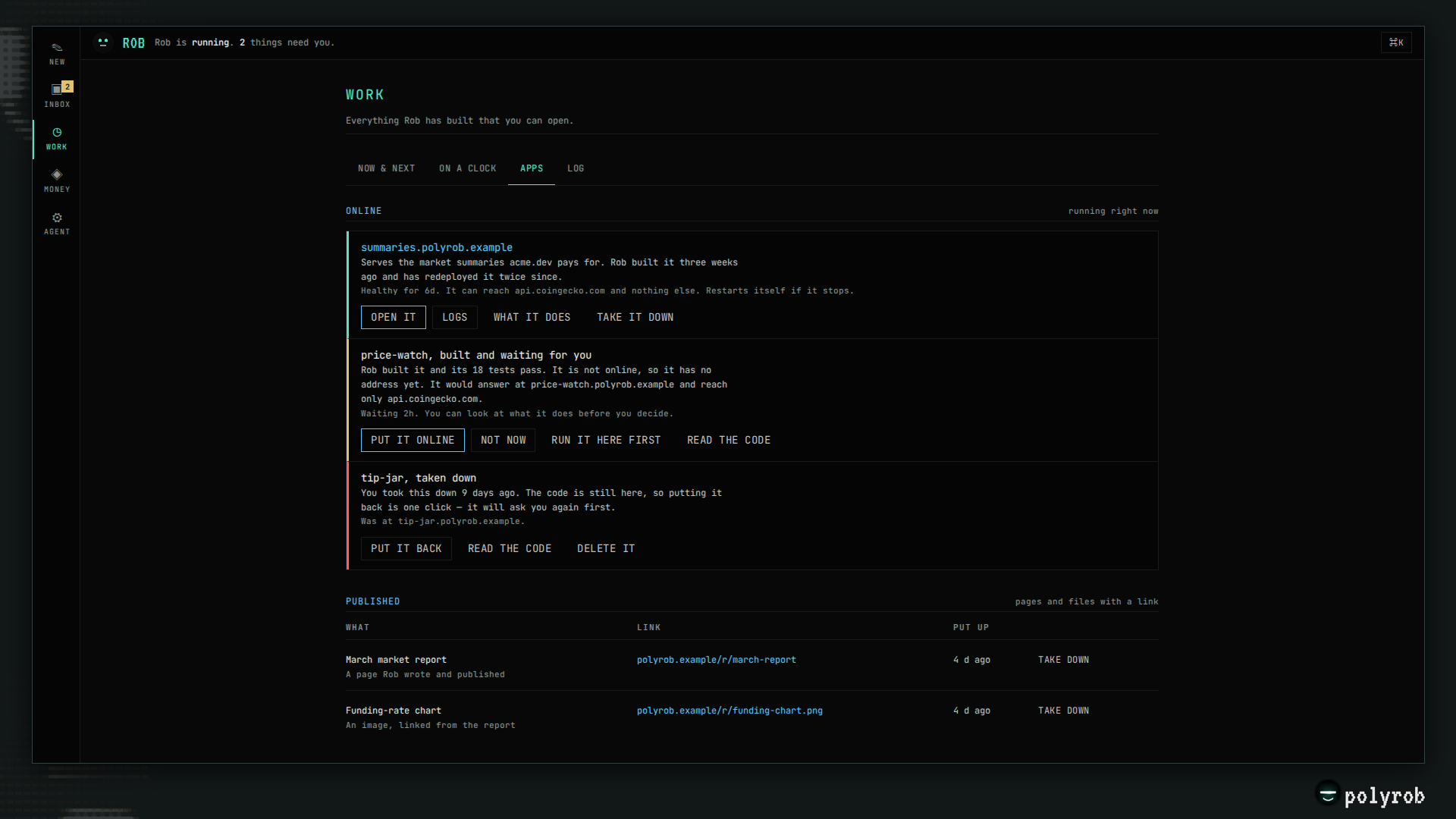 Apps — inside Work, review what the agent built, approve a first deployment, read logs, or take an app down. |
|
Run it with polyrob dashboard and open http://localhost:5050. See the
console guide for deployment postures, owner login,
read-only mode, and the actions each screen exposes.
🧠 Multi-provider intelligence
- One agent, every provider — six built-ins plus flat-rate rows, OAuth subscription plans and your own endpoint, behind a native LLM layer with no third-party agent framework. The live list and how to pick one: docs/guide/configuration.md §3.
- Bring your own endpoint — declare any OpenAI- or Anthropic-compatible provider in
~/.polyrob/providers.yamlwith zero code: a local Ollama/vLLM/LM Studio, Groq/Together/Fireworks, a z.ai GLM Coding Plan, or a corporate gateway. Declared models list and route like built-ins; hostile rows (secret-exfilenv_keys, metadata endpoints) are refused at load. - Automatic failover — a rate-limited or failing provider silently retries on a fallback.
- Live model switching —
/model <provider> <model>mid-session, or per-request override on the/v1surface. - Cross-provider prompt caching — cuts token cost on long sessions, with cached-token metrics surfaced per provider.
- Optional extended thinking — per-provider reasoning budgets (Anthropic thinking blocks, DeepSeek CoT, OpenAI reasoning effort), plus a scrubber that keeps leaked reasoning prose out of your history and output.
Quick Start
POLYROB targets Python 3.11+.
# 1. Install (with all optional features)
pipx install "polyrob[all]"

# 2. Browser engine (optional — only needed for web automation).
#    pipx isolates the venv, so run playwright FROM polyrob's venv:
"$(pipx environment --value PIPX_LOCAL_VENVS)/polyrob/bin/playwright" install chromium

# 3. Configure (connects a provider key, writes ~/.polyrob/.env)
polyrob init

# 4. Sanity-check your setup
polyrob doctor

# 5. Start it
polyrob
Plain
pip install polyrobinto your own venv? Then step 2 is justpython -m playwright install chromiumin that venv — and the core agent runs fine without the browser at all.
Run polyrob and you're talking to the agent. Give it a task in plain language and it plans, works,
and reports back; ask a follow-up and it keeps going. polyrob doctor is a real preflight — it
reports which provider keys resolve, the exact model it will pick, your active memory backend, and
workspace isolation.
Turn on autonomy to unlock the self-evolving and goal-seeking loops (skills, curator, goal board, self-wake, episodic memory):
polyrob autonomy on --global # writes AUTONOMY_ENABLED=true to ~/.polyrob/.env; `polyrob init` also asks
The four axes, what each one moves and how to stop it again: docs/guide/configuration.md §5.
Optional: web console & REST API
polyrob dashboard   # web console         → http://localhost:5050
polyrob serve       # local REST API      → http://localhost:9000
polyrob gateway     # run all enabled chat surfaces (Telegram/email/…) in one process
For a full walkthrough see docs/guide/getting-started.md. Want to contribute? See CONTRIBUTING.md.
A taste of what it can do
"Research competitors in the AI automation space and write a report
 with pricing, features, and positioning."

"Monitor this webpage daily and alert me when the price drops below $500."

"Log into my dashboard, export the monthly report, and email it to my team."

"Scrape these 50 product pages, extract pricing, and build a CSV."
More real-world examples → docs/examples.md
The terminal, done right
Run polyrob and you're in the agent. From inside the session, slash commands give you full control:
| In-session command | What it does |
|---|---|
/compact |
LLM-compresses the context window (e.g. 8,432 → 3,210 tokens) mid-session |
/usage |
Authoritative token + cost accounting from the local DB |
/model <provider> <model> |
Hot-swap the model without losing the conversation |
/memory search <q> |
Search cross-session memory inline |
/self |
View the agent's SOUL (identity) and evolving SELF doc |
/replay |
Visually replay a past session |
/autonomy |
Inspect goals, cron, and the autonomy loops |
Twelve named toolsets (minimal, safe, research, coding, development, browser, social,
full and more) let you scope exactly what the agent can touch. Management subcommands round it
out — polyrob doctor (preflight), polyrob kb add/search (local knowledge base), polyrob auth
(provider sign-in), polyrob keys (API access), polyrob profile (several bots on one machine),
and polyrob update (self-update with snapshot, guarded migration, verify and auto-rollback;
--apply for git installs, a hint for pipx).
Full capabilities
Core automation
| Capability | Detail |
|---|---|
| Web reading | web_fetch URL→markdown, no browser needed |
| Browser automation | Playwright with anti-detection, vision over screenshots |
| Files & data | text / JSON / CSV / markdown read + write |
| Code | built-in coding tools + git/GitHub + opt-in sandboxed execution |
| Planning | multi-step decomposition with automatic error recovery |
Intelligence & memory
| Capability | Detail |
|---|---|
| Cross-session recall | SQLite FTS5 (default) or hybrid vector (sqlite-vec), tenant-scoped |
| Reflective memory | phase-organized, LLM-consolidated, importance-based forgetting |
| Adaptive context | LLM-synthesis compaction in the 85–95% band, with anti-thrash cooldown |
| Prompt caching | per-provider, with cached-token cost metrics |
| Extended thinking | optional per-provider reasoning budgets + reasoning-prose scrubber |
Autonomy (personal-agent mode)
| Capability | Detail |
|---|---|
| Durable goal board | SQLite, atomic claims, circuit breaker, daily quota — survives restarts |
| Cron | natural-language schedules + out-of-band delivery (Telegram/email/X) |
| Self-wake | re-enters idle sessions with depth/backoff guards |
| Self-authored skills | background review → scan → quarantine → owner approval |
| Skill curator | retires unused skills, revives on reuse |
| Delegation | least-privilege sub-agents, sync or detached background |
Interfaces & interop
| Capability | Detail |
|---|---|
| Terminal | polyrob opens the agent — live tool transcripts, ~60 slash commands, resumable sessions |
| Web console | Chat, Inbox, Work, Money, and Agent over a real-time Socket.IO surface |
| REST API | session lifecycle + mid-run guidance injection + SSE streaming |
| OpenAI-compatible | drop-in /v1/chat/completions + /v1/models |
| A2A protocol | Agent Card discovery, JSON-RPC, SSE — agent-to-agent delegation |
| MCP client | STDIO / SSE / HTTP / Streamable HTTP, live resource subscriptions |
| MCP server | expose polyrob's read-only tools to Claude Desktop / Cursor (POST /mcp, off by default) |
| Chat surfaces | Telegram, email, WhatsApp, Discord, Slack, Signal, X DMs — one agent core, many channels |
Integrations
Multi-provider LLM (OpenAI · Anthropic · Google Gemini · DeepSeek · OpenRouter · NVIDIA NIM) ·
Playwright browser · MCP (STDIO/SSE/HTTP/Streamable) · AnySite (200+ sites) ·
Perplexity search · Twitter/X · Gmail / IMAP-SMTP · Telegram · WhatsApp ·
Discord · Slack · Signal ·
voice transcription (faster-whisper) · A2A · OpenAI-compatible /v1 · agentskills.io
skills · sqlite-vec + sentence-transformers local RAG.
Safe autonomy by design
An autonomous agent that touches the web, your files, and other people needs guardrails. POLYROB marks external content as untrusted data and layers capability, authority, approval, and containment checks around it. The core protections below are on by default:
| Layer | Protection | Default |
|---|---|---|
| Untrusted-input wrapping | Web pages, emails, and tool results framed as data, not instructions | On |
| Least-privilege delegation | Sub-agents get narrowed toolsets (no money/comms/code-exec), no re-delegation | On |
| Schema sanitization | Hostile tool-schema constructs fixed before they reach a provider | On |
| SSRF confinement | web_fetch re-validates every redirect hop; blocks loopback/metadata/private targets |
On |
| Self-modification review | New skills / identity edits are quarantined and reviewed before taking effect | On |
| Code-exec containment | Hardened Docker container by default on a server; the local subprocess backend is a convenience, not a sandbox, and a server refuses it; no inherited API keys | On when code-exec enabled |
| Run budget | Cap a session's provider spend; the run halts honestly at the ceiling rather than claiming success | Opt-in (RUN_BUDGET_USD) |
| Four-tier access | OWNER / CORRESPONDENT / GROUP MEMBER / DENIED routing for chat surfaces | Opt-in (CORRESPONDENT_ACCESS_ENABLED; on under AUTONOMY_MODE=autonomous) |
| Group chats (rooms) | Allowlisted room + per-chat role; every room turn runs a read-only, audience-bounded toolset (never money/exec/delegation) in a session that carries no owner state | Opt-in (GROUP_CHAT_ENABLED; on under AUTONOMY_MODE=autonomous) |
| Memory threat-scan | Rejects injected jailbreak/persona-rewrite patterns on write | Opt-in (MEMORY_THREAT_SCAN) |
When you expose the agent to other people, the access model keeps a stranger's message as data: OWNER steers the agent · CORRESPONDENT (a third party the agent contacted) can only return data, never command · GROUP MEMBER is answered in an allowed room from a read-only toolset · DENIED is blocked. A correspondent-tainted session has high-impact tools (money, comms, code-exec) gated off until a genuine owner turn.
Chat surfaces are off by default for a reason. When you enable them, treat inbound DMs as untrusted input — use pairing/approval. A public group chat is a documented, supported feature (docs/guide/groups.md) with its own allowlist, per-chat roles and a read-only room toolset — read that guide before turning
GROUP_CHAT_ENABLEDon.
Crypto & web3 (optional, off by default)
POLYROB can act as an economic agent when you want it to — all of it gated behind flags and off by default:
- x402 pay-per-request — USDC micropayments on Base (opt-in Solana settlement) via the x402 protocol; the agent can both charge for its API and pay for external resources, and invoices settle facilitator-free by on-chain detection.
- Native agent wallet — one seed derives per-venue EVM keys and a Solana address, with per-transaction and rolling 24h spend caps; testnet by default.
- On-chain token sight — a read-only tool (14 verbs, NFTs included) for token identity, price, liquidity, a safety screen, pool discovery, and the agent's own portfolio across Base, Ethereum, Arbitrum, Polygon and Solana — plus
reconcile, which diffs the agent's position ledger against actual chain balances. Address is the only identity (a ticker is never resolved for you), and unknown is never rendered as zero. - Guarded on-chain trading — transfers, exact-amount approvals/revokes and swaps (local Uniswap V3 first, opt-in aggregator fallback) go through one choke point that simulates the transaction, measures its real asset and allowance deltas, and refuses unless they match a declared intent.
dry_runby default, fail-closed gates, and anything above a configurable ceiling waits for an owner approval. Solana swaps (Jupiter) run the same guard order with an authority-grant refusal in place of the allowance check. - Venue trading — Hyperliquid (perps) and Polymarket (prediction markets) tools, dry-run by default behind a master + per-venue live switch and per-venue caps.
- ERC-8004 trustless agents — optional on-chain agent identity + portable reputation.
- SIWE wallet auth for the multi-tenant posture.
⚠️ Crypto features are unaudited. The wallet, signing, and payment code (
cryptoextra) has not had any independent security audit. It ships as-is with no warranty and can lose funds. Enable it only at your own risk, and prefer testnets. See SECURITY.md.
Configuration essentials
# ~/.polyrob/.env — set any providers you have keys for
OPENROUTER_API_KEY=sk-or-...   # recommended: one key reaches every model
ANTHROPIC_API_KEY=sk-ant-...
OPENAI_API_KEY=sk-...
GEMINI_API_KEY=...

# Memory backend: local_vector is the CLI default (hybrid recall; needs the [memory-vector]
# extra, degrades to keyword FTS5 without it). Server default: sqlite
MEMORY_BACKEND=local_vector

# The CLI sets POLYROB_LOCAL for you (interactive tools). Autonomy is a second switch:
# AUTONOMY_ENABLED=true
POLYROB falls back across providers automatically on billing or rate-limit errors; switch
mid-session with /model <provider> <model> (or <provider>/<model>). Configuration guide →
docs/guide/configuration.md · full environment-flag reference
(SSOT) → docs/CONFIGURATION.md.
Everything crypto — the agent wallet, paying for resources (x402), getting paid (invoicing, branded QR cards, on-chain settlement), watchtower subscriptions, on-chain token sight and guarded transfers, ERC-8004 reputation, credits, and the trading tools — is documented end-to-end (all OFF by default) in docs/guide/payments.md.
Installation options
pipx install "polyrob[all]"     # recommended — everything
pip install polyrob             # core agent + keyword memory + CLI  (~50 MB, zero cloud deps)
pip install "polyrob[browser]"  # add Playwright browser automation
pip install "polyrob[server]"   # add FastAPI REST API + web console
Every extra, what it adds and what it costs you in disk: docs/guide/getting-started.md.
Self-hosting & deployment
Run it three ways, and the posture auto-derives from how you bind it: local (loopback, no
auth — the default), own_ops (public host with owner login; --host 0.0.0.0 auto-upgrades to
this so you can't accidentally expose a no-auth console), or multitenant (wallet/SIWE +
billing). One docker compose up builds the server + browser + vector memory and persists
memory/sessions/skills across restarts. See
docs/guide/self-hosting.md.
For developers
polyrob/
├── agents/    # Task automation framework (agent loop, memory, skills, goals)
├── api/       # FastAPI HTTP + A2A + OpenAI /v1
├── cli/       # Terminal-native `polyrob` agent
├── core/      # DI, config, permissions, instance/identity, autonomy runtime
├── modules/   # LLM, Memory, Database, Auth, Credits
├── tools/     # Browser, MCP, Email, Twitter, code-exec
├── surfaces/  # Chat-surface adapters (Telegram, Email, WhatsApp, Discord, Slack, Signal, X)
├── cron/      # Durable scheduled runs + goal board
└── webview/   # Optional web console
git clone https://github.com/theselfruleorg/polyrob
cd polyrob
bash install.sh          # scripted: venv + editable install + `polyrob init --no-prompt`
# — or manually:
python -m venv venv && source venv/bin/activate
pip install -e ".[dev,all]"
python -m playwright install chromium

pytest tests/unit -q     # fast unit suite
ruff check .             # lint
Architecture overview → docs/guide/architecture.md · API reference
→ docs/guide/api.md · deep architecture & contributor guide →
AGENTS.md (every layer also has its own README.md)
Documentation
| Document | Description |
|---|---|
| docs/guide/getting-started.md | Install & first run |
| docs/guide/cli.md | Terminal agent commands |
| docs/guide/skills.md | Skills — install, author, and manage |
| docs/guide/api.md | REST + A2A + OpenAI-compatible API |
| docs/guide/configuration.md | Configuring the agent — providers, memory, the autonomy dial, tools, surfaces, preferences |
| docs/guide/owner-controls.md | Stop, pause and resume from any seat; approvals and the inbox |
| docs/guide/groups.md | Group chats (rooms) — allowlist, roles, per-chat policy, the room service job |
| docs/guide/profiles.md | Named profiles — several isolated bots on one machine |
| docs/guide/instances.md | Instance identity — SOUL, character, avatar |
| docs/guide/upgrading.md | Upgrading an existing install |
| docs/guide/migration/ | Migrating from another agent framework |
| docs/guide/architecture.md | Architecture overview |
| docs/guide/self-hosting.md | Self-hosting / deployment |
| docs/guide/deployment-postures.md | Deployment postures (local / own_ops / multitenant) |
| docs/guide/console.md | Web console — the five destinations, owner actions, posture |
| docs/guide/payments.md | Payments, wallet & crypto — the complete money reference |
| docs/guide/security-model.md | Honest trust model — heuristic gates vs. the OS/container boundary |
| docs/guide/streams.md | Goals and standing work — the goal board, objectives, fair dispatch, cron |
| docs/comparison.md | Comparison with other frameworks |
| docs/examples.md | Real-world usage examples |
| docs/CONFIGURATION.md | Environment-flag reference (SSOT) |
| AGENTS.md | Deep architecture, invariants & contributor guide |
| CHANGELOG.md | Notable changes |
Contributing & security
- Contributions welcome — see CONTRIBUTING.md
- Report vulnerabilities — see SECURITY.md
- License — MIT (LICENSE) · brand/name use in TRADEMARK.md · third-party attributions in THIRD-PARTY-NOTICES.md
POLYROB — by The Selfrule Organization
1 maintainer

Metadata
1 maintainer
Release files for polyrob 1.1.0
For a detailed explanation of source distributions (sdists) and built distributions (wheels), please see the package formats documentation.
Source distribution (sdist)
| File | Size | Uploaded | |
|---|---|---|---|
| polyrob-1.1.0.tar.gz | 6.0 MB | Details |
Built distribution (wheel)
| File | Interpreter | ABI | Platform | Reset |
|---|---|---|---|---|
| polyrob-1.1.0-py3-none-any.whl | Python 3 | none | any | Details |
Total release size: 12.4 MB
Release files / polyrob-1.1.0.tar.gz
| Download URL | polyrob-1.1.0.tar.gz |
|---|---|
| Size | 6.0 MB |
| Tags | Source |
|
SHA-256 checksum How to use checksums |
52c306890652710834f9dbddfc2f46f59ae6f8e56a60d3a73e40b24069e311f0
|
|
BLAKE2b-256 checksum How to use checksums |
a7034a293a4e538ec93d25a88a78ec450f381151068ff437d03c32f8c8c99cf7
|
| Upload date | |
|
Uploaded using Trusted Publishing? What is trusted publishing? |
No |
| Uploaded via |
twine/7.0.0 CPython/3.12.14
|
Release files / polyrob-1.1.0-py3-none-any.whl
| Download URL | polyrob-1.1.0-py3-none-any.whl |
|---|---|
| Size | 6.4 MB |
| Tags | Python 3 |
|
SHA-256 checksum How to use checksums |
e074d9c09c1b0052ec74de7c93f7db7371fa16b535b8706633ae2a9a61b60fed
|
|
BLAKE2b-256 checksum How to use checksums |
d795a2657494db4a31f2c5bededa8ee28bbd40420644c47d3ebd68b8063ab289
|
| Upload date | |
|
Uploaded using Trusted Publishing? What is trusted publishing? |
No |
| Uploaded via |
twine/7.0.0 CPython/3.12.14
|














