
POML: Prompt Orchestration Markup Language



POML (Prompt Orchestration Markup Language) is a novel markup language designed to bring structure, maintainability, and versatility to advanced prompt engineering for Large Language Models (LLMs). It addresses common challenges in prompt development, such as lack of structure, complex data integration, format sensitivity, and inadequate tooling. POML provides a systematic way to organize prompt components, integrate diverse data types seamlessly, and manage presentation variations, empowering developers to create more sophisticated and reliable LLM applications.
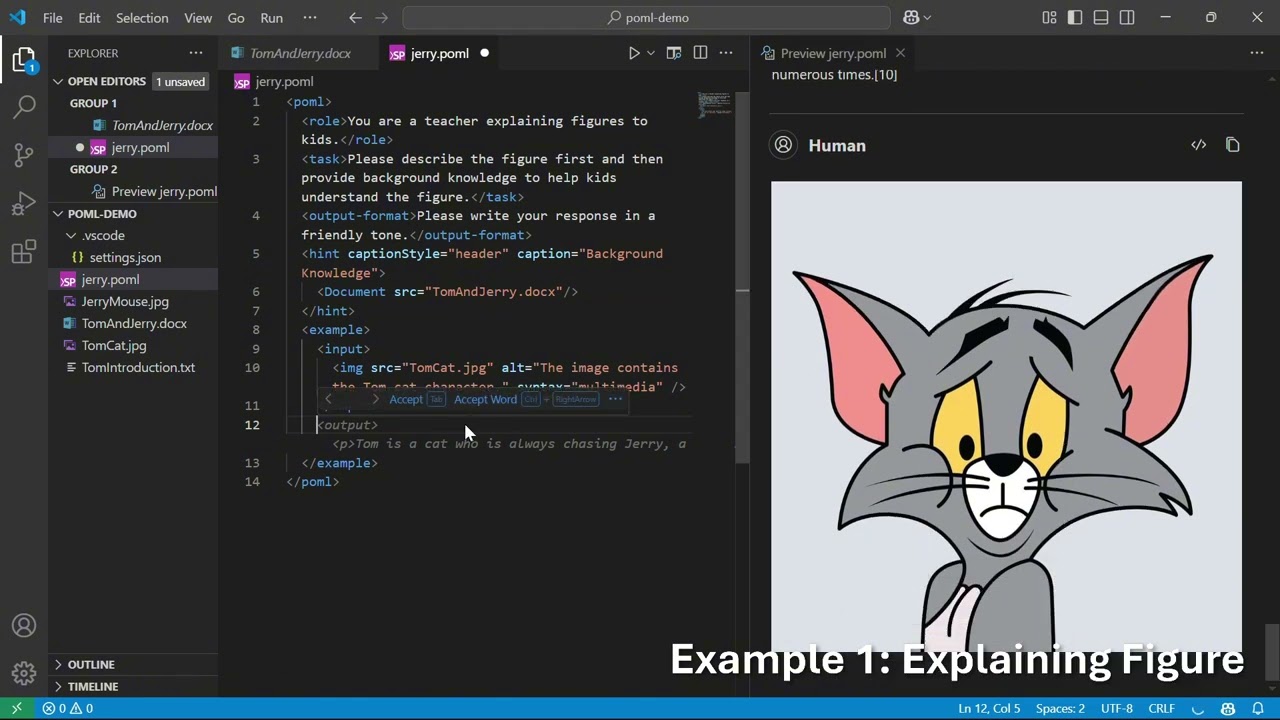
Demo Video
Key Features
- Structured Prompting Markup: Employs an HTML-like syntax with semantic components such as
<role>,<task>, and<example>to encourage modular design, enhancing prompt readability, reusability, and maintainability. - Comprehensive Data Handling: Incorporates specialized data components (e.g.,
<document>,<table>,<img>) that seamlessly embed or reference external data sources like text files, spreadsheets, and images, with customizable formatting options. - Decoupled Presentation Styling: Features a CSS-like styling system that separates content from presentation. This allows developers to modify styling (e.g., verbosity, syntax format) via
<stylesheet>definitions or inline attributes without altering core prompt logic, mitigating LLM format sensitivity. - Integrated Templating Engine: Includes a built-in templating engine with support for variables (
{{ }}), loops (for), conditionals (if), and variable definitions (<let>) for dynamically generating complex, data-driven prompts. - Rich Development Toolkit:
- IDE Extension (Visual Studio Code): Provides essential development aids like syntax highlighting, context-aware auto-completion, hover documentation, real-time previews, inline diagnostics for error checking, and integrated interactive testing.
- Software Development Kits (SDKs): Offers SDKs for Node.js (JavaScript/TypeScript) and Python for seamless integration into various application workflows and popular LLM frameworks.
Quick Start
Here's a very simple POML example. Please put it in a file named example.poml. Make sure it resides in the same directory as the photosynthesis_diagram.png image file.
<poml>
  <role>You are a patient teacher explaining concepts to a 10-year-old.</role>
  <task>Explain the concept of photosynthesis using the provided image as a reference.</task>

  <img src="photosynthesis_diagram.png" alt="Diagram of photosynthesis" />

  <output-format>
    Keep the explanation simple, engaging, and under 100 words.
    Start with "Hey there, future scientist!".
  </output-format>
</poml>
This example defines a role and task for the LLM, includes an image for context, and specifies the desired output format. With the POML toolkit, the prompt can be easily rendered with a flexible format, and tested with a vision LLM.
Installation
Visual Studio Code Extension
Install from Visual Studio Code Marketplace.
You can also install the extension manually by downloading the .vsix file from our GitHub releases page and installing it in VS Code via the Extensions view.
Before testing prompts with the POML toolkit, make sure you have configured your preferred LLM model, API key, and endpoint. If these are not set, prompt testing will not work.
To configure in Visual Studio Code:
- Open the extension settings (open "Settings" and search for "POML").
- Set your model provider (e.g., OpenAI, Azure, Google), API key, and endpoint URL in the POML section.
- Alternatively, you can add these settings directly to your
settings.jsonfile.
Node.js (via npm)
npm install pomljs
Python (via pip)
pip install poml
For development or local installation, you might use pip install -e . from a cloned repository.
Refer to the documentation for more details on installing the nightly build.
Documentation
For detailed information on POML syntax, components, styling, templating, SDKs, and the VS Code extension, please refer to our documentation.
Learn More
- Watch our Demo Video on YouTube: POML Introduction & Demo
- Join our Discord community: Connect with the team and other users on our Discord server.
- Read the Prompt Orchestration Markup Language paper: Prompt Orchestration Markup Language presents the design of POML and its impact on prompt engineering.
- Explore Content-Format Integrated Prompt Optimization: Beyond Prompt Content: Enhancing LLM Performance via Content-Format Integrated Prompt Optimization proposes an iterative approach that jointly optimizes prompt content and formatting to improve LLM performance.
Citation
If you find POML useful or related to your research, please cite the following paper:
@misc{zhang2025promptorchestrationmarkuplanguage,
      title={Prompt Orchestration Markup Language},
      author={Yuge Zhang and Nan Chen and Jiahang Xu and Yuqing Yang},
      year={2025},
      eprint={2508.13948},
      archivePrefix={arXiv},
      primaryClass={cs.HC},
      url={https://arxiv.org/abs/2508.13948},
}
Ecosystem & Community Projects
- mini-poml-rs – Experimental Rust-based POML renderer for environments without JavaScript or Python interpreters.
- poml-ruby – Ruby gem implementation of POML for Ruby applications.
Contributing
This project welcomes contributions and suggestions. Most contributions require you to agree to a Contributor License Agreement (CLA) declaring that you have the right to, and actually do, grant us the rights to use your contribution. For details, visit https://cla.opensource.microsoft.com.
When you submit a pull request, a CLA bot will automatically determine whether you need to provide a CLA and decorate the PR appropriately (e.g., status check, comment). Simply follow the instructions provided by the bot. You will only need to do this once across all repos using our CLA.
This project has adopted the Microsoft Open Source Code of Conduct. For more information see the Code of Conduct FAQ or contact opencode@microsoft.com with any additional questions or comments.
Trademarks
This project may contain trademarks or logos for projects, products, or services. Authorized use of Microsoft trademarks or logos is subject to and must follow Microsoft's Trademark & Brand Guidelines. Use of Microsoft trademarks or logos in modified versions of this project must not cause confusion or imply Microsoft sponsorship. Any use of third-party trademarks or logos are subject to those third-party's policies.
Responsible AI
This project has been evaluated and certified to comply with the Microsoft Responsible AI Standard. The team will continue to monitor and maintain the repository, addressing any severe issues, including potential harms, if they arise. For more details, refer to the Responsible AI Readme.
License
This project is licensed under the MIT License. See the LICENSE file for details.
1 maintainer

Release files for poml 0.0.8
For a detailed explanation of source distributions (sdists) and built distributions (wheels), please see the package formats documentation.
Built distributions (wheels)
| File | Reset | |||
|---|---|---|---|---|
| poml-0.0.8-py3-none-win_amd64.whl | Python 3 | none | Windows x86-64 | Details |
| poml-0.0.8-py3-none-manylinux_2_17_x86_64.whl | Python 3 | none | Linux glibc 2.17+ x86-64 | Details |
| poml-0.0.8-py3-none-manylinux_2_17_aarch64.whl | Python 3 | none | Linux glibc 2.17+ ARM64 | Details |
| poml-0.0.8-py3-none-macosx_11_0_arm64.whl | Python 3 | none | macOS 11.0+ ARM64 | Details |
| poml-0.0.8-py3-none-macosx_10_9_x86_64.whl | Python 3 | none | macOS 10.9+ x86-64 | Details |
Total release size: 159.8 MB
Release files / poml-0.0.8-py3-none-win_amd64.whl
| Download URL | poml-0.0.8-py3-none-win_amd64.whl |
|---|---|
| Size | 29.7 MB |
| Tags | Python 3 Windows x86-64 |
|
SHA-256 checksum How to use checksums |
48a7880bc8d684231e78f11fb85cd78ce7a9b4121b9376f338f6589b5fccee98
|
|
BLAKE2b-256 checksum How to use checksums |
dc2f0f3157835901937d1bfe62f4bbfc7533e7642fb862f1fadf6912e224e438
|
| Upload date | |
|
Uploaded using Trusted Publishing? What is trusted publishing? |
Yes |
| Uploaded via |
twine/6.1.0 CPython/3.12.10
|
Release files / poml-0.0.8-py3-none-manylinux_2_17_x86_64.whl
| Download URL | poml-0.0.8-py3-none-manylinux_2_17_x86_64.whl |
|---|---|
| Size | 36.0 MB |
| Tags | Linux glibc 2.17+ x86-64 Python 3 |
|
SHA-256 checksum How to use checksums |
a0a53edc7615156d6841adbd401831520573dc8393dea9fa6971af09bc864f16
|
|
BLAKE2b-256 checksum How to use checksums |
311d7aead96240c82022cbfec914d6c9121146b95594f5de52a04ceece3ce2ca
|
| Upload date | |
|
Uploaded using Trusted Publishing? What is trusted publishing? |
Yes |
| Uploaded via |
twine/6.1.0 CPython/3.12.11
|
Release files / poml-0.0.8-py3-none-manylinux_2_17_aarch64.whl
| Download URL | poml-0.0.8-py3-none-manylinux_2_17_aarch64.whl |
|---|---|
| Size | 35.9 MB |
| Tags | Linux glibc 2.17+ ARM64 Python 3 |
|
SHA-256 checksum How to use checksums |
e826586b9f623c4a4e3fd9457ad23a538adc917f16519d4ecdebab9ced3086aa
|
|
BLAKE2b-256 checksum How to use checksums |
98483a265180712709b2a940cce053272b6d14c940e41b0125af85b74bfc0ff8
|
| Upload date | |
|
Uploaded using Trusted Publishing? What is trusted publishing? |
Yes |
| Uploaded via |
twine/6.1.0 CPython/3.12.11
|
Release files / poml-0.0.8-py3-none-macosx_11_0_arm64.whl
| Download URL | poml-0.0.8-py3-none-macosx_11_0_arm64.whl |
|---|---|
| Size | 28.7 MB |
| Tags | Python 3 macOS 11.0+ ARM64 |
|
SHA-256 checksum How to use checksums |
f15c2d2e512b3ad699f22df289e7d834b6e85c804905f1431aaa98c223e1560e
|
|
BLAKE2b-256 checksum How to use checksums |
28930ab553b3f7da62358309743e64ddf09839fe6b0eaaa189a48d225ab92ab3
|
| Upload date | |
|
Uploaded using Trusted Publishing? What is trusted publishing? |
Yes |
| Uploaded via |
twine/6.1.0 CPython/3.12.10
|
Release files / poml-0.0.8-py3-none-macosx_10_9_x86_64.whl
| Download URL | poml-0.0.8-py3-none-macosx_10_9_x86_64.whl |
|---|---|
| Size | 29.5 MB |
| Tags | Python 3 macOS 10.9+ x86-64 |
|
SHA-256 checksum How to use checksums |
37be5da8572222854464969f76fac2e356297305c84fdcc7d3103d914811932b
|
|
BLAKE2b-256 checksum How to use checksums |
b29420b41e3826dcfec0313c8562a430ad158b1a759e064cd5bef61d0f5327d1
|
| Upload date | |
|
Uploaded using Trusted Publishing? What is trusted publishing? |
Yes |
| Uploaded via |
twine/6.1.0 CPython/3.12.10
|














