

pomlock
pomlock is a Linux Pomodoro timer for developers who ignore timer notifications. When your break starts, it locks your keyboard and mouse through evdev and covers the screen with a countdown overlay. You cannot dismiss a popup or keep typing until the break ends.
I built pomlock because desktop notifications never worked on me. I would dismiss the alert and keep typing for hours until my wrists hurt. pomlock removes the choice so you actually step away from your desk.
Demo
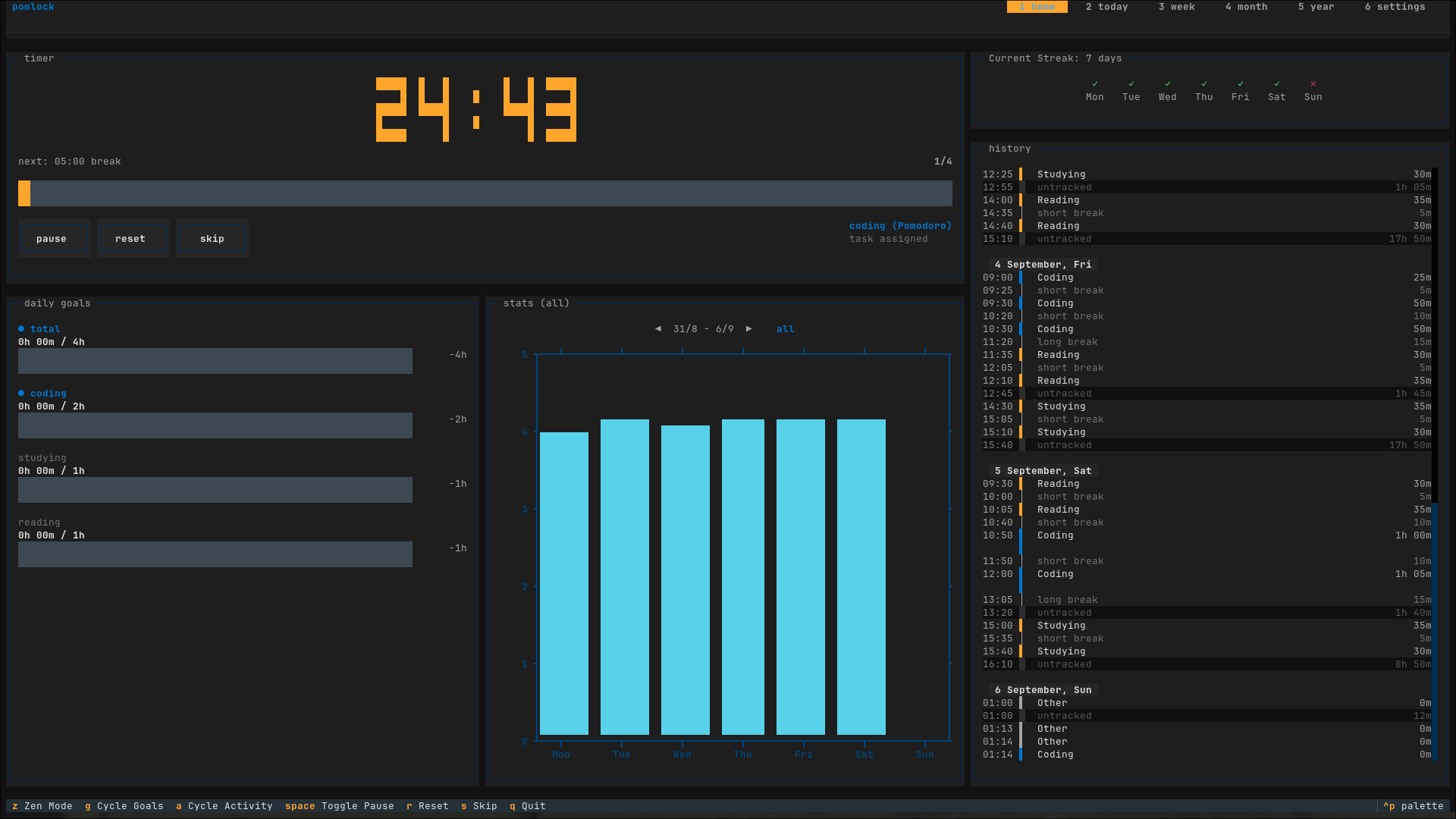
pomlock's interface is a terminal UI — the home screen, stats views, and break overlay all run in-terminal.
Installation
Install pomlock using pipx or uv:
pipx
pipx install pomlock
uv
uv tool install pomlock
If you prefer to run without device locking, pass --no-block-input.
Usage
Start pomlock with the default 25-minute work and 5-minute break cycle:
pomlock
CLI Options
# Use a preset: standard (25/5), ultradian (90/20), or fifty_ten (50/10)
pomlock -t ultradian

# Set a custom cycle: 45m work, 10m short break, 20m long break, 3 cycles
pomlock -t "45 10 20 3"

# Tag the session with an activity
pomlock -a coding

# Disable keyboard and mouse blocking
pomlock --no-block-input

# Enable pause button and space pause (disabled by default)
pomlock --pause-button

# Open interactive session setup screen
pomlock --setup

# List configured presets
pomlock --show-presets

# List configured activities and goals
pomlock --show-activities
Controls
Navigate the interface with these keybindings:
| Key | Action |
|---|---|
Space |
Pause or resume timer (when pause is enabled) |
s |
Skip current interval |
r |
Reset current interval |
z |
Toggle zen mode |
g |
Cycle activity goals |
a |
Cycle chart activity filter |
1 |
Home screen |
2 - 5 |
Today, Week, Month, and Year stats |
6 |
Settings screen |
q |
Quit |
Note: Pause is disabled by default to make it harder to avoid breaks, but it can be enabled with
--pause-buttonorpause_button = truein config if needed.
Configuration
Settings live at ~/.config/pomlock/pomlock.conf. You can edit this file directly or update values inside the app by pressing 6.
Here is an example configuration:
[general]
block_input = true
pause_button = false
notify = true
break_notify_msg = Time for a break!
long_break_notify_msg = Time for a long break!
pomo_notify_msg = Time for a pomodoro!
callback =
timer = standard

[presets]
standard = 25 5 20 4
ultradian = 90 20 20 1
fifty_ten = 50 10 10 1
study = 50 5 10 4

[overlay]
enabled = true
bg_color = #283618
opacity = 0.8
title_color = #fefae0
# title_font_family =
title_font_size = 48
# short_break_title =
# long_break_title =
font_size = 48
color = #bc6c25
inactive_segment_color = #606c38
# msg =
msg_color = #fefae0
# msg_font_family =
msg_font_size = 12

[activities]
auto_calc = false
daily = 1h

[streak]
allowed_gap = 1
indicator_style = icon

[localization]
week_start_day = sunday
locale = en_US

[pomodoro]
pomodoro = 25.0
short_break = 5.0
long_break = 20.0
cycles = 4

[activities.coding]
daily = 4h
weekly = 20h
color = bar-blue

[activities.other]
Config Sections
[general]: Configures input blocking, pause button availability, notification text, and event scripts.[presets]: Timers defined asWORK SHORT_BREAK LONG_BREAK CYCLESin minutes.[overlay]: Configures the full-screen break window.opacityaccepts values from0.0to1.0.[activities]: Whenauto_calc = true, overall goals are calculated from individual activities. Whenfalse, explicit goals set here apply.[activities.<name>]: Goal targets (daily,weekly,monthly,yearly) and chart colors for a specific activity.[streak]: Daily streak tracker.allowed_gapsets allowed missed days before resetting a streak.[localization]: Calendar display options.week_start_dayacceptsmondayorsunday.[pomodoro]: Stores the active session parameters.
Integrations
Status File Polling
pomlock writes its live state to /tmp/pomlock.json every second:
{
  "action": "pomodoro",
  "time": 1500,
  "start_time": 1725580800.0,
  "crr-cycle": 1,
  "total-cycles": 4,
  "crr-session": 1,
  "state": "running"
}
Use this file to feed custom status bar widgets like Waybar or Polybar. The file is removed when pomlock exits.
Waybar
A ready-made script is located at src/pomlock/waybar.py. Add this block to your Waybar configuration:
"custom/pomodoro": {
    "exec": "python3 /path/to/waybar.py",
    "interval": 1,
    "return-type": "json",
    "on-click": "python3 /path/to/waybar.py left",
    "on-click-right": "python3 /path/to/waybar.py right"
}
Script Callback
Pass a script to execute whenever a session phase changes:
pomlock --callback /path/to/script.sh
pomlock sends a JSON object as the last argument to your script with the following fields:
{
  "action": "pomodoro|short_break|long_break",
  "time": 1500,
  "start_time": 1725580800.0,
  "crr-cycle": 1,
  "total-cycles": 4,
  "crr-session": 1
}
Example callback in pomlock.conf:
callback = uv run /home/luisca/p/scripts/pomlock_brainfm.py
Note: The action values correspond to the current phase: "pomodoro" (work), "short_break", "long_break".
Emergency Restore
Inputs release automatically when pomlock exits or receives SIGINT (Ctrl+C).
If the interface locks and does not respond:
- Switch to another virtual console (
Ctrl+Alt+F3). - Kill the process:
pkill -f pomlock
1 maintainer

Metadata
1 maintainer
Release files for pomlock 4.2.2
For a detailed explanation of source distributions (sdists) and built distributions (wheels), please see the package formats documentation.
Source distribution (sdist)
| File | Size | Uploaded | |
|---|---|---|---|
| pomlock-4.2.2.tar.gz | 83.7 kB | Details |
Built distribution (wheel)
| File | Interpreter | ABI | Platform | Reset |
|---|---|---|---|---|
| pomlock-4.2.2-py3-none-any.whl | Python 3 | none | any | Details |
Total release size: 178.7 kB
Release files / pomlock-4.2.2.tar.gz
| Download URL | pomlock-4.2.2.tar.gz |
|---|---|
| Size | 83.7 kB |
| Tags | Source |
|
SHA-256 checksum How to use checksums |
35d69da5b695994ef6d6956e5a08dceba2a5d3fdd389fe1d5bb65e069d4e90f5
|
|
BLAKE2b-256 checksum How to use checksums |
d544fd5158b15b0ed707b4e4d0aede04a2c660552b9024ce1910ff8d374305d1
|
| Upload date | |
|
Uploaded using Trusted Publishing? What is trusted publishing? |
Yes |
| Uploaded via |
uv/0.12.23 {"installer":{"name":"uv","version":"0.12.23","subcommand":["publish"]},"python":null,"implementation":{"name":null,"version":null},"distro":{"name":"Ubuntu","version":"24.04","id":"noble","libc":null},"system":{"name":null,"release":null},"cpu":null,"openssl_version":null,"setuptools_version":null,"rustc_version":null,"ci":true}
|
Release files / pomlock-4.2.2-py3-none-any.whl
| Download URL | pomlock-4.2.2-py3-none-any.whl |
|---|---|
| Size | 95.0 kB |
| Tags | Python 3 |
|
SHA-256 checksum How to use checksums |
985b500eae694dfa60970071c18818f2cfb6f538758b67148ddad9f2126cd1ca
|
|
BLAKE2b-256 checksum How to use checksums |
5d0204aa8d1c3eaff8c1689547970330d8d4c1d3f9371c8b3e27877a6deec4d3
|
| Upload date | |
|
Uploaded using Trusted Publishing? What is trusted publishing? |
Yes |
| Uploaded via |
uv/0.12.23 {"installer":{"name":"uv","version":"0.12.23","subcommand":["publish"]},"python":null,"implementation":{"name":null,"version":null},"distro":{"name":"Ubuntu","version":"24.04","id":"noble","libc":null},"system":{"name":null,"release":null},"cpu":null,"openssl_version":null,"setuptools_version":null,"rustc_version":null,"ci":true}
|














