
A simple terminal-based Pomodoro timer system


Project description
Python Package Exercise
An exercise to create a Python package, build it, test it, distribute it, and use it. See instructions for details.
Description
This package provides a simple Pomodoro timer system that allows developers to create, store, and manage timers programmatically.
PyPl Link
Contributors
For Users
Installation
Install the package via PyPI:
$ python -m pip install pomodoro
or if you are installing locally:
$ git clone https://github.com/swe-students-spring2026/3-package-emperor_penguins.git
$ cd 3-package-emperor_penguins
$ python -m pip install .
Running the Pomodoro Timer
After installing, you can run the terminal-based Pomodoro timer as follows:
$ python -m pomodoro --work 25 --break 5 --cycles 4
Parameters
--work(-w) — Work duration in minutes (default: 25)--break(-b) — Break duration in minutes (default: 5)--cycles(-c) — Number of Pomodoro cycles (default: 4)--history– Print history of Pomodoro cycles with its ID and Durations--use-timer- Paste timer ID from history and run it normally--version(-v) — Show the version of the Pomodoro TUI and exit
Example
python -m pomodoro -w 10 -b 3 -c 2
This will start a Pomodoro session with:
- 10 minutes of work
- 3 minutes of break
- 2 cycles in total
The terminal will show the current sub-session and a progress bar for either studying or resting.
For Developers
How to Contribute
-
If you use Windows OS, switch to git bash and then proceed. If you use a Unix-like OS, just proceed.
-
Clone the repository:
$ git clone https://github.com/swe-students-spring2026/3-package-emperor_penguins.git
-
Create a virtual environment using
pipenv. Please make sure you global python interpreter haspipenvinstalled. If not, install it:$ python -m pip install pipenv
-
After you have
pipenvinstalled, install all dependencies and activate a virtual environment$ python -m pipenv install --dev $ python -m pipenv shell
-
Now you should've noticed a prompt prefix in the terminal:
(3-package-emperor_penguins) xxx$
This indicates that you've been placed in a virtual environment!
-
(optional) Note that in some cases after your entry to the virtual environment, the texts that you code in the prompt might be invisible. Whenever this happens, run:
$ stty echo
and return. Now the texts you code should be visible again.
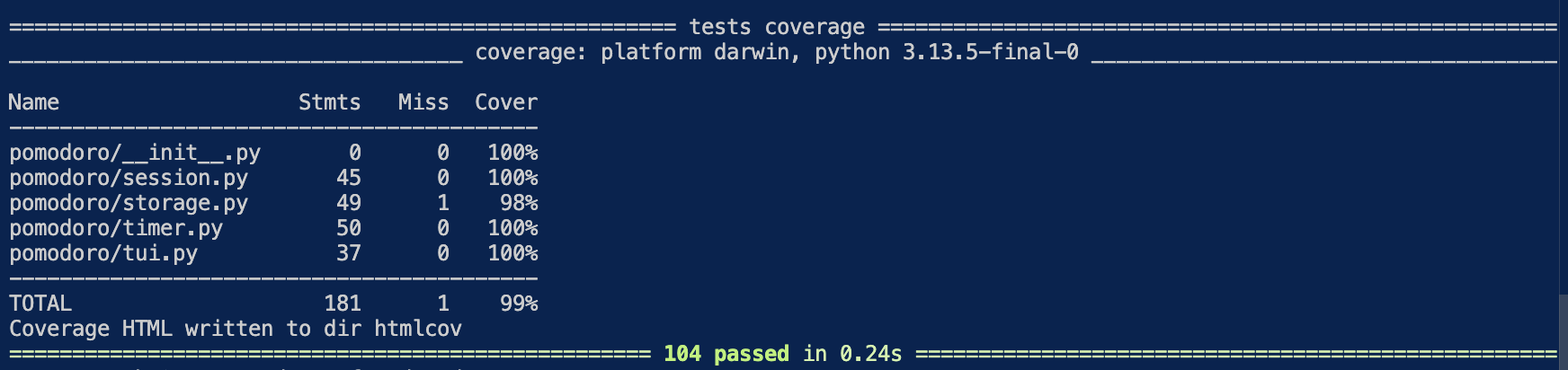
Run Coverage Tests
-
Make sure you've completed all the setup steps above.
-
Place all the test files under:
3-package-emperor_penguins/tests -
Direct to the root directory of the project:
$ cd xxx/3-package-emperor_penguins
-
Run the automatic coverage test script:
$ source run-test.sh
- Ideally, this will launch an automatic testing and display the coverage result in the default web browser.
Example Code


Download files
Download the file for your platform. If you're not sure which to choose, learn more about installing packages.
Source Distribution
Built Distribution
Filter files by name, interpreter, ABI, and platform.
If you're not sure about the file name format, learn more about wheel file names.
Copy a direct link to the current filters
File details
Details for the file pomodoro_penguin-1.0.2.tar.gz.
File metadata
- Download URL: pomodoro_penguin-1.0.2.tar.gz
- Upload date:
- Size: 50.0 kB
- Tags: Source
- Uploaded using Trusted Publishing? No
- Uploaded via: twine/6.2.0 CPython/3.13.12
File hashes
| Algorithm | Hash digest | |
|---|---|---|
| SHA256 |
ef59041016c1a37d52e218d7be2a828ce165faf3fb80eff8233daa5ce70f688f
|
|
| MD5 |
081384e9f94a92ec34d0a90c42c4412e
|
|
| BLAKE2b-256 |
5a12d6a5763044b5ebaa6267247345e72f67903e1d1732d95a1bbada9a66e528
|
File details
Details for the file pomodoro_penguin-1.0.2-py3-none-any.whl.
File metadata
- Download URL: pomodoro_penguin-1.0.2-py3-none-any.whl
- Upload date:
- Size: 38.6 kB
- Tags: Python 3
- Uploaded using Trusted Publishing? No
- Uploaded via: twine/6.2.0 CPython/3.13.12
File hashes
| Algorithm | Hash digest | |
|---|---|---|
| SHA256 |
0d8411a8dc2d3a0e96d0bf5baa5d40b697d135d252de3a29cbea9ae390feefdf
|
|
| MD5 |
ed6faa83b8907e0e07f061ec83788998
|
|
| BLAKE2b-256 |
87130875810928d5dfb8e1ccfdb1e77d42838759ec1ab26651a9d53ee4b39054
|






