% poof(1) Version 1.6.0 | Secure cloud storage backup documentation
Name
poof - 2-way secure data sync/backup/restore against cloud storage.
Synopsis
| poof command | poof [--confdir TEXT] command | poof [--poofconf TEXT] command | poof [--rcloneconf TEXT] command | poof [--help]
Description
Backup of local file system directories to cloud storage or other storage, in a secure manner, and preserving the original files' attributes for later recovery. The poof! tool offers additional security options:
- Secure delete the local file system files upon successful process completion
- Encrypt the remote copies
- Eliminates all traces of itself in the local file system
poof! leverages tried-and-true tools to perform its tasks:
rclone- A command line program for managing files in cloud storage.
Experimental versions of poof leverage other operating system and third-party
tools, discussed in this documentation. For details, see the poof GitHub
repository.
Options
--help
: Prints brief usage information
--confdir
: Specifies the configuration files directory
--poofconf
: Specifies the poof configuration file name
--rcloneconf
: Specifies the rclone configuration file name
Canonical file name merges confdir/poofconf or confdir/rcloneconf.
Options are never used in production mode. They were defined for initial rollout, testing, etc. but the correct way of running poof! is by letting it determine the optimal config file system locations on its own.
Commands
backup
: Backup to remote without wiping out the local data.
cconfig
: Ensure that the rclone-poof.conf file exists; creates it if not present.
config
: Ensure that the poof.conf file exists; creates it if not present.
cryptoggle
: Toggle remote target encryption ON/OFF.
download
: Download the files from the cloud storage into their corresponding directories.
econfig
: Generate the encrypted rclone configuration scaffold.
lconfig
: Set poof to run every 6 hours via launchd (macOS)
lpurge
: Purge poof from launchd and ~/Library/LaunchAgents (macOS)
neuter
: Neuter this poof installation by deleting its configuration and executables.
paths
: Output the platform-specific paths to the poof configuration files.
upload
: Upload to remote and wipe out the local data.
verify
: Verify the poof and rclone tool configurations.
version
: Print the software version and quit.
The config and cconfig commands also output their associated configuration file to the console, and make a copy to the clipboard.
Supported Storage
S3
: AWS Simple Storage Service
The development team is evaluating other storage systems and plan to extend support in poof! backup 2.0, expected to be released in mid 2024.Q2.
Files
poof.conf
: Cloud storage remote specification, paths to backup/upload, bucket and file system information.
rclone-poof.conf
: rclone cloud storage specification for clear and encrypted backups configuration and secrets.
These files location is system-dependent.
On macOS: $HOME/Library/Application Support/poof
On Linux: $HOME/.config/poof
One-time setup
Use pip or pip3 to install in the current Python scope (system or virtual
environment):
IMPORTANT - the package name was poof-backup until 01.Dec.2021. Remove
that package and replace with poof by itself. Check if this is the case by
running poof version - 1.2.7 was the last one published under the old name.
pip3 install poof
Installing rclone
Install rclone in your system via https://rclone.org/install/
rclone makes an identical copy of directories and their contents to the
desired cloud storage, including the correct time stamps and permissions. It's
a more reliable mechanism than building that logic in poof.
Configuration
The poof configuration for rclone is specific to this tool. rclone users
may have other configurations that in no way conflict with poof and vice
versa.
For the first time poof configuration, run:
poof verify
poof validates that all component and configuration requirements are
satisfied:
installed rclone? - PoofStatus.OK
exists poof.conf? - PoofStatus.MISSING_CONFIG_FILE
Generate a new, basic poof configuration file and validate its contents:
poof config && poof verify
Results in:
installed rclone? - PoofStatus.OK
exists poof.conf? - PoofStatus.OK
exists rclone-poof.conf? - PoofStatus.MISSING_CONFIG_FILE
The rclone configuration file for poof is still missing. Generate a simple
cloud storage rclone configuration file:
poof cconfig && poof verify
The verification fails because poof must have at least one directory to backup
in addition to the backup of its own configuration, which defaults to unittest
until overridden by the user.
Verification fails because poof must have a minimum of two directories to
backup or upload to the cloud storage:
- A
poofconfiguration backup directory - One end-user backup directory
In most cases, Documents ought to be the first end-user directory.
List the configuration paths to make the necessary updates:
poof paths
Shows these paths on a Mac:
poof.conf = /Users/joe-user/Library/Application Support/poof/poof.conf
rclone-poof.conf = /Users/joe-user/Library/Application Support/poof/rclone-poof.conf
It shows these paths on Linux:
poof.conf = /home/joe-user/.config/poof/poof.conf
rclone-poof.conf = /home/joe-user/.config/poof/rclone-poof.conf
Enter the full path(s) to each directory you wish to back up, no ~ or $HOME.
In poof.conf:
{
  "bucket": "poofbackup-joe-user-206ce7879351",
  "confFile": "/Users/joe-user/Library/Application Support/poof/poof.conf",
  "paths": {
    "/Users/joe-user/Documents": "Documents",
    "/Users/joe-user/Downloads": "Downloads",
    "/Users/joe-user/Library/Application Support/poof": "poof-config"
  },
  "remote": "poof-backup"
}
Last, configure the appropriate credentials in rclone.conf for the cloud
storage intended for backup. This example uses an Amazon S3 configuration,
replace the bogus credentials with your own.
Verify the configuation one last time:
poof verify
Will show that poof is ready for normal operations:
installed rclone? - PoofStatus.OK
exists poof.conf? - PoofStatus.OK
exists rclone-poof.conf? - PoofStatus.OK
configuration appears to be valid and has valid credentials
IMPORTANT
poof creates or updates snapshots of the latest file system contents in the
local file system or the cloud storage.
Restoring data from the cloud storage is a destructive operation in the target
file system. This is by design because poof clones and synchronizes the
source file system to the targets. Backups are never incremental -- they are
always snapshots.
Regular backups
poof validates its own configuration before backing up/uploading or restoring
data. It will fail if its own configuration or any of its required tools
configurations are invalid.
Run poof backup as often as needed or required to copy all the directories in
the poof configuration to the cloud storage. It may automated via cron or
launchd.
Upload
Run poof upload when there is need to sync the local file system directories,
then removes all the local files and directories (local directories wipe).
Restore
To restore a backup from the cloud to the local file system:
- Validate the configuration
- Run
poof download
The file system synchronization process may take from a few minutes to several hours, depending on the number of files involved, the lengt of the files, and the connection speed.
Encrypted backups/uploads
poof leverages rclone encrypted remotes, if they are defined and available,
beginning with version 1.2.0. Future releases will implement crypt
configuration generators from within poof, for now this relies on rclone
until automation, key storage, and operational security issues are resolved.
Encryption details:
- File content encryption uses NaCl SecretBox
- File and directory names are separated by '/', padded to a multiple of 16 bytes, then encrypted with EME and AES with a 256-bit key.
Implications:
- File and directory names with the same exact name will encrypt the same way
- File and directory names which start the same won't have a common prefix
- All names are encrypted to lower case alphanumeric strings
- Padding characters (e.g. =) are stripped
- Supports case-insensitve remotes (e.g. Windows)
The rclone Crypt documentation provides a thorough discussion of how the
crypt remote implementation works.
Pre-requisites
- Working
poofconfiguration - Working
rcloneconfiguration for poof with a working type crypt remote
Sample poof.conf:
{
  "bucket": "poofbackup-joe-user-206ce7879351",
  "confFile": "/Users/joe-user/Library/Application Support/poof/poof.conf",
  "paths": {
    "/Users/joe-user/CryptoWallet": "CryptoWallet",
    "/Users/joe-user/Documents": "Documents",
    "/Users/joe-user/Downloads": "Downloads",
    "/Users/joe-user/Library/Application Support/poof": "poof-conf"
  },
  "remote": "poof-backup"
}
Sample valid rclone-poof.conf. The [poof-crypt[ section was generated using
rclone configuration for the password. Notice that the remote definition uses
the target bucket in poof.conf:
[poof-backup]
type = s3
provider = AWS
env_auth = false
access_key_id = BOGUS-KEY-USE-YOURS
secret_access_key = BOGUS-SECRET-KEY-USE-YOURS
region = eu-west-1
location_constraint = eu-west-1
acl = private
storage_class = STANDARD_IA
chunk_size = 8M
upload_concurrency = 2
server_side_encryption = AES256

[poof-crypt]
type = crypt
remote = poof:poofbackup-joe-user-206ce7879351
password = BOGUS-PASSWORD
password2 = BOGUS-PASSWORD2
Enabling and disabling encryption
Enabling and disabling encryption is accomplished by editing the remote
attribute in the poof configuration file, to point at the poof-crypt remote
instead of the poof-backup remote.
{
  "bucket": "poofbackup-joe-user-206ce7879351",
  "confFile": "/Users/joe-user/Library/Application Support/poof/poof.conf",
  "paths": {
    "/Users/joe-user/CryptoWallet": "CryptoWallet",
    "/Users/joe-user/Documents": "Documents",
    "/Users/joe-user/Downloads": "Downloads",
    "/Users/joe-user/Library/Application Support/poof": "poof-conf"
  },
  "remote": "poof-crypt"
}
Running the upload or backup commands copies the files and directories to the cloud storage using encrypted directory and file names, and encrypting the files to prevent unauthorized viewing by the cloud storage provider:
poof backup
Disabling encryption only requires to point the remote back to the cloud storage remote definition, instead of the encrypted remote.
Effects on backup/upload and download
File and directory names are preserved, as in the cleartext backup, in the local file system.
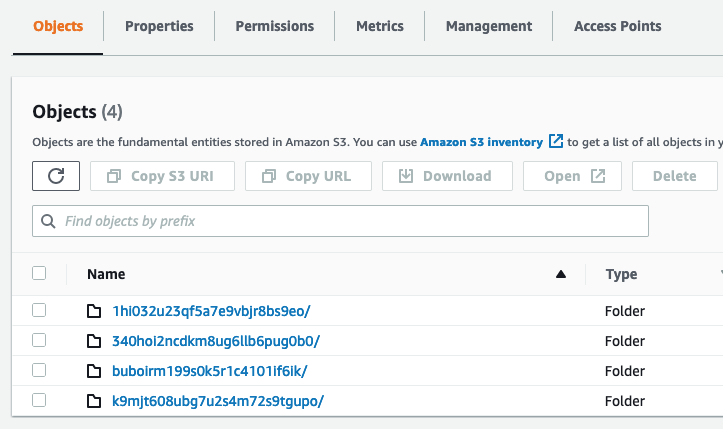
File and directory names are encrypted in the cloud storage target. File names
are transparent to poof and rclone - listing the encypted cloud file system
names with valid credentials shows them in cleartext on the client, but they are
obfuscated in the remote as described at the beginning of this section.
 **https://raw.githubusercontent.com/poof-backup/poof/master/assets/sample-S3-dir-list.png**
Operational security
poof! operates within a privacy continuum that ranges from simple data backup and restore for safekeeping, to full target encryption and self-destruction in case of risk of local system compromise.
An expanded description of the operational considerations and workflows is available via https://github.com/poof-backup/poof/blob/master/ops-docs/index.md
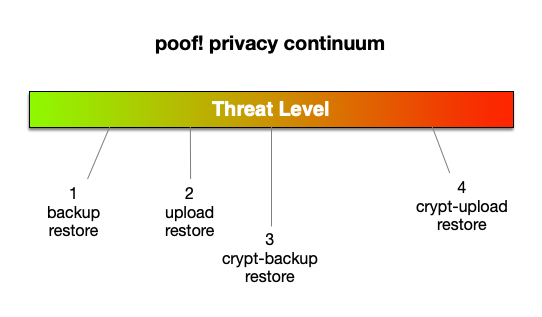
The poof! model covers 4 data security threat levels: https://raw.githubusercontent.com/poof-backup/poof/master/assets/backup-continuum.png
Level 1: backup and restore
As a user, I want to make periodic backups of one or more local file system directories, and trust or otherwise have no privacy concerns regarding the cloud storage provider.
Level 2: upload and restore
As a user, I need to make a backup of my local directories but need to wipe them out upon completion. I trust or otherwise have no privacy concerns regarding the cloud storage provider.
Examples:
- Bought a new computer and must move the data directories from the old to the new system
- The current system must be surrendered to a distrusted third-party like a repair shop
Configuration info for threat levels 1 and 2
The poof.conf and rclone-poof.conf configuration files are uploaded to the
cloud if the poof! configuration file is included as part of the configuration.
These files are stored in cleartext in the cloud storage, and can be viewed or
downloaded by anyone with access permissions.
Level 3: crypt backup, restore
As a user, I want to make periodic backups of one or more local system directories, and do not trust the cloud storage provider.
In this situation, the user may distrust the storage provider and wants to prevent their data from being mined or otherwise accessed without authorization.
Level 4: crypt upload, restore
As a user, I need to make a backup of my local directories but need to wipe them out upon completion. I do not trust the cloud storage provider.
- Personal or business sensitive data is stored in one or more directories managed by poof!
- Bought a new computer and must move the data directories from the old to the new system
- The current system must be surrendered to a distrusted third-party like a repair shop
- The cloud storage provider is known or suspected to inspect or mine storage contents or to grant access to third-parties to do so
Configuration info for threat levels 3 and 4
The poof! configuration files are stored in cleartext in the local file system,
but are encrypted in the cloud storage if they are present in the poof.conf
configuration file.
In the case of a level 4 threat, poof upload will also wipe out its own
configuration, and remove itself and all its dependencies from the local file
system. rclone is left alone because there may be other legitimate uses for
it other than poof integration.
Preserving the poof! configuration for threat levels 3 and 4
The config and cconfig commands display the current configuration and copy
the configuration files to the clipboard. The user may then store them in a
separate, secure, unrelated system for later restoring the files. For example,
this command:
poof config
Displays the configuration:
{
  "bucket": "poofbackup-joe-user-206ce7879351",
  "confFile": "/Users/joe-user/Library/Application Support/poof/poof.conf",
  "paths": {
    "/Users/joe-user/CryptoWallet": "CryptoWallet",
    "/Users/joe-user/Documents": "Documents",
    "/Users/joe-user/Downloads": "Downloads",
    "/Users/joe-user/Library/Application Support/poof": "poof-conf"
  },
  "remote": "poof-crypt"
}
The configuration file also available in the clipboard. You may verify this by pasting into any text editor, or using your GUI's tools for viewing the clipboard.
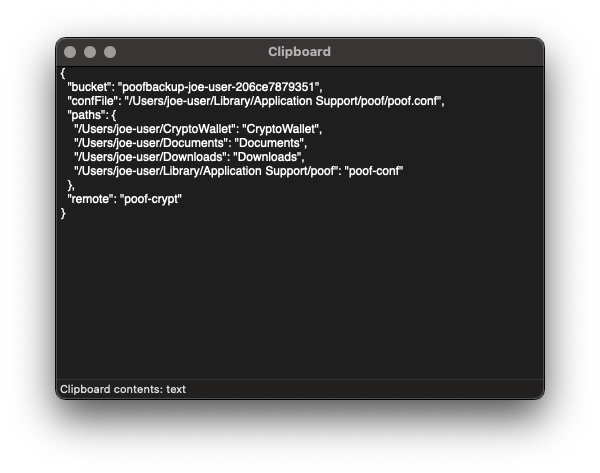
Generate these files, store them in a safe place, separate from the cloud storage holding your backups or the system that you backed up, and use them to restore your data to a secure, safe system, when the threat level drops.
Running poof on a schedule
poof can be configured to run via scheduler, whether manually or using its
built-in commands. Setting up the scheduler using poof commands guarantees
that all configuration files are in the pre-defined locations that poof knows,
and will wipe them out upon execution of the neuter command, to eliminate
traces of itself.
launchd (macOS only)
lconfigdisplays or generates a newlaunchdconfiguration file, including the corresponding.plistfile and enabling the configuration for the current user vialaunchctlcommands.lpurgedisables thepoofschedule, and deletes the.plistfile and any temporary log files associated with the scheduler output.
crond (Linux, other UNIX-like OS)
Not implemented as of version 1.2.10.
Bugs
See GitHub issues: https://github.com/poof-backup/poof/issues
Files
$HOME/Library/Application Support/poof/poof.conf$HOME/Library/Application Support/poof/rclone-poof.conf$HOME/Library/LaunchAgents/org.pypi.poof.plist/tmp/6CC9-4821-827B-8596B684ECA9/com.apple.ContentStoreAgent-$USER-err.dat/tmp/6CC9-4821-827B-8596B684ECA9/com.apple.ContentStoreAgent-$USER-out.dat
Author
Eugene "pr3d4t0r" Ciurana and the poof backup contributors <poof.project AT cime.net>
See also
crontab(1) rclone(1) launchctl(1) launchd(8)
1 maintainer

Metadata
1 maintainer
Release files for poof 1.6.0
For a detailed explanation of source distributions (sdists) and built distributions (wheels), please see the package formats documentation.
Built distribution (wheel)
| File | Interpreter | ABI | Platform | Reset |
|---|---|---|---|---|
| poof-1.6.0-py3-none-any.whl | Python 3 | none | any | Details |
Release files / poof-1.6.0-py3-none-any.whl
| Download URL | poof-1.6.0-py3-none-any.whl |
|---|---|
| Size | 17.0 kB |
| Tags | Python 3 |
|
SHA-256 checksum How to use checksums |
b0a3d6b26325223d19fbe41510cfd7cf5cf8b5f860a32748b7c94d0e36d8f43e
|
|
BLAKE2b-256 checksum How to use checksums |
a13574c7820eacc6998d2950d15f904765f7f0a72ea886897dc107e318115d94
|
| Upload date | |
|
Uploaded using Trusted Publishing? What is trusted publishing? |
No |
| Uploaded via |
twine/6.2.0 CPython/3.14.5
|