
Poottu Password Manager

Project description

Poottu Password Manager











A fast, privacy-first, offline desktop password manager for Windows, macOS, and Linux. Poottu stores credentials locally with strong, authenticated encryption and offers a clean, modern UI with helpful workflows like live search, context-menu copy, timed clipboard clearing, and encrypted backup/restore.
Features
- Secure, offline-by-default local vault with modern, authenticated encryption.
- Create/Unlock dialogs with readable light/dark designs and show/hide toggles.
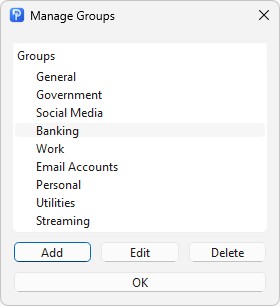
- Groups for organizing entries, with quick Edit Groups management.
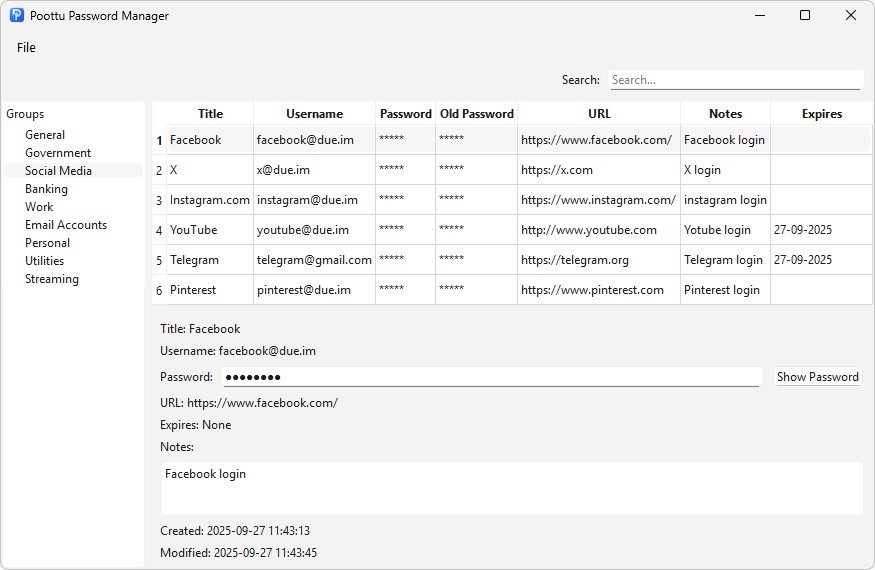
- Live search across Title, Username, URL, and Notes.
- Entry preview panel with Show Password button.
- Context menu actions: Copy Username, Password, URL, Old Password, and Notes.
- Timed clipboard clear, plus an in-app HUD toast that confirms copy and clear timing.
- Encrypted Backup and Restore from the File menu.
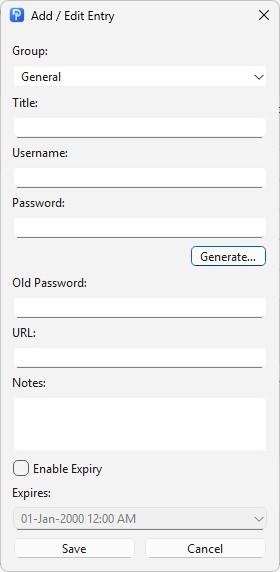
- Build in Password Generator in add entry
- Keyboard shortcuts:
- Ctrl+N: Add Entry
- Ctrl+G: Edit Groups
- Ctrl+B: Backup
- Ctrl+R: Restore
- F2: Edit selected entry
- Delete: Delete selected entry
Why the name “Poottu”?
Poottu (பூட்டு, pronounced Poo-ttu) means “lock” in Tamil, symbolizing security and protection. The name reflects the app’s purpose: a simple, safe, and trusted password manager.
Screenshots
-
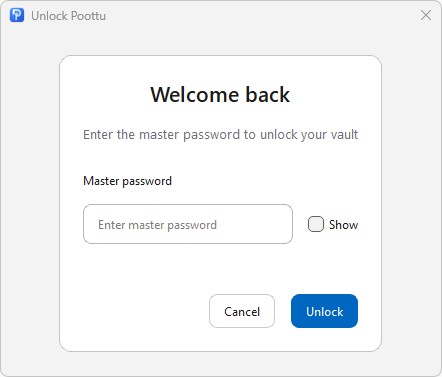
Unlock dialog with modern card design and show/hide toggles.
-
-
Manage Gruops Window.
-
-
Add/Edit Entry
-
Getting Started
Prerequisites
- Python 3.12+
- A virtual environment is recommended.
Installation
-
Clone the repository and enter the project directory.
-
Create and activate a virtual environment:
- Windows:
- python -m venv venv
- venv\Scripts\activate
- macOS/Linux:
- python3 -m venv venv
- source venv/bin/activate
- Install dependencies:
- pip install -r requirements.txt
- or
- pip install "PySide6>=6.5.0" "argon2-cffi>=21.3.0" "pynacl>=1.5.0" "cryptography>=41.0.0" "platformdirs>=3.0.0" "zxcvbn>=4.5.0"
Running
- From the project root:
- python src/poottu/main.py
On first run without a vault, the Create window appears to set a master password. If a vault already exists, the Unlock window will prompt for the master password.
Usage
Create Master Password
- Enter and confirm a strong password.
- Requirements:
- At least 12 characters.
- Contains lowercase, uppercase, number, and special character.
- The strength checker will guide improvements if needed.
- Press Create to initialize the vault.
Unlock Vault
- Enter master password and press Unlock or hit Enter.
- Use Show to verify the password if necessary.
- On error, an “Invalid master password” message appears.
Main Window Overview
- Groups (left): pick a group to filter entries.
- Search (top): filters entries across Title, Username, URL, and Notes as text is typed.
- Entries (top-right): table with Title, Username, masked Password/Old Password, URL, Notes preview, and Expires.
- Preview (bottom-right): see details for the selected entry and reveal/hide password.
File Menu
- Add Entry: create new credential records.
- Edit Groups: add, rename, and delete groups.
- Backup: export an encrypted backup file.
- Restore: import a previously exported encrypted backup.
- Clipboard → Configure Clear Timer…: choose the seconds before the clipboard is auto-cleared (0 disables).
- About: version, author, project URL, and full MIT license.
- Exit: close the app.
Entries
- Add Entry: choose Group, then fill Title, Username, Password, Old Password, URL, Notes, optional Expires.
- Edit Entry: right-click rows or select a row and press F2.
- Delete Entry: right-click rows or press Delete, then confirm.
Copying Safely
- Right-click an entry row to copy Username/Password/URL/Old Password/Notes.
- If the clipboard clear timer is enabled, copied data is automatically cleared after N seconds.
- A small HUD toast displays “Copied. Will clear in Ns” or “Copied.” when timer is disabled.
Keyboard Shortcuts
- Ctrl+N: Add Entry
- Ctrl+G: Edit Groups
- Ctrl+B: Backup
- Ctrl+R: Restore
- F2: Edit selected entry
- Delete: Delete selected entry
Backup and Restore
- Backup creates an encrypted backup file; keep it in a safe location.
- Restore replaces current contents with the backup’s data after validation.
- Recommended:
- Maintain multiple backups.
- Verify backups periodically by restoring in a separate environment.
Security Notes
- Offline-first: no automatic syncing or telemetry; everything stays local unless a manual backup is performed.
- Modern, authenticated encryption protects sensitive fields.
- Strong key derivation and header checks ensure data integrity and tamper resistance.
- Clipboard timer reduces the time secrets remain accessible to other apps.
Best Practices
- Use unique, strong passwords for each account.
- Rotate passwords periodically; use the Expires field to track changes.
- Keep multiple encrypted backups in different secure locations.
- Never share the master password; it cannot be recovered if lost.
- Lock the OS session or close the app when stepping away from the computer.
- Keep the OS and Python environment up to date for security patches.
Troubleshooting
- Invalid master password:
- Check keyboard layout, caps lock, and try again.
- Clipboard not clearing:
- Ensure the timer isn’t set to 0 (disabled) in File → Clipboard → Configure Clear Timer….
- Text readability:
- The app uses accessible styles for light/dark themes. If a custom OS theme overrides defaults, consider adjusting system appearance for contrast.
Contributing
- Bug reports, feature requests, and pull requests are welcome.
- Please discuss large changes via an issue first.
License
MIT License
Copyright (c) 2025 Manikandan D
Permission is hereby granted, free of charge, to any person obtaining a copy of this software and associated documentation files (the “Software”), to deal in the Software without restriction, including without limitation the rights to use, copy, modify, merge, publish, distribute, sublicense, and/or sell copies of the Software, and to permit persons to whom the Software is furnished to do so, subject to the following conditions:
The above copyright notice and this permission notice shall be included in all copies or substantial portions of the Software.
THE SOFTWARE IS PROVIDED “AS IS”, WITHOUT WARRANTY OF ANY KIND, EXPRESS OR IMPLIED, INCLUDING BUT NOT LIMITED TO THE WARRANTIES OF MERCHANTABILITY, FITNESS FOR A PARTICULAR PURPOSE AND NONINFRINGEMENT. IN NO EVENT SHALL THE AUTHORS OR COPYRIGHT HOLDERS BE LIABLE FOR ANY CLAIM, DAMAGES OR OTHER LIABILITY, WHETHER IN AN ACTION OF CONTRACT, TORT OR OTHERWISE, ARISING FROM, OUT OF OR IN CONNECTION WITH THE SOFTWARE OR THE USE OR OTHER DEALINGS IN THE SOFTWARE.
Acknowledgements
- Thanks to the open-source ecosystem for libraries and inspiration that make secure, user-friendly tools possible.
Project
Website: https://due.im/poottu/ Version: 1.0.0 Author: Manikandan D
Release history Release notifications | RSS feed


Download files
Download the file for your platform. If you're not sure which to choose, learn more about installing packages.
Source Distribution
Built Distribution
Filter files by name, interpreter, ABI, and platform.
If you're not sure about the file name format, learn more about wheel file names.
Copy a direct link to the current filters
File details
Details for the file poottu-1.0.0.tar.gz.
File metadata
- Download URL: poottu-1.0.0.tar.gz
- Upload date:
- Size: 256.3 kB
- Tags: Source
- Uploaded using Trusted Publishing? No
- Uploaded via: twine/6.2.0 CPython/3.13.3
File hashes
| Algorithm | Hash digest | |
|---|---|---|
| SHA256 |
787c942e971647e89f66ddc664ad303180eaad3d4e34ef78aaec28cc072a6f4e
|
|
| MD5 |
3b17dfdb6da9d11a8cfa55dd9cacbbcd
|
|
| BLAKE2b-256 |
cffa43be8775f376272b11f572aaadb9d724b677b237fc20f8ac0bb1d3c932c7
|
File details
Details for the file poottu-1.0.0-py3-none-any.whl.
File metadata
- Download URL: poottu-1.0.0-py3-none-any.whl
- Upload date:
- Size: 253.5 kB
- Tags: Python 3
- Uploaded using Trusted Publishing? No
- Uploaded via: twine/6.2.0 CPython/3.13.3
File hashes
| Algorithm | Hash digest | |
|---|---|---|
| SHA256 |
241d3e3115195a2efa2c85ec6088472b937f5a00cf2331ecbc66ae19fd507e0e
|
|
| MD5 |
2cbed712e997e9da6ed10d7478afeac2
|
|
| BLAKE2b-256 |
4edf17fb7f89c2a0fa99ce3039efd1cae1632cd1ef4c901b54cb09bf974a64c5
|






