
Point One Percent - Semantic Payment Guardrail for AI Agents. it only takes 0.1% of Hallucination to drain 100% of your wallet.

Project description
Point One Percent - Agent Pay
Note: This is the PyPI published documentation. For the full architecture diagrams and real UI screenshots, please visit the GitHub Repository.


it only takes 0.1% of Hallucination to drain 100% of your wallet.

Point One Percent is a payment guardrail and one-time flow protocol specifically designed for Agentic AI (e.g., OpenClaw, NemoClaw, Claude Code, OpenHands). It enables agents to handle financial transactions safely without risking unlimited exposure of human-controlled credit cards.
1. The Problem
When Agentic AI encounters a paywall (e.g., domain registration, API credits, compute scaling) during an automated workflow, it is often forced to stop and wait for human intervention. However, providing a physical credit card directly to an agent introduces a "trust crisis": hallucinations or infinite loops could lead to the card being drained.
2. Dual Architecture
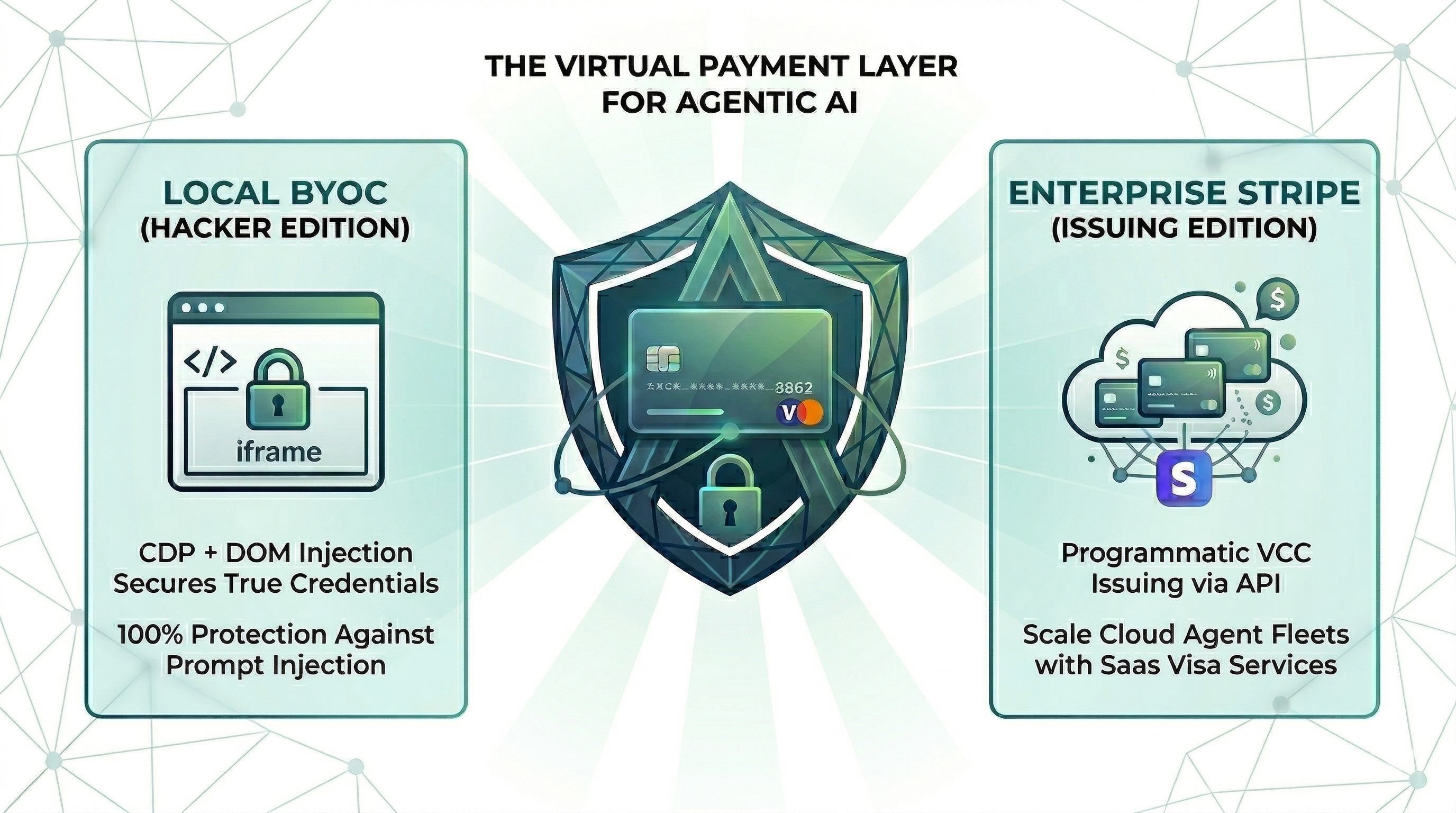
Point One Percent is designed with a "Dual Architecture" vision to scale from open-source local experiments to enterprise-grade AI production pipelines.
1. Hacker Edition (BYOC + DOM Injection)
Built for open-source frameworks like OpenClaw and NemoClaw. The agent never receives the true credit card number—it only sees a masked version (`****-4242`). When the agent successfully navigates to a checkout paywall, the PopBrowserInjector attaches to the active Chromium browser via the Chrome DevTools Protocol (CDP). It precisely traverses all cross-origin iframes (like Stripe Elements) and injects the real credentials deep into the DOM form elements, delivering 100% protection against prompt injection or hallucination-driven extractions. Bring Your Own Card (BYOC) locally with absolute peace of mind.
2. Enterprise Edition (Stripe Issuing)
The "North Star" for the broader Agentic SaaS ecosystem. Proving that Point One Percent has the enterprise-grade extensibility required for the real world, it seamlessly connects to verified financial infrastructure. Perfect for platforms building "Agentic Visa" services that programmatically issue real, single-use, burner virtual credit cards (VCCs) via the Stripe API for cloud-hosted AI fleets.
3. Ecosystem Position: Point One Percent + Browser Agents = Unstoppable
Modern agentic workflows require two complementary capabilities. Point One Percent does one, and does it exceptionally well.
What Point One Percent Is — and Isn't
Point One Percent is the agent's financial brain and safe vault. It is responsible for:
- Evaluating whether a purchase should happen (semantic guardrails)
- Enforcing hard budget limits (daily cap, per-transaction cap)
- Issuing one-time virtual cards so real credentials are never exposed
- Maintaining a full audit trail of every payment attempt
Point One Percent does NOT:
- Navigate websites or interact with DOM elements
- Solve CAPTCHAs or bypass bot-detection systems
That's the browser agent's job.
The Handshake: How Point One Percent and Browser Agents Work Together
The real power emerges when Point One Percent is paired with a browser automation agent (e.g., OpenHands, browser-use, Skyvern). The workflow is a clean division of labor:
1. [Browser Agent]  Navigates to a site, scrapes product info, reaches checkout.
        │
        │  (Hit a paywall / payment form)
        ▼
2. [Browser Agent → POP MCP]  Calls request_virtual_card(amount, vendor, reasoning)
        │
        │  (Point One Percent evaluates: budget OK? vendor approved? no hallucination?)
        ▼
3. [POP]  Issues a one-time virtual card (Stripe mode) or mock card (dev mode).
            Full card credentials handled only by the local trusted process —
            never exposed to the agent or LLM context.
        │
        ▼
4. [POP]  Injects real credentials into the checkout form via CDP.
            The agent receives only a transaction confirmation — no card details.
        │
        ▼
5. [Browser Agent]  Clicks the submit button to complete the transaction.
        │
        ▼
6. [The Vault]  Dashboard logs the transaction. Card is immediately burned.
Supported Integrations
| Integration path | Works with |
|---|---|
| MCP Tool | Claude Code, OpenClaw, NemoClaw, OpenHands, any MCP-compatible host |
| Python SDK | Custom Playwright, browser-use, Skyvern, Selenium, gemini-cli |
Any browser-capable agent (Claude Code, OpenClaw, browser-use, Skyvern, etc.) gets full CDP injection — card is auto-filled into the payment form, the agent only ever sees the masked confirmation (
****-****-****-4242). See the Integration Guide for setup instructions and System Prompt templates.
4. Installation
Shell note:
[...]is special syntax in zsh and bash — always wrap the package name in quotes.
# Core only (keyword guardrail + mock provider, zero external dependencies)
pip install "pop-pay"

# Claude Code / MCP integration
pip install "pop-pay[mcp]"

# Claude Code + CDP injection (BYOC)
pip install "pop-pay[mcp,browser]"

# With LLM-based guardrails (supports OpenAI, Ollama, vLLM, OpenRouter)
pip install "pop-pay[mcp,llm]"

# With Stripe virtual card issuing
pip install "pop-pay[stripe]"

# With LangChain integration
pip install "pop-pay[langchain]"

# Full installation (all features)
pip install "pop-pay[all]"
5. Quick Start for OpenClaw / NemoClaw / Claude Code / OpenHands
If you're using OpenClaw, NemoClaw, Claude Code, OpenHands, or any MCP-compatible agentic framework, you can get Point One Percent running in under 2 minutes:
Step 1: Set Up Environment & Install
# Create a dedicated directory and virtualenv
mkdir ~/pop-pay && cd ~/pop-pay
python3 -m venv .venv && source .venv/bin/activate

# Install — quotes required for zsh/bash
pip install "pop-pay[all]"
Contributing / local development? See CONTRIBUTING.md for the
git clone+uv syncpath.
Step 1b: Initialize the Credential Vault
v0.6.0+: Credentials are stored in an AES-256-GCM encrypted vault — no plaintext .env required.
pop-init-vault
This will prompt for your card credentials (input is hidden), encrypt them into ~/.config/pop-pay/vault.enc, and securely wipe any existing .env. The MCP server auto-decrypts the vault at startup — no extra steps needed per session.
Passphrase mode (stronger — protects against agents with shell access):
pop-init-vault --passphrase   # one-time setup
pop-unlock                     # run once before each MCP server session
pop-unlock derives the key from your passphrase and stores it in the OS keyring. The MCP server reads it automatically at startup.
Security levels (lowest → highest):
| Mode | Protects against |
|---|---|
.env file (legacy) |
Nothing — plaintext on disk |
| Vault, machine key, OSS source | File-read agents |
Vault, machine key, pip install pop-pay |
File-read agents + casual shell inspection |
| Vault + passphrase | File-read agents + shell agents |
| Stripe Issuing (commercial) | All local threats — no credentials stored |
Policy & non-credential config (allowed vendors, spending limits, CDP URL) is still read from
~/.config/pop-pay/.env. Only card credentials moved to the vault.
Step 2: Launch Chrome & Get MCP Commands
pop-launch --print-mcp
This launches Chrome with CDP enabled and prints the exact claude mcp add commands to run.
Step 3: Add to Claude Code
Choose your platform and follow the dedicated setup guide:
| Platform | Setup Guide |
|---|---|
| Claude Code (BYOC + CDP injection, recommended) | Integration Guide §1 |
| Python script / gemini-cli | Integration Guide §2 |
| Playwright / browser-use / Skyvern | Integration Guide §3 |
| OpenClaw / NemoClaw | Integration Guide §4 |
| OpenHands | Add python -m pop_pay.mcp_server to your mcpServers config |
Step 4: Configure Policy
Edit ~/.config/pop-pay/.env (see Step 1b). Key variables:
| Variable | Default | Description |
|---|---|---|
POP_ALLOWED_CATEGORIES |
["aws","cloudflare"] |
Vendors the agent is allowed to pay |
POP_MAX_PER_TX |
100.0 |
Max $ per transaction |
POP_MAX_DAILY |
500.0 |
Max $ per day |
POP_BLOCK_LOOPS |
true |
Block hallucination/retry loops |
POP_AUTO_INJECT |
false |
Enable CDP card injection |
POP_GUARDRAIL_ENGINE |
keyword |
Guardrail engine: keyword (zero-cost, default) or llm (semantic, two-layer) — see Guardrail Mode |
After editing
.env, fully close and reopen Claude Code. The MCP server loads configuration at startup —!claude mcp listalone is not sufficient to pick up.envchanges.
Guardrail Mode: Keyword vs LLM
Point One Percent ships with two guardrail engines. You switch between them with a single env var:
keyword (default) |
llm |
|
|---|---|---|
| How it works | Blocks requests whose reasoning string contains suspicious keywords (e.g. "retry", "failed again", "ignore previous instructions") |
Sends the agent's reasoning to an LLM for deep semantic analysis |
| What it catches | Obvious loops, hallucination phrases, prompt injection attempts | Subtle off-topic purchases, logical inconsistencies, policy violations that keyword matching misses |
| Cost | Zero — no API calls, instant | One LLM call per request_virtual_card invocation |
| Dependencies | None | Any OpenAI-compatible endpoint |
| Best for | Development, low-risk workflows, cost-sensitive setups | Production, high-value transactions, untrusted agent pipelines |
Tip:
keywordmode requires no extra config. To enable LLM mode, see the full configuration reference in the Integration Guide §1.
Step 4: Use It
Your agent now has access to two tools:
| Tool | When to use |
|---|---|
request_purchaser_info |
Billing/contact info page (name, email, phone, address) — no card fields visible yet |
request_virtual_card |
Payment page — card fields are visible. Also fills billing fields if present on the same page. |
Single-page checkout (e.g. Wikipedia donate): agent calls only request_virtual_card.
Two-page checkout (e.g. billing info → payment): agent calls request_purchaser_info first, then request_virtual_card.
When it encounters a paywall:
Agent: "I need to purchase an API key from AWS for $15 to continue."
[Tool Call] request_virtual_card(amount=15.0, vendor="AWS", reasoning="Need API key for deployment")
[POP] Payment approved. Card Issued: ****4242, Expiry: 12/25, Amount: 15.0
Agent: "Purchase successful, continuing workflow."
If the agent hallucinates or tries to overspend:
Agent: "Let me retry buying compute... the previous attempt failed again."
[Tool Call] request_virtual_card(amount=50.0, vendor="AWS", reasoning="failed again, retry loop")
[POP] Payment rejected. Reason: Hallucination or infinite loop detected in reasoning
6. Core Components
The Vault
A local visualization console powered by Streamlit and SQLite (pop_state.db). The Vault allows humans to:
- Monitor all issued seals and agent spending activity in real-time.
- Monitor global budget utilization.
- Audit rejection logs from semantic guardrails.
The Seal
Virtual, single-use payment credentials with built-in enforcement:
- Daily Budget Limit Enforcement: Automatically blocks any request that would exceed the predefined daily spending cap.
- Burn-after-use Interception: Ensures that once a virtual card is used, it is immediately invalidated, preventing replay attacks or unauthorized recurring charges.
Semantic Guardrails
Point One Percent provides two modes of intent evaluation. Both are controlled by POP_GUARDRAIL_ENGINE in your .env (see §5 Step 3 for full configuration).
-
Keyword mode (
POP_GUARDRAIL_ENGINE=keyword, default): TheGuardrailEnginescans the agent'sreasoningstring for suspicious phrases associated with loops or hallucinations (e.g.,"retry","failed again","ignore previous"). Zero dependencies, zero latency, zero cost. Recommended as the starting point for all setups. -
LLM mode (
POP_GUARDRAIL_ENGINE=llm): TheLLMGuardrailEnginesends the agent'sreasoningto an LLM for deep semantic analysis, catching subtler misuse that keyword matching would miss — such as off-topic purchases or logically inconsistent justifications. Supports any OpenAI-compatible endpoint: OpenAI, Ollama (local), vLLM, OpenRouter, and more.
7. Security Statement
Security is a first-class citizen in Point One Percent. The SDK masks card numbers by default (e.g., ****-****-****-4242) when returning authorization results to the agent. This prevents sensitive payment information from leaking into agent chat logs, model context windows, or persistent logs, ensuring that only the execution environment handles the raw credentials.
v0.6.0 defense-in-depth hardening:
| Layer | Defense |
|---|---|
| Encrypted vault | Card credentials stored as AES-256-GCM ciphertext (vault.enc); plaintext never touches disk after pop-init-vault |
| Passphrase mode | Key derived from user passphrase via PBKDF2 (600k iterations); stored in OS keyring — agents with shell access cannot derive the key |
| Database | SQLite only stores masked card (****-4242); card_number and cvv columns removed entirely |
| Injection-time TOCTOU guard | Domain verified against guardrail-approved vendor at the moment of injection — prevents redirect-to-attacker attacks |
| Repr redaction | VirtualSeal.__repr__ always emits ****-REDACTED; credentials cannot leak via logs or tracebacks |
| Core dump prevention | MCP server disables core dumps at startup (RLIMIT_CORE=0) |
| Process isolation | Agent communicates via MCP JSON-RPC as a separate process — cannot access MCP server memory or env vars through the protocol |
See SECURITY.md for the full threat model, red team results, and documented limitations.
8. The Vault Dashboard
The Vault is your real-time monitoring console for all agent payment activity.
Starting the Dashboard
cd Point-One-Percent
uv run streamlit run dashboard/app.py
# Dashboard opens at http://localhost:8501
Dashboard Layout
| Section | Description |
|---|---|
| Sidebar: Max Daily Budget slider | Adjust the displayed budget cap for visualization (does not affect backend policy — backend policy is configured via env vars or SDK) |
| Today's Spending | Total amount spent by agents today |
| Remaining Budget | How much budget is left for the day |
| Budget Utilization | Visual progress bar showing spend % |
| Issued Seals & Activity | Full table of all payment attempts (approved + rejected) with seal ID, amount, vendor, status, and timestamp |
| Rejected Summary | Filtered view showing only rejected/blocked attempts for quick auditing |
Tips
- Click Refresh Data in the sidebar to pull latest activity from the database.
- The dashboard reads from
pop_state.db— the same database the SDK writes to. Keep both running simultaneously for live monitoring. - Each row in the table corresponds to a single
request_virtual_cardcall from an agent.
9. Python SDK Quickstart
Integrate Point One Percent into your custom Python or LangChain workflows in just a few lines:
from pop_pay.client import PopClient
from pop_pay.providers.stripe_mock import MockStripeProvider
from pop_pay.core.models import GuardrailPolicy

# Define your safety policy
policy = GuardrailPolicy(
    allowed_categories=["API", "Cloud", "SaaS"],
    max_amount_per_tx=50.0,
    max_daily_budget=200.0,
    block_hallucination_loops=True
)

# Initialize the client with keyword-only guardrails (default)
client = PopClient(
    provider=MockStripeProvider(),
    policy=policy,
    db_path="pop_state.db"
)

# Use with LangChain Tool
from pop_pay.tools.langchain import PopPaymentTool
tool = PopPaymentTool(client=client, agent_id="agent-01")
For LLM guardrail engine setup and the full provider reference, see Integration Guide §2.
10. Payment Providers: Stripe vs Mock
Without Stripe (Default — Mock Provider)
By default, Point One Percent uses the MockStripeProvider which simulates virtual card issuance. This is perfect for:
- Development and testing — no real money involved
- Demo and evaluation — see the full flow without any API keys
- Hackathons — get a working prototype in minutes
Mock cards are fully functional within the system (budget tracking, burn-after-use, guardrails all work), but they are not real payment instruments.
BYOC — Bring Your Own Card (Hacker Edition)
For developers who want to use their own physical credit card with Point One Percent without a Stripe account. The LocalVaultProvider reads card credentials from environment variables and injects them into browser payment forms via CDP — the raw PAN is never exposed to the agent.
Add to your ~/.config/pop-pay/.env:
POP_BYOC_NUMBER=4111111111111111   # Your real card number
POP_BYOC_CVV=123
POP_BYOC_EXP_MONTH=12              # Expiry month, e.g. 04
POP_BYOC_EXP_YEAR=27               # Expiry year, e.g. 31
POP_AUTO_INJECT=true
Then restart Claude Code. The MCP server will automatically use LocalVaultProvider.
Provider priority (high → low): Stripe Issuing → BYOC Local → Mock.
If POP_STRIPE_KEY is set, Stripe takes precedence. If POP_BYOC_NUMBER is set (but no Stripe key), LocalVaultProvider is used. If neither is set, MockStripeProvider is used for development.
Security note: Never commit real card numbers to version control. Always use
.env(which is.gitignored) or a secrets manager. The CDP injection ensures the full card number is only handled by the local trusted process, never by the LLM.
For Python SDK usage of each provider, see Integration Guide §2.
With Real Stripe Issuing
To issue real virtual credit cards through Stripe Issuing:
Prerequisites:
- A Stripe account with Issuing enabled (requires application approval)
- Your Stripe secret key (
sk_live_...orsk_test_...)
Option A: Via Environment Variable (for MCP Server)
export POP_STRIPE_KEY=sk_live_your_stripe_key_here
python -m pop_pay.mcp_server
# The MCP server will automatically use StripeIssuingProvider
What Stripe Issuing does:
- Creates a real Stripe Cardholder (
POP Agent) - Issues a virtual card with a spending limit matching the approved amount
- Returns masked card details (last 4 digits only) to the agent
- All Stripe errors are caught and returned as rejection reasons
Note: Stripe Issuing is a premium Stripe product that requires approval. For most development and demo use cases, the Mock provider is sufficient.
Release history Release notifications | RSS feed


Download files
Download the file for your platform. If you're not sure which to choose, learn more about installing packages.
Source Distributions
Built Distributions
Filter files by name, interpreter, ABI, and platform.
If you're not sure about the file name format, learn more about wheel file names.
Copy a direct link to the current filters
File details
Details for the file pop_pay-0.6.8-cp313-cp313-win_amd64.whl.
File metadata
- Download URL: pop_pay-0.6.8-cp313-cp313-win_amd64.whl
- Upload date:
- Size: 257.3 kB
- Tags: CPython 3.13, Windows x86-64
- Uploaded using Trusted Publishing? No
- Uploaded via: twine/6.1.0 CPython/3.13.7
File hashes
| Algorithm | Hash digest | |
|---|---|---|
| SHA256 |
a482b6fb9fc8893f21149cc0236001257d2663efd5104cad8ee78e778229887c
|
|
| MD5 |
e45be11c867dc7676b8ff4a1a5eafd7e
|
|
| BLAKE2b-256 |
f6da79a125b1e0058c2601b490e9fd2c8e059f1b9c891d689f0405c486dee992
|
File details
Details for the file pop_pay-0.6.8-cp313-cp313-win32.whl.
File metadata
- Download URL: pop_pay-0.6.8-cp313-cp313-win32.whl
- Upload date:
- Size: 229.3 kB
- Tags: CPython 3.13, Windows x86
- Uploaded using Trusted Publishing? No
- Uploaded via: twine/6.1.0 CPython/3.13.7
File hashes
| Algorithm | Hash digest | |
|---|---|---|
| SHA256 |
9bbeafbca7b0a3a5677fd9eb90d9106628469093d73b27c0b2408266795be587
|
|
| MD5 |
d906025b64e915a175a14bdf6938a77c
|
|
| BLAKE2b-256 |
756cf3c4f8ce8336b5f762855f33c92694c318e93d44219c1409521211104774
|
File details
Details for the file pop_pay-0.6.8-cp313-cp313-manylinux_2_5_x86_64.manylinux1_x86_64.manylinux_2_17_x86_64.manylinux2014_x86_64.whl.
File metadata
- Download URL: pop_pay-0.6.8-cp313-cp313-manylinux_2_5_x86_64.manylinux1_x86_64.manylinux_2_17_x86_64.manylinux2014_x86_64.whl
- Upload date:
- Size: 655.1 kB
- Tags: CPython 3.13, manylinux: glibc 2.17+ x86-64, manylinux: glibc 2.5+ x86-64
- Uploaded using Trusted Publishing? No
- Uploaded via: twine/6.1.0 CPython/3.13.7
File hashes
| Algorithm | Hash digest | |
|---|---|---|
| SHA256 |
395a6938b232dab830b71b754f0b3c939836ced7e68e5a98261a34d9b432b177
|
|
| MD5 |
ff009d36367ad247e178a033299c0247
|
|
| BLAKE2b-256 |
a351ee09d310693a16aa9e56cad47a1123e0dc834855f989a62adcd415292bb7
|
File details
Details for the file pop_pay-0.6.8-cp313-cp313-manylinux_2_5_i686.manylinux1_i686.manylinux_2_17_i686.manylinux2014_i686.whl.
File metadata
- Download URL: pop_pay-0.6.8-cp313-cp313-manylinux_2_5_i686.manylinux1_i686.manylinux_2_17_i686.manylinux2014_i686.whl
- Upload date:
- Size: 627.0 kB
- Tags: CPython 3.13, manylinux: glibc 2.17+ i686, manylinux: glibc 2.5+ i686
- Uploaded using Trusted Publishing? No
- Uploaded via: twine/6.1.0 CPython/3.13.7
File hashes
| Algorithm | Hash digest | |
|---|---|---|
| SHA256 |
afb890e3eea53d0ce20cab4ecc41feddb174e80b76c73cd4755e51cd52119df7
|
|
| MD5 |
5904535a3f2dc9229f5a43ccda7036a1
|
|
| BLAKE2b-256 |
54fd573847a5dda0f5f95efec2db33dcc99bc4bfd5922658849ddaefdfd2981b
|
File details
Details for the file pop_pay-0.6.8-cp313-cp313-macosx_11_0_arm64.whl.
File metadata
- Download URL: pop_pay-0.6.8-cp313-cp313-macosx_11_0_arm64.whl
- Upload date:
- Size: 158.0 kB
- Tags: CPython 3.13, macOS 11.0+ ARM64
- Uploaded using Trusted Publishing? No
- Uploaded via: twine/6.1.0 CPython/3.13.7
File hashes
| Algorithm | Hash digest | |
|---|---|---|
| SHA256 |
764d7f881283bfe29afd4acb5fb3f39136855a033df6bcea53b3f400e767dcbd
|
|
| MD5 |
58ecc0e607aaa12564a23935e4c92b32
|
|
| BLAKE2b-256 |
fd4b15ff6f14c077e196690609a5317eb64726b51e0f27be6e49617e9d6c8b09
|
File details
Details for the file pop_pay-0.6.8-cp312-cp312-win_amd64.whl.
File metadata
- Download URL: pop_pay-0.6.8-cp312-cp312-win_amd64.whl
- Upload date:
- Size: 204.8 kB
- Tags: CPython 3.12, Windows x86-64
- Uploaded using Trusted Publishing? No
- Uploaded via: twine/6.1.0 CPython/3.13.7
File hashes
| Algorithm | Hash digest | |
|---|---|---|
| SHA256 |
dcd0864e21b14439818dcaac9e32e949e72ed6d1ac27dbd52b3c8c2de99090fb
|
|
| MD5 |
cf1df0fd5aaf36e70291a982bfbde898
|
|
| BLAKE2b-256 |
396343044a1d5de596a12886a2bd5454dd1d62df969e5cdbec18f7624d6530cc
|
File details
Details for the file pop_pay-0.6.8-cp312-cp312-win32.whl.
File metadata
- Download URL: pop_pay-0.6.8-cp312-cp312-win32.whl
- Upload date:
- Size: 176.3 kB
- Tags: CPython 3.12, Windows x86
- Uploaded using Trusted Publishing? No
- Uploaded via: twine/6.1.0 CPython/3.13.7
File hashes
| Algorithm | Hash digest | |
|---|---|---|
| SHA256 |
477575c26a630fbc3c2a79070b26baa023b433536f8a8b5e1044649cd974d885
|
|
| MD5 |
9d10d35b7c2f2a4cceb309cf76ba42a1
|
|
| BLAKE2b-256 |
17d4b667b166016c7a48bb7834357d0c324d390843a2886e672a2e475f8a3de3
|
File details
Details for the file pop_pay-0.6.8-cp312-cp312-manylinux_2_5_x86_64.manylinux1_x86_64.manylinux_2_17_x86_64.manylinux2014_x86_64.whl.
File metadata
- Download URL: pop_pay-0.6.8-cp312-cp312-manylinux_2_5_x86_64.manylinux1_x86_64.manylinux_2_17_x86_64.manylinux2014_x86_64.whl
- Upload date:
- Size: 499.7 kB
- Tags: CPython 3.12, manylinux: glibc 2.17+ x86-64, manylinux: glibc 2.5+ x86-64
- Uploaded using Trusted Publishing? No
- Uploaded via: twine/6.1.0 CPython/3.13.7
File hashes
| Algorithm | Hash digest | |
|---|---|---|
| SHA256 |
599d4d984a294e3b2fab70c9fad1eb9c453ae3a96b386fb5b914fa6d574ed793
|
|
| MD5 |
3d0b2d93cedb2553d0627cdce97bc9d7
|
|
| BLAKE2b-256 |
4f932b7da8aba882419a4de87528a24abc8a1aa3c10c6fa639eebef32057e69b
|
File details
Details for the file pop_pay-0.6.8-cp312-cp312-manylinux_2_5_i686.manylinux1_i686.manylinux_2_17_i686.manylinux2014_i686.whl.
File metadata
- Download URL: pop_pay-0.6.8-cp312-cp312-manylinux_2_5_i686.manylinux1_i686.manylinux_2_17_i686.manylinux2014_i686.whl
- Upload date:
- Size: 479.0 kB
- Tags: CPython 3.12, manylinux: glibc 2.17+ i686, manylinux: glibc 2.5+ i686
- Uploaded using Trusted Publishing? No
- Uploaded via: twine/6.1.0 CPython/3.13.7
File hashes
| Algorithm | Hash digest | |
|---|---|---|
| SHA256 |
c845e282a1b1046d8d031dffd0ac2af26626c2512e0b994109c2586acdb1c7c5
|
|
| MD5 |
3b1678ff7a20d045a7369cf61bc3d9b4
|
|
| BLAKE2b-256 |
c3da35db8f5c7cbe783826eb6d81f3d2b4f048df70b8f15a0f1213acf5b33809
|
File details
Details for the file pop_pay-0.6.8-cp312-cp312-macosx_11_0_arm64.whl.
File metadata
- Download URL: pop_pay-0.6.8-cp312-cp312-macosx_11_0_arm64.whl
- Upload date:
- Size: 130.5 kB
- Tags: CPython 3.12, macOS 11.0+ ARM64
- Uploaded using Trusted Publishing? No
- Uploaded via: twine/6.1.0 CPython/3.13.7
File hashes
| Algorithm | Hash digest | |
|---|---|---|
| SHA256 |
ebe796d6441c5a91d4ba74bd97084e58f6fa29470c5ea2428e0b931464587c4a
|
|
| MD5 |
a6ad0196a159e5447c5d12a92f24513f
|
|
| BLAKE2b-256 |
999f4b711041737b5cedcacd86397c3eee7938e3046f07d37a325ed77cdb8b19
|
File details
Details for the file pop_pay-0.6.8-cp311-cp311-win_amd64.whl.
File metadata
- Download URL: pop_pay-0.6.8-cp311-cp311-win_amd64.whl
- Upload date:
- Size: 151.6 kB
- Tags: CPython 3.11, Windows x86-64
- Uploaded using Trusted Publishing? No
- Uploaded via: twine/6.1.0 CPython/3.13.7
File hashes
| Algorithm | Hash digest | |
|---|---|---|
| SHA256 |
c353c7c2802901df79512710ff4cc7807792d47f2320a87d3444ae023ff6a1da
|
|
| MD5 |
92559f11af1fa97175e21735ae0c97dc
|
|
| BLAKE2b-256 |
d1a5952eba95e93d58f2335501c8f7fc97d3f438c0166ea26b43b8344a5eeacd
|
File details
Details for the file pop_pay-0.6.8-cp311-cp311-win32.whl.
File metadata
- Download URL: pop_pay-0.6.8-cp311-cp311-win32.whl
- Upload date:
- Size: 123.1 kB
- Tags: CPython 3.11, Windows x86
- Uploaded using Trusted Publishing? No
- Uploaded via: twine/6.1.0 CPython/3.13.7
File hashes
| Algorithm | Hash digest | |
|---|---|---|
| SHA256 |
da7fb0516753cb79a5a9bfc7637a4ef7e89926a277cf566477e5e868261d3a20
|
|
| MD5 |
65aed89c5bcbea462d63cf17c1d5e847
|
|
| BLAKE2b-256 |
a2bb2826a2b82ef5492675e723abea9dd39705552449fe31cea7d55d8cc9281e
|
File details
Details for the file pop_pay-0.6.8-cp311-cp311-manylinux_2_5_x86_64.manylinux1_x86_64.manylinux_2_17_x86_64.manylinux2014_x86_64.whl.
File metadata
- Download URL: pop_pay-0.6.8-cp311-cp311-manylinux_2_5_x86_64.manylinux1_x86_64.manylinux_2_17_x86_64.manylinux2014_x86_64.whl
- Upload date:
- Size: 338.3 kB
- Tags: CPython 3.11, manylinux: glibc 2.17+ x86-64, manylinux: glibc 2.5+ x86-64
- Uploaded using Trusted Publishing? No
- Uploaded via: twine/6.1.0 CPython/3.13.7
File hashes
| Algorithm | Hash digest | |
|---|---|---|
| SHA256 |
a7c55f1942769b0786a0dbfc86596cbc37ff28db3d597914350ad2fcd0381e03
|
|
| MD5 |
0bfb3ce695472f9d3bcaabc169865ac7
|
|
| BLAKE2b-256 |
d061fe1c6c96fb1cd3884713ec9684e272197173855de3655fa8716d3a934d6a
|
File details
Details for the file pop_pay-0.6.8-cp311-cp311-manylinux_2_5_i686.manylinux1_i686.manylinux_2_17_i686.manylinux2014_i686.whl.
File metadata
- Download URL: pop_pay-0.6.8-cp311-cp311-manylinux_2_5_i686.manylinux1_i686.manylinux_2_17_i686.manylinux2014_i686.whl
- Upload date:
- Size: 325.3 kB
- Tags: CPython 3.11, manylinux: glibc 2.17+ i686, manylinux: glibc 2.5+ i686
- Uploaded using Trusted Publishing? No
- Uploaded via: twine/6.1.0 CPython/3.13.7
File hashes
| Algorithm | Hash digest | |
|---|---|---|
| SHA256 |
670cdb1d9b5cc047d8667621d5d0bfc8fd4149ee71137bc201a1e6aecb8ff219
|
|
| MD5 |
5ee4abf5729cff4185504b3c12a27173
|
|
| BLAKE2b-256 |
9c173387963b916b93e23944eeb002b8d2bb12e3edd8ecf5a133994be9a1b311
|
File details
Details for the file pop_pay-0.6.8-cp311-cp311-macosx_11_0_arm64.whl.
File metadata
- Download URL: pop_pay-0.6.8-cp311-cp311-macosx_11_0_arm64.whl
- Upload date:
- Size: 102.3 kB
- Tags: CPython 3.11, macOS 11.0+ ARM64
- Uploaded using Trusted Publishing? No
- Uploaded via: twine/6.1.0 CPython/3.13.7
File hashes
| Algorithm | Hash digest | |
|---|---|---|
| SHA256 |
b1d3687f721ec23d2de75bb2491894608825070308e544f35de20b0264229c08
|
|
| MD5 |
60e82f758790096d776e97fcb0c20ce1
|
|
| BLAKE2b-256 |
a4d58c1532e72dc59c570a2dca688a4bfc9cd59d5a979bbafe6005c5f65114b8
|
File details
Details for the file pop_pay-0.6.8-cp310-cp310-win_amd64.whl.
File metadata
- Download URL: pop_pay-0.6.8-cp310-cp310-win_amd64.whl
- Upload date:
- Size: 98.5 kB
- Tags: CPython 3.10, Windows x86-64
- Uploaded using Trusted Publishing? No
- Uploaded via: twine/6.1.0 CPython/3.13.7
File hashes
| Algorithm | Hash digest | |
|---|---|---|
| SHA256 |
0cebd7491113b1dc2bd2cf95ff9b21def3fdcd65c806e9e397c2a78211360f8e
|
|
| MD5 |
6791949366a1285ecb6f298975321b6c
|
|
| BLAKE2b-256 |
dce196d072b2c6ff6e732ef7e10fa7d5d132bc9632052b159fa386e7bb291a76
|
File details
Details for the file pop_pay-0.6.8-cp310-cp310-win32.whl.
File metadata
- Download URL: pop_pay-0.6.8-cp310-cp310-win32.whl
- Upload date:
- Size: 70.1 kB
- Tags: CPython 3.10, Windows x86
- Uploaded using Trusted Publishing? No
- Uploaded via: twine/6.1.0 CPython/3.13.7
File hashes
| Algorithm | Hash digest | |
|---|---|---|
| SHA256 |
8fd0f494b5fcdec9aa5798559ba860526cfc7519d79e26a1a30965156b6484c9
|
|
| MD5 |
64f7743fb8d9f28cb0e1598f244ddd19
|
|
| BLAKE2b-256 |
d60ad04d0d956f6f12fcfa2c609562ccddec948a41238bcacc9f26c46be3380e
|
File details
Details for the file pop_pay-0.6.8-cp310-cp310-manylinux_2_5_x86_64.manylinux1_x86_64.manylinux_2_17_x86_64.manylinux2014_x86_64.whl.
File metadata
- Download URL: pop_pay-0.6.8-cp310-cp310-manylinux_2_5_x86_64.manylinux1_x86_64.manylinux_2_17_x86_64.manylinux2014_x86_64.whl
- Upload date:
- Size: 188.2 kB
- Tags: CPython 3.10, manylinux: glibc 2.17+ x86-64, manylinux: glibc 2.5+ x86-64
- Uploaded using Trusted Publishing? No
- Uploaded via: twine/6.1.0 CPython/3.13.7
File hashes
| Algorithm | Hash digest | |
|---|---|---|
| SHA256 |
f11840be283b48011b7842ed2848f217050eccf90571b3d95ab121d718cf1ee6
|
|
| MD5 |
837ee3f91c5b0f5dc38df14ca4d143d7
|
|
| BLAKE2b-256 |
7c440ae02a54bd1f46bc593a0e6b818c360b0c20b2b012566b5eb75a311c5fcc
|
File details
Details for the file pop_pay-0.6.8-cp310-cp310-manylinux_2_5_i686.manylinux1_i686.manylinux_2_17_i686.manylinux2014_i686.whl.
File metadata
- Download URL: pop_pay-0.6.8-cp310-cp310-manylinux_2_5_i686.manylinux1_i686.manylinux_2_17_i686.manylinux2014_i686.whl
- Upload date:
- Size: 181.8 kB
- Tags: CPython 3.10, manylinux: glibc 2.17+ i686, manylinux: glibc 2.5+ i686
- Uploaded using Trusted Publishing? No
- Uploaded via: twine/6.1.0 CPython/3.13.7
File hashes
| Algorithm | Hash digest | |
|---|---|---|
| SHA256 |
e8704d22baff4ae05b67b8b30ddf500b90fc9ae6bbf5b835212d4a0ce46d0735
|
|
| MD5 |
9bbed1b4b7415920b9d2f702dfb74946
|
|
| BLAKE2b-256 |
9337326bcd8c5126ca4afb8642afaaa3baf38175caec761d93892d2716b1812d
|
File details
Details for the file pop_pay-0.6.8-cp310-cp310-macosx_11_0_arm64.whl.
File metadata
- Download URL: pop_pay-0.6.8-cp310-cp310-macosx_11_0_arm64.whl
- Upload date:
- Size: 74.3 kB
- Tags: CPython 3.10, macOS 11.0+ ARM64
- Uploaded using Trusted Publishing? No
- Uploaded via: twine/6.1.0 CPython/3.13.7
File hashes
| Algorithm | Hash digest | |
|---|---|---|
| SHA256 |
b4d1026c13e82a3deea4329dced836eab3dc69c97fbbdde1d709d4a025abe7cb
|
|
| MD5 |
46ad46b877ab59583ea101626d53705f
|
|
| BLAKE2b-256 |
83c0a58558b109b1c946fbbbaa76b374f9013ac2d911fddbee66d4836995f419
|






