
Local reverse proxy for production-like .localhost domains

Project description
Portman
Production-like local domains for local development.




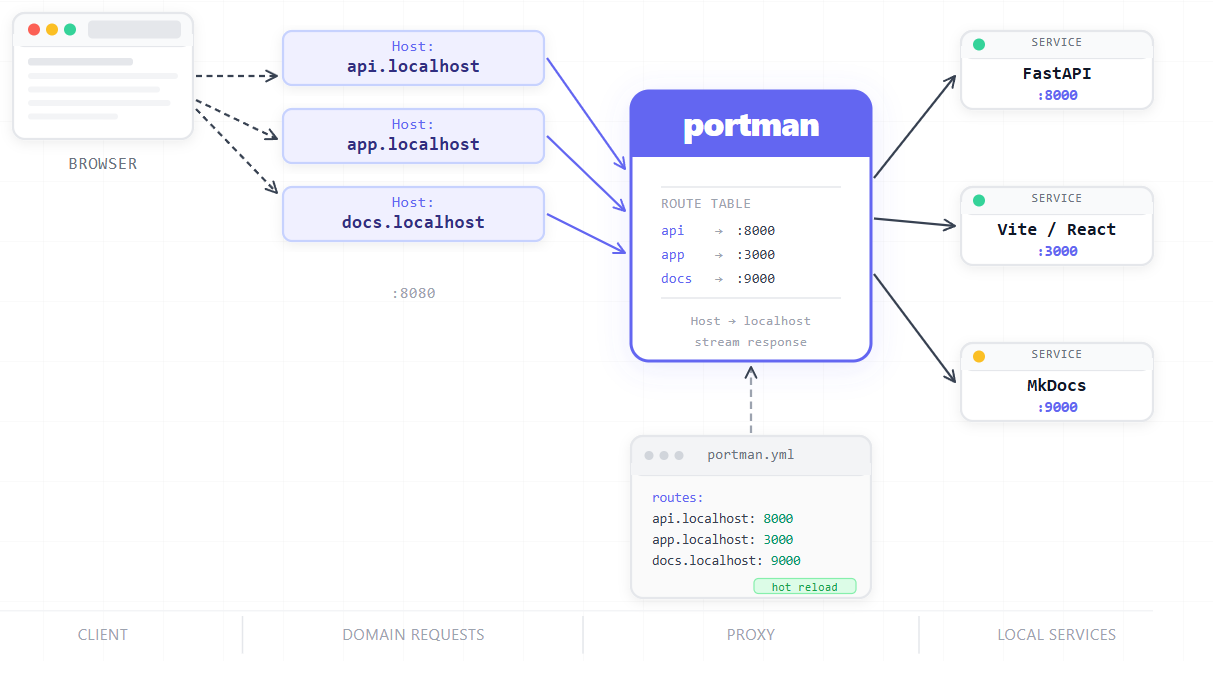
Portman is a lightweight local reverse proxy that routes named .localhost domains to your running services — no DNS server, no Docker, no sudo.
http://api.localhost:8080   →   localhost:8000
http://app.localhost:8080   →   localhost:3000
http://docs.localhost:8080  →   localhost:9000
Portman Architecture
The Problem
A typical local development project runs several services at once:
| Service | URL |
|---|---|
| Frontend | localhost:3000 |
| API | localhost:8000 |
| Admin panel | localhost:8080 |
| Docs | localhost:9000 |
Port numbers accumulate. You forget which is which. Teammates use different ports. Cookies set on localhost:3000 are invisible to localhost:8000. None of this resembles production.
The Solution
One config file. One command. Named domains.
# portman.yml
routes:
  api.localhost: 8000
  app.localhost: 3000
  docs.localhost: 9000
portman start
Your services are now at:
http://api.localhost:8080
http://app.localhost:8080
http://docs.localhost:8080
*.localhost resolves to 127.0.0.1 in all modern browsers without any DNS or hosts file configuration. Portman routes by the HTTP Host header and proxies traffic to the correct upstream port.
Installation
pip install portman-proxy
Requires Python 3.10+. No system dependencies.
Quick Start
1. Create portman.yml in your project root:
proxy_port: 8080

routes:
  api.localhost: 8000
  app.localhost: 3000
2. Start your local services (Django, FastAPI, Vite, whatever).
3. Start Portman:
portman start
4. Open in your browser:
http://api.localhost:8080
http://app.localhost:8080
That's it. No DNS changes. No root access. No system configuration.
Features
- Host-based routing — routes requests by
Hostheader to the correct upstream port .localhostdomains — resolve in all modern browsers without configuration- HTTP reverse proxy — streaming, no response buffering, full body forwarding
- WebSocket support — bidirectional relay, works with Vite HMR and similar tools
- Hot configuration reload — edit
portman.ymlwhile the proxy is running; changes apply immediately without a restart - Health checks —
portman listshows which upstreams are reachable before you start debugging - Host header rewriting — forwards
Host: localhostto upstreams, fixing Vite, Webpack, Next.js, and Django validation - X-Forwarded-* headers — sets
X-Forwarded-Host,X-Forwarded-For,X-Forwarded-Protocorrectly - Type-safe configuration — YAML config validated with Pydantic v2; errors are human-readable
- Cross-platform — macOS, Linux, Windows (WSL2)
Commands
portman start
Start the proxy in the foreground. Ctrl+C to stop.
portman start
portman start --config path/to/portman.yml
portman start --config portman.yml
The proxy watches the config file and reloads routes automatically when it changes. If the new config is invalid, the old routes stay active and the error is logged.
portman list
Show configured routes and check whether each upstream is reachable.
portman list
        Portman Routes
┌───────────────────┬──────┬─────────────┐
│ Domain            │ Port │   Status    │
├───────────────────┼──────┼─────────────┤
│ api.localhost     │ 8000 │  ✓ Healthy  │
│ app.localhost     │ 3000 │  ✓ Healthy  │
│ docs.localhost    │ 9000 │ ✗ Unreachab │
└───────────────────┴──────┴─────────────┘
portman --version
portman --version
Configuration Reference
# portman.yml

# Port the proxy listens on. Default: 8080.
# Use 8080 (no elevated permissions required).
proxy_port: 8080

routes:
  # Simple form: domain: port
  api.localhost: 8000

  # Extended form: with per-route timeout
  app.localhost:
    port: 3000
    timeout: 60   # seconds, default 30
Domain rules
- Must end in
.localhost,.test, or.localhost .localhostis preferred — resolves in all modern browsers without any setup- Case-insensitive; trailing dots stripped
Port rules
- Any integer from 1 to 65535
- Must not equal
proxy_port(would create a routing loop)
How It Works
Portman is a single Python process with no external dependencies at runtime:
portman.yml
    │  (validated at startup, watched for changes)
    ▼
RouteTable
    │  (domain → port mapping, atomically updated on reload)
    ▼
HTTP Proxy  ─── reads Host header
    │         ─── rewrites Host to localhost
    │         ─── sets X-Forwarded-* headers
    │         ─── streams request and response bodies
    ▼
Local service at localhost:PORT
WebSocket connections are detected by the Upgrade: websocket header and tunnelled bidirectionally through the same routing logic.
The config file is watched by a file-system observer. When the file changes, the new config is parsed and validated. If valid, the route table is atomically replaced. If invalid, the error is logged and the previous configuration stays active.
Browser Compatibility
*.localhost resolves to 127.0.0.1 in the browser without any system configuration on:
| Browser | Version |
|---|---|
| Chrome / Edge / Brave | All supported versions |
| Firefox | v91+ (2021) |
| Safari | macOS Sequoia (2024) |
For curl, Python requests, and other non-browser tools on macOS, or for older Safari, use the optional hosts file integration:
portman hosts install   # adds *.localhost entries to /etc/hosts (requires sudo)
portman hosts uninstall # removes them
This is entirely optional. Browser-based development works without it.
Framework Compatibility
Portman rewrites the Host header to localhost before forwarding. This is intentional: modern dev servers validate the Host header and reject requests with unrecognised values.
| Framework | Works out of the box? | Notes |
|---|---|---|
| FastAPI / Uvicorn | ✓ | No configuration needed |
| Django (DEBUG=True) | ✓ | Accepts localhost by default |
| Vite | ✓ | HMR WebSocket works; sees Host: localhost |
| Next.js | ✓ | No configuration needed |
| Webpack Dev Server | ✓ | allowedHosts: "all" not required |
| Any standard HTTP server | ✓ | Sees localhost as the host |
Experimental: Hosts File Integration
The portman hosts commands are available for users who want to use custom (non-.localhost) domains or need non-browser tools to resolve the domains.
# Preview what would be written (no changes made)
portman hosts install --dry-run

# Write entries to /etc/hosts (requires sudo on macOS/Linux)
sudo portman hosts install

# Remove portman-managed entries
sudo portman hosts uninstall
Portman manages its entries between sentinel comments and never touches anything else in the file. The operation is idempotent.
Core Portman functionality does not require this. Use .localhost domains and skip hosts file management entirely.
Benchmarking
A stdlib-only benchmark script is included:
python scripts/benchmark.py \
  --host api.localhost \
  --port 8080 \
  --requests 1000 \
  --concurrency 50
Run while Portman and the target upstream are running. Reports throughput, mean, median, p95, and p99 latency.
Development
Install in editable mode with dev dependencies:
pip install -e ".[dev]"
Run tests:
pytest
Run linting:
ruff check src tests scripts
Run type checking:
mypy src
CI runs:
- pytest (with coverage)
- ruff
- mypy
- Python 3.10, 3.11, 3.12, 3.13
- Ubuntu (primary), macOS
Limitations
These are deliberate. Portman is a local development tool.
- No TLS — local development does not require it in most cases
- No daemon mode — run in a terminal tab like any other dev server
- No process management — start your services yourself
- No Docker discovery — configure ports manually
- No custom DNS server —
*.localhosthandles the common case without one - No production use — binds to
127.0.0.1only, by design
Roadmap
v0.2
- Request logging with timing per route
portman list --watchfor live health monitoring
Future consideration
- Optional TLS (self-signed, development only)
- Docker Compose port auto-detection
- Path-based routing
License
MIT. See LICENSE.
Release history Release notifications | RSS feed


Download files
Download the file for your platform. If you're not sure which to choose, learn more about installing packages.
Source Distribution
Built Distribution
Filter files by name, interpreter, ABI, and platform.
If you're not sure about the file name format, learn more about wheel file names.
Copy a direct link to the current filters
File details
Details for the file portman_proxy-0.1.2.tar.gz.
File metadata
- Download URL: portman_proxy-0.1.2.tar.gz
- Upload date:
- Size: 26.8 MB
- Tags: Source
- Uploaded using Trusted Publishing? No
- Uploaded via: twine/6.2.0 CPython/3.14.5
File hashes
| Algorithm | Hash digest | |
|---|---|---|
| SHA256 |
9407a5ac13af17578c610f73bc8e76c739714d3cec259c4156879cc1a1ccaf57
|
|
| MD5 |
e2404fcf821a0a3f0fc2886c14959e1b
|
|
| BLAKE2b-256 |
629cfd70f6de7d9956b5752eb40a89beba0f5148deba67b8d94d982aab88cef2
|
File details
Details for the file portman_proxy-0.1.2-py3-none-any.whl.
File metadata
- Download URL: portman_proxy-0.1.2-py3-none-any.whl
- Upload date:
- Size: 20.7 kB
- Tags: Python 3
- Uploaded using Trusted Publishing? No
- Uploaded via: twine/6.2.0 CPython/3.14.5
File hashes
| Algorithm | Hash digest | |
|---|---|---|
| SHA256 |
8998eac9d0d39c1b5ab96af144036b9c376236dbab6e91860f28b44e10e876d5
|
|
| MD5 |
5266ed37e9bdc47503f060c63cc246eb
|
|
| BLAKE2b-256 |
e169f97f9de103e617131b5e08d87bd9dce55ca2b77b3f50f1fc1f5e01b93835
|






