
portzup 🔌


Because
lsof -i :3000is not a personality.
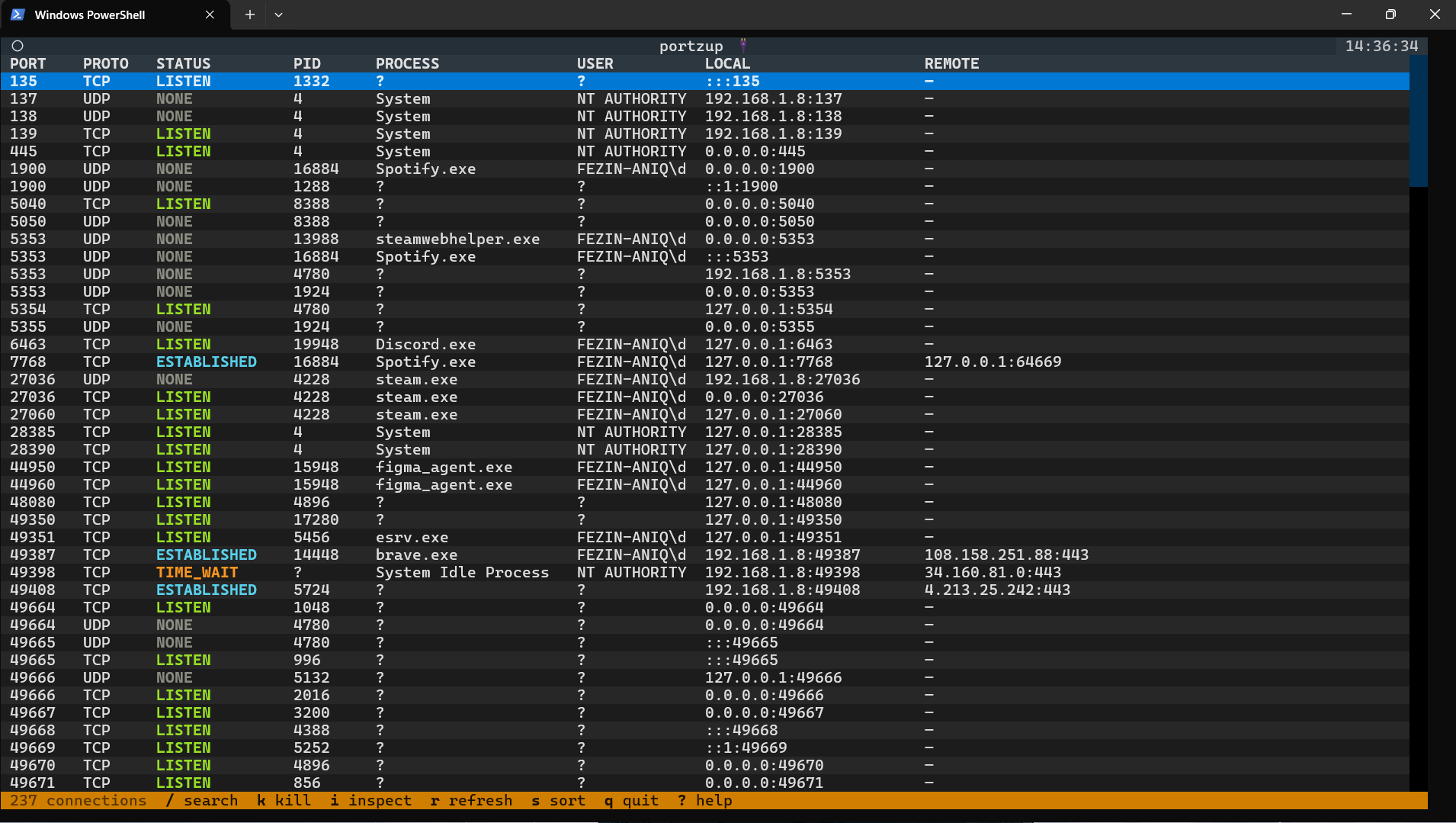
A Interactive terminal UI that shows every process running on your machine's network ports — live, searchable, and killable in one keypress. No more googling commands. No more chaining lsof | grep | kill. Just open portzup and see everything.
Install
pip install portzup
Then run:
portzup
That's it. Zero to running in under 30 seconds.
Why portzup?
You know this moment:
Error: listen EADDRINUSE: address already in use :::3000
Then the ritual:
- Google "how to kill port 3000"
- Find a Stack Overflow answer
- Run
lsof -ti:3000 | xargs kill -9 - Forget it by next week
- Google it again
portzup ends this loop.
Features
| Live port table | Every open port, process name, PID, protocol, status — updated every 2 seconds |
| Fuzzy search | Press / and type to filter by port number, process name, or status |
| Kill with one key | Press k to terminate the selected process (with confirmation) |
| Process detail pane | Press i to see full command, user, local/remote addresses |
| Sort | Press s to cycle between sort modes: port → PID → process name |
| Auto-refresh | Table stays live — or press r to force an instant refresh |
| Cross-platform | Linux ✅ macOS ✅ Windows (v1.1) |
Keybindings
| Key | Action |
|---|---|
↑ / ↓ |
Navigate the port list |
/ |
Open fuzzy search |
Escape |
Clear search / close detail pane |
k |
Kill selected process |
i |
Toggle process detail pane |
r |
Force refresh |
s |
Cycle sort (port → PID → name) |
q |
Quit |
? |
Show help |
Status colours
| Colour | Status |
|---|---|
| 🟢 Green | LISTEN |
| 🔵 Cyan | ESTABLISHED |
| 🟡 Yellow | TIME_WAIT |
| 🟣 Magenta | CLOSE_WAIT |
| 🔴 Red | FIN_WAIT |
Platform support
| Platform | Status |
|---|---|
| Linux | ✅ Fully supported |
| macOS | ✅ Fully supported |
| Windows | ✅ Fully supported (run as Administrator) |
Stack
| Language | Python 3.10+ |
| TUI | Textual |
| System data | psutil |
| Packaging | pip / PyPI |
Contributing
PRs are welcome! The project is MIT licensed.
portzup/
├── portzup/
│   ├── main.py          # Textual App — entry point
│   ├── ui/
│   │   ├── table.py     # Port table widget
│   │   ├── detail.py    # Process detail pane
│   │   └── footer.py    # Status bar
│   ├── core/
│   │   ├── ports.py     # psutil port fetching
│   │   ├── killer.py    # Safe process kill
│   │   └── models.py    # PortEntry dataclass
│   └── config.py
├── tests/
├── pyproject.toml
└── README.md
Run tests:
pip install pytest
pytest tests/
License
MIT — open, contribution-friendly, no friction.
Built with Python + Textual. Inspired by the daily frustration of every developer who has ever googled "how to kill port 3000".
1 maintainer

Metadata
1 maintainer
Release files for portzup 1.0.4
For a detailed explanation of source distributions (sdists) and built distributions (wheels), please see the package formats documentation.
Source distribution (sdist)
| File | Size | Uploaded | |
|---|---|---|---|
| portzup-1.0.4.tar.gz | 213.4 kB | Details |
Built distribution (wheel)
| File | Interpreter | ABI | Platform | Reset |
|---|---|---|---|---|
| portzup-1.0.4-py3-none-any.whl | Python 3 | none | any | Details |
Total release size: 226.1 kB
Release files / portzup-1.0.4.tar.gz
| Download URL | portzup-1.0.4.tar.gz |
|---|---|
| Size | 213.4 kB |
| Tags | Source |
|
SHA-256 checksum How to use checksums |
7fdf83ac5eea0a036690aa3905312db6f564f11079bfd25a4eedaaffaed896dc
|
|
BLAKE2b-256 checksum How to use checksums |
299fa1d54159eeb24faee69236daacb5892c3026b1476d4cd77c288e5277fd6e
|
| Upload date | |
|
Uploaded using Trusted Publishing? What is trusted publishing? |
No |
| Uploaded via |
twine/6.2.0 CPython/3.13.2
|
Release files / portzup-1.0.4-py3-none-any.whl
| Download URL | portzup-1.0.4-py3-none-any.whl |
|---|---|
| Size | 12.7 kB |
| Tags | Python 3 |
|
SHA-256 checksum How to use checksums |
6c7121fdcc4b98033488a54110d4166e2afada2fe4109bdf32d4db1d890de992
|
|
BLAKE2b-256 checksum How to use checksums |
c3ee1b19bbae7b87b7e3c337638be4e71854badac52c509e9baec377e0d9f909
|
| Upload date | |
|
Uploaded using Trusted Publishing? What is trusted publishing? |
No |
| Uploaded via |
twine/6.2.0 CPython/3.13.2
|













