
porymap-mcp
An MCP server that lets Claude, or any MCP client, paint, render and critique Porymap-compatible maps for Pokémon Gen 3 decompilation projects.


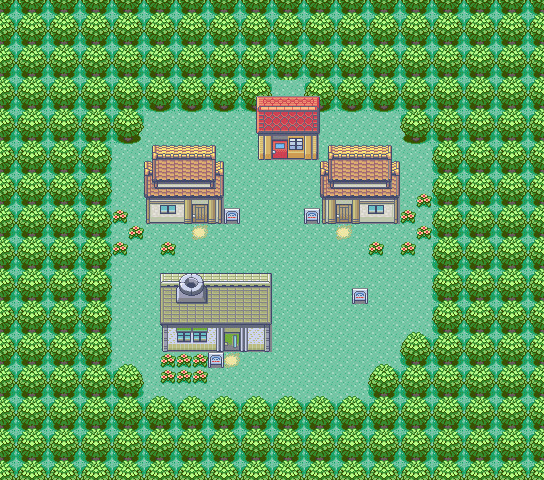
Littleroot Town from pokeemerald-expansion, rendered by the server's render_map tool with include_border=True. Pixel-identical to Porymap's own PNG export.
What it does
- Reads a pokeemerald-family project: maps, layouts, tilesets, metatiles, events, prefabs.
- Writes the same files Porymap writes: metatiles, rectangles, flood fills, borders, prefabs, warps, NPCs, signs (with a script stub), triggers, new maps and map-group registration. Writes are atomic.
- Renders maps, regions and single metatiles to PNG and returns them as MCP
imagecontent blocks. Output is pixel-identical to Porymap's own export on a 5-map reference corpus (Littleroot Town, Route 101, Granite Cave 1F, Battle Frontier Outside East, plus a synthetic edge case).
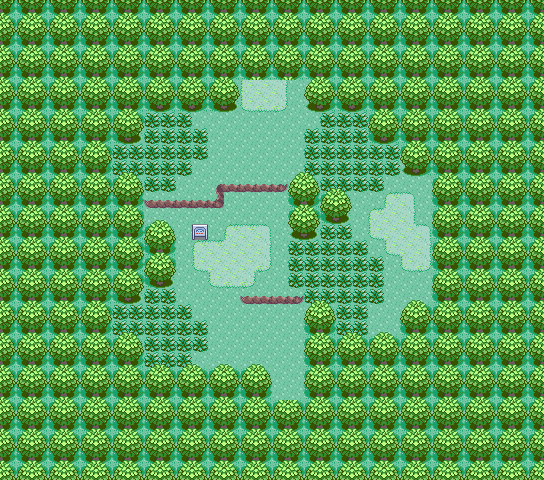
Route 101, same tool and settings, also pixel-identical to Porymap's export.
Porymap does not need to be running. Open the project in Porymap whenever you like: your manual workflow is untouched.
It does not edit tilesets (creating new metatiles stays in Porymap), and it does not generate graphics, music or story content.
Compatibility
Built and tested against rh-hideout/pokeemerald-expansion, the base most active hacks use today (ADR-0002). Vanilla pret/pokeemerald uses the same file formats and loads the same way. Bit masks and paths are read from your porymap.project.cfg, so nothing is hard-coded per fork. pokefirered and pokeruby projects are recognised but not covered by the test corpus yet.
Install
pip install "porymap-mcp[render]"
Or run it with no install step via uv:
uvx --from "porymap-mcp[render]" porymap-mcp
The render extra pulls in Pillow and numpy for the three render tools. Without it (pip install porymap-mcp), the 21 read/write tools work on their own.
Requires Python 3.11+.
Register it with your MCP client
Claude Code:
claude mcp add porymap -- uvx --from "porymap-mcp[render]" porymap-mcp
Claude Desktop (claude_desktop_config.json) or any client that takes a JSON server list:
{
  "mcpServers": {
    "porymap": {
      "command": "uvx",
      "args": ["--from", "porymap-mcp[render]", "porymap-mcp"]
    }
  }
}
If you installed with pip, use "command": "porymap-mcp" (or "python" with "args": ["-m", "porymap_mcp"]).
No environment variables are needed: the project path is passed on every tool call, so one server can work on several projects.
First map in 5 minutes
With the server registered, ask your agent:
Open my pokeemerald project at
~/code/pokeemerald-expansion. Create a 20×20 map calledLakesideTownin thegMapGroup_TownsAndRoutesgroup, usinggTileset_General+gTileset_Petalburg. Stamp a small house at (3, 4), put a sign next to its door that says "Welcome to Lakeside!", then render the map and critique it.
The agent will typically:
- Call
get_project_infoto confirm the project loads and read its config. - Call
list_tilesetsto check that both tilesets exist. - Call
create_map, which writesdata/maps/LakesideTown/map.json,data/layouts/LakesideTown/map.binandborder.bin, and registers the map indata/layouts/layouts.jsonanddata/maps/map_groups.json. - Call
paint_prefabwithhouse_smallat (3, 4): a 3×3 footprint with its door at (4, 6). - Call
add_signat (3, 7). This appends the event tomap.jsonand generates a script stub (poryscript, or.incif your project hasuse_poryscript=0). - Call
render_mapand look at the PNG it gets back.
Every write tool returns the list of files it modified. Open the project in Porymap, or rebuild your ROM: the map is there.
Tileset labels. Littleroot Town, Oldale Town and Petalburg City all use
gTileset_General+gTileset_Petalburg, in both vanillapokeemeraldandpokeemerald-expansion. There is nogTileset_LittlerootTown. If your fork renames or adds tilesets, ask the agent to calllist_tilesetsfirst and pick from what it returns.
Self-critique loop
Because renders come back inside the tool response, the agent can look at its own work. It paints the map, renders it, critiques the image against a 12-criterion Gen 3 design rubric (path geometry, tile variety, building placement, border softness, …), fixes the top issues and renders again.
| Iteration 1: first draft | Iteration 2: after one critique pass |
|---|---|
 |
 |
| Score 7 / 36 | Score 21 / 36 |
The demo runs on a small synthetic tileset made of flat colour blocks, so it works without a pokeemerald checkout. On a real project, renders use your actual tilesets, as in the Littleroot Town image above. Runnable walkthrough: examples/04_render_loop/.
Tools
24 tools. Each tool's docstring is what your agent reads, and the full contracts are in the ADRs listed below. Every tool takes project_path as its first argument.
| Tool | Group | What it does |
|---|---|---|
get_project_info |
Discovery | Project snapshot: base game, map, layout and tileset counts. |
list_maps |
Discovery | Every map registered in map_groups.json. |
get_map_info |
Discovery | Full metadata for one map: layout, tilesets, size, header. |
list_tilesets |
Discovery | Every primary and secondary tileset found on disk. |
list_metatiles |
Discovery | The metatiles of one tileset, with attributes. |
list_prefabs |
Discovery | Named multi-metatile stamps available to paint_prefab. |
list_events |
Discovery | Every event on a map, grouped by class. |
paint_metatile |
Mutation | Set one tile (metatile, collision, elevation). Idempotent. |
paint_rectangle |
Mutation | Fill an inclusive rectangle with one metatile. |
flood_fill |
Mutation | Replace a 4-connected region of identical metatiles. |
set_border |
Mutation | Replace the map's repeating border tiles. |
paint_prefab |
Mutation | Stamp a named prefab, top-left anchored. |
create_map |
Mutation | Create a new map: writes its files and registers it everywhere. |
resize_map |
Mutation | Resize a layout from its top-left corner, keeping the overlapping content. |
register_map |
Project | Add an existing map directory to map_groups.json. |
unregister_map |
Project | Remove a map from map_groups.json (files are kept). |
add_warp |
Events | Add a warp to another map. |
add_object_event |
Events | Add an NPC, item ball or other object event. |
add_sign |
Events | Add a sign with inline text and generate its script stub. |
add_trigger |
Events | Add a coordinate-based script trigger. |
remove_event |
Events | Remove any event by its id. |
render_map |
Render | Render a full map to PNG, optionally with its border frame. |
render_map_region |
Render | Render a rectangular slice of a large map. |
render_metatile |
Render | Preview a single metatile from a tileset. |
The three render tools accept overlays (collision, elevation, grid, events) and a scale factor. All seven map-mutation tools and all five event tools accept return_render=True, which adds the post-edit render to the same response and saves a round trip.
Design records
Every decision that is hard to reverse is written up as an ADR in docs/decisions/:
- ADR-0001: FastMCP as the MCP framework
- ADR-0002: pokeemerald-expansion as the primary target
- ADR-0003: a single
Projectentry point, config-driven formats - ADR-0004: where tileset metadata comes from
- ADR-0005, ADR-0006, ADR-0007: discovery, mutation and event tool contracts
- ADR-0008: prefab library and
paint_prefab - ADR-0009: why live Porymap hot-reload was dropped
- ADR-0010: renderer design, including the four corrections found while validating against Porymap
The project's vision document is MCP_PORYMAP.md (in French).
Prefabs
paint_prefab ships with three stamps: single_tree, flower_patch and house_small. Their metatile IDs follow vanilla gTileset_General conventions. If your fork uses custom tilesets, register your own prefabs in porymap_mcp.prefabs.LIBRARY (a plain dict). See ADR-0008.
Develop
git clone https://github.com/hugomrts/porymap-mcp
cd porymap-mcp
uv sync --all-extras        # or: pip install -e ".[dev]"
pre-commit install
pytest
CI blocks on ruff check, ruff format --check, mypy --strict and the full test suite (Linux and macOS, Python 3.11 to 3.13). CLAUDE.md describes the conventions used to develop this repo with Claude Code, including the sub-agents in .claude/agents/, which anyone can reuse.
Acknowledgements
- Porymap by Marcus Huderle: the editor whose files this server writes.
- pret: the decompilation projects that make all of this possible.
- rh-hideout: the
pokeemerald-expansionfork. - FastMCP: the Python MCP framework used here.
License
1 maintainer

Metadata
1 maintainer
Release files for porymap-mcp 1.0.1
For a detailed explanation of source distributions (sdists) and built distributions (wheels), please see the package formats documentation.
Source distribution (sdist)
| File | Size | Uploaded | Provenance | Actions |
|---|---|---|---|---|
| porymap_mcp-1.0.1.tar.gz | 689.9 kB | With provenance | Details for porymap_mcp-1.0.1.tar.gz |
Built distribution (wheel)
| File | Interpreter | ABI | Platform | Actions Reset |
|---|---|---|---|---|
| porymap_mcp-1.0.1-py3-none-any.whl | Python 3 | none | any | Details for porymap_mcp-1.0.1-py3-none-any.whl |
Total release size: 781.2 kB
Release files / porymap_mcp-1.0.1.tar.gz
| Download URL | porymap_mcp-1.0.1.tar.gz |
|---|---|
| Size | 689.9 kB |
| Tags | Source |
|
SHA-256 checksum How to use checksums |
e3da2b988f080323e77fcd486ecf7b839054172e10563ae4dd09381cecb52d3e
|
|
BLAKE2b-256 checksum How to use checksums |
66c382e79b519ade7fec516534d734b886866a895da37a18ccb6b0797837683c
|
| Upload date | |
|
Uploaded using Trusted Publishing? What is trusted publishing? |
Yes |
| Uploaded via |
twine/7.0.0 CPython/3.13.16
|
Provenance
Provenance describes where a file came from. On PyPI, provenance is shared via attestations, which provide a verifiable record of the build or publishing details. View details, limitations and caveats.


PyPI Publish Attestation
PyPI verified that this artifact, at this checksum, originated from the publisher listed below.
Signed by GitHub Actions, verified by PyPI on Oct 31, 2026.
Transparency logRelease files / porymap_mcp-1.0.1-py3-none-any.whl
| Download URL | porymap_mcp-1.0.1-py3-none-any.whl |
|---|---|
| Size | 91.3 kB |
| Tags | Python 3 |
|
SHA-256 checksum How to use checksums |
0a6566adcfaa532bac506e1826c40cb26b52ece1c51e5fc84bb873d39efbfd28
|
|
BLAKE2b-256 checksum How to use checksums |
f322fb2f8179cb0707aa6e37b6aeb108daad9218877d9a8ea65d2a47e28444da
|
| Upload date | |
|
Uploaded using Trusted Publishing? What is trusted publishing? |
Yes |
| Uploaded via |
twine/7.0.0 CPython/3.13.16
|
Provenance
Provenance describes where a file came from. On PyPI, provenance is shared via attestations, which provide a verifiable record of the build or publishing details. View details, limitations and caveats.
PyPI Publish Attestation
PyPI verified that this artifact, at this checksum, originated from the publisher listed below.
Signed by GitHub Actions, verified by PyPI on Oct 31, 2026.
Transparency logSecurity for porymap-mcp 1.0.1
Provenance
Provenance describes where a file came from. On PyPI, provenance is shared via attestations, which provide a verifiable record of the build or publishing details. View details, limitations and caveats.
Full provenance
All 2 files in this release have been uploaded with provenance metadata.
Attestation for porymap_mcp-1.0.1.tar.gz
PyPI Publish Attestation
PyPI verified that this artifact, at this checksum, originated from the publisher listed below.
Signed by GitHub Actions, verified by PyPI on Oct 31, 2026.
Transparency logA note on package security
PyPI is a repository for distributing packages, not a service for auditing them. While third-party security researchers and our staff do their best to detect and remove malicious packages, PyPI cannot guarantee the quality, security or suitability of any given package.
To learn more about protecting yourself from malicious actors, visit our package security documentation.














