
OpenHand





The OpenHand application uses the excellent full-body pose estimator OpenPose from CMU Perceptual Computing Lab to ease hand keypoints datasets creation and real-time pose classification.
Installation
Using PyPi
Simply run the following command to install the whole package in the desired Python environment:
pip install pose-classification-kit[app]
If you don't plan to use the application but just want access to the datasets and pre-trained models:
pip install pose-classification-kit
From source
Ensure that Poetry is installed for Python 3.7 and above on your system.
-
Git clone the repository -
git clone https://github.com/ArthurFDLR/pose-classification-kit.git -
Create an adequate
venvvirtual environment -python -m poetry install -
You should now be able to run the application -
poetry run pose-classification-app
Even if OpenHand classifier can run without OpenPose, it must be installed on your system to allow real-time hand gesture classification.
-
Once the installation is completed, change the variable
OPENPOSE_PATH(.\pose-classification-kit\config.py) to the location of the OpenPose installation folder on your system.
Note: TensorFlow 2.4.0 is installed by default (can be changed through Poetry). GPU support thus requires CUDA 11.0, which might conflict with OpenPose requirements. However, classification models available in the application are relatively light. Modern CPUs will handle these models' inference process flawlessly.
Under the hood
Features extraction
The 21 hand keypoints (2D) used as input for this classifier are produced by OpenPose. The hand output format is as follow:
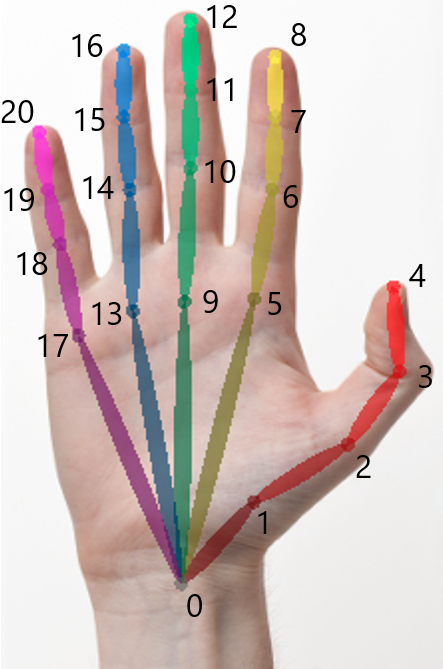
More information are available here. Please note that even though OpenHand focuses on hand keypoints, OpenPose requires the whole body to be analyzed to generate hand data. Furthermore, keypoints coordinates are given in the frame of reference of the image fed to OpenPose. Thus, the coordinates have to be normalized. I addition to x, y coordinates, the accuracy of detection of each key points is provided.
Keypoints normalization
OpenPose outputs have to be formatted and normalized before classification analysis. Coordinates are normalized relative to finger length and the center of gravity of the hand.
-
Scaling: First, the length of each fingers - defined as a set of lines of the same color, see above - is calculated. The euclidian distances of all segments of a finger are sumed - e.g.
. Then, every coordinates composing the hand are divided by the greater finger length.
-
Centering: Keypoints are centered relative to the center of mass of the hand which, in this case, is simply defined as
.
Click to show code
handKeypoints = np.array(op.Datum().handKeypoints)[handID, self.personID]

lengthFingers = [np.sqrt((handKeypoints[0,0] - handKeypoints[i,0])**2 + (handKeypoints[0,1] - handKeypoints[i,1])**2) for i in [1,5,9,13,17]] #Initialized with the length of the first segment of each fingers.
for i in range(3): #Add length of other segments for each fingers
    for j in range(len(lengthFingers)):
        lengthFingers[j] += np.sqrt((handKeypoints[1+j*4+i+1, 0] - handKeypoints[1+j*4+i, 0])**2 + (handKeypoints[1+j*4+i+1, 1] - handKeypoints[1+j*4+i, 1])**2)
normMax = max(lengthFingers)

handCenterX = handKeypoints.T[0].sum() / handKeypoints.shape[0]
handCenterY = handKeypoints.T[1].sum() / handKeypoints.shape[0]
outputArray = np.array([(handKeypoints.T[0] - handCenterX)/normMax,
                        -(handKeypoints.T[1] - handCenterY)/normMax,
                        (handKeypoints.T[2])])
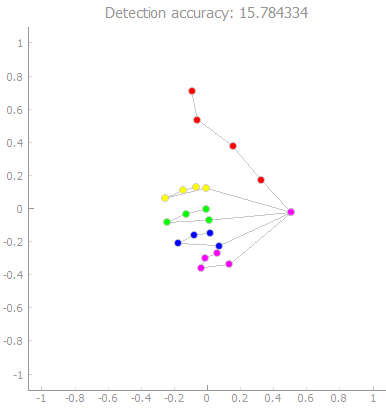
Dataset creation - 11090 samples for 27 categories
🚧 Out-dated section, will be updated soon 🚧
The dataset is composed of several classes consisting of two text files, one for each hand. The dataset is structured as follow:
.\AppHandClassifier\Datasets
│
└───class_label_1
│   └───left_hand
│   │       data.txt
│   └───right_hand
│           data.txt
│
└───class_label_2
│   └───left_hand
│   │       data.txt
│   └───right_hand
│           data.txt
.
.
The first line of a data.txt file contains the set's characteristics:
- Class label
- Hand identifier (0 for the left hand, 1 for the right hand)
- The minimum accuracy of detection
To add comments, begin a line with ##. A sample is (at least) composed of 3 lines: a header giving the detection accuracy, x coordinates, y coordinates.
Click to show examples - First lines of 'Super' set for right hand
Super,1,13.0
## Data generated the 2020-07-28 labeled Super (right hand) with a global accuracy higher than 13.0, based on OpenPose estimation.
## Data format: Coordinates x, y, and accuracy of estimation a

#14.064389
x:-0.47471642 -0.38345036 -0.27814367 -0.17283674 -0.16581643 -0.07455035 0.24136995 0.26243138 0.18520646 -0.060509484 0.24136995 0.17116559 0.05883807 -0.095611796 0.22732908 0.14308357 0.030756325 -0.10965267 0.1220224 0.10798126 0.02373602
y:-0.120350584 0.12536536 0.38512218 0.6238177 0.8203904 0.13238579 0.12536536 0.097283475 0.09026304 -0.07822783 -0.043125518 -0.029084647 -0.015043774 -0.2467187 -0.19757552 -0.16247334 -0.14843246 -0.3801074 -0.36606652 -0.30990276 -0.30288246
a:0.4513099 0.52159405 0.73779285 0.7362725 0.8151489 0.8092662 0.74224406 0.4387765 0.23850155 0.797209 0.79372936 0.59578335 0.44275257 0.81076413 0.9635796 0.647649 0.5396069 0.80517197 0.8936012 0.7543843 0.52925146

#15.550782
x:-0.4933955 -0.3817585 -0.23523489 -0.109643176 -0.053824674 0.008971046 0.23224507 0.13456275 0.043857645 0.001993833 0.24619977 0.13456275 0.015948527 -0.025915554 0.22526786 0.113630846 0.001993833 -0.053824674 0.12060806 0.07874425 -0.0049836473
y:-0.113298275 0.13090765 0.36813638 0.5914105 0.779798 0.109975755 0.102998406 0.137885 0.14486235 -0.07841181 -0.06445711 -0.0225933 -0.015615954 -0.23888998 -0.19702616 -0.16213956 -0.16911678 -0.3575045 -0.350527 -0.30168596 -0.2947085
a:0.59823513 0.6402868 0.81965464 0.87657 0.9046949 0.83729064 0.8742925 0.47936943 0.43094704 0.82496655 0.87384015 0.65166384 0.5838103 0.8670102 0.9759184 0.6943432 0.5715823 0.81283325 0.8954963 0.71702033 0.62095624
Note that a training set of 150 samples per hand and per pose seems enough to yield good classification results. A couple of minutes of recording with the provided tool is enough to generate enough data for a pose.
Pose classifier models
Classification models available in the application are stored in .\Models. Each model sub-folder contains two HDF5 files containing the model's architecture and weights values. While both models usually share the same architecture, they are trained to analyze the right or the left hand. Besides, a text file class.txt provides labels associated with the classifiers' one-hot encoded output.
.\AppHandClassifier\Models
│
└───model_1
|       class.txt
│       model_1_left.h5
|       model_1_right.h5
│
└───model_2
|       class.txt
│       model_2_left.h5
|       model_2_right.h5
.
.
See OpenHand-Models repository for more details about model creation.
User guide
🚧 Out-dated section, will be updated soon 🚧
Real-time pose classification
The video feed of the selected camera is fed to OpenPose at all times. The analysis results are displayed on the left side of the application. You have to choose one of the available models in the drop-down at the bottom of the hand-analysis window. Hand keypoints extracted from the video feed by OpenPose are automatically normalized and fed to the classifier.
Create and manipulate datasets
First, you either have to load or create a new set of samples for a specific label and hand side. To do so, respectively choose Open (Ctrl+O) or Create new (Ctrl+N) in Dataset of the menu bar. You have to specify the hand side, the label, and the newly created samples set' accuracy threshold. The accuracy threshold defines the minimum accuracy of hand keypoints detection from OpenPose of any sample in the set. This accuracy is displayed on top of hand keypoints graphs.
Now that a set is loaded in the application, you can record new samples from your video feed or inspect the set and delete inadequate samples. When your done, save the set through Dataset -> Save (Ctrl+S).
Additional scripts
Some functionalities are currently unavailable through the GUI:
- You can export all dataset samples from
.\Datasetin a single CSV file -make dataset-csv(orpoetry run python .\pose-classification-kit\scripts\dataset_export.py) - You can generate videos similar to this one (
.\pose-classification-kit\scripts\video_creation.pymight need some modification to fit your use case) -make video-overlay(orpoetry run python .\pose-classification-kit\scripts\video_creation.py)
1 maintainer

Metadata
1 maintainer
Release files for pose-classification-kit 1.1.5
For a detailed explanation of source distributions (sdists) and built distributions (wheels), please see the package formats documentation.
Source distribution (sdist)
| File | Size | Uploaded | Provenance | Actions |
|---|---|---|---|---|
| pose-classification-kit-1.1.5.tar.gz | 23.7 MB | Without provenance | Details for pose-classification-kit-1.1.5.tar.gz |
Built distribution (wheel)
| File | Interpreter | ABI | Platform | Actions Reset |
|---|---|---|---|---|
| pose_classification_kit-1.1.5-py3-none-any.whl | Python 3 | none | any | Details for pose_classification_kit-1.1.5-py3-none-any.whl |
Total release size: 47.9 MB
Release files / pose-classification-kit-1.1.5.tar.gz
| Download URL | pose-classification-kit-1.1.5.tar.gz |
|---|---|
| Size | 23.7 MB |
| Tags | Source |
|
SHA-256 checksum How to use checksums |
d04687912f733b3ac8d6b27ce1bbd30a9c75c5878447a63a3fe76eafe02a7e17
|
|
BLAKE2b-256 checksum How to use checksums |
189c82ac0c50d235c99583a2d2113e8fbf336b24dcf735a00de5d2e687f349c5
|
| Upload date | |
|
Uploaded using Trusted Publishing? What is trusted publishing? |
No |
| Uploaded via |
poetry/1.1.3 CPython/3.7.9 Windows/10
|
Release files / pose_classification_kit-1.1.5-py3-none-any.whl
| Download URL | pose_classification_kit-1.1.5-py3-none-any.whl |
|---|---|
| Size | 24.2 MB |
| Tags | Python 3 |
|
SHA-256 checksum How to use checksums |
c3ea7053f67422f779572449d4f4a9d2270233904fd56fddc5c465d102be41c8
|
|
BLAKE2b-256 checksum How to use checksums |
8abb06211fd11094f1cdfa6e146376b88c5c04fb92f3eda8b4f39cc62d6ad0a8
|
| Upload date | |
|
Uploaded using Trusted Publishing? What is trusted publishing? |
No |
| Uploaded via |
poetry/1.1.3 CPython/3.7.9 Windows/10
|
Security for pose-classification-kit 1.1.5
Provenance
Provenance describes where a file came from. On PyPI, provenance is shared via attestations, which provide a verifiable record of the build or publishing details. View details, limitations and caveats.
No provenance found
None of the files in this release were uploaded with provenance metadata.
A note on package security
PyPI is a repository for distributing packages, not a service for auditing them. While third-party security researchers and our staff do their best to detect and remove malicious packages, PyPI cannot guarantee the quality, security or suitability of any given package.
To learn more about protecting yourself from malicious actors, visit our package security documentation.














