
Pose Lab
Measured spatial answers for posing first-person arms and a rifle in Blender, over MCP.
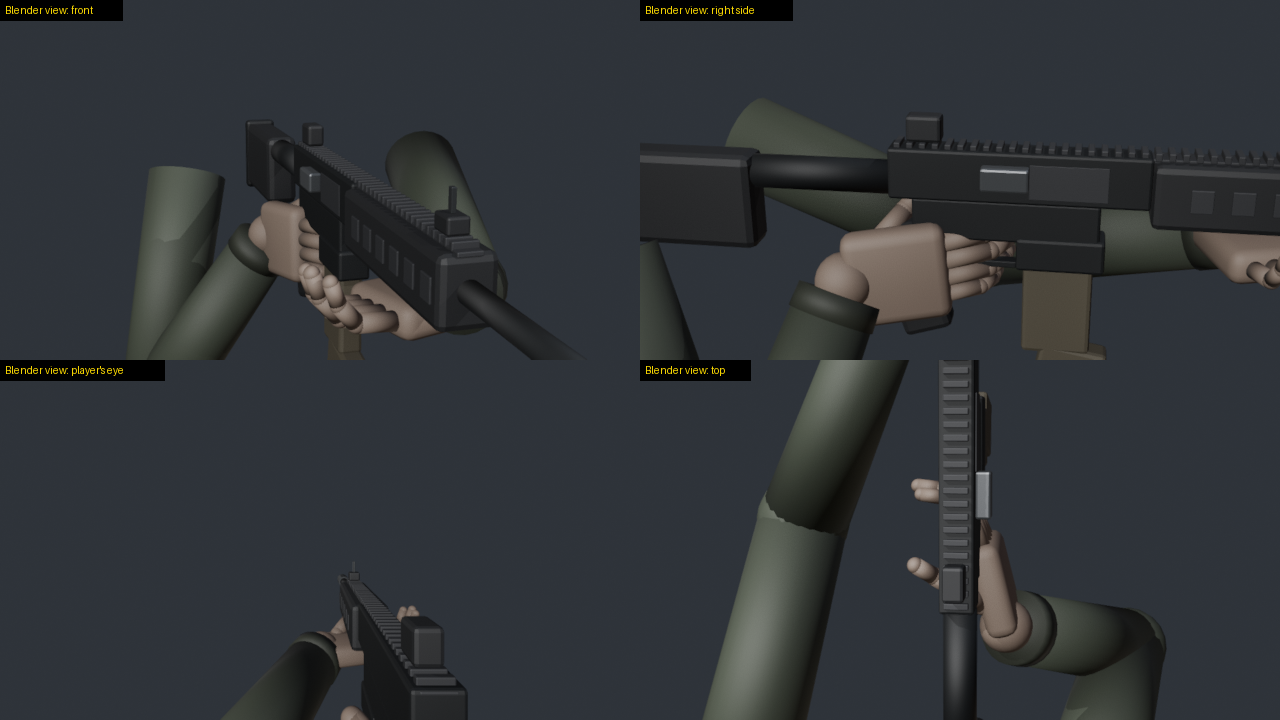
Models are weak at judging 3D space from pictures: which side of a rifle faces the eye, whether a finger sits inside the receiver, whether any turn of the gun can ever show its ejection port. Pose Lab gives a model numbers instead. It reports positions in named frames and how deep anything clips. It measures how squarely a surface faces the eye and what the eye can see. Its solver searches rifle moves against goals and reports which goals no move can meet.
I built it while hand-making chamber checks for my first-person shooter. One question took me several full Blender
runs: can turning the rifle show its ejection port to the eye? With Pose Lab it is one solve call. On my game's AK
rig, turning alone met the goal in 0 of 60 samples. That is a fact of the geometry: the eye looks along the barrel.
Turning and moving the rifle met every goal in about 20 s. The built-in sample rig shows the same result: 0 of 60
samples for turning alone, and every goal met in 9 s for turning and moving.
What it gives a model
| Tool | Answers |
|---|---|
list_rigs, load_rig, describe |
the rigs, the frames, the sign rules, named points, clips, moving parts |
pose_idle, pose_clip, move_part, snapshot |
put the rig in a pose: a clip at a time, the carrier drawn back, saved poses |
move_gun |
roll, swing, pitch and move the rifle; the hands keep their hold by arm IK |
reach |
a wrist onto a point by arm IK (try elbow poles to clear a forearm) |
where, distance |
positions in a named frame |
clearance |
how deep the rifle sits inside a forearm, palm or finger, and where |
faces_eye, visible, screen |
how squarely a surface faces the eye, how much of it the eye sees, where it falls on screen |
solve |
searches rifle moves against goals; reports each goal and how often any sample met it |
render |
a contact sheet: the player's eye and outside views, each tile labelled as a Blender view |
Frames and signs
Every position goes in and comes out in a named frame, so no one has to guess axes:
gun: the gun bone as it stands, Unreal-style axes, cm: +X the gun's left, +Y along the barrel, +Z up (the default)arms: the arms' space, Unreal-style axes, cmview: from the eye, cm: +X right, +Y forward, +Z up
Turns use the player's words: roll + turns the gun's right side up, swing + takes the muzzle left, pitch + the
muzzle up. Moves (right, forward, up) are in the view.
A hand round its grip touches the rifle on the idle pose already (a finger on the trigger, fingers round the
handguard). Call clearance at pose_idle for that baseline, and leave those segments out with ignore wildcards.
Install
You need Blender and Python 3.10 or newer. I tested it on Windows 10 with Blender 5.2.2 and Python 3.14. I have not tested macOS, Linux or older Blender versions yet.
uvx poselab-mcp
or pip install poselab-mcp and run poselab-mcp.
Add it to Claude Code:
claude mcp add poselab -- uvx poselab-mcp
or to any MCP client's configuration:
{
  "mcpServers": {
    "poselab": {
      "command": "uvx",
      "args": ["poselab-mcp"],
      "env": { "POSELAB_BLENDER": "C:/Program Files/Blender Foundation/Blender 5.2/blender.exe" }
    }
  }
}
Settings
| Variable | Meaning |
|---|---|
POSELAB_BLENDER |
Blender's executable, if it is not on the PATH or in the usual install folder |
POSELAB_RIGS |
a rigs.json describing your own rigs (see examples/rigs.example.json) |
POSELAB_OUT |
the only folder Pose Lab writes to (renders, the worker's log); default ~/.poselab |
Rigs
The built-in sample (load_rig {"rig": "sample"}) needs no files. Pose Lab builds it in Blender from code: two
arms with Unreal mannequin bone names hold an AR-style rifle with a charging handle that slides back.
Your own rigs come from FBX files: the arms mesh, an idle pose, the rifle, and clips. Describe them in a
rigs.json (copy examples/rigs.example.json) and point POSELAB_RIGS at it. Clips can be FBX animations on the same
skeleton, or <clip>.pose.json bone data: {"fps": 30, "frames": [{"bone": [[x, y, z], [w, x, y, z]], ...}, ...]},
local location and rotation per bone on the idle armature. (Blender misreads an FBX animation it exported itself when
it imports it again; bone data avoids that. describe reports each FBX clip's skeleton fit.)
Safety
- Pose Lab only reads your rig files. It writes nothing but renders and its log, and only inside
POSELAB_OUT. - The Blender worker listens on 127.0.0.1 only, on a free port, and answers only requests that carry the session's random token. It runs only Pose Lab's own commands.
How it works
poselab_mcp/server.py: the MCP server (the official Python SDK, stdio).poselab_mcp/worker_client.py: starts one headless Blender on the first call and keeps the rig loaded.poselab_mcp/blender/lab.py: inside Blender: the rig, the frames, the measures, the IK, the solver, the renders.poselab_mcp/blender/sample.py: the built-in sample rig.
Test
python examples/selftest.py
It starts the server as an MCP client does and loads the sample rig. Then it replays the question above: turning
alone never shows the port, and turning and moving does. The contact sheet lands in ~/.poselab/renders/sheet.png.
License
MIT
1 maintainer

Metadata
1 maintainer
Release files for poselab-mcp 0.1.0
For a detailed explanation of source distributions (sdists) and built distributions (wheels), please see the package formats documentation.
Source distribution (sdist)
| File | Size | Uploaded | |
|---|---|---|---|
| poselab_mcp-0.1.0.tar.gz | 589.8 kB | Details |
Built distribution (wheel)
| File | Interpreter | ABI | Platform | Reset |
|---|---|---|---|---|
| poselab_mcp-0.1.0-py3-none-any.whl | Python 3 | none | any | Details |
Total release size: 617.4 kB
Release files / poselab_mcp-0.1.0.tar.gz
| Download URL | poselab_mcp-0.1.0.tar.gz |
|---|---|
| Size | 589.8 kB |
| Tags | Source |
|
SHA-256 checksum How to use checksums |
eeee12a773572060dde276dd812ddce8c2c342f11e1df60ed326331364cfd74e
|
|
BLAKE2b-256 checksum How to use checksums |
38dd48b8ef9756ceb34b11a02bd83e90da36c8aa4c2e284c6527f1b0d38eea82
|
| Upload date | |
|
Uploaded using Trusted Publishing? What is trusted publishing? |
No |
| Uploaded via |
twine/7.0.0 CPython/3.14.0
|
Release files / poselab_mcp-0.1.0-py3-none-any.whl
| Download URL | poselab_mcp-0.1.0-py3-none-any.whl |
|---|---|
| Size | 27.6 kB |
| Tags | Python 3 |
|
SHA-256 checksum How to use checksums |
7a3279080b1a90852f347782e138143311b7b75617ebb1eaf31eadafe7d3d826
|
|
BLAKE2b-256 checksum How to use checksums |
8150517c1976407dab5a90dcf7566596f094c64a45c5aea32f57d43121c86915
|
| Upload date | |
|
Uploaded using Trusted Publishing? What is trusted publishing? |
No |
| Uploaded via |
twine/7.0.0 CPython/3.14.0
|














