
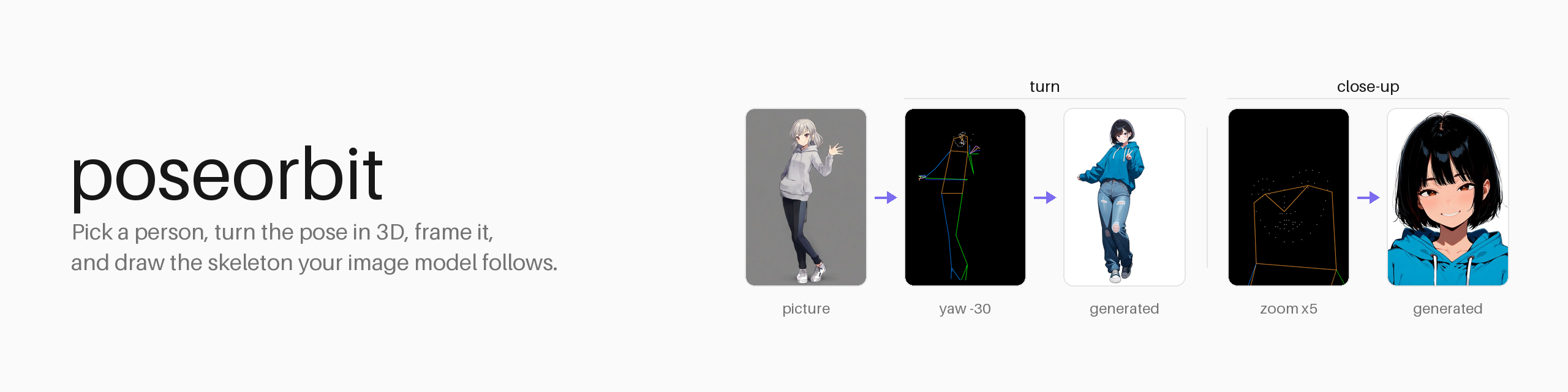
poseorbit





Take the pose from a picture, pick whose, look at it from another angle or closer in, and get the skeleton your image model follows.
poseorbit finds every person in a picture, lets you choose one (or everyone), turns the whole-body pose (hands and face included) in 3D, frames it (from a face close-up to room around the figure), and draws the skeleton in the style a pose-conditioned model was trained on. It is a small Python package: CPU only, no torch, usable as a library, a command, or an HTTP server.
from PIL import Image
from poseorbit import Camera, Detector, Framing, pose

result = pose(Detector(), Image.open("group.png"), size=(832, 1216),
              person=1, camera=Camera(yaw=40, pitch=10),
              framing=Framing(zoom=2, x=0.5, y=0.35), style="openpose")
result.skeleton.save("skeleton.png")   # feed this to your ControlNet or pose adapter
Examples
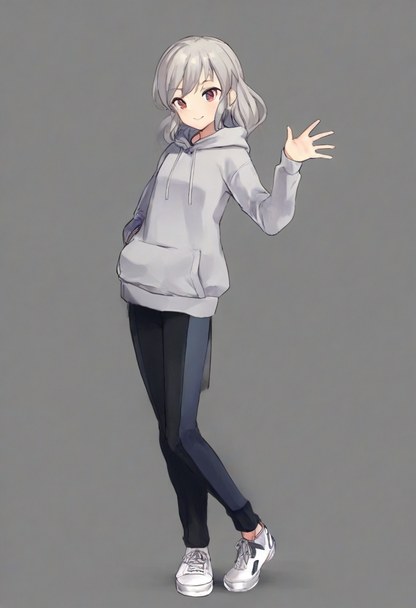
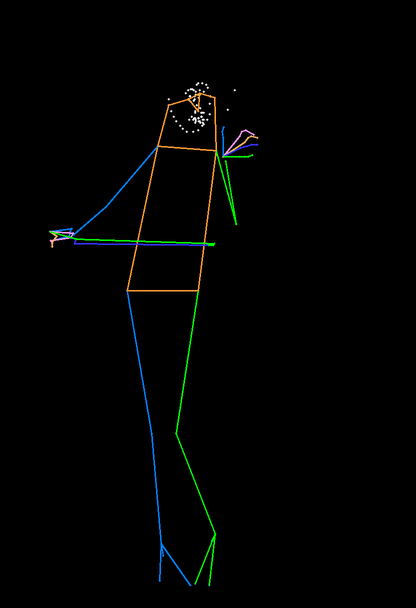
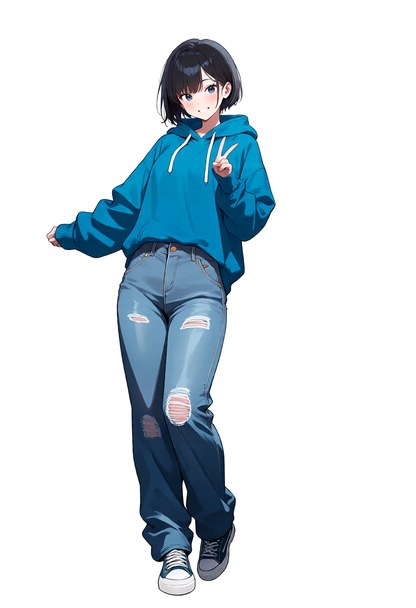
One reference, two skeletons, two pictures generated from them:
| Reference | Turned: Camera(yaw=-30) |
Generated | Close-up: Framing(zoom=5) on the face |
Generated |
|---|---|---|---|---|
 |
 |
 |
 |
 |
All pictures were generated for this README. The reference: Illustrious XL
2.0, "1girl, solo, full body, standing, waving, one hand raised, head tilt,
grey hoodie, black pants, white sneakers, simple background", seed 13. The
other two: Anima Base 1.0 with Anima-Control-Pose (dwpose style), 832×1216,
30 steps, CFG 5, "1girl, solo, short black hair, blue oversized hoodie, loose
jeans, sneakers, front view, looking at viewer, smile, simple background"
plus "full body" or "portrait, face focus, close-up", seed 43 each (picked
from four and three). The skeleton sets the figure, the prompt everything
else. Note that Anima and Anima-Control-Pose are under CircleStone Labs'
non-commercial licence (pictures made with them are not restricted);
poseorbit itself does not use or include them.
How it works
flowchart LR
  A[picture] --> B["find people<br/>YOLOX"]
  B --> C["133 keypoints<br/>DWPose"]
  B --> D["depth<br/>RTMW3D"]
  C --> E[choose a person<br/>or everyone]
  D --> E
  E --> F["turn<br/>yaw / pitch"]
  F --> G["fit onto the<br/>output canvas"]
  G --> H["frame<br/>zoom / centre"]
  H --> I["draw<br/>dwpose / openpose"]
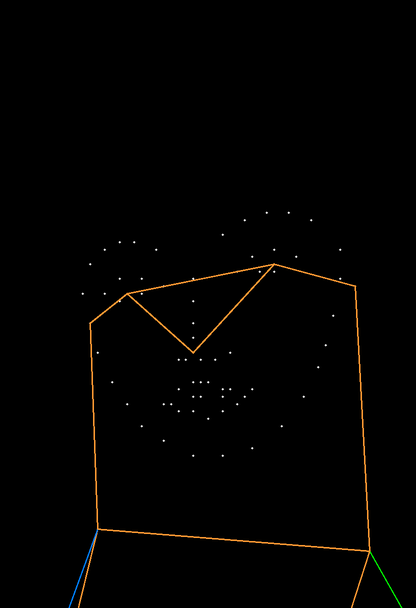
One person detector feeds two keypoint models on the same boxes: DWPose gives x and y, RTMW3D (only when a turn is asked for) gives depth. The camera is orthographic and orbits the middle of the drawn people's hips. The turned pose is letterboxed onto the output's canvas, framed like a cropped photo, and drawn on black.
What sets it apart
Turning a pose in 3D for ControlNet is not new (see related projects). poseorbit's choices are different:
- Depth for all 133 whole-body points, from one picture. x and y come from DWPose (RTMW-DW-x-l) and depth from RTMW3D-x, run on the same person boxes. Hands and face turn with the body instead of staying flat or being dropped, and the front view is pixel-identical to plain 2D detection.
- Choose a person in a group. Everyone found comes back left to right with a box, so index 1 is the same person on every call. Draw one of them or all of them, turned together around a shared centre so the group keeps its layout.
- Drawn for the model that will read it.
dwposeis rtmlib's COCO-WholeBody drawing (thin lines, hands and face), the usual input of DWPose-trained adapters.openposeis the thick, body-only drawing xinsir's OpenPose ControlNet for SDXL was trained on, line width growing with the canvas as its model card specifies. - Framing, not just turning. Zoom from ×0.5 to ×6 around any point of the output canvas: a face or upper-body close-up from a full-body reference, or a smaller figure with room around it. The answer says how many body joints are left in the frame, so a client can warn when a body-only skeleton has little to follow.
- What you preview is what is followed. The whole mapping (turn, letterbox, framing) is specified below, so a browser viewer can show exactly what will be drawn. Latentry's three.js view is tested against it to within 0.05 px.
- No framework attached. No ComfyUI or web UI required, no torch, no
GPU: a library,
python -m poseorbit draw, orpython -m poseorbit serveansweringPOST /api/pose. A generation server can embed the same handler (poseorbit.api.handle) so both speak one API. - Guard rails from measurement. Turning is held to ±90° yaw and ±45° pitch, where single-picture depth is still mostly right. Detections with fewer than 8 of 17 body joints seen are not offered as people (a blank canvas otherwise "finds" one).
Measured
Generated with and without the skeleton, same seed, 832×1216. The score is PCK@0.1 of the re-detected output against the skeleton: 1.0 means every point landed within 10% of the diagonal of where the skeleton put it.
| Model | Pose | Without | With |
|---|---|---|---|
Illustrious XL 2.0 + xinsir OpenPose ControlNet (openpose) |
walking, front | 0.76 | 0.94 |
| same | standing, front | 0.47 | 0.76 |
| same | walking, turned yaw 45° / yaw −60° pitch 15° | — | 0.94 / 0.88 |
Anima Base 1.0 + Anima-Control-Pose (dwpose) |
walking, front | 0.06 | 0.71 |
| same | walking, turned yaw 45° | — | 0.94 |
Framed, scored on the body and face points left in the frame (the prompt says "upper body" or "portrait, close-up" in both runs):
| Model | Framing | Without | With |
|---|---|---|---|
| Illustrious XL 2.0 + xinsir ControlNet | upper body, ×2 | 0.02 | 1.00 |
| same | face, ×5 (7 body joints left) | 0.48 | 0.99 |
| Anima Base 1.0 + Anima-Control-Pose | upper body ×2 / face ×5 | 0.93 / 0.97 | 0.93 / 0.99 |
Anima already centres a close-up by itself, so its score barely moves; with the skeleton the head's tilt and turn follow the reference. Detection takes about 0.7 s for one person on a desktop CPU, all three models together.
Install
Python 3.10 or newer.
pip install poseorbit
pip install "poseorbit[server]"     # with the HTTP server
The latest main, before it is released:
pip install "poseorbit @ git+https://github.com/33rd-kk/poseorbit".
The model files (about 700 MB, all Apache-2.0) download from Hugging Face on
first use into ~/.cache/poseorbit, or the weights_dir you give Detector.
Use
From Python
from pathlib import Path
from PIL import Image
from poseorbit import ALL_PEOPLE, Camera, Detector, Framing, pose

detector = Detector(weights_dir=Path("weights"))   # load once, reuse; thread-safe
picture = Image.open("reference.png")

people = detector.detect(picture)                  # everyone, left to right
print([p.bbox for p in people])                    # boxes in the picture's pixels

result = pose(detector, picture, size=(832, 1216), person=ALL_PEOPLE,
              camera=Camera(yaw=-30), style="dwpose")
result.skeleton            # PIL image, 832x1216, on black
result.joints_in_frame     # body joints left inside the canvas
With diffusers
import torch
from diffusers import ControlNetModel, StableDiffusionXLControlNetPipeline

controlnet = ControlNetModel.from_pretrained("xinsir/controlnet-openpose-sdxl-1.0", torch_dtype=torch.float16)
pipe = StableDiffusionXLControlNetPipeline.from_pretrained(
    "stabilityai/stable-diffusion-xl-base-1.0", controlnet=controlnet, torch_dtype=torch.float16
).to("cuda")

skeleton = pose(detector, picture, size=(832, 1216), camera=Camera(yaw=45), style="openpose").skeleton
image = pipe("1girl, full body", image=skeleton, width=832, height=1216).images[0]
From the command line
python -m poseorbit draw ref.png skeleton.png --size 832x1216 --person -1 --yaw 40 --style openpose
python -m poseorbit draw ref.png face.png --size 832x1216 --zoom 5 --centre 0.62,0.2
Over HTTP
python -m poseorbit serve --port 7870 # set POSEORBIT_TOKEN to require a Bearer token
curl -s localhost:7870/api/pose -H 'Content-Type: application/json' -d '{
  "image_base64": "<base64 PNG or JPEG>", "width": 832, "height": 1216,
  "person": 0, "want_3d": true,
  "camera": { "yaw": 30, "pitch": 10, "framing": { "zoom": 2, "x": 0.5, "y": 0.35 } },
  "style": "openpose" }'
{ "skeleton_base64": "…png…", "width": 832, "height": 1216, "person": 0,
  "camera": { "yaw": 30, "pitch": 10, "framing": { "zoom": 2, "x": 0.5, "y": 0.35 } },
  "style": "openpose", "limits": { "yaw": 90, "pitch": 45, "zoom": [0.5, 6] },
  "joints_in_frame": 13,
  "people": [ { "bbox": [0.31, 0.2, 0.8, 1.0],
                "points_3d": [[0.61, 0.24, -0.03], "…"], "scores": [0.92, "…"] } ] }
Everything but image_base64 is optional. person is an index into
people (left to right), -1 for everyone, or absent for the most
confident. want_3d adds each person's 133 points as [x, y, z] in units of
the picture's width, for a 3D viewer. Out-of-range angles and zoom are
clamped; a picture with nobody in it, or a person index past the end, gets a
400 with a detail message. Server and API are 127.0.0.1-only by default.
Reference
| Name | What it is |
|---|---|
Detector(weights_dir=None, device="cpu") |
Loads the models on first use. detect(image, depth=False) -> list[Person], left to right; raises NoPersonError. |
pose(detector, image, size, person=None, camera=None, style="dwpose", depth=False, framing=None) -> PoseResult |
Detect, choose, turn, frame and draw in one call. |
Camera(yaw=0, pitch=0) |
Degrees. +yaw swings the camera to the viewer's right, +pitch raises it. Clamped to MAX_YAW (90) / MAX_PITCH (45). |
Framing(zoom=1, x=0.5, y=0.5) |
The canvas point (x, y) (fractions) goes to the middle, scaled by zoom (MIN_ZOOM 0.5 to MAX_ZOOM 6). |
PoseResult |
skeleton (PIL image), people, person, camera and framing as used, joints_in_frame. |
Person |
keypoints (133×2), scores (133), depth (133 or None), bbox, visible (body joints seen), points_3d. |
render(keypoints, scores, size, style) |
Draw (N, 133, 2) keypoints on a black size canvas. |
letterbox(skeleton, size) |
Fit a skeleton drawn at another size onto size, uniformly scaled and centred. |
poseorbit.api.handle(detector, body, default_style) |
The /api/pose handler without a web framework, to embed in another server. |
Skeleton styles
| Style | Drawing | For |
|---|---|---|
dwpose |
rtmlib's COCO-WholeBody: thin coloured lines, body, feet, hands and face | DWPose-trained adapters, such as Anima-Control-Pose |
openpose |
18 OpenPose body points, thick translucent limbs scaled with the canvas | OpenPose ControlNets, such as xinsir/controlnet-openpose-sdxl-1.0 |
Coordinates
x right, y down, depth away from the viewer, all in the picture's pixels
(the API scales them by the picture's width). The camera at (yaw, pitch)
stands at (sin yaw · cos pitch, −sin pitch, −cos yaw · cos pitch) from the
centre (the middle of the drawn people's hips). In a y-up, z-toward-viewer
frame such as three.js that is (sin yaw · cos pitch, sin pitch, cos yaw · cos pitch).
The turned picture is letterboxed onto the output canvas, then framed:
canvas point (x, y) (fractions) goes to the middle and everything scales
by zoom around it. Framing never moves the point the camera orbits.
Limits
- Depth is estimated from a single picture: past a side view, which limb is in front gets unreliable. That is why the camera is limited.
- Chosen from a group, a person is drawn where they stand in the picture, letterboxed onto the output. A small figure gives a small skeleton, which models follow loosely; zoom in on them.
- Some models do not tell front from back by the skeleton alone. Anima, for
one, often draws a strongly turned figure from behind. What helps: turn
away from the side the figure already shows (look at
Person.depth: the nearer shoulder is the smaller value), keep the turn moderate, and put "front view" in the prompt and "from behind" in the negative. - Animals and non-human figures are not detected.
Related projects
Other ways to get a turned or posed skeleton, each with its own strengths:
- 3D Openpose Editor: a browser 3D mannequin editor for Stable Diffusion web UI, with hand editing and depth, normal and canny maps.
- ComfyUI-Magos-Nodes: a DWPose skeleton editor for ComfyUI with NLF-based 3D, an orbit view and animated cameras for video.
- ComfyUI-Fisher-Pose: a posable MakeHuman mannequin and camera moves for Qwen-Image editing.
- RTMW / RTMW3D and rtmlib: the models and the runtime poseorbit is built on.
Used by
Latentry, a local web UI for diffusion backends, uses poseorbit for its pose slot and its 3D pose view.
Development
pip install -e ".[test,server]"
pytest                             # geometry and API checks; no model download
python scripts/make_banner.py      # redraws docs/assets/banner-*.png
Security
Report vulnerabilities privately through GitHub's reporting; see SECURITY.md.
License
Apache-2.0. See LICENSE, and NOTICE for the third-party
work poseorbit builds on (rtmlib; the OpenPose drawing from xinsir's model
card and controlnet_aux). The model files (OpenMMLab's YOLOX, RTMW and
RTMW3D, Apache-2.0) are downloaded, not shipped. Models you condition with
the skeletons keep their own licences. The example pictures in
docs/assets were generated by the author for this README.
1 maintainer

Metadata
1 maintainer
Release files for poseorbit 0.1.1
For a detailed explanation of source distributions (sdists) and built distributions (wheels), please see the package formats documentation.
Source distribution (sdist)
| File | Size | Uploaded | |
|---|---|---|---|
| poseorbit-0.1.1.tar.gz | 26.9 kB | Details |
Built distribution (wheel)
| File | Interpreter | ABI | Platform | Reset |
|---|---|---|---|---|
| poseorbit-0.1.1-py3-none-any.whl | Python 3 | none | any | Details |
Total release size: 54.4 kB
Release files / poseorbit-0.1.1.tar.gz
| Download URL | poseorbit-0.1.1.tar.gz |
|---|---|
| Size | 26.9 kB |
| Tags | Source |
|
SHA-256 checksum How to use checksums |
4b51292a1c1b4d8a4d1116e379e0fa456f55a89b8625a6099ee95752f8c49fad
|
|
BLAKE2b-256 checksum How to use checksums |
48b5380cadd785ec9e437910cf1eb83c70b38ab18e5975fec84381cd0a37ebc5
|
| Upload date | |
|
Uploaded using Trusted Publishing? What is trusted publishing? |
Yes |
| Uploaded via |
twine/7.0.0 CPython/3.13.14
|
Provenance
Provenance describes where a file came from. On PyPI, provenance is shared via attestations, which provide a verifiable record of the build or publishing details. View details, limitations and caveats.


PyPI Publish Attestation
PyPI verified that this artifact, at this checksum, originated from the publisher listed below.
Signed by GitHub Actions, verified by PyPI on Oct 5, 2026.
Transparency logRelease files / poseorbit-0.1.1-py3-none-any.whl
| Download URL | poseorbit-0.1.1-py3-none-any.whl |
|---|---|
| Size | 27.5 kB |
| Tags | Python 3 |
|
SHA-256 checksum How to use checksums |
8f965a9c6cf2a1dfa74f13124db45912fd90c2209a2e46ef7af87df9b1dd6a1a
|
|
BLAKE2b-256 checksum How to use checksums |
ff40b689ff0687125b13ef9791e44adbe921f0b8a2240a03e9f80d1995299a6d
|
| Upload date | |
|
Uploaded using Trusted Publishing? What is trusted publishing? |
Yes |
| Uploaded via |
twine/7.0.0 CPython/3.13.14
|
Provenance
Provenance describes where a file came from. On PyPI, provenance is shared via attestations, which provide a verifiable record of the build or publishing details. View details, limitations and caveats.
PyPI Publish Attestation
PyPI verified that this artifact, at this checksum, originated from the publisher listed below.
Signed by GitHub Actions, verified by PyPI on Oct 5, 2026.
Transparency log












