
Use AI to create custom filters on Poshmark

Project description
poshmarkfilter
A Python library for creating custom filters on Poshmark. Use AI to extract (virtually) any information you want from a Poshmark listing.
Requirements
- Python 3.11+
- An OpenAI API key
Installation
pip3 install git+https://github.com/samuel-poon/poshmarkfilter-py
Quick start
Include OPENAI_API_KEY in your environment variables. See .env.example for reference.
It is highly recommended that you store your API keys in a .env file and load them through python-dotenv.
from typing import Literal
import json

from dotenv import load_dotenv
from poshmarkfilter import get_poshmark_listings, scan_listing, Filter

filters = [
    Filter(
        name='lapel_style',
        description='The style of the lapel on the jacket. Options include "notch", "peak", and "shawl".',
        type_annotation=Literal['notch', 'peak', 'shawl']
        ),
    Filter(
        name='material',
        description='The material of the garment. Options include "cotton", "wool", "polyester", "silk", and "other".',
        type_annotation=Literal['cotton', 'wool', 'polyester', 'silk', 'other']
        ),
    Filter(
        name='pit_to_pit',
        description='The pit-to-pit measurement of the garment in inches, rounded to the nearest integer. Prioritize the measurement in the description over the images. If it is not provided, return 0.',
        type_annotation=int
    )
]

listings = get_poshmark_listings('https://poshmark.ca/category/Men-Suits_&_Blazers-Sport_Coats_&_Blazers?size%5B%5D=40R', count=10)

results = {}
for listing in listings:
    chat_completion = scan_listing(listing, filters=filters) # Returns a ParsedChatCompletion object
    filtered_result = json.loads(chat_completion.choices[0].message.content)

    results[listing.url] = filtered_result

print(json.dumps(results, indent=4)) # Pretty print results
A closer look
Filter
The core of poshmarkfilter is the Filter object. This is how you define the criteria you want to filter for. In the example above, I filter for lapel style, material, and the pit-to-pit measurement of the jacket.
Filter takes a name, description, and a type_annotation. Any type_annotation compatible with pydantic should work.
get_poshmark_listings
get_poshmark_listings gets the first count listings from a Poshmark feed in a url. Returns a list of Listing objects.
poshmark_listings = get_poshmark_listings(
    url='https://poshmark.ca/link/to/feed', # Mandatory (str), the URL of the Poshmark feed to retrieve listings from
    count=100,                              # Optional (int, default=100), the number of listings to retrieve
    starting_max_id=1,                      # Optional (int, default=1), the starting page to retrieve listings from
    delay_seconds=2,                        # Optional (int, default=2), the delay between each page request
)
Recommendations:
- For best results, use
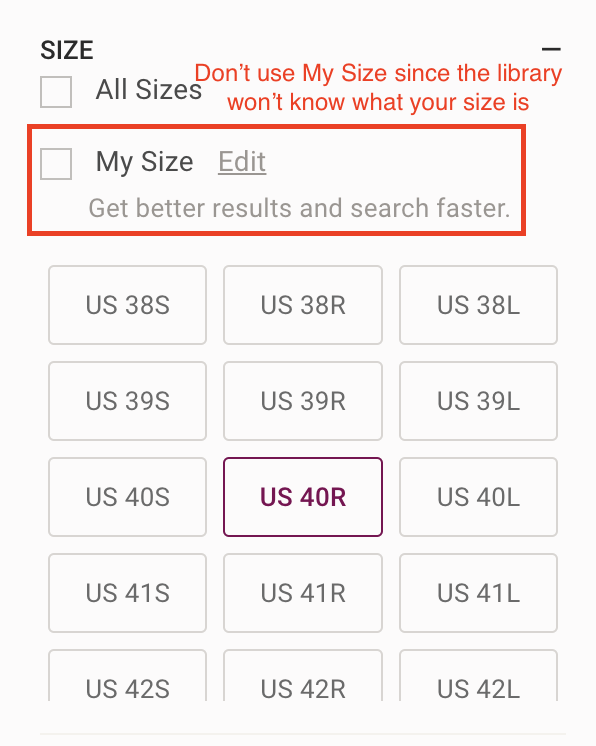
get_poshmark_listingsin conjunction with the existing filters on Poshmark. In the quick start example, I have filtered for Men's Suits & Blazers, Sports Coats & Blazers, in a size 40R. - This library does not have access to your account. You must manually filter for your size as "My Size" will not work.
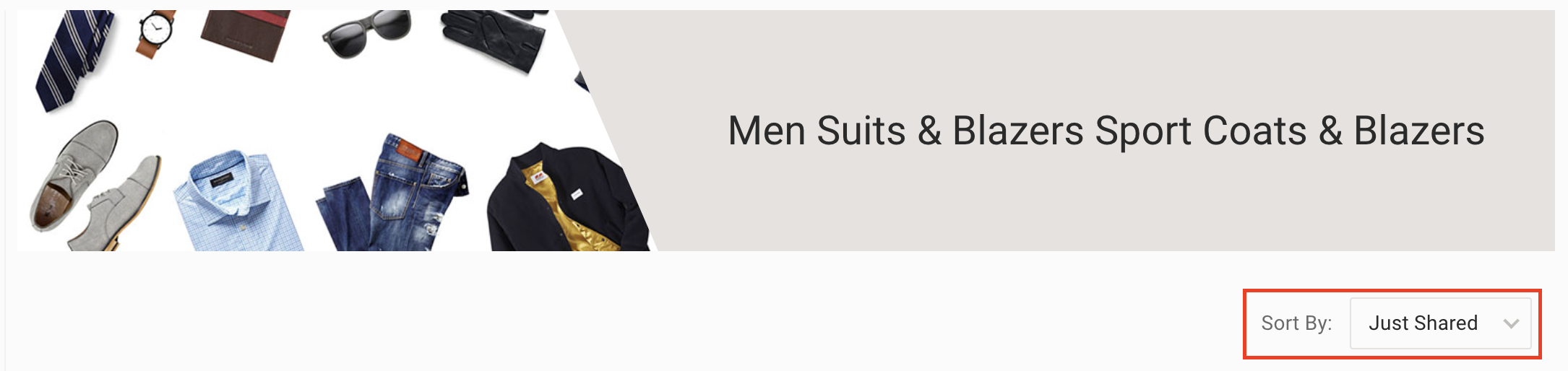
get_poshmark_listingsreturns the firstcountlistings. If you are not scanning every listing, consider how you sort the results.
scan_listing
scan_listing takes a Listing and filters them based on filters. Returns a ParsedChatCompletion object whose message content is {"filter_name_1":"filter_1_result", "filter_name_2":"filter_2_result",...}.
chat_completion = scan_listing(
    listing=listing,            # Mandatory (poshmarkfilter.Listing), the Listing object to scan
    filters=filters,            # Mandatory (Iterable[poshmarkfilter.Filter]), the filters to include in the chat completion
    include_cover_shot=True,    # Optional (bool, default=True), if True, includes the cover shot in the prompt.
    include_all_pictures=False, # Optional (bool, default=False), if True, includes all pictures in the prompt.
    openai_client=None,         # Optional (openai.Client), the OpenAI client to use. If None, creates an OpenAI client using the OPENAI_API_KEY environment variable.
    model='gpt-4o-mini',        # Optional (str, default='gpt-4o-mini'), the OpenAI model to use.
    detail='low',               # Optional (str, default='low'), the detail level of the OpenAI model. Options include 'low', 'medium', and 'high'.
    max_tokens=None             # Optional (int | None, default=None), the maximum number of tokens to generate.
)
Recommendations:
- At a minimum, all listings scanned through
scan_listingwill include the title and description of the listing. By default, this function will also provide the cover shot to the model, but if this is unnecessary, I recommmend settinginclude_cover_shottoFalse. - Unless you absolutely need to include all pictures in the prompt (e.g. for specific measurements), I recommend keeping
include_all_picturestoFalse. Setting this toTruecan be expensive.
Estimating costs
Based on my personal usage, scanning a listing using gpt-4o-mini with include_cover_shot=True and include_all_pictures=False at detail=low (the default options) consumes roughly 3k input tokens. Assuming that each completion takes 20 output tokens, this means each call costs ~$0.0005 or $0.46/1000 calls.
If the filter can be processed using the title and description of the listing alone, you can drastically reduce the cost by excluding all photos from the scan.
Release history Release notifications | RSS feed


Download files
Download the file for your platform. If you're not sure which to choose, learn more about installing packages.
Source Distribution
Built Distribution
Filter files by name, interpreter, ABI, and platform.
If you're not sure about the file name format, learn more about wheel file names.
Copy a direct link to the current filters
File details
Details for the file poshmarkfilter-0.0.2.tar.gz.
File metadata
- Download URL: poshmarkfilter-0.0.2.tar.gz
- Upload date:
- Size: 10.3 kB
- Tags: Source
- Uploaded using Trusted Publishing? No
- Uploaded via: twine/6.1.0 CPython/3.13.1
File hashes
| Algorithm | Hash digest | |
|---|---|---|
| SHA256 |
4d7f39f52c33acf747c0a72e58ad2c0a365e1fa6cdca2d23b4874241e0471ba1
|
|
| MD5 |
d0933c868221b3f4bdce8e26f140cdaf
|
|
| BLAKE2b-256 |
19a42272d85a0d55883ca34ec612431d69913bb8e2682d51e843426dd8701474
|
File details
Details for the file poshmarkfilter-0.0.2-py3-none-any.whl.
File metadata
- Download URL: poshmarkfilter-0.0.2-py3-none-any.whl
- Upload date:
- Size: 10.0 kB
- Tags: Python 3
- Uploaded using Trusted Publishing? No
- Uploaded via: twine/6.1.0 CPython/3.13.1
File hashes
| Algorithm | Hash digest | |
|---|---|---|
| SHA256 |
2e649217d271c83e8f11f628d1d74a84d57159d3206a9b0f389fced8fdba502e
|
|
| MD5 |
05b31937c64c4c61b78fcb12a12f2825
|
|
| BLAKE2b-256 |
9b97def89112278c23f0241d33445fe2bdfa3237580e3c8a0778b91e710114c2
|






