
No project description provided

Project description
Poster Generator
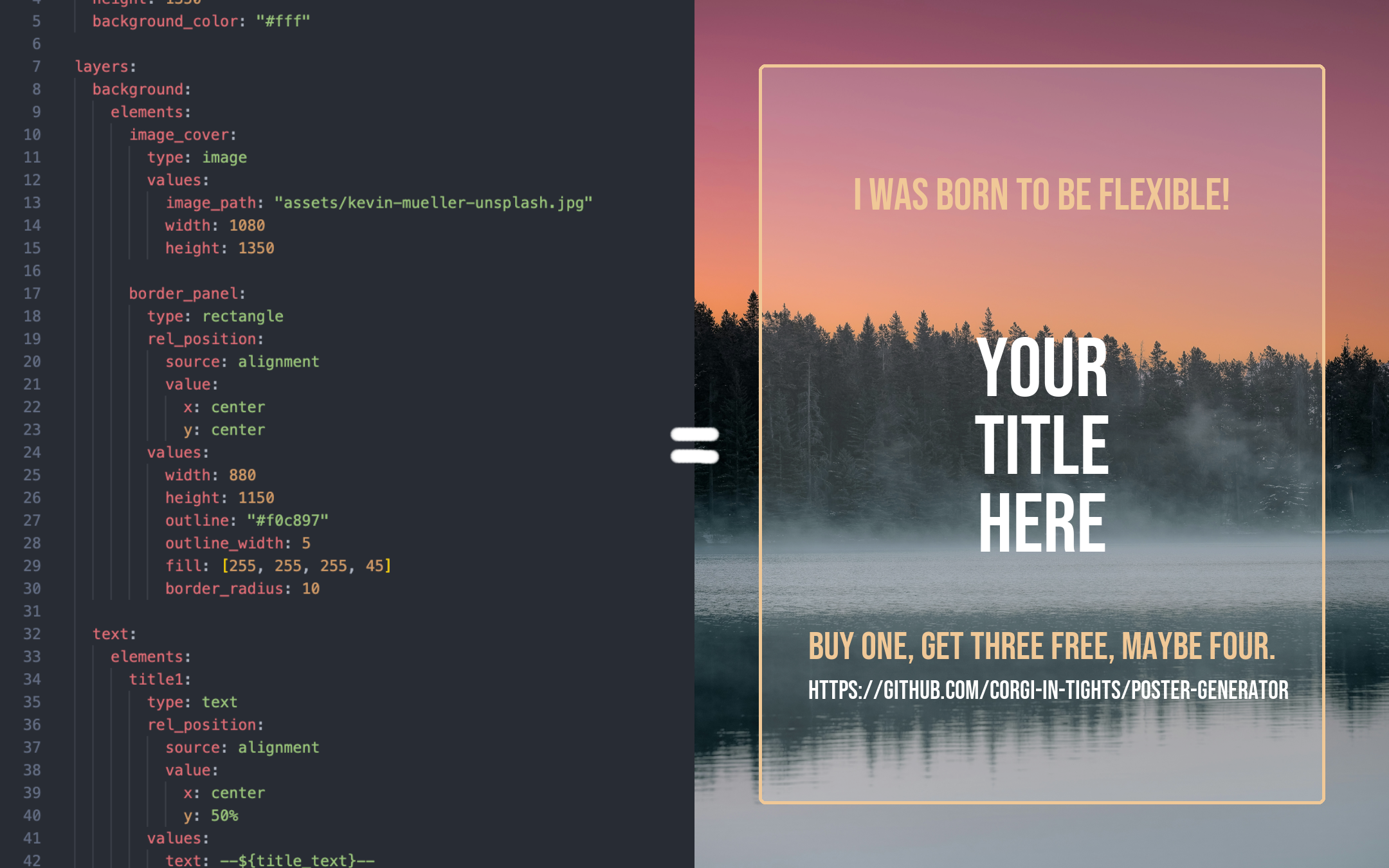
A flexible Python library for building and rendering posters/infomatics with focus on text templates and dynamic usage.


Features
•	🧱 Element and layer system with blend settings leveraging Pillow

•	🗂️ Canvas element querying, grouping, deserialization and composites

•	📄 YAML/JSON template loaders with variable substitution for reusable layouts

•	🎯 'Canva' snapping-inspired relative positioning for quick template development

•	🔌 Extensible, format-agnostic registry for every inheritable class

•	🛠️ Function-driven operations (e.g., hue shifting, scaling, transforms)

•	📣 Designed for automated poster and social media post generation
⸻
Installation
Using Poetry (recommended)
poetry add poster-generator
Using pip
pip install poster-generator
From source
git clone https://github.com/corgi-in-tights/poster-generator.git
cd poster-generator
poetry install
Requirements
- Python >= 3.13
- Pillow >= 12.0.0
- PyYAML >= 6.0.3
Quick Start
Check out the examples/ directory for concrete examples and TEMPLATES.md for a reference on the in-built template format.
Reference
Elements
Elements are the basic pieces you use to build a poster.
The library comes with a few ready-to-use ones:
- TextElement (
text) – Regular text with custom fonts, wrapping, alignment, and opacity. - ImageElement (
image) – Shows an image from a file path and lets you resize it however you need. - RectangleElement (
rectangle) – A simple box shape with size, corner radius, fill, and opacity options. - EllipseElement (
ellipse) – Like a rectangle, but drawn as an oval/circle instead.
To learn how to register custom elements for templates, please see TEMPLATES.md.
canvas = Canvas(width=500, height=500)

image = ImageElement(
    image_path="image.png",
    width=500,
    height=500
)  # position defaults to (0, 0)
canvas.add_element("background", image, layer="background")

text = TextElement(
    position=(100, 100),
    text="Hello World",
    font_size=48,
    color="#000000",
    font_family="Open Sans"  # See FontManager.get_font_families() for a full list!
)
canvas.add_element("my_text_id", text, groups="titles")

image = canvas.render()
image.show()
Layers
Layers help organize elements and control rendering order:
canvas.add_element("bg", background, layer="background")
canvas.add_element("title", text, layer="foreground")
Groups
Groups allow you to manage related elements:
canvas.add_element("title", text, groups=["headers", "top-section"])
canvas.add_element("subtitle", subtitle, groups=["headers", "top-section"])

# Query elements by group
headers = canvas.get_elements(groups="headers")
Operations
Apply transformations to elements:
from poster_generator.operations import apply_hue_shift, set_hue_from_hex

# Hue shift
element.apply_operation(apply_hue_shift, degrees=45)
To learn how to register custom operations for templates, please see TEMPLATES.md.
Element Queries
Query elements by identifier, group, or layer:
# Get specific elements
elements = canvas.get_first_element(identifier="my_subtitle")

# Combine filters (requires all to match by default)
specific = canvas.get_elements(
    groups="images",
    layers="background",
    # require_all=True,
)
There are a few other methods, mostly to do with drawing, removing elements, cropping, etc. I recommend taking a look to see if any are useful to you :)
Contributing & Issues
Contributions are welcome! Please feel free to submit a PR. I am open to significant design changes if they match the project's intention.
If any critical bugs come up, please open a GitHub issue, feature requests are fine but a PR would be much preferred :p
License
This project is licensed under the MIT License - see the LICENSE file for details.
Acknowledgments
Release history Release notifications | RSS feed


Download files
Download the file for your platform. If you're not sure which to choose, learn more about installing packages.
Source Distribution
Built Distribution
Filter files by name, interpreter, ABI, and platform.
If you're not sure about the file name format, learn more about wheel file names.
Copy a direct link to the current filters
File details
Details for the file poster_generator-1.2.0.tar.gz.
File metadata
- Download URL: poster_generator-1.2.0.tar.gz
- Upload date:
- Size: 401.5 kB
- Tags: Source
- Uploaded using Trusted Publishing? No
- Uploaded via: twine/6.2.0 CPython/3.13.9
File hashes
| Algorithm | Hash digest | |
|---|---|---|
| SHA256 |
b09be3b36c4f70c28cc322d3786136a09e605d45cc2ece75f6b389d3ebf7cde0
|
|
| MD5 |
4dc78efdafae0c304ccdedcc16af2401
|
|
| BLAKE2b-256 |
171f6b3b097c4226c1acfb661623e0c84b4a4f450dc7773f65a70f73bc4b12c0
|
File details
Details for the file poster_generator-1.2.0-py3-none-any.whl.
File metadata
- Download URL: poster_generator-1.2.0-py3-none-any.whl
- Upload date:
- Size: 410.9 kB
- Tags: Python 3
- Uploaded using Trusted Publishing? No
- Uploaded via: twine/6.2.0 CPython/3.13.9
File hashes
| Algorithm | Hash digest | |
|---|---|---|
| SHA256 |
5da8bf8bb49c875895926e4a5acd18b42b4c89a9dfc2f0e899a9f8f81c3ce71a
|
|
| MD5 |
320e50bb8de4bfdd28a2ddbcb476fb45
|
|
| BLAKE2b-256 |
08898871168f5475e6f183b488ec46871f9d5a76384c1017ecb3aa3015236992
|






