
PostFader: FL Studio MCP Server
Let Claude, Codex, Cursor, or any MCP client work inside the FL Studio project you have open.








Quick start · What it does · Why PostFader · Docs · FAQ
Free and open source. Unofficial: not made by or affiliated with Image-Line.
PostFader is an FL Studio MCP server. It connects your AI assistant to the project you already have open, so the AI can read your mixer, channels, plug-ins and patterns, check your exported mix, write MIDI, and make changes for you. Every supported change is read back from FL Studio, so you see what actually happened.
It runs on your computer. There is no PostFader account, cloud service, or telemetry.
What you can ask for
| Ask your AI | What PostFader does | |
|---|---|---|
| 🔎 Understand a project | "Which instruments aren't routed to the mixer?" | Reads routing, effects, channels, patterns, Playlist tracks, and plug-in parameters. |
| 🩺 Fix a mix | "What are the three biggest problems in this bounce?" | Measures loudness, peaks, tonal balance, stereo width, and vocal masking in the files you export, and compares them with a reference. |
| 🎛️ Change the session | "Pan the backing vocals wider and pull the reverb send down 3 dB." | Sets faders, pan, sends, routing, names, colors, tempo, transport, and any parameter a loaded plug-in exposes, then reads each one back. |
| 🎹 Write music | "Add an 8-bar D Dorian bassline under my chords." | Generates chords, melodies, basslines, and drums; writes them to the Piano Roll or exports MIDI files. |
| 🎚️ Pick sounds | "Choose the sounds yourself from what's loaded." | Picks presets on the instruments in your project and confirms each selection. |
| 🧱 Run a whole task | "Turn this loop into a 16-bar draft, but keep my vocal." | Runs the job as a checked plan you can resume. Export a bounce and it can review the draft and plan one revision. |
Browse all 85 tools in the tool reference.
Quick start
You need: FL Studio 2026 (26.1.3 or newer) on Windows or macOS, Python 3.10 to 3.14, and a virtual MIDI port: the built-in IAC Driver on macOS, or a free app such as loopMIDI on Windows.
- Run the installer. Download the Windows or macOS ZIP from the latest release, extract it, and run the installer inside. It installs PostFader, copies the bridge script into FL Studio, and asks which MIDI port to use.
- In FL Studio, open Options → MIDI settings. Enable your virtual port as both input and output, set the input's controller type to Universal Bridge, and give both the same port number.
- Connect your AI client with the configuration the installer prints (see Works with).
- Ask a question first, like "Summarize my project." PostFader starts read-only, so nothing changes until you ask for an edit.
Using Python directly? Run pip install postfader-fl-studio-mcp, then
postfader setup. The setup guide covers every option, and
postfader-doctor pinpoints anything that isn't connected.
How it works
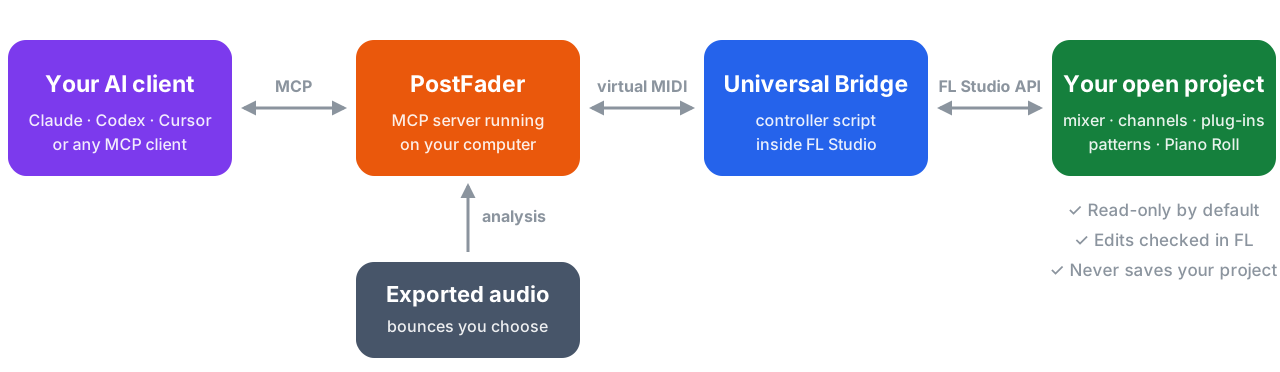
FL Studio only runs scripts from inside itself, so PostFader talks to a small controller script, the Universal Bridge, over a virtual MIDI port. Audio analysis works on files you export, because FL Studio doesn't expose its live output to scripts.
Why PostFader
- Nothing changes until you ask. PostFader starts read-only. Edits need write mode, which the AI turns on for your session only when you ask for a change. Reloading the project turns it off again.
- Changes are checked, not assumed. After each supported edit, PostFader reads the value back from FL Studio and reports what actually happened.
- Your project is never saved for you. You decide when to save, and FL Studio's undo history keeps working.
- It checks your mix, not just your settings. Mix Doctor, loudness and true-peak checks, reference comparison, and vocal masking run on the bounces you choose.
- It doesn't crowd your AI's context. Detailed plan formats load only when the AI needs them, leaving room for your conversation.
- Windows and macOS, tested on both. Every change runs the full test suite on both systems before release.
See how PostFader compares with other FL Studio MCP servers →
Works with
PostFader is a local MCP server, so your AI client must run on the same
computer as FL Studio. postfader setup prints ready-to-paste configuration.
| Client | How to connect |
|---|---|
| Claude Desktop | Paste the generated claude-json config, or install the .mcpb extension from the release page. |
| Claude Code | claude mcp add-json fl-studio '<the fl-studio entry from claude-json>' |
| Codex (CLI, IDE, app) | Run the Codex installer ZIP, or postfader setup --client codex-toml --register-codex. |
| Cursor | Paste the claude-json entry into ~/.cursor/mcp.json. |
| Other MCP clients | Any client that can launch a local stdio server. Use the same command, arguments, and environment. |
Documentation
| Guide | What's in it |
|---|---|
| Setup and troubleshooting | Installers, MIDI settings, every client, upgrades, and the doctor |
| Tool reference | All 85 tools and 8 resources, grouped by task |
| FAQ | Short answers to common questions and problems |
| Comparison | PostFader next to other FL Studio MCP servers and Gopher |
| Production Runs | Multi-step jobs, resuming, and stopping |
| Creation Review | Reviewing a draft bounce, revising it, and preparing delivery |
| Sound Selection | How PostFader picks presets from loaded instruments |
| Plug-in support | Parameter control, presets, and compatibility reports |
| FL Studio limits | What FL Studio's scripting API can't do |
| Security and privacy | What runs where, and how to report a vulnerability |
| All documentation | Architecture, contracts, release notes, and more |
FAQ
What is an FL Studio MCP server?
MCP (Model Context Protocol) is the open standard AI assistants use to call tools. An FL Studio MCP server gives the assistant tools for FL Studio, so it can read and change your project instead of only describing what to click.
Which FL Studio versions work?
FL Studio 2026, version 26.1.3 build 5336 or newer. Older builds are refused because they lack MIDI-scripting fixes PostFader relies on.
Do I need loopMIDI?
On Windows you need one virtual MIDI port; loopMIDI is a common free choice. On macOS, enable the built-in IAC Driver in Audio MIDI Setup.
Can it hear my song?
It analyzes audio files you export. FL Studio doesn't give scripts access to its live output, so PostFader can't listen in real time.
Can it load plug-ins?
On macOS, yes: it adds instruments and effects from FL Studio's Add menu (this needs Accessibility access). On Windows, load them yourself; PostFader can then control their parameters.
Will it mess up my project?
It starts read-only, checks every supported change, and never saves. Use FL Studio's undo if you don't like an edit, and try your first edits on a copy.
More in the FAQ.
Contributing and security
Bug reports, plug-in compatibility results, and pull requests are welcome; see CONTRIBUTING.md and GitHub Discussions. Report vulnerabilities privately as described in SECURITY.md.
PostFader is licensed under the Apache License 2.0. FL Studio is a trademark of Image-Line, which does not make or endorse this project.
1 maintainer

Metadata
1 maintainer
Release files for postfader-fl-studio-mcp 12.0.3
For a detailed explanation of source distributions (sdists) and built distributions (wheels), please see the package formats documentation.
Source distribution (sdist)
| File | Size | Uploaded | |
|---|---|---|---|
| postfader_fl_studio_mcp-12.0.3.tar.gz | 1.7 MB | Details |
Built distribution (wheel)
| File | Interpreter | ABI | Platform | Reset |
|---|---|---|---|---|
| postfader_fl_studio_mcp-12.0.3-py3-none-any.whl | Python 3 | none | any | Details |
Total release size: 2.5 MB
Release files / postfader_fl_studio_mcp-12.0.3.tar.gz
| Download URL | postfader_fl_studio_mcp-12.0.3.tar.gz |
|---|---|
| Size | 1.7 MB |
| Tags | Source |
|
SHA-256 checksum How to use checksums |
5bf78584b3a0ae61c15da1f5fdd2c67f223eae26269d7625af88ba0de09fcaa4
|
|
BLAKE2b-256 checksum How to use checksums |
ef0b624ca3e1f2cfc505f1fe1b15ec335b6cdd0a1f48066e5fbe245b4aa07ff1
|
| Upload date | |
|
Uploaded using Trusted Publishing? What is trusted publishing? |
Yes |
| Uploaded via |
twine/7.0.0 CPython/3.13.14
|
Provenance
Provenance describes where a file came from. On PyPI, provenance is shared via attestations, which provide a verifiable record of the build or publishing details. View details, limitations and caveats.


PyPI Publish Attestation
PyPI verified that this artifact, at this checksum, originated from the publisher listed below.
Signed by GitHub Actions, verified by PyPI on Oct 5, 2026.
Transparency logRelease files / postfader_fl_studio_mcp-12.0.3-py3-none-any.whl
| Download URL | postfader_fl_studio_mcp-12.0.3-py3-none-any.whl |
|---|---|
| Size | 804.9 kB |
| Tags | Python 3 |
|
SHA-256 checksum How to use checksums |
4c5aefb2ad46a60bad37571646a6e1f8bbe6fa2d53eb90988de7cff0ec13aa82
|
|
BLAKE2b-256 checksum How to use checksums |
82dc82d2a93730a3ecc5ceef7312a84b808844e5822059a4eb2e2f119d1aa315
|
| Upload date | |
|
Uploaded using Trusted Publishing? What is trusted publishing? |
Yes |
| Uploaded via |
twine/7.0.0 CPython/3.13.14
|
Provenance
Provenance describes where a file came from. On PyPI, provenance is shared via attestations, which provide a verifiable record of the build or publishing details. View details, limitations and caveats.
PyPI Publish Attestation
PyPI verified that this artifact, at this checksum, originated from the publisher listed below.
Signed by GitHub Actions, verified by PyPI on Oct 5, 2026.
Transparency log













