
postfx
Theme-based image post-processing & film-emulation pipeline — pure Python, CPU, no GPU.




postfx gives any image a consistent, reusable look — film stocks, cinematic
grades, LUTs — defined entirely in YAML. Pick a theme, apply it to one image or a
whole folder, and every output shares the same visual identity. It's a compact
color/grain/lens pipeline (white balance, tone, split-toning, halation, grain,
vignette, LUTs…) built on numpy + opencv that runs on the CPU — no GPU,
no ML, no cloud.
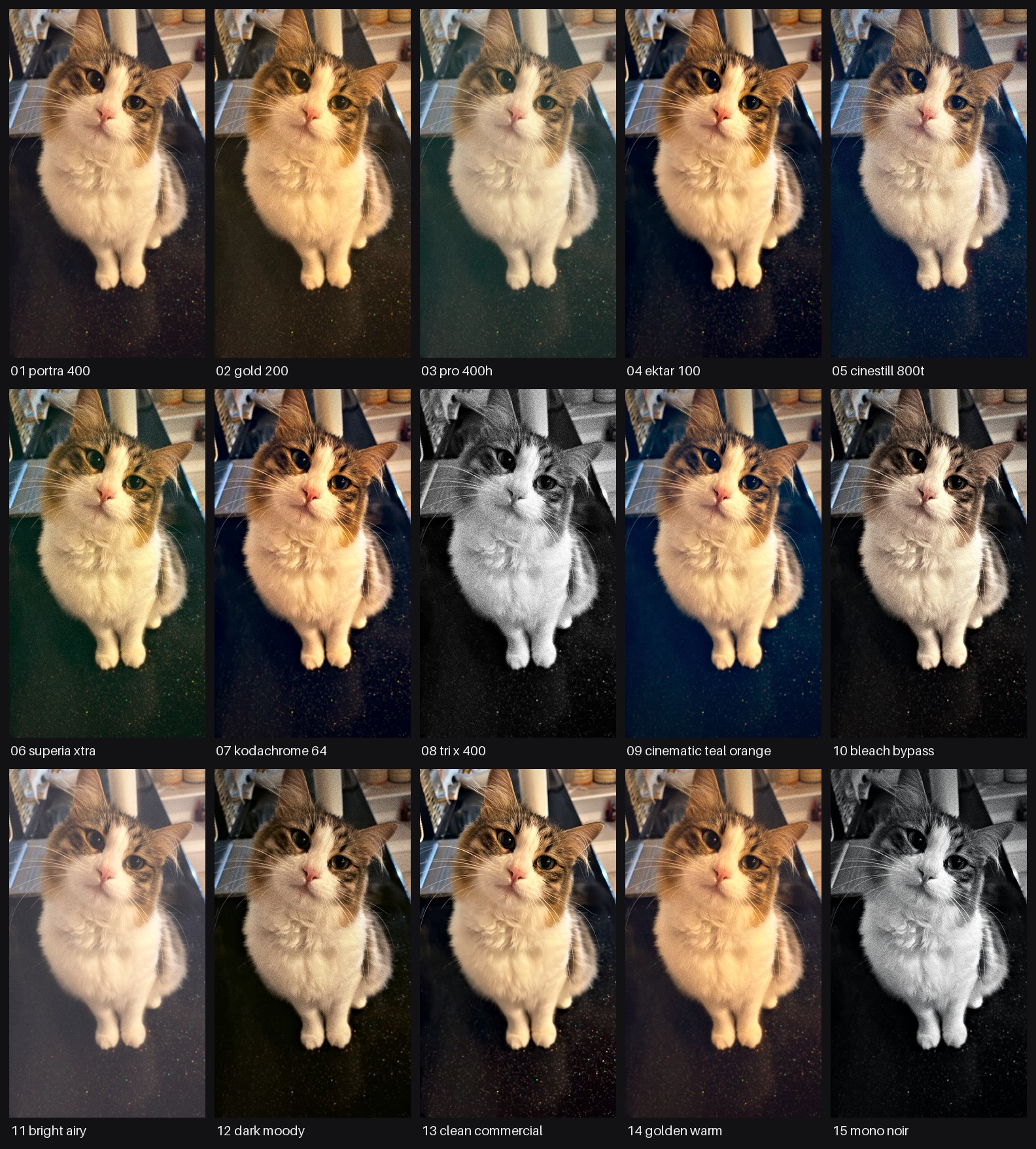
The 15 built-in signature themes, applied to one source image
(python -m postfx sheet).
Highlights
- Theme = YAML. Code and looks are fully decoupled. 30 themes built in
(15 film-stock/industry
signaturelooks, 15experimental, 3 texture-onlygrain), plus.cubeLUT support. - Pure & deterministic. Every operation is a pure
(array, params) -> arrayfunction. Same image + theme = byte-identical output (grain seed derives from the filename). - Resolution-safe. Aspect ratio and resolution are preserved — no crop/resize. Grain and blur radii scale with image size, so a look is identical at any resolution.
- Fast on CPU. ~0.5 s @ 2 MP on a single core; batch mode fans out across cores.
- Three ways in: a
postfxCLI, a tiny Python API, and drop-in.cubeLUTs.
Install
pip install postfx
or with uv:
uv add postfx          # into a project
uv tool install postfx # as a standalone CLI tool
Quickstart
CLI
# One image or a whole folder (batch = auto-parallel across cores)
postfx run --input photo.jpg --theme portra_400 --condition day_outdoor --out out/

# Preview every signature theme on one image as a labeled grid
postfx sheet --input photo.jpg --out sheet.jpg

# List all themes (grouped by category) and conditions
postfx list
Python
import postfx
from postfx import Theme, Condition

# One-liner: load, process, save. Names are StrEnums — autocomplete + typo-safe.
# (Plain strings like "portra_400" still work everywhere too.)
postfx.process_file("photo.jpg", "graded.jpg",
                    theme=Theme.Signature.CINEMATIC_TEAL_ORANGE,
                    condition=Condition.INDOOR_EVENING, strength=1.0)

# Or work with arrays directly (float32 [0,1] RGB in, same out)
from postfx import load_theme, get_condition, imgio, process

rgb, alpha = imgio.load_image("photo.jpg")
out = process(rgb, load_theme(Theme.Signature.PORTRA_400), get_condition(Condition.DAY_OUTDOOR),
              strength=1.0, seed=imgio.seed_from_path("photo.jpg"))
imgio.save_image("graded.png", out, alpha)
Showcase
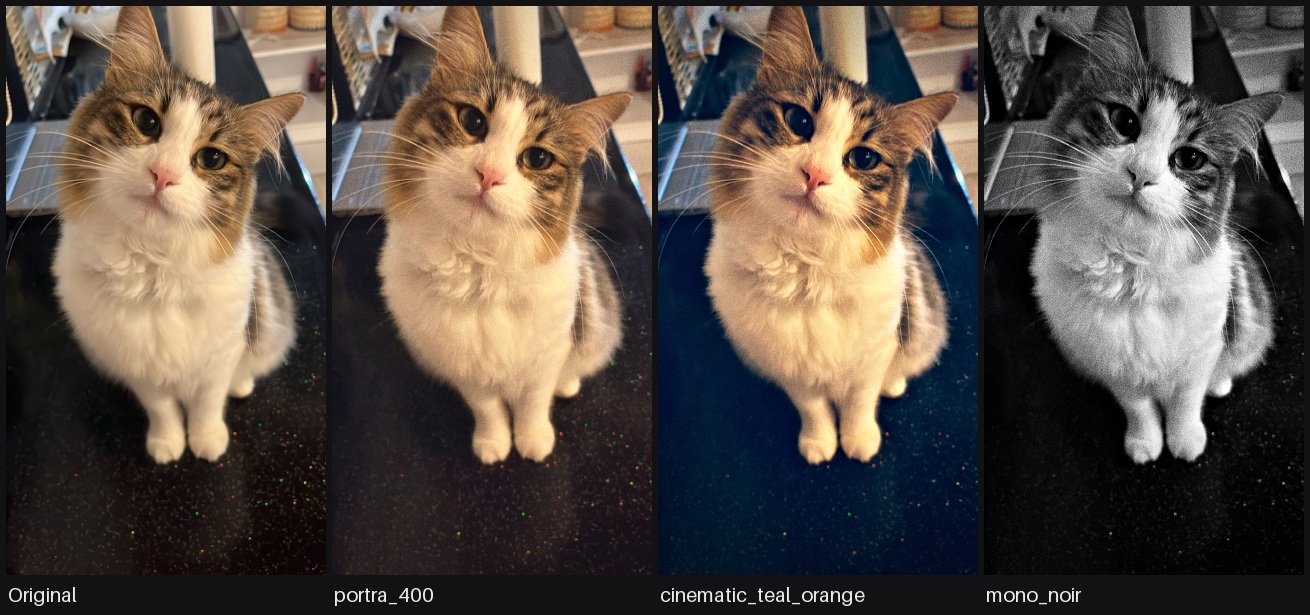
One source image (cat.jpg), four different themes — same pipeline, YAML-only difference:
Themes
Themes live under postfx/themes/, grouped into categories. Names are unique
across categories, so --theme <name> resolves globally.
| Category | What | Count |
|---|---|---|
grain |
Texture only, colour untouched | 3 |
signature |
Market-standard, reference-grounded looks — the primary set | 15 |
luts |
LUT-based themes (a .cube file is a selectable look) |
1+ |
experimental |
Earlier / exploratory looks | 15 |
Grain (texture only)
Measured from published social stills, not from film stocks: fine, near-monochrome grain over the whole frame at every brightness, generated per pixel so it reads as sensor texture at 100% and disappears at feed size. Colour is untouched — chain a signature theme before one for a look.
| Theme | Character |
|---|---|
fine_grain_light |
luma 0.018 — the default social-still finish |
fine_grain_medium |
luma 0.028 — visible on skin at 100% |
fine_grain_heavy |
luma 0.040 — the compressed re-upload look |
Signature (grounded in real film stocks & industry grades)
| Theme | Reference / character |
|---|---|
portra_400 |
Kodak Portra 400 — creamy warm skin, soft highlights (portrait/wedding standard) |
gold_200 |
Kodak Gold 200 — nostalgic golden-amber, punchy consumer film |
pro_400h |
Fuji Pro 400H — soft airy pastel, minty cyan-green shadows |
ektar_100 |
Kodak Ektar 100 — vivid saturation, deep blues, fine grain |
cinestill_800t |
Cinestill 800T — tungsten teal cast + signature red halation |
superia_xtra |
Fuji Superia X-TRA 400 — punchy, green-leaning shadows |
kodachrome_64 |
Kodachrome 64 — rich reds/blues, hard micro-contrast, vintage slide |
tri_x_400 |
Kodak Tri-X 400 — classic high-contrast B&W film grain |
cinematic_teal_orange |
Hollywood blockbuster grade — teal shadows, orange skin |
bleach_bypass |
Silver-retention — desaturated, high contrast, silvery, gritty |
bright_airy |
Bright & Airy — high-key wedding/lifestyle staple |
dark_moody |
Dark & Moody — rich, earthy, low-key staple |
clean_commercial |
Neutral, crisp, accurate color, polished skin (e-comm/beauty) |
golden_warm |
Golden-hour grade — warm, glowy, sun-kissed skin |
mono_noir |
Cinematic high-contrast B&W noir, deep blacks, cool tone |
experimental holds 15 earlier looks. Run postfx list for the full set with
descriptions.
LUTs (a LUT is a theme)
A .cube 3D LUT is a selectable look like any other theme. Bundled LUTs live in
postfx/themes/luts/ with a small YAML wrapper. To use your own, drop a .cube
there with a YAML referencing it — or point any theme's lut.file at an external
absolute path. The LUT is applied in display (sRGB) space, with grain/lens/texture
on top. See postfx/themes/luts/README.md.
Conditions
A separate axis from the theme. A theme sets the look (color); a condition
sets how strongly the capture/optical texture — grain, chroma noise, halation —
reads for the situation a shot was taken in, as a multiplier on the theme's own
values. So one theme stays consistent across shooting conditions. Select with
--condition (default neutral — the theme's texture exactly as authored).
| Condition | grain | chroma noise | halation | Character |
|---|---|---|---|---|
neutral |
1.0× | 1.0× | 1.0× | identity / default — theme as authored |
day_outdoor |
0.2× | 0.0× | 0.7× | clean daylight |
overcast |
0.4× | 0.1× | 0.5× | soft, diffuse, low bloom |
indoor_evening |
1.0× | 0.6× | 1.0× | tungsten interior |
neon_night |
1.4× | 0.9× | 1.7× | neon-lit night, bloom-dominant |
night_flash |
2.2× | 1.5× | 1.4× | direct flash, grittiest |
Conditions live under postfx/conditions/ as YAML — add your own exactly the way
you'd add a theme. neon_night deliberately blooms harder than night_flash
while staying less grainy: the three multipliers are independent, not one slider.
Global strength
--strength 0.0–1.5 linearly blends the whole theme effect with the original:
0 = untouched, 1 = full theme, 1.5 = over. Additive effects like grain
scale with it too.
Processing order (fixed)
1 sRGB→linear · 2 white balance (Bradford) · 3 exposure · 4 highlight
rolloff · 5 lift/gamma/gain · 6 split toning · 7 tone curve · 8
vibrance+saturation · 9 halation (linear) · 10 linear→sRGB · 10b optional
LUT (.cube) · 11 distortion · 12 chromatic aberration · 13 vignette · 14
black point lift · 15 clarity · 16 grain (luminance-weighted) · 17 sharpen
· 18 JPEG re-encode (JPEG output only).
Halation must be in linear space, the LUT right after linear→sRGB, grain in sRGB — this order is deliberate and shouldn't be reordered.
Parameter reference
Each theme YAML carries the op blocks below. Omitted keys fall back to a neutral (no-op) default; an unknown key raises an error (so typos fail fast).
| Op | Parameters | Effect |
|---|---|---|
white_balance |
temp, tint |
temp>0 warm (red↑ blue↓); tint>0 magenta, <0 green |
exposure |
stops |
Linear exposure; +1 = 2× light |
highlight_rolloff |
knee, strength |
Soft-compress above knee (breaks clipped highlights) |
lift_gamma_gain |
lift[3], gamma[3], gain[3] |
ASC-CDL: gain=slope, lift=offset, gamma=power |
split_toning |
shadow[3], highlight[3], strength |
Separate shadow/highlight tint (luma-masked) |
tone_curve |
strength, pivot |
S-curve contrast around the pivot |
vibrance |
vibrance, saturation, skin_protect |
Vibrance lifts low-sat pixels & protects skin |
halation |
threshold, radius_frac, tint[3], strength |
Highlight bloom; linear space, red-shifted, screen blend |
lut |
file, intensity |
Optional 3D .cube LUT, display-referred |
distortion |
k |
k<0 barrel, k>0 pincushion |
chromatic_aberration |
amount |
Lateral CA; scales R/B about center |
vignette |
strength, feather, roundness |
Radial darkening; feather = start radius |
black_point |
lift (scalar or [3]) |
Lifts blacks (matte/faded); can be tinted |
clarity |
amount, radius_frac |
Wide-radius local contrast; negative = soften |
grain |
luma, chroma, size, floor |
Luminance-weighted, resolution-independent grain. size is in px at a 1024 px long edge; below 1 it gets finer than that grid, and at size <= 1024 / long edge it is plain per-pixel noise |
sharpen |
amount, radius_frac, halo |
Narrow-radius unsharp + optional halo |
jpeg |
quality, cycles |
JPEG re-encode loop (JPEG output only) |
Determinism & constraints
- Resolution and aspect ratio are preserved — no crop/resize.
- All intermediate work is float32 in
[0,1]RGB; conversion to 8-bit happens only on save. PNG keeps alpha and skips the JPEG step. - The grain seed derives from the filename hash, so the same image + theme is byte-identical every run.
- No EXIF/metadata is written to outputs.
Adding a theme
Add postfx/themes/<category>/<name>.yaml. The first comment lines are the
name / character / suited content; parameters follow (see the table above).
Then verify with postfx sheet + pytest.
# my_look
# Warm, low-contrast, soft — a gentle everyday grade.
name: my_look
white_balance: { temp: 0.12, tint: 0.02 }
tone_curve: { strength: 0.15, pivot: 0.45 }
vibrance: { vibrance: 0.1, saturation: 1.03 }
grain: { luma: 0.015, size: 1.5 }
Development
git clone https://github.com/0xBeycan/postfx.git
cd postfx
uv sync --extra dev        # or: pip install -e ".[dev]"
uv run pytest -q           # or: pytest -q
License
MIT © 0xBeycan
1 maintainer

Release files for postfx 1.1.0
For a detailed explanation of source distributions (sdists) and built distributions (wheels), please see the package formats documentation.
Source distribution (sdist)
| File | Size | Uploaded | |
|---|---|---|---|
| postfx-1.1.0.tar.gz | 241.1 kB | Details |
Built distribution (wheel)
| File | Interpreter | ABI | Platform | Reset |
|---|---|---|---|---|
| postfx-1.1.0-py3-none-any.whl | Python 3 | none | any | Details |
Total release size: 501.8 kB
Release files / postfx-1.1.0.tar.gz
| Download URL | postfx-1.1.0.tar.gz |
|---|---|
| Size | 241.1 kB |
| Tags | Source |
|
SHA-256 checksum How to use checksums |
5eaa5b9eaa242067ae0a50b1391c378a2bcf7cee45a2e496111ef65f4a843b0b
|
|
BLAKE2b-256 checksum How to use checksums |
0af7a318775e34ee8176c066e6906322a8974fe838be712dfac50a65fa6adf70
|
| Upload date | |
|
Uploaded using Trusted Publishing? What is trusted publishing? |
Yes |
| Uploaded via |
twine/7.0.0 CPython/3.13.14
|
Provenance
Provenance describes where a file came from. On PyPI, provenance is shared via attestations, which provide a verifiable record of the build or publishing details. View details, limitations and caveats.


PyPI Publish Attestation
PyPI verified that this artifact, at this checksum, originated from the publisher listed below.
Signed by GitHub Actions, verified by PyPI on Sep 22, 2026.
Transparency logRelease files / postfx-1.1.0-py3-none-any.whl
| Download URL | postfx-1.1.0-py3-none-any.whl |
|---|---|
| Size | 260.7 kB |
| Tags | Python 3 |
|
SHA-256 checksum How to use checksums |
e27a5c6df5b69d7c89fd5e5511a5cca8447d8febb06d34b034c93cb1d0123f4b
|
|
BLAKE2b-256 checksum How to use checksums |
15b781a070cdbffb03ceb4b34e3f0a389acd713772d2691a03d2ecbd420d5b3b
|
| Upload date | |
|
Uploaded using Trusted Publishing? What is trusted publishing? |
Yes |
| Uploaded via |
twine/7.0.0 CPython/3.13.14
|
Provenance
Provenance describes where a file came from. On PyPI, provenance is shared via attestations, which provide a verifiable record of the build or publishing details. View details, limitations and caveats.
PyPI Publish Attestation
PyPI verified that this artifact, at this checksum, originated from the publisher listed below.
Signed by GitHub Actions, verified by PyPI on Sep 22, 2026.
Transparency log













