

postloom
Your LinkedIn, remembered.
A private, local-first memory of your articles, posts, every comment under them and the people who wrote them: search, chat, a knowledge graph and reply drafts, with any AI model or none.




Website · Tour · Install · User guide · What's new
You publish a post or an article, and a conversation starts in the comments. A week later it's all buried in the feed. postloom keeps it: paste in your post or article, and it becomes a connected note in your own graph, linked to its topics, its series, the links and hashtags you used, and every comment and reply. Then you can chat with anything you wrote and its discussion, see who engages with your work, and draft replies grounded in what you actually wrote.
https://github.com/user-attachments/assets/0b2f2c29-c153-4e21-a0fa-3c1486bf95ab
A two-minute tour with a fictional library. Watch it on the website, chapter by chapter.
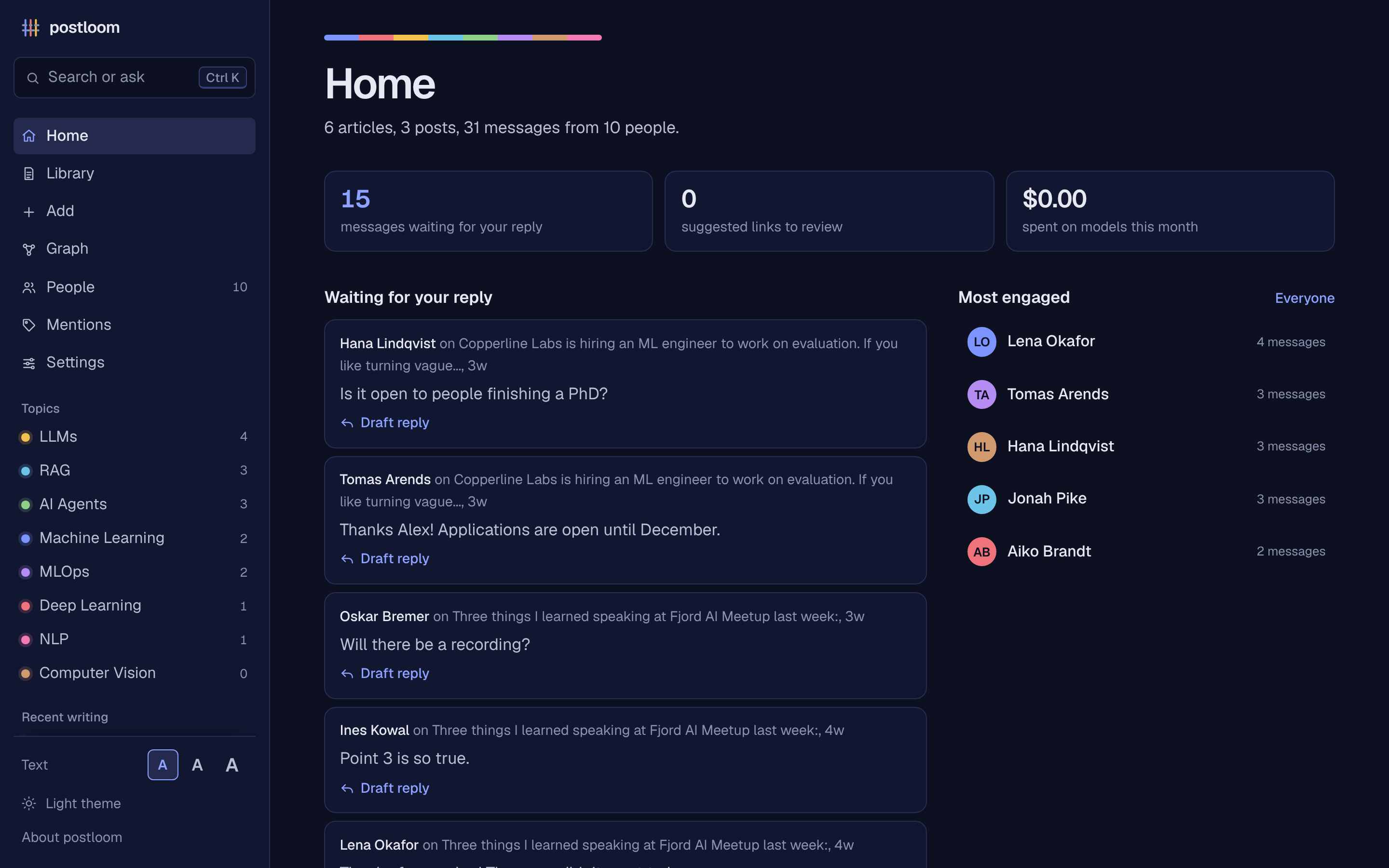
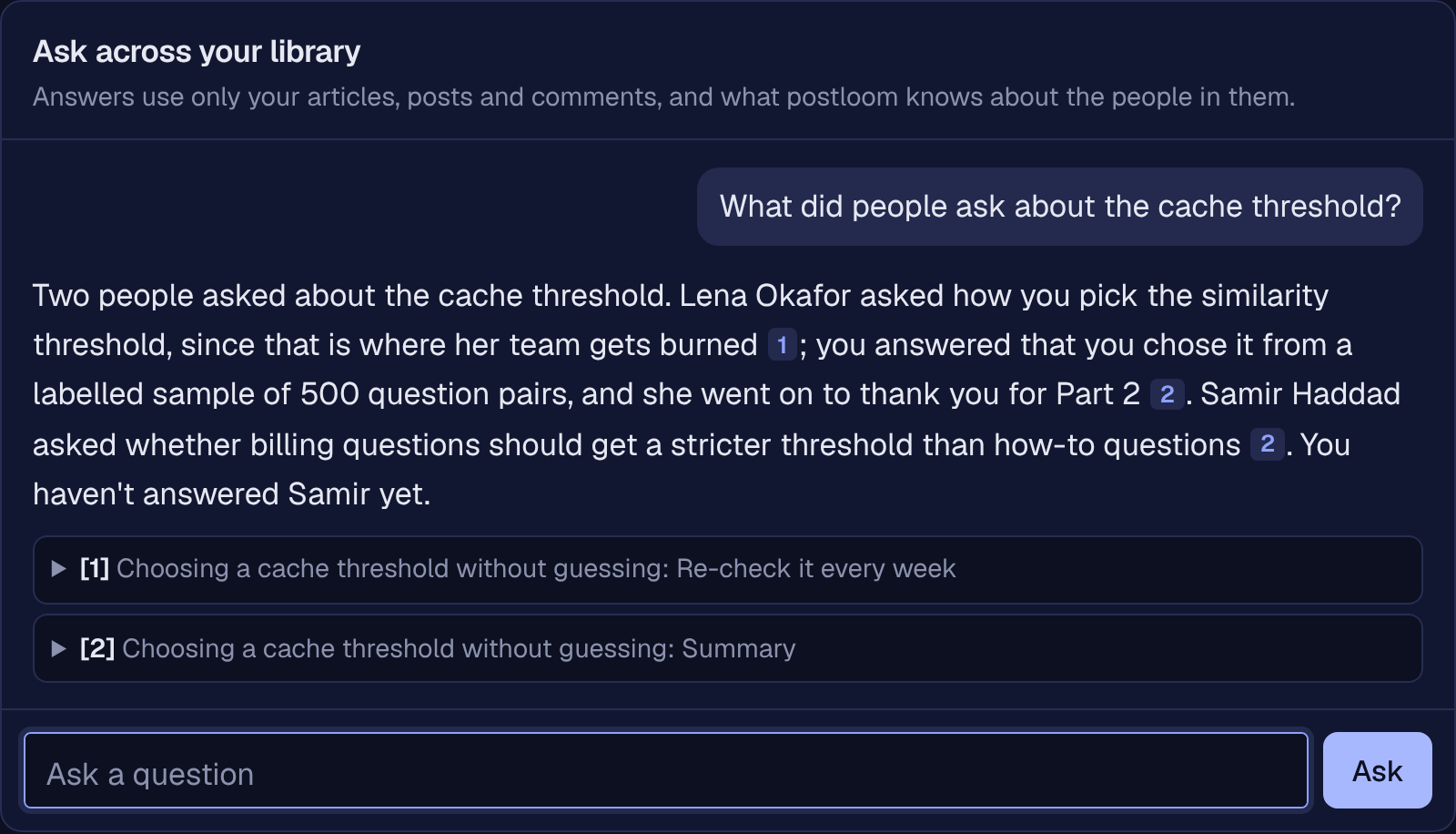
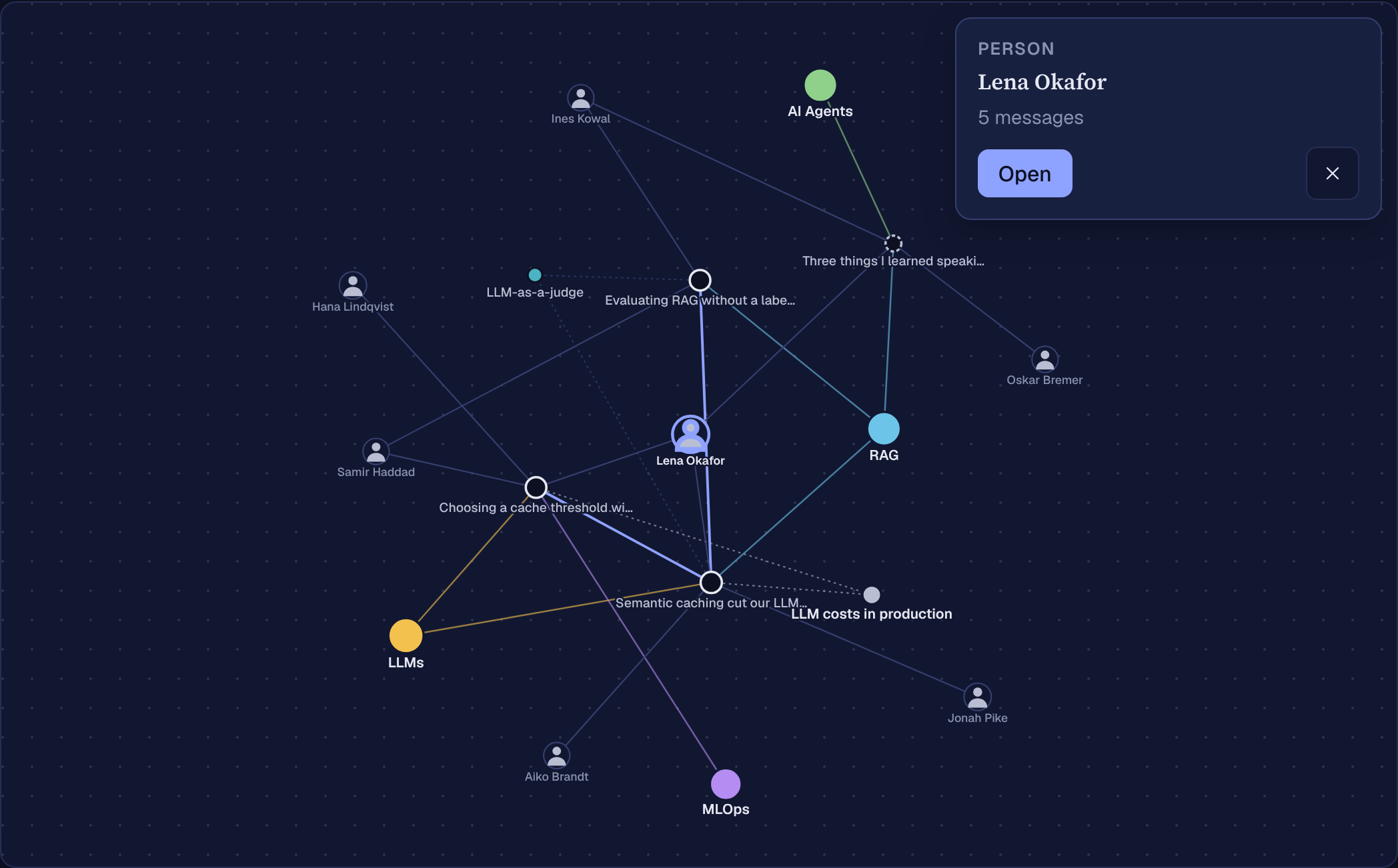
Screenshots use a fictional library: the author, the people and the numbers are invented.
scripts/demo/screenshots.py rebuilds it and retakes them.
Why postloom
- Runs on your machine. Your writing and the people you talk to stay on your computer. No account, no cloud, no telemetry.
- Any model, your key. Gemini, Claude, OpenAI, OpenRouter, any OpenAI-compatible server, or free local models with Ollama. Search runs on your computer for free. A usage page shows what every task costs, and an optional monthly budget caps it.
- Your files, not a database you can't read. Everything lives in a plain Markdown folder that is also a valid Obsidian vault. It is the source of truth: edit a note and postloom reads the change; lose the index and postloom rebuilds itself from the folder. Backing up that one folder backs up everything.
- A graph you can trust. Links postloom reads from your own text are facts; links an AI suggests stay suggestions until you accept them. Nothing you decided is ever overwritten, and history is kept instead of deleted.
- Answers you can check. Chat answers only from your own articles, posts and comments, cites the passage behind every claim, and says "not found" instead of guessing.
- Knows your audience. Every commenter becomes a person in the graph, identified by their LinkedIn profile URL, with every article they've interacted with. Anyone can be removed completely when they ask.
Install
Four steps, about two minutes. You don't need Python or anything else first, and nothing needs an administrator password. After that, postloom is an app with its own icon.
Mac
-
Open Terminal. Press ⌘ and Space together, type Terminal and press Return.
-
Copy the install line (the copy button is at the right of the box):
curl -LsSf https://raw.githubusercontent.com/mdhabibi/postloom/main/install.sh | sh
-
Paste it into Terminal and press Return. Click in the Terminal window, press ⌘ V, then Return. Text scrolls by while postloom installs.
-
Wait for postloom to open in your browser. You can close Terminal then. Next time, open postloom from Launchpad or Applications, like any app.
Windows
-
Open PowerShell. Click Start, type PowerShell and press Enter.
-
Copy the install line:
irm https://raw.githubusercontent.com/mdhabibi/postloom/main/install.ps1 | iex
-
Paste it into PowerShell and press Enter. Right-click inside the window (or press Ctrl V), then press Enter.
-
Wait for postloom to open in your browser. You can close PowerShell then. Next time, open postloom from the Start menu or the desktop icon.
Linux
-
Open a terminal (Ctrl Alt T on most systems).
-
Copy the install line:
curl -LsSf https://raw.githubusercontent.com/mdhabibi/postloom/main/install.sh | sh
-
Paste it with Ctrl Shift V and press Enter.
-
Wait for postloom to open in your browser. Next time, open it from your applications menu.
Stuck? Tell us what you see.
Update, quit or uninstall
-
Update: do the same steps again. Your data is never touched.
-
Quit: choose Quit postloom at the bottom of the sidebar.
-
Uninstall: run the line for your computer the same way. Your data folder is kept; delete it yourself if you want.
Mac or Linux:
curl -LsSf https://raw.githubusercontent.com/mdhabibi/postloom/main/install.sh | sh -s -- --uninstall
Windows:
$env:POSTLOOM_UNINSTALL = 1; irm https://raw.githubusercontent.com/mdhabibi/postloom/main/install.ps1 | iex
The installer uses uv, which downloads its own copy of Python for postloom, so it never changes the Python on your computer. Everything else postloom needs (its database, search engine and local search model) is inside it or downloaded on first use: there is no database server to install.
For developers: uvx postloom start runs it from PyPI, uv tool install postloom keeps
it installed, and uv sync && uv run postloom start runs a clone.
Getting started
postloom opens in your browser (dark by default; switch to light at the bottom of the sidebar). Press ⌘K or Ctrl K anywhere to search your articles and people, ask a question, or jump to a page. On first run:
- Open Settings, pick a model provider, paste your API key and click Test connection. Keys are saved only in your Postloom folder. No key? Choose Ollama: postloom walks you through installing it, suggests a model that fits your computer's memory and downloads it, all without a terminal.
- Click Add. For an article, paste it and the post that announced it; postloom restores the formatting, files it under your topics and indexes it. For a post that stands on its own, choose Post and paste it (no model needed; with one, postloom also picks its topics).
- Open the article to read it and ask questions about it, or use the search box to search and ask across everything you've written. Answers cite the sections they come from, and when nothing relevant exists postloom says so instead of guessing.
Choosing a model
| Provider | Key | Good for |
|---|---|---|
| Google Gemini | aistudio.google.com | A free tier to start with |
| Anthropic Claude | console.anthropic.com | Reply drafts that sound like you |
| OpenAI | platform.openai.com | GPT models |
| OpenRouter | openrouter.ai | One key for hundreds of models, exact cost per call |
| Ollama | none | Free and fully private; needs a capable computer |
| Other OpenAI-compatible | depends | LM Studio, Groq, Mistral, DeepSeek, Together, vLLM... |
Each task has its own model, with sensible defaults: a cheap model restores articles, reads comments and answers questions, and a stronger one writes reply drafts. Change any of them under Models in Settings.
What it costs. Rough figures at list prices on 2026-10-25 (the usage page shows your real numbers):
| Gemini (default models) | Claude (Haiku, Sonnet for replies) | |
|---|---|---|
| Adding a 2,000-word article | ~$0.01 | ~$0.002 |
| A question about an article | ~$0.005 | under $0.001 |
| A reply draft | ~$0.006 | ~$0.02 |
| A month of daily articles, 5 questions and 2 replies a day | ~$1.40 | ~$1.40 |
Search, related-article suggestions, the graph and the people pages cost nothing: they run on your computer. (On Intel Macs, where the local embedding runtime isn't available, postloom uses your provider's embeddings for search instead, or keywords.) Nothing runs in the background; a model is only called when you click something.
Local models with Ollama. Choose Ollama in Settings. postloom checks whether Ollama is installed and running (and starts it for you), suggests a model for your computer's memory (Qwen 3.5 in 4B, 9B or 27B), downloads it with a progress bar and uses it for every task. Models you already pulled are offered too. Reading comments and chat work well with mid-size models. Restoring long articles needs a capable model (14B parameters or more, so 32 GB of memory helps) and can take several minutes. postloom sizes Ollama's context for every request and refuses, with a clear message, texts too long for the limit you set, instead of letting them be silently cut off.
What you can do
- Comments and replies: paste a comment section; postloom works out who answered whom, and drafts replies in your voice from the article and the whole thread.
- People: everyone who engaged with you, across all your posts, with your private notes.
- Mentions: the people, organisations, events and links your writing names, confirmed by you before they enter your graph.
- Images and videos: found by your captions, by what a model sees in them and by subtitles.
- Ask questions: answers only from your own library, with sources you can open.
- The graph: articles, topics, series, people and mentions, focused on whatever you pick.
- Export the graph: RDF (Turtle, JSON-LD) with schema.org and PROV-O, Cypher for Neo4j, or GraphML for Gephi, with the provenance of every link (how).
- Your vault: plain Markdown you can open in Obsidian, edit, back up or move.
- Command line: everything the app does, scriptable.
The user guide explains each of them in detail, with every setting.
Export your graph
Take your whole graph into the tools you already use: every article, post, comment, person and mention, every link between them, and where each link came from (parsed from your text, suggested by a model, or confirmed by you).
-
Open Settings and scroll to Export your graph.
-
Pick a format:
Format Pick it for RDF (Turtle) A triple store (GraphDB, Apache Jena, Stardog) and SPARQL RDF (JSON-LD) The same RDF as JSON, for your own code Cypher for Neo4j Neo4j (or Memgraph) and Cypher queries GraphML Gephi, yEd, Cytoscape, NetworkX or igraph -
Choose what goes in. Include what was written (on by default) adds article bodies, posts, comments and your notes on people; turn it off to share only the structure (names, titles, dates). Include history adds links that were replaced or that you dismissed, marked as not current.
-
Click Export the graph. The file lands in your downloads, named like
postloom-graph-2026-11-26.ttl.
From the terminal: postloom export turtle (or jsonld, cypher, graphml), with
--history, --no-text and -o <file>.
Load it into Neo4j
With Neo4j running, load the script with cypher-shell (it comes with Neo4j):
cypher-shell -u neo4j -p <your password> -f postloom-graph-2026-11-26.cypher
Or open Neo4j Browser, turn on Enable multi statement query editor in its settings, paste the file and run it. Loading the same file again changes nothing, and a newer export updates what changed. Then try:
MATCH (p:Person)-[:AUTHORED]->(:Comment)-[:COMMENTED_ON]->(:Post)-[:ANNOUNCES]->(a:Article)
RETURN p.name, count(DISTINCT a) AS articles ORDER BY articles DESC LIMIT 10;
Every node has the label Postloom, its kind (Article, Post, Comment, Person,
Topic, Series, Entity, Media) and a unique id. Relationships (BELONGS_TO,
PART_OF, ANNOUNCES, COMMENTED_ON, REPLIED_TO, AUTHORED, RELATED_TO, LINKS_TO,
MENTIONS) carry origin, grade (verified, asserted or rejected), producer and
recorded_at. With history, filter on r.current = true for today's graph.
Load it into a triple store and query it with SPARQL
- GraphDB: create a repository, then Import → Upload RDF files, choose the
.ttlfile and click Import. Query it under SPARQL. - Apache Jena:
sparql --data postloom-graph-2026-11-26.ttl --query query.rq - Python:
rdflib.Graph().parse("postloom-graph-2026-11-26.ttl")
Who comments most:
PREFIX pl: <https://postloom-app.vercel.app/ns#>
PREFIX schema: <https://schema.org/>
SELECT ?name (COUNT(?comment) AS ?comments) WHERE {
  ?person pl:authored ?comment ; schema:name ?name .
} GROUP BY ?name ORDER BY DESC(?comments) LIMIT 10
Links a model made that you haven't confirmed yet, using the provenance records:
PREFIX pl: <https://postloom-app.vercel.app/ns#>
PREFIX rdf: <http://www.w3.org/1999/02/22-rdf-syntax-ns#>
PREFIX prov: <http://www.w3.org/ns/prov#>
SELECT ?from ?link ?to ?producer WHERE {
  ?record a pl:EdgeRecord ; pl:grade pl:Asserted ; pl:producer ?producer ;
          rdf:subject ?from ; rdf:predicate ?link ; rdf:object ?to .
  FILTER NOT EXISTS { ?record prov:invalidatedAtTime ?until }
}
Nodes use schema.org (schema:Article, schema:Comment, schema:Person...) and SKOS
for topics, and are named urn:postloom:<id>. Relations are pl: properties mapped to
schema.org and Dublin Core; the vocabulary is at
postloom-app.vercel.app/ns and inside every export.
Each link is also a pl:EdgeRecord (an rdf:Statement) with its origin, grade, producer
and PROV-O times.
Open it in Gephi, yEd or NetworkX
- Gephi: File → Open, choose the
.graphmlfile, keep Directed and click OK. Under Appearance, colour nodes by thelabelsattribute (partition) and size them by degree; run ForceAtlas 2 under Layout. - yEd: File → Open, then Layout → Organic.
- NetworkX:
networkx.read_graphml("postloom-graph-2026-11-26.graphml") - Neo4j: copy the file into Neo4j's
importfolder, then runCALL apoc.import.graphml("file:///postloom-graph-2026-11-26.graphml", {readLabels: true})(needs the APOC plugin andapoc.import.file.enabled=true).
The file holds the names and comments of the people in your library, so share it with the same care as your vault. The user guide has the full data model.
Privacy
postloom runs only on your computer and listens only on 127.0.0.1, so nothing on your
network can reach it. It refuses requests that don't come from its own page, so other
websites you visit can't use it either. It stores the names, headlines and profile URLs of
people who comment on your posts, locally and only for your own use. If one of them asks
to be removed, Delete this person erases them from the app, its history, the search
index and your vault.
When you use a hosted model, the text a feature needs (the article you add, the comments you paste, the passages behind an answer, an image you ask it to describe) is sent to that provider under its terms. Check them: free tiers may use your data for training. Search embeddings run on your computer by default, and with Ollama nothing leaves your computer at all.
postloom is not affiliated with or endorsed by LinkedIn.
Documentation
- User guide: every feature and setting
- Architecture: how postloom is built, and why
- Changelog: what changed in each version
- Contributing, code of conduct and security policy
Contributing
Contributions are welcome. See CONTRIBUTING.md. Something missing? Suggest an idea.
License
postloom is fair source, under the Functional Source License 1.1 (FSL-1.1-ALv2). You can read, run, modify and share the code for anything except offering a competing commercial product or service. Using postloom for your own work, including your business, is allowed. Each release becomes Apache-2.0 two years after it is published. The postloom name and logo aren't covered by the license.
1 maintainer

Metadata
1 maintainer
Release files for postloom 0.1.0
For a detailed explanation of source distributions (sdists) and built distributions (wheels), please see the package formats documentation.
Source distribution (sdist)
| File | Size | Uploaded | Provenance | Actions |
|---|---|---|---|---|
| postloom-0.1.0.tar.gz | 1.6 MB | With provenance | Details for postloom-0.1.0.tar.gz |
Built distribution (wheel)
| File | Interpreter | ABI | Platform | Actions Reset |
|---|---|---|---|---|
| postloom-0.1.0-py3-none-any.whl | Python 3 | none | any | Details for postloom-0.1.0-py3-none-any.whl |
Total release size: 3.1 MB
Release files / postloom-0.1.0.tar.gz
| Download URL | postloom-0.1.0.tar.gz |
|---|---|
| Size | 1.6 MB |
| Tags | Source |
|
SHA-256 checksum How to use checksums |
8ae035ef3c6e31e6f6f4a34b3a7431ad574dd75d6a928b4c08d7d6b25c86b86b
|
|
BLAKE2b-256 checksum How to use checksums |
41373d166ca26ac7a177086d682c98b2e5e1a00e44b2bf33c63681e73961d022
|
| Upload date | |
|
Uploaded using Trusted Publishing? What is trusted publishing? |
Yes |
| Uploaded via |
twine/7.0.0 CPython/3.13.16
|
Provenance
Provenance describes where a file came from. On PyPI, provenance is shared via attestations, which provide a verifiable record of the build or publishing details. View details, limitations and caveats.


PyPI Publish Attestation
PyPI verified that this artifact, at this checksum, originated from the publisher listed below.
Signed by GitHub Actions, verified by PyPI on Nov 26, 2026.
Transparency logRelease files / postloom-0.1.0-py3-none-any.whl
| Download URL | postloom-0.1.0-py3-none-any.whl |
|---|---|
| Size | 1.4 MB |
| Tags | Python 3 |
|
SHA-256 checksum How to use checksums |
1e8c87c5847a98820dece028ee65b15d21f35db2623d50112b63ffc500ad0c62
|
|
BLAKE2b-256 checksum How to use checksums |
ed120ceb1f1f78fb6d7f19404d94a8cb161dcc414d27629dd42db0a20dbc36d1
|
| Upload date | |
|
Uploaded using Trusted Publishing? What is trusted publishing? |
Yes |
| Uploaded via |
twine/7.0.0 CPython/3.13.16
|
Provenance
Provenance describes where a file came from. On PyPI, provenance is shared via attestations, which provide a verifiable record of the build or publishing details. View details, limitations and caveats.
PyPI Publish Attestation
PyPI verified that this artifact, at this checksum, originated from the publisher listed below.
Signed by GitHub Actions, verified by PyPI on Nov 26, 2026.
Transparency logSecurity for postloom 0.1.0
Provenance
Provenance describes where a file came from. On PyPI, provenance is shared via attestations, which provide a verifiable record of the build or publishing details. View details, limitations and caveats.
Full provenance
Both files in this release have been uploaded with provenance metadata.
Attestation for postloom-0.1.0.tar.gz
PyPI Publish Attestation
PyPI verified that this artifact, at this checksum, originated from the publisher listed below.
Signed by GitHub Actions, verified by PyPI on Nov 26, 2026.
Transparency logA note on package security
PyPI is a repository for distributing packages, not a service for auditing them. While third-party security researchers and our staff do their best to detect and remove malicious packages, PyPI cannot guarantee the quality, security or suitability of any given package.
To learn more about protecting yourself from malicious actors, visit our package security documentation.













