
A custom Powerline segment for displaying the current Kubernetes context and namespace

Project description
powerline-k8s



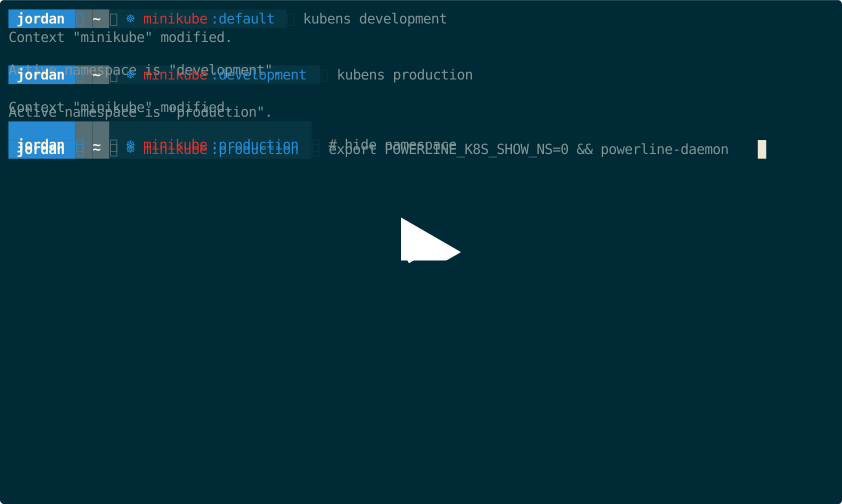
A custom Powerline segment for displaying the current Kubernetes context and namespace.

Installation
Using pip
$ pip install powerline-k8s
Local development
$ pip install --editable .
Installing the package in editable mode saves you from having to "re-install" to see the latest changes.
Configuration
Colorscheme
Add the following config items to your Powerline colorscheme config file (usually located at ~/.config/powerline/colorschemes/),
see Powerline Colorschemes for more info.
{
  "k8s":           { "fg": "solarized:blue", "bg": "solarized:base02", "attrs": [] },
  "k8s_namespace": { "fg": "solarized:red",  "bg": "solarized:base02", "attrs": [] },
  "k8s_context":   { "fg": "solarized:blue", "bg": "solarized:base02", "attrs": [] },
  "k8s:divider":   { "fg": "gray4",          "bg": "solarized:base02", "attrs": [] }
}
Segment
Add the following config item to your Powerline segments config file, see Powerline Segment reference for more info.
{
  "function": "powerline_k8s.k8s",
  "priority": 30
}
- If adding the segment to the shell, edit
~/.config/powerline/themes/shell/default.json. - If adding the segment to the tmux status line, edit
~/.config/powerline/themes/tmux/default.json.
Toggle visibility
Toggle entire segment or specific section's visibility with the following environment variables:
POWERLINE_K8S_SHOWPOWERLINE_K8S_SHOW_NS
Note: Full segment visibility takes precedence over namespace section visibility.
# toggle segment visibility
$ POWERLINE_K8S_SHOW=0 powerline-daemon --replace # hide powerline-k8s segment
$ POWERLINE_K8S_SHOW=1 powerline-daemon --replace # show powerline-k8s segment (default)

# toggle namespace section visibility
$ POWERLINE_K8S_SHOW_NS=0 powerline-daemon --replace # hide namespace section
$ POWERLINE_K8S_SHOW_NS=1 powerline-daemon --replace # show namespace section (default)
Alternatively you can add the following function to your shell for easier toggling:
toggle_powerline_k8s() {
  case "$1" in
    # pass the '-ns' flag to toggle namespace visibility
    "-ns" | "--namespace")
      if [[ "${POWERLINE_K8S_SHOW_NS:-1}" -eq 1 ]]; then
        export POWERLINE_K8S_SHOW_NS=0
      else
        export POWERLINE_K8S_SHOW_NS=1
      fi
    ;;
    *)
      # toggle segment visibility
      if [[ "${POWERLINE_K8S_SHOW:-1}" -eq 1 ]]; then
        export POWERLINE_K8S_SHOW=0
      else
        export POWERLINE_K8S_SHOW=1
      fi
    ;;
  esac
}
Docs
For more detailed documentation see https://j4ckofalltrades.github.io/powerline-k8s
Demo
Stats
Release history Release notifications | RSS feed


Download files
Download the file for your platform. If you're not sure which to choose, learn more about installing packages.
Source Distribution
Built Distribution
Filter files by name, interpreter, ABI, and platform.
If you're not sure about the file name format, learn more about wheel file names.
Copy a direct link to the current filters
File details
Details for the file powerline-k8s-1.3.0.tar.gz.
File metadata
- Download URL: powerline-k8s-1.3.0.tar.gz
- Upload date:
- Size: 5.2 kB
- Tags: Source
- Uploaded using Trusted Publishing? No
- Uploaded via: twine/3.8.0 pkginfo/1.8.2 readme-renderer/33.0 requests/2.27.1 requests-toolbelt/0.9.1 urllib3/1.26.8 tqdm/4.63.0 importlib-metadata/4.11.2 keyring/23.5.0 rfc3986/2.0.0 colorama/0.4.4 CPython/3.9.10
File hashes
| Algorithm | Hash digest | |
|---|---|---|
| SHA256 |
35f715b959b7b0aadd3cf080d9c40305f1192e0c3f1c861a395b7f7d107bef3a
|
|
| MD5 |
55ed27d1e10a8a5fe8798352de87f373
|
|
| BLAKE2b-256 |
53e5a02ef8cada57c0852907fa832f55e1a86610c8923a0470434ecf9e37afd5
|
File details
Details for the file powerline_k8s-1.3.0-py3-none-any.whl.
File metadata
- Download URL: powerline_k8s-1.3.0-py3-none-any.whl
- Upload date:
- Size: 6.3 kB
- Tags: Python 3
- Uploaded using Trusted Publishing? No
- Uploaded via: twine/3.8.0 pkginfo/1.8.2 readme-renderer/33.0 requests/2.27.1 requests-toolbelt/0.9.1 urllib3/1.26.8 tqdm/4.63.0 importlib-metadata/4.11.2 keyring/23.5.0 rfc3986/2.0.0 colorama/0.4.4 CPython/3.9.10
File hashes
| Algorithm | Hash digest | |
|---|---|---|
| SHA256 |
25c9879ba127414ee9319e9c1d15d21bd93b1797e6c4fe7d8c603eaefdb290b7
|
|
| MD5 |
ba5d46168d8d16d1986173904647f2be
|
|
| BLAKE2b-256 |
d5a884592f74a1460c8e060a854f1642c34d0ffeff679620040ab25bbb9e8a73
|






