
Powerline K8S Status



A Powerline segment for showing the status of current Kubernetes context.
By imjoseangel
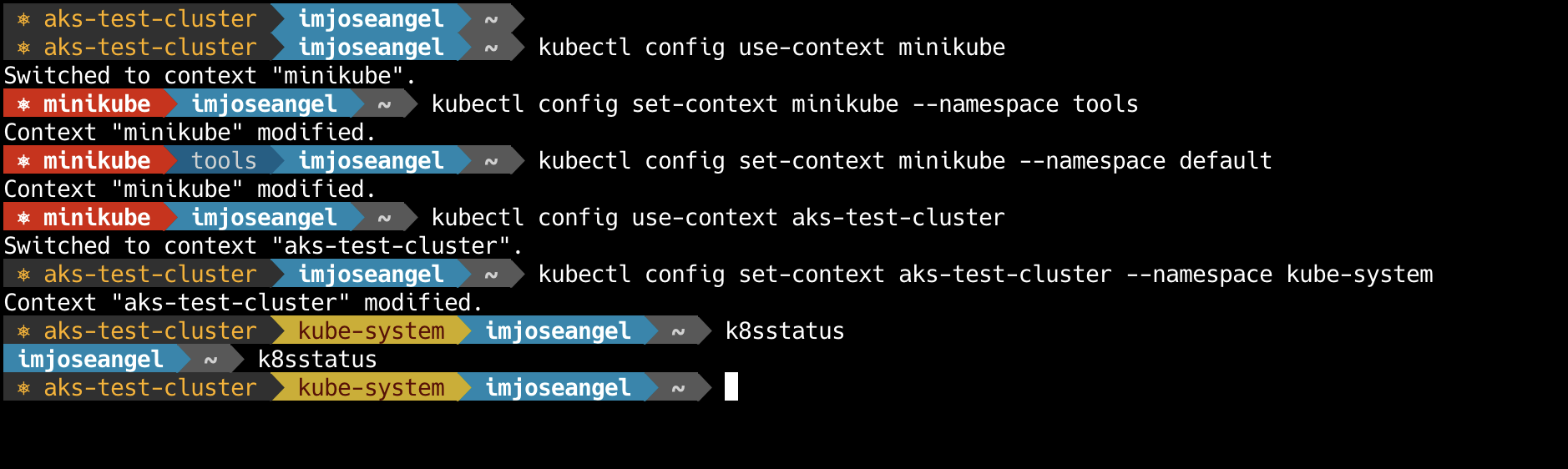
It will show any or all of:
- context name
- namespace
- username
- controlplane version
You can also:
-
Toggle on or off the powerline-k8sstatus segment using an environment variable which can easily be mapped to a function in your ~/.profile file.
-
Define certain contexts or namespaces to be colored differently for alerting purposes. For instance, you can have your production context or kube-system namespace showing up in bright red or solarized yellow respectively.
Requirements
The K8Sstatus segment requires kubectl. It can be installed following the instructions here.
Installation
Using pip
pip install powerline-k8sstatus
Configuration
The K8Sstatus segment uses a couple of custom highlight groups. You'll need to define those groups in your colorscheme,
for example in .config/powerline/colorschemes/default.json:
{
  "groups": {
    "k8sstatus": {
      "fg": "brightestorange",
      "bg": "gray2",
      "attrs": []
    },
    "k8sstatus:alert": {
      "fg": "white",
      "bg": "solarized:red",
      "attrs": [
        "bold"
      ]
    },
    "k8sstatus_namespace": {
      "fg": "gray10",
      "bg": "darkestblue",
      "attrs": []
    },
    "k8sstatus_namespace:alert": {
      "fg": "darkestred",
      "bg": "solarized:yellow",
      "attrs": []
    },
    "k8sstatus_user": {
      "fg": "white",
      "bg": "green",
      "attrs": []
    },
    "k8sstatus_version": {
      "fg": "white",
      "bg": "mediumorange",
      "attrs": []
    },
    "k8sstatus:divider": {
      "fg": "white",
      "bg": "mediumorange",
      "attrs": []
    }
  }
}
Then you can activate the K8Sstatus segment by adding it to your segment configuration,
for example in .config/powerline/themes/shell/default.json:
{
  "function": "powerline_k8sstatus.k8sstatus",
  "priority": 50,
  "args": {
    "show_namespace": true,
    "show_user": true,
    "show_version": true,
    "context_alert": [
      "minikube",
      "production"
    ],
    "namespace_alert": [
      "kube-system",
      "production"
    ]
  }
}
- Context names added to the
context_alertarguments will be outlined in the segment by a different colour. - Namespace names added to the
namespace_alertarguments will be outlined in the segment by a different colour. Note thatdefaultnamespace won't be shown and as result not colorized.
Reload powerline running powerline-daemon --replace to load the new settings.
By default powerline-k8sstatus will display the Kubernetes status segment context. It can be disabled temporarily if the environment variable POWERLINE_K8SSTATUS is set to 0. One way to do this would be with a simple function, such as putting this k8sstatus function in your ~/.bash_profile:
k8sstatus() {
    if [[ $POWERLINE_K8SSTATUS = "0" ]]; then
        unset POWERLINE_K8SSTATUS
    else
        export POWERLINE_K8SSTATUS=0
    fi
}
Toggle showing your Kubernetes segment in powerline by just typing k8sstatus in your terminal
Authors
Originally created by @imjoseangel
License
Licensed under the MIT License.
1 maintainer

Release files for powerline-k8sstatus 21.2.2
For a detailed explanation of source distributions (sdists) and built distributions (wheels), please see the package formats documentation.
Source distribution (sdist)
| File | Size | Uploaded | |
|---|---|---|---|
| powerline-k8sstatus-21.2.2.tar.gz | 5.7 kB | Details |
Built distribution (wheel)
| File | Interpreter | ABI | Platform | Reset |
|---|---|---|---|---|
| powerline_k8sstatus-21.2.2-py3-none-any.whl | Python 3 | none | any | Details |
Total release size: 10.9 kB
Release files / powerline-k8sstatus-21.2.2.tar.gz
| Download URL | powerline-k8sstatus-21.2.2.tar.gz |
|---|---|
| Size | 5.7 kB |
| Tags | Source |
|
SHA-256 checksum How to use checksums |
9c20ea98cf24a7441f52161a4aa9357271659c4f7adb642b15fc96e33072e52c
|
|
BLAKE2b-256 checksum How to use checksums |
4a8f478a3e29135f1f6fb4bd270335c8b13777281a61a25cd8bcda4f3482c750
|
| Upload date | |
|
Uploaded using Trusted Publishing? What is trusted publishing? |
No |
| Uploaded via |
twine/3.4.2 importlib_metadata/4.8.1 pkginfo/1.7.1 requests/2.26.0 requests-toolbelt/0.9.1 tqdm/4.62.2 CPython/3.9.6
|
Release files / powerline_k8sstatus-21.2.2-py3-none-any.whl
| Download URL | powerline_k8sstatus-21.2.2-py3-none-any.whl |
|---|---|
| Size | 5.2 kB |
| Tags | Python 3 |
|
SHA-256 checksum How to use checksums |
5743f06ed0f538ce5689c5b661f9084e7d0dba95981e669e4c5d44efbeaaf7b7
|
|
BLAKE2b-256 checksum How to use checksums |
3064e776104ad8af5c59bca8ed677c53743f9e38f0be7fa42a5d34dfdf9e7df6
|
| Upload date | |
|
Uploaded using Trusted Publishing? What is trusted publishing? |
No |
| Uploaded via |
twine/3.4.2 importlib_metadata/4.8.1 pkginfo/1.7.1 requests/2.26.0 requests-toolbelt/0.9.1 tqdm/4.62.2 CPython/3.9.6
|














