
[!NOTE] Compatibility:
v0.0.5 → Immich version 1.106.x - latest
v0.0.4 → Immich version 1.105.x
v0.0.2 → Immich version 1.93.x - 1.104.x

Photoprism to Immich migrator
This tool can migrate albums and favorites from Photoprism to Immich. It does not migrate your photo files.
Prerequisites
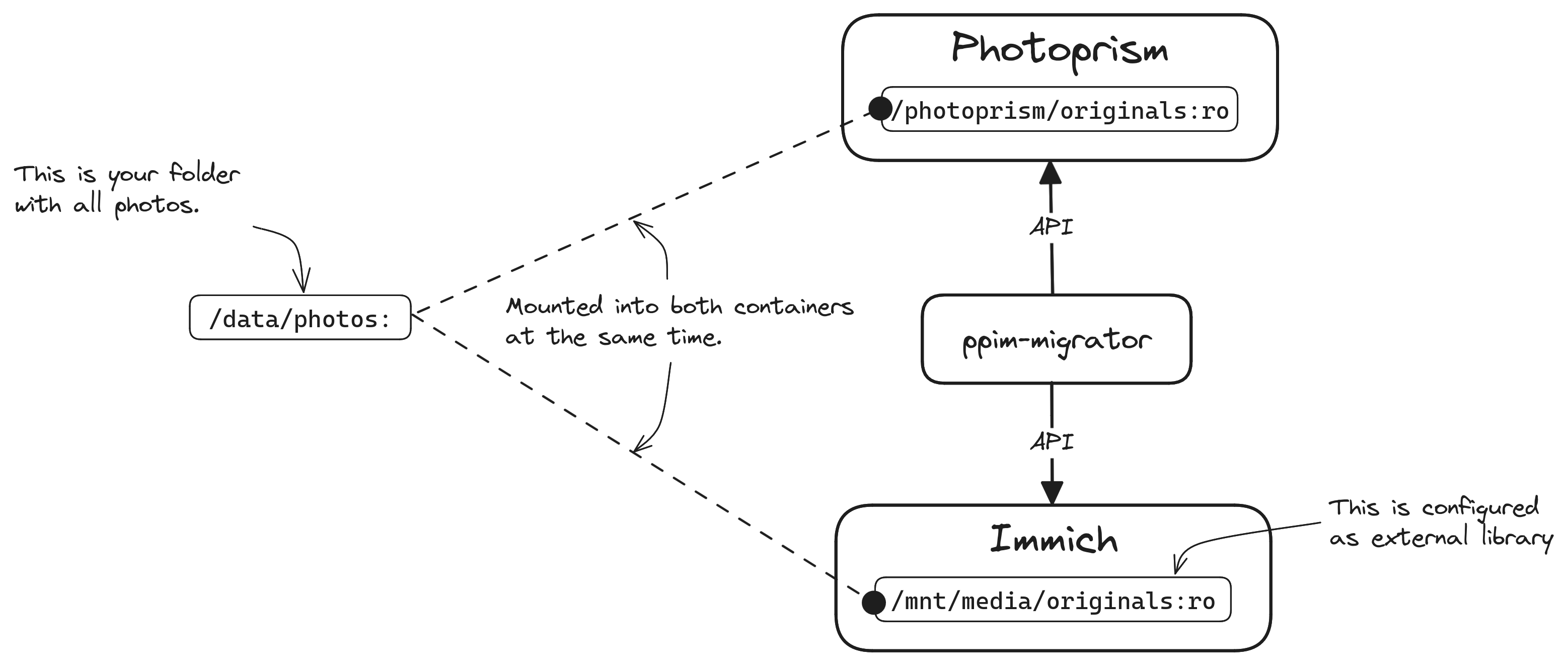
- The tool will only work if you keep the same file structure in immich that you already had in photoprism. This is the case if you take the
originalsfolder from photoprism and use it in immich as external library. - Photoprism and Immich must both be running at the same time, because the tool communicates with both APIs.
How it works
Migrate favorites
- The tool fetches all photos with a
favoritetag from your photoprism instance - For each photo, it retrieves the original
filenameand its respectivepath - It connects to immich, tries to find the photo by
filenameand validates potential candidates on the immich side by comparing the filepath - If a match was found, it marks the photo on immich as
favorite
Migrate album
- The tool fetches all photos of a certain
albumfrom your photoprism instance - For each photo, it retrieves the original
filenameand its respectivepath - It connects to immich, tries to find the photo by
filenameand validates potential candidates on the immich side by comparing the filepath - If a match was found, it creates a new
albumin immich and adds the matched photos
Migrate all albums
- The tool fetches all albums from your photoprism instance (1000 albums by default)
- For each album found, the migration is launched as described per the previous paragraph.
Installation
pip install ppim-migrator
Configuration
Create a config.yaml file in the working directory where you want to run the command.
photoprism:
  base_url: https://photoprism.example.com
  username:
  password:
immich:
  base_url: https://immich.example.com
  api_key:
Notes:
- The PhotoPrism account must not have two factor authentication enabled
Usage
Migrate all favorites from photoprism to immich
python -m ppim-migrator migrate-favorites
Migrate a certain album from photoprism to immich
To get an album-id just open the album in photoprism. The id is part of the url.
Example:
- Url, when opening the album:
https://photoprism.example.com/library/albums/aqrcixa2uf1q45iq/viewThealbum-idwould beaqrcixa2uf1q45iq
python -m ppim-migrator migrate-album <album-id-here>
Migrate all albums from photoprism to immich
python -m ppim-migrator migrate-all-albums
You can overwrite the default 1000 albums cap, by adding a --count= option:
python -m ppim-migrator migrate-all-albums --count=5000
Migrate JPG+RAW stacks from photoprism to immich
Since Immich does not support auto stacking yet, these stacks can be migrated over from photoprism.
python -m ppim-migrator migrate-stacked-raws
You can overwrite the default 100000 photos cap, by adding a --count= option:
python -m ppim-migrator migrate-stacked-raws --count=200000
1 maintainer

Metadata
1 maintainer
Release files for ppim-migrator 0.0.9
For a detailed explanation of source distributions (sdists) and built distributions (wheels), please see the package formats documentation.
Source distribution (sdist)
| File | Size | Uploaded | |
|---|---|---|---|
| ppim_migrator-0.0.9.tar.gz | 6.5 kB | Details |
Built distribution (wheel)
| File | Interpreter | ABI | Platform | Reset |
|---|---|---|---|---|
| ppim_migrator-0.0.9-py3-none-any.whl | Python 3 | none | any | Details |
Total release size: 13.7 kB
Release files / ppim_migrator-0.0.9.tar.gz
| Download URL | ppim_migrator-0.0.9.tar.gz |
|---|---|
| Size | 6.5 kB |
| Tags | Source |
|
SHA-256 checksum How to use checksums |
6bec344563e02d2daac558ffa93844c944ae9bf01e0558291d94fe988d837be7
|
|
BLAKE2b-256 checksum How to use checksums |
cf98025b2a91c7e1f4c68832c2a0cde44a2fde39d8f0bdcbed57e621eab2a3ee
|
| Upload date | |
|
Uploaded using Trusted Publishing? What is trusted publishing? |
Yes |
| Uploaded via |
twine/6.1.0 CPython/3.12.9
|
Provenance
Provenance describes where a file came from. On PyPI, provenance is shared via attestations, which provide a verifiable record of the build or publishing details. View details, limitations and caveats.


PyPI Publish Attestation
PyPI verified that this artifact, at this checksum, originated from the publisher listed below.
Signed by GitHub Actions, verified by PyPI on Feb 21, 2025.
Transparency logRelease files / ppim_migrator-0.0.9-py3-none-any.whl
| Download URL | ppim_migrator-0.0.9-py3-none-any.whl |
|---|---|
| Size | 7.1 kB |
| Tags | Python 3 |
|
SHA-256 checksum How to use checksums |
aacaa20c2248374381d254d93e71dab7f6be465784599c6b701419e68efab5f9
|
|
BLAKE2b-256 checksum How to use checksums |
28f1cda8e4055bb2d3575fbab4be600bd5a6aa2863def3cdb8b7f58b228e95d4
|
| Upload date | |
|
Uploaded using Trusted Publishing? What is trusted publishing? |
Yes |
| Uploaded via |
twine/6.1.0 CPython/3.12.9
|
Provenance
Provenance describes where a file came from. On PyPI, provenance is shared via attestations, which provide a verifiable record of the build or publishing details. View details, limitations and caveats.
PyPI Publish Attestation
PyPI verified that this artifact, at this checksum, originated from the publisher listed below.
Signed by GitHub Actions, verified by PyPI on Feb 21, 2025.
Transparency log













