
ppk2-lib
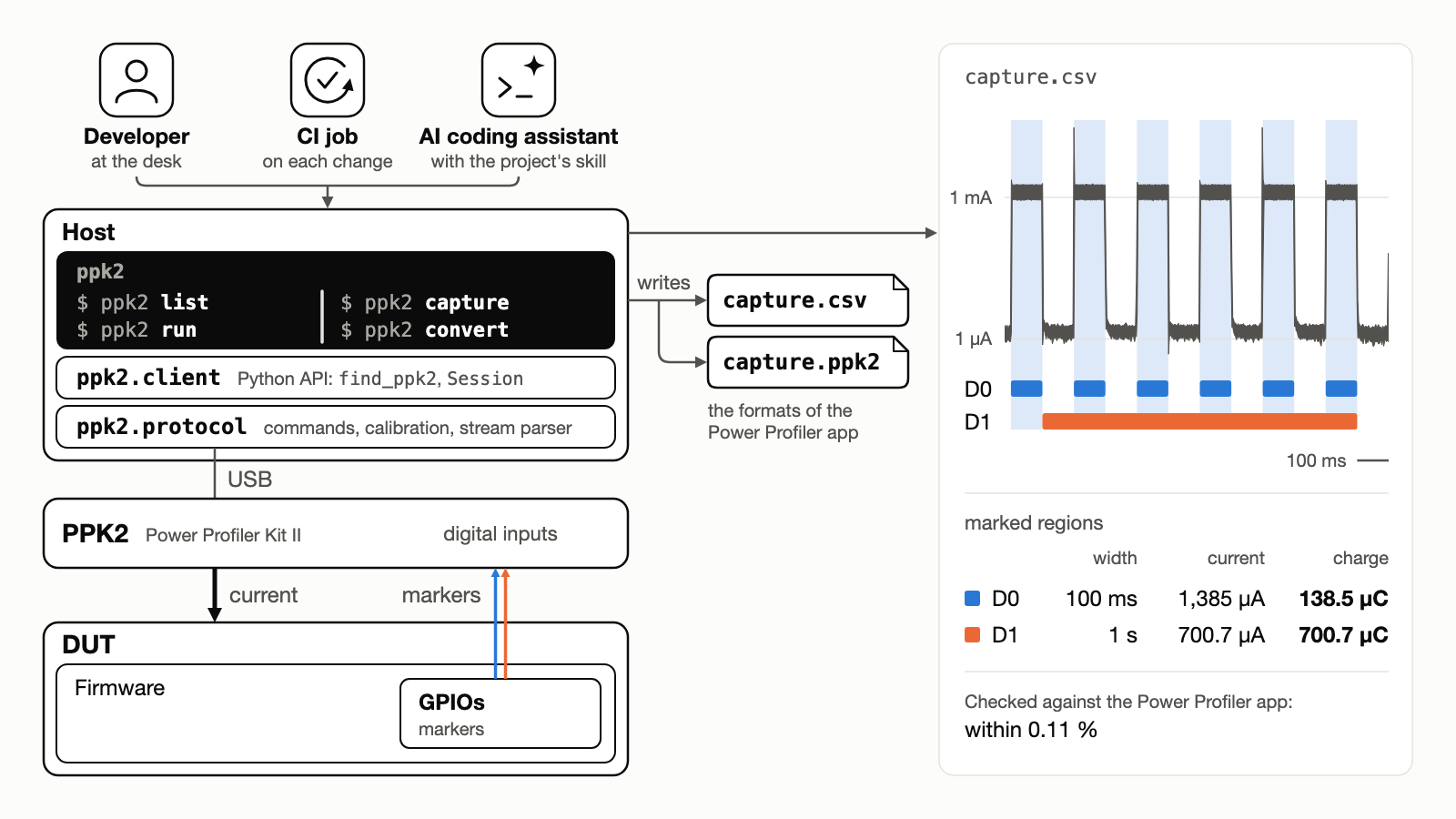
ppk2-lib provides a Python library and CLI for scripted measurements with Nordic's Power Profiler Kit II (PPK2). It records current and the eight digital inputs at 100,000 samples per second, from a terminal or in CI. Its captures are checked against Nordic's Power Profiler app.
A GPIO that the firmware raises around a piece of code shows on a digital input, so a capture also tells what that code draws.
This is an experimental release (0.1.0). It works and is checked on hardware, but the API may still change between 0.x versions.

Installation
pip install ppk2-lib
Or with uv:
uv tool install ppk2-lib
uvx --from ppk2-lib ppk2 list
You need Python 3.11 or newer. On Windows, two things do not work yet: see platform notes.
Quick start
Wire the PPK2 as for the app, quit the app, and run:
$ ppk2 list
PPK2  serial=A1B2C3D4E5F6
  /dev/cu.usbmodemA1B2C3D4E5F62   [data port]
  /dev/cu.usbmodemA1B2C3D4E5F64   [idle]

$ ppk2 capture --out boot.csv --seconds 3 --source --vdd 3.3
opening session (Source meter mode, vdd=3300 mV)
capturing 3.00 s -> boot.csv (Ctrl-C to stop early)
  [  1.0s]       99329 samples  mean  954.17 µA
  [  2.0s]      199681 samples  mean  826.31 µA
captured 300000 samples over 3.00 s (100037 Hz)
With --source, the PPK2 powers the device under test (DUT) at 3.3 V.
Without it, the PPK2 is in Ampere meter mode, for a DUT with its own
supply.
A few more commands:
ppk2 capture --out idle.ppk2 --seconds 30    # a session file in the app's format
ppk2 convert boot.csv boot.ppk2              # the same, from a CSV
ppk2 power on --hold --source --vdd 3.3      # keep the DUT powered until Ctrl-C
ppk2 run --source --vdd 3.3 -- west flash    # power the DUT for one command
And from Python:
from ppk2 import Mode, Session, find_ppk2

with Session.open(find_ppk2().device) as session:
    session.set_mode(Mode.AMPERE)
    session.start_measuring()
    session.power_on()
    session.capture(lambda sample: sample.current_micro_amps < 1000)
Documentation
The documentation is published at https://rdagher.github.io/ppk2-lib/,
built from docs/ by just docs.
See the changelog for what 0.1.0 contains and for its
limits. For AI coding assistants, llms.txt maps the
documentation, and .claude/skills/ppk2/SKILL.md
is a procedure for driving a PPK2.
Validation
Captures of the same bench by the app and by ppk2 capture agree
within 0.11 % on the mean current and charge of the marked regions,
in both modes. See the method and
the results, with their limits: one PPK2,
and the app as the reference.
Development
just sync        # install into .venv (needs uv and just)
just ci          # type check, lint, unit tests
just test-hw     # hardware tests: needs a PPK2 and the bench firmware
just docs        # build the documentation site into site/
Origin
The protocol code was written from a reading of the source of Nordic's app (pc-nrfconnect-ppk) and from bench measurements. It contains none of that source, whose licence allows reading and running it but not redistributing it.
The code and the documentation were written with Claude Code and reviewed by the author. The figures are checked on a bench against Nordic's app: see the method and the results.
Related projects
- Nordic's Power Profiler app: the reference for this package.
- The
ppk2skill of Nordic MCP, Nordic's tooling for AI assistants. - IRNAS's ppk2-api-python: another Python library for the PPK2, under GPL-2.0.
See related projects for more.
Licence
Apache-2.0 or MIT, at your option.
ppk2-lib is not affiliated with or endorsed by Nordic Semiconductor. PPK2, Power Profiler Kit and nRF are Nordic's product names.
1 maintainer

Metadata
1 maintainer
Release files for ppk2-lib 0.1.0
For a detailed explanation of source distributions (sdists) and built distributions (wheels), please see the package formats documentation.
Source distribution (sdist)
| File | Size | Uploaded | Provenance | Actions |
|---|---|---|---|---|
| ppk2_lib-0.1.0.tar.gz | 98.2 kB | With provenance | Details for ppk2_lib-0.1.0.tar.gz |
Built distribution (wheel)
| File | Interpreter | ABI | Platform | Actions Reset |
|---|---|---|---|---|
| ppk2_lib-0.1.0-py3-none-any.whl | Python 3 | none | any | Details for ppk2_lib-0.1.0-py3-none-any.whl |
Total release size: 157.0 kB
Release files / ppk2_lib-0.1.0.tar.gz
| Download URL | ppk2_lib-0.1.0.tar.gz |
|---|---|
| Size | 98.2 kB |
| Tags | Source |
|
SHA-256 checksum How to use checksums |
443994c64472c356a9f72053113e4afbe2b5c39cbc7aa556d3cd45aa490f685d
|
|
BLAKE2b-256 checksum How to use checksums |
f3c41476f06d6b1d41d05a27fc4a62cbf3870795a81febb5f3a8918b595337ac
|
| Upload date | |
|
Uploaded using Trusted Publishing? What is trusted publishing? |
Yes |
| Uploaded via |
twine/7.0.0 CPython/3.13.16
|
Provenance
Provenance describes where a file came from. On PyPI, provenance is shared via attestations, which provide a verifiable record of the build or publishing details. View details, limitations and caveats.


PyPI Publish Attestation
PyPI verified that this artifact, at this checksum, originated from the publisher listed below.
Signed by GitHub Actions, verified by PyPI on Nov 24, 2026.
Transparency logRelease files / ppk2_lib-0.1.0-py3-none-any.whl
| Download URL | ppk2_lib-0.1.0-py3-none-any.whl |
|---|---|
| Size | 58.8 kB |
| Tags | Python 3 |
|
SHA-256 checksum How to use checksums |
c5411548452e7f617bd6b617a3acfc980c14b529bd18687bbd239d54cde00429
|
|
BLAKE2b-256 checksum How to use checksums |
7e9986f7d4e2a43f58ba25f09b103beea41df94b2c5ba377769d596a570a23e9
|
| Upload date | |
|
Uploaded using Trusted Publishing? What is trusted publishing? |
Yes |
| Uploaded via |
twine/7.0.0 CPython/3.13.16
|
Provenance
Provenance describes where a file came from. On PyPI, provenance is shared via attestations, which provide a verifiable record of the build or publishing details. View details, limitations and caveats.
PyPI Publish Attestation
PyPI verified that this artifact, at this checksum, originated from the publisher listed below.
Signed by GitHub Actions, verified by PyPI on Nov 24, 2026.
Transparency logSecurity for ppk2-lib 0.1.0
Provenance
Provenance describes where a file came from. On PyPI, provenance is shared via attestations, which provide a verifiable record of the build or publishing details. View details, limitations and caveats.
Full provenance
Both files in this release have been uploaded with provenance metadata.
Attestation for ppk2_lib-0.1.0.tar.gz
PyPI Publish Attestation
PyPI verified that this artifact, at this checksum, originated from the publisher listed below.
Signed by GitHub Actions, verified by PyPI on Nov 24, 2026.
Transparency logA note on package security
PyPI is a repository for distributing packages, not a service for auditing them. While third-party security researchers and our staff do their best to detect and remove malicious packages, PyPI cannot guarantee the quality, security or suitability of any given package.
To learn more about protecting yourself from malicious actors, visit our package security documentation.













