
Prompt-Promptor: An Autonomous Agent Framework for Prompt Engineering
Prompt-Promptor(or shorten for ppromptor) is a Python library designed to automatically generate and improve prompts for LLMs. It draws inspiration from autonomous agents like AutoGPT and consists of three agents: Proposer, Evaluator, and Analyzer. These agents work together with human experts to continuously improve the generated prompts.
🚀 Features:
-
🤖 The use of LLMs to prompt themself by giving few samples.
-
💪 Guidance for OSS LLMs(eg, LLaMA) by more powerful LLMs(eg, GPT4)
-
📈 Continuously improvement.
-
👨👨👧👦 Collaboration with human experts.
-
💼 Experiment management for prompt engineering.
-
🖼 Web GUI interface.
-
🏳️🌈 Open Source.
Warning
-
This project is currently in its earily stage, and it is anticipated that there will be major design changes in the future.
-
The main function utilizes an infinite loop to enhance the generation of prompts. If you opt for OpenAI's ChatGPT as Target/Analysis LLMs, kindly ensure that you set a usage limit.
Concept
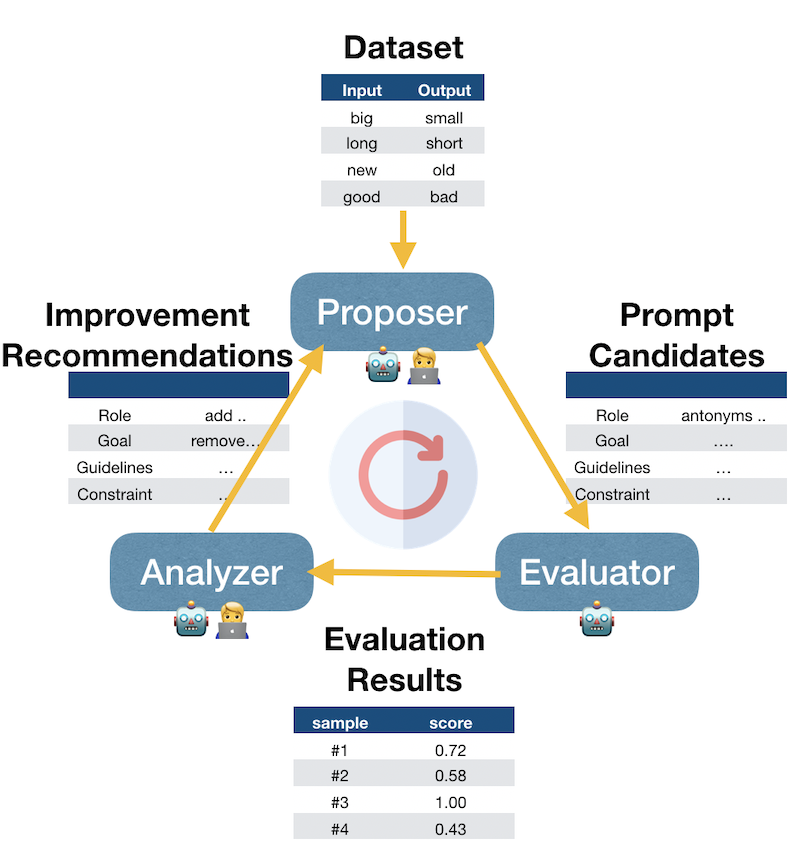
A more detailed class diagram could be found in doc
Installations
From Github
- Install Package
pip install ppromptor --upgrade
- Clone Repository from Github
git clone https://github.com/pikho/ppromptor.git
- Start Web UI
cd ppromptor
streamlit run ui/app.py
Running Local Model(WizardLM)
- Install Required Packages
pip install requirements_local_model.txt
- Test if WizardLM can run correctly
cd <path_to_ppromptor>/ppromptor/llms
python wizardlm.py
Usage
- Start the Web App
cd <path_to_ppromptor>
streamlit run ui/app.py
-
Load the Demo Project Load
examples/antonyms.db(default) for demo purposes. This demonstrates how to use ChatGPT to guide WizardLM to generate antonyms for given inputs. -
Configuration In the Configuration tab, set
Target LLMaswizardlmif you can infer this model locally. Or choose bothTarget LLMandAnalysis LLMaschatgpt. If chatgpt is used, please provide the OpenAI API Key. -
Load the dataset The demo project has already loaded 5 records. You can add your own dataset.(Optional)
-
Start the Workload Press the
Startbutton to activate the workflow. -
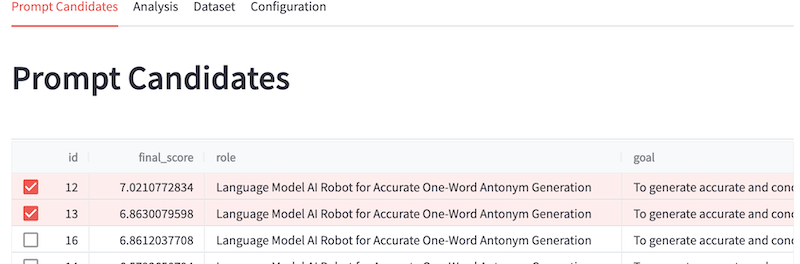
Prompt Candidates Generated prompts can be found in the
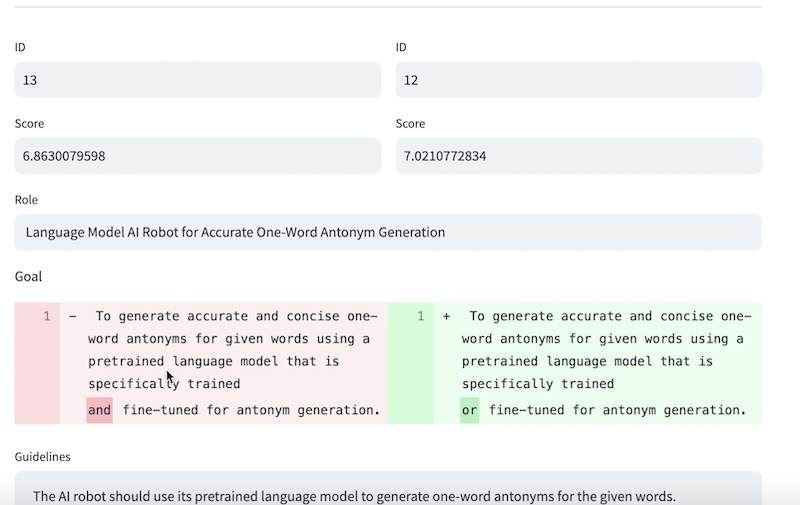
Prompt Candidatestab. Users can modify generated prompts by selecting only 1 Candidate, then modifying the prompt, thenCreate Prompt. This new prompt will be evaluated by Evaluator agent and then keep improving by Analyzer agent. By selecting 2 prompts, we can compare these prompts side by side.
Contribution
We welcome all kinds of contributions, including new feature requests, bug fixes, new feature implementation, examples, and documentation updates. If you have a specific request, please use the "Issues" section. For other contributions, simply create a pull request (PR). Your participation is highly valued in improving our project. Thank you!
1 maintainer

Metadata
1 maintainer
Release files for ppromptor 0.1.4
For a detailed explanation of source distributions (sdists) and built distributions (wheels), please see the package formats documentation.
Built distribution (wheel)
| File | Interpreter | ABI | Platform | Reset |
|---|---|---|---|---|
| ppromptor-0.1.4-py3-none-any.whl | Python 3 | none | any | Details |
Release files / ppromptor-0.1.4-py3-none-any.whl
| Download URL | ppromptor-0.1.4-py3-none-any.whl |
|---|---|
| Size | 22.0 kB |
| Tags | Python 3 |
|
SHA-256 checksum How to use checksums |
0a6f818bd93dd79a90d3e752311674da2e701b51828e22c8b15296d5045d3d7c
|
|
BLAKE2b-256 checksum How to use checksums |
27d5e3bb302d9c8ecc86dffa57977a756ec25be6ee34f8bffd4245d8a233400d
|
| Upload date | |
|
Uploaded using Trusted Publishing? What is trusted publishing? |
No |
| Uploaded via |
twine/4.0.2 CPython/3.10.11
|














