
PR Decorator
Automatically analyses and decorates pull requests using Amazon Bedrock Nova Pro. Triggered on every PR open, update, or reopen- no manual input needed.
What it does
When a PR is opened or updated, the workflow:
- Authenticates with AWS using OIDC (no stored access keys)
- Calls Amazon Bedrock Nova Pro to analyse the PR diff
- Updates the PR body with a structured summary
- Posts a completion comment
Sequence Diagram
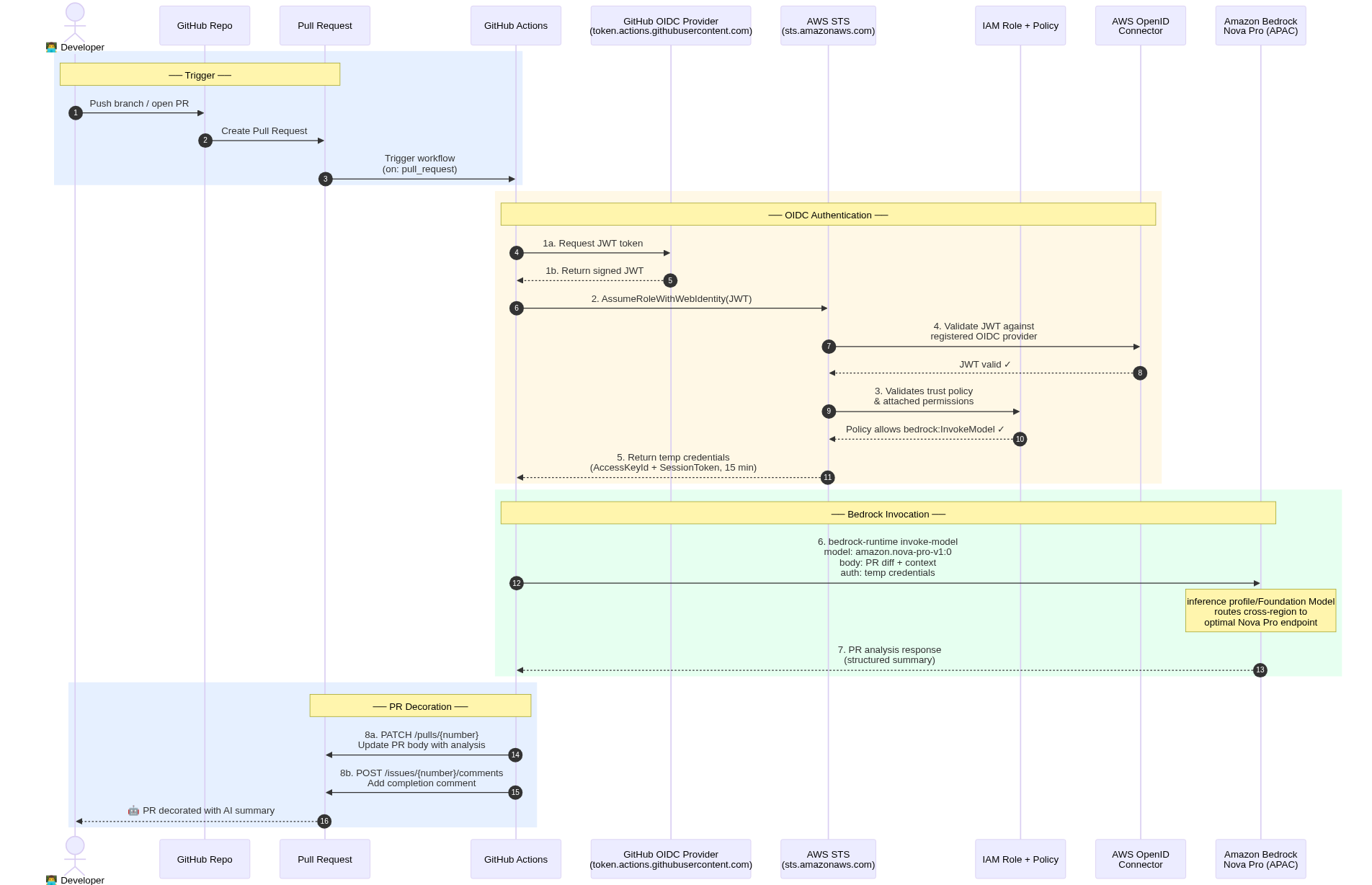
sequenceDiagram
autonumber
actor Dev as 👨💻 Developer
participant Repo as GitHub Repo
participant PR as Pull Request
participant GHA as GitHub Actions
participant GOIDC as GitHub OIDC Provider<br/>(token.actions.githubusercontent.com)
participant STS as AWS STS<br/>(sts.amazonaws.com)
participant IAM as IAM Role + Policy
participant AOIDC as AWS OpenID<br/>Connector
participant BR as Amazon Bedrock<br/>Nova Pro (APAC)
rect rgb(230, 240, 255)
Note over Dev,PR: ── Trigger ──
Dev->>Repo: Push branch / open PR
Repo->>PR: Create Pull Request
PR->>GHA: Trigger workflow<br/>(on: pull_request)
end
rect rgb(255, 248, 230)
Note over GHA,AOIDC: ── OIDC Authentication ──
GHA->>GOIDC: 1a. Request JWT token
GOIDC-->>GHA: 1b. Return signed JWT
GHA->>STS: 2. AssumeRoleWithWebIdentity(JWT)
STS->>AOIDC: 4. Validate JWT against<br/>registered OIDC provider
AOIDC-->>STS: JWT valid ✓
STS->>IAM: 3. Validates trust policy<br/>& attached permissions
IAM-->>STS: Policy allows bedrock:InvokeModel ✓
STS-->>GHA: 5. Return temp credentials<br/>(AccessKeyId + SessionToken, 15 min)
end
rect rgb(230, 255, 240)
Note over GHA,BR: ── Bedrock Invocation ──
GHA->>BR: 6. bedrock-runtime invoke-model<br/>model: amazon.nova-pro-v1:0<br/>body: PR diff + context<br/>auth: temp credentials
Note over BR: inference profile/Foundation Model<br/>routes cross-region to<br/>optimal Nova Pro endpoint
BR-->>GHA: 7. PR analysis response<br/>(structured summary)
end
rect rgb(230, 240, 255)
Note over GHA,PR: ── PR Decoration ──
GHA->>PR: 8a. PATCH /pulls/{number}<br/>Update PR body with analysis
GHA->>PR: 8b. POST /issues/{number}/comments<br/>Add completion comment
PR-->>Dev: 🤖 PR decorated with AI summary
end
Architecture
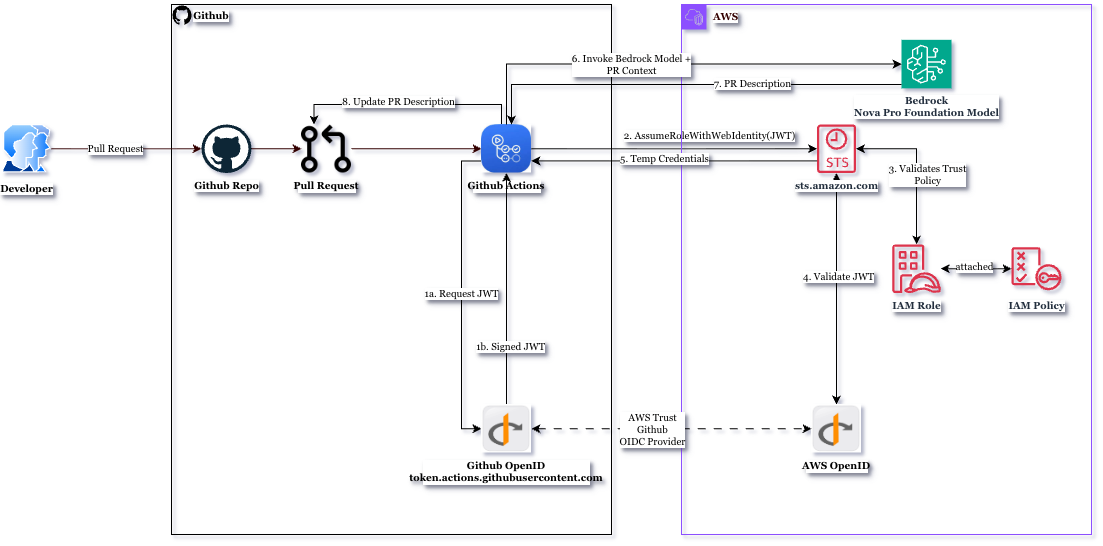
How authentication works
This setup uses OpenID Connect (OIDC). GitHub generates a short-lived token per workflow run. AWS trusts that token and returns temporary credentials- no AWS_ACCESS_KEY_ID or AWS_SECRET_ACCESS_KEY stored anywhere.
Prerequisites
- AWS account with Bedrock access enabled for Amazon Nova Pro
- Admin access to your GitHub repository
- AWS CLI installed locally (for setup commands)
Step 1: AWS setup
1a. Register GitHub as an identity provider
Run this once per AWS account:
aws iam create-open-id-connect-provider \
  --url https://token.actions.githubusercontent.com \
  --client-id-list sts.amazonaws.com
Note: If you get
EntityAlreadyExists, the provider is already registered — skip this step.
1b. Create the IAM trust policy
Create trust-policy.json:
{
  "Version": "2012-10-17",
  "Statement": [{
    "Effect": "Allow",
    "Principal": {
      "Federated": "arn:aws:iam::<YOUR_ACCOUNT_ID>:oidc-provider/token.actions.githubusercontent.com"
    },
    "Action": "sts:AssumeRoleWithWebIdentity",
    "Condition": {
      "StringEquals": {
        "token.actions.githubusercontent.com:aud": "sts.amazonaws.com"
      },
      "StringLike": {
        "token.actions.githubusercontent.com:sub": "repo:{YOUR_GITHUB_USERNAME||YOUR_GITHUB_ORG}/YOUR_REPO_NAME:*"
      }
    }
  }]
}
Replace:
| Placeholder | Replace with |
|---|---|
YOUR_ACCOUNT_ID |
Your 12-digit AWS account ID |
YOUR_GITHUB_USERNAME |
Your GitHub username name |
YOUR_GITHUB_ORG |
Your GitHub org name |
YOUR_REPO_NAME |
Exact repository name (case-sensitive) |
1c. Create the IAM role
aws iam create-role \
  --role-name pr-decorator-bedrock-role \
  --assume-role-policy-document file://trust-policy.json \
  --description "Role for GitHub Actions PR Decorator"
1d. Create and attach the Bedrock access policy
Create bedrock-policy.json:
{
    "Version": "2012-10-17",
    "Statement": [
        {
            "Sid": "AllowNovaModelsApSouth1Only",
            "Effect": "Allow",
            "Action": [
                "bedrock:InvokeModel"
            ],
            "Resource": [
                "arn:aws:bedrock:::foundation-model/amazon.nova-lite-v1:0",
                "arn:aws:bedrock:::foundation-model/amazon.nova-pro-v1:0",
                "arn:aws:bedrock::<YOUR_ACCOUNT_ID>:inference-profile/apac.amazon.nova-pro-v1:0",
                "arn:aws:bedrock::<YOUR_ACCOUNT_ID>:inference-profile/apac.amazon.nova-lite-v1:0"
            ]
        }
    ]
}
Attach it:
aws iam create-policy \
  --policy-name BedrockProfilePolicy \
  --policy-document file://bedrock-policy.json

aws iam attach-role-policy \
  --role-name pr-decorator-bedrock-role \
  --policy-arn arn:aws:iam::<YOUR_ACCOUNT_ID>:policy/BedrockProfilePolicy
1e. Enable Nova Pro model access
- Go to the Amazon Bedrock console
- Click Model access in the left navigation
- Find Amazon Nova Pro and click Request access
- Wait for approval (usually instant)
Step 2: GitHub setup
2a. Add repository secret
Go to Settings → Secrets and variables → Actions → New repository secret:
| Secret name | Value |
|---|---|
AWS_IAM_ROLE_ARN |
arn:aws:iam::<YOUR_ACCOUNT_ID>:role/pr-decorator-bedrock-role |
2b. Add repository variables
On the same page, click the Variables tab:
i.e apac preferred region set
| Variable name | Value |
|---|---|
AWS_REGION |
ap-south-1 |
AWS_BEDROCK_MODEL_ID |
apac.amazon.nova-pro-v1:0 |
2c. Add the workflow file
Create .github/workflows/pr-decorator.yml:
name: PR Decorator (Automatic)

on:
  pull_request:
    types: [opened, synchronize, reopened]
    branches:
      - main

permissions:
  contents: read
  pull-requests: write
  id-token: write   # required for OIDC

jobs:
  decorate-pr:
    runs-on: ubuntu-latest
    # Block fork PRs — they cannot access secrets
    if: github.event.pull_request.head.repo.full_name == github.repository

    steps:
      - name: Checkout code
        uses: actions/checkout@v6
        with:
          fetch-depth: 0

      - name: Configure AWS credentials
        uses: aws-actions/configure-aws-credentials@v6
        with:
          role-to-assume: ${{ secrets.AWS_IAM_ROLE_ARN }}
          role-session-name: GitHubActions-AutoPRDecorator
          aws-region: ${{ vars.AWS_REGION }}

      # ubuntu-latest ships with CLI v1 which lacks bedrock-runtime
      - name: Upgrade AWS CLI
        run: |
          curl -s https://awscli.amazonaws.com/awscli-exe-linux-x86_64.zip -o awscliv2.zip
          unzip -q awscliv2.zip
          sudo ./aws/install --update

      - name: Test Bedrock access
        run: |
          aws bedrock-runtime invoke-model \
            --model-id ${{ vars.AWS_BEDROCK_MODEL_ID }} \
            --body '{"messages":[{"role":"user","content":[{"text":"ping"}]}]}' \
            --region ${{ vars.AWS_REGION }} \
            --cli-binary-format raw-in-base64-out \
            test-response.json
          echo "Bedrock access confirmed"

      - name: Run PR decorator
        uses: ./
        with:
          pr-decorator-version: source
          pr-number: ${{ github.event.pull_request.number }}
          base-sha: ${{ github.event.pull_request.base.sha }}
          head-sha: ${{ github.event.pull_request.head.sha }}
          head-ref: ${{ github.event.pull_request.head.ref }}
          aws-region: ${{ vars.AWS_REGION }}
          region: ${{ vars.AWS_REGION }}
          mode: "body"
          overwrite: "false"

      - name: Add completion comment (optional)
        uses: actions/github-script@v9
        with:
          script: |
            github.rest.issues.createComment({
              issue_number: ${{ github.event.pull_request.number }},
              owner: context.repo.owner,
              repo: context.repo.repo,
              body: '🤖 **PR Decorator Complete**\n\nAnalysed using AWS Bedrock Nova Pro (APAC).\n\n_Triggered by: ${{ github.event_name }} on ${{ github.event.pull_request.head.ref }}_'
            })
Step 3: Verify
Create a test PR to trigger the workflow:
git checkout -b test/bedrock-setup
echo "test" >> README.md
git add README.md
git commit -m "test: trigger PR decorator"
git push origin test/bedrock-setup
Open a PR targeting main. In the Actions tab, a successful run shows all steps green, the PR body updated, and a completion comment posted.
Troubleshooting
| Error | Cause | Fix |
|---|---|---|
Not authorized to perform sts:AssumeRoleWithWebIdentity |
Trust policy sub condition mismatch, or OIDC provider missing |
Verify provider exists: aws iam list-open-id-connect-providers. Check repo name in trust policy matches exactly. |
Found invalid choice 'invoke-model' under bedrock |
Wrong CLI namespace | Use aws bedrock-runtime invoke-model, not aws bedrock invoke-model |
AccessDenied on bedrock:InvokeModel |
Policy not attached, or wrong resource ARN | Run aws iam list-attached-role-policies --role-name pr-decorator-bedrock-role |
| Model access denied | Nova Pro not enabled | Go to Bedrock console → Model access → enable Amazon Nova Pro |
Verify your setup
# Check OIDC provider exists
aws iam list-open-id-connect-providers

# Check trust policy
aws iam get-role \
  --role-name pr-decorator-bedrock-role \
  --query Role.AssumeRolePolicyDocument

# Check attached policies
aws iam list-attached-role-policies \
  --role-name pr-decorator-bedrock-role

# Test Bedrock directly
aws bedrock-runtime invoke-model \
  --model-id apac.amazon.nova-pro-v1:0 \
  --body '{"messages":[{"role":"user","content":[{"text":"hello"}]}]}' \
  --region ap-south-1 \
  --cli-binary-format raw-in-base64-out \
  response.json && cat response.json
Security notes
- Fork PRs are blocked — the
if:condition prevents forks from accessing secrets - OIDC tokens are short-lived (15 min) and scoped to a single workflow run
- The IAM role is limited to
bedrock:InvokeModelonly- no broader AWS access - The trust policy
subcondition locks the role to this specific repository
1 maintainer

Metadata
1 maintainer
Release files for pr-decorator 1.1.5
For a detailed explanation of source distributions (sdists) and built distributions (wheels), please see the package formats documentation.
Source distribution (sdist)
| File | Size | Uploaded | |
|---|---|---|---|
| pr_decorator-1.1.5.tar.gz | 47.0 kB | Details |
Built distribution (wheel)
| File | Interpreter | ABI | Platform | Reset |
|---|---|---|---|---|
| pr_decorator-1.1.5-py3-none-any.whl | Python 3 | none | any | Details |
Total release size: 84.7 kB
Release files / pr_decorator-1.1.5.tar.gz
| Download URL | pr_decorator-1.1.5.tar.gz |
|---|---|
| Size | 47.0 kB |
| Tags | Source |
|
SHA-256 checksum How to use checksums |
f68c0e8d969e80522082ca0abdd74bb0ef8cbd7f872718f8371a9cbbbf29e239
|
|
BLAKE2b-256 checksum How to use checksums |
b5ae9f5e19db8bd2e3e8611aae6fb9da3aae64c909822a7c4c8601dfb7b7623e
|
| Upload date | |
|
Uploaded using Trusted Publishing? What is trusted publishing? |
Yes |
| Uploaded via |
twine/6.1.0 CPython/3.13.13
|
Provenance
Provenance describes where a file came from. On PyPI, provenance is shared via attestations, which provide a verifiable record of the build or publishing details. View details, limitations and caveats.


PyPI Publish Attestation
PyPI verified that this artifact, at this checksum, originated from the publisher listed below.
Signed by GitHub Actions, verified by PyPI on Jun 15, 2026.
Transparency logRelease files / pr_decorator-1.1.5-py3-none-any.whl
| Download URL | pr_decorator-1.1.5-py3-none-any.whl |
|---|---|
| Size | 37.7 kB |
| Tags | Python 3 |
|
SHA-256 checksum How to use checksums |
8c55712cf23701d3365ebd29fd63cdb43241ca885ce582538e2efdd61baf6096
|
|
BLAKE2b-256 checksum How to use checksums |
fe0098c792b93f0ccefeef6f7c1f7e206a6dc54a9dc8f9858d1d3f91b3340c7c
|
| Upload date | |
|
Uploaded using Trusted Publishing? What is trusted publishing? |
Yes |
| Uploaded via |
twine/6.1.0 CPython/3.13.13
|
Provenance
Provenance describes where a file came from. On PyPI, provenance is shared via attestations, which provide a verifiable record of the build or publishing details. View details, limitations and caveats.
PyPI Publish Attestation
PyPI verified that this artifact, at this checksum, originated from the publisher listed below.
Signed by GitHub Actions, verified by PyPI on Jun 15, 2026.
Transparency log













