
PRogramming PROgrams

https://pypi.org/project/pr-pro/
pr_pro is a Python package for defining training programs. It's main features at a glance are:
- Modular and extensible definition of different types of exercises
- Export to and import from
jsonfiles - Automatic computation of weights based on defined max values
- Render as plain text or pdf
- Ready to deploy
streamlitapp for each custom program that you define
Simple example
program = get_simple_example_program()
program.compute_values(ComputeConfig(one_rm_calculator=Brzycki1RMCalculator()))
print(program)

# Export to pdf
program.export_to_pdf(Path('example.pdf'))
--- Workout Test program ---
Best exercise values
  Backsquat: 100
  Bench Press: 80

Workout sessions
--- W1D1 ---
notes: Easy on first day.
Backsquat with 2 sets:
  reps 5, weight 55.0, percentage 0.55, relative_percentage 0.619
  reps 5, weight 55.0, percentage 0.55, relative_percentage 0.619
Pendlay row + Pushup with 2 sets:
  reps 6, percentage 0.6 | reps 10
  reps 6, percentage 0.6 | reps 10
Bench Press with 2 sets:
  reps 8, weight 40.0, percentage 0.5, relative_percentage 0.621
  reps 8, weight 40.0, percentage 0.5, relative_percentage 0.621
pr_pro also allows defining progressions throughout the training block. Look into pr_pro/examples.py for an example of this.
Installation
pip install pr_pro
Visualization
The pr_pro.visualization gives you multiple options to visualize different aspects of your program:
visualize_metrics: Visualize metrics of your program, e.g. volume (total reps, total sets), or intensity.visualize_exercises: A heatmap of the number of sets per exercise in the program.visualize_sessions: Prints a table of concise information about the exercises per sessions in the program.
streamlit visualization
You need to install the visualization dependencies
pip install pr_pro[vis]
Simply define your program and create a file streamlit_app.py with
from pr_pro.streamlit_vis.streamlit_app import run_streamlit_app

program = ...  # Your program
run_streamlit_app(program)
Then run the streamlit app as per usual
streamlit run streamlit_app.py
The app looks like this:
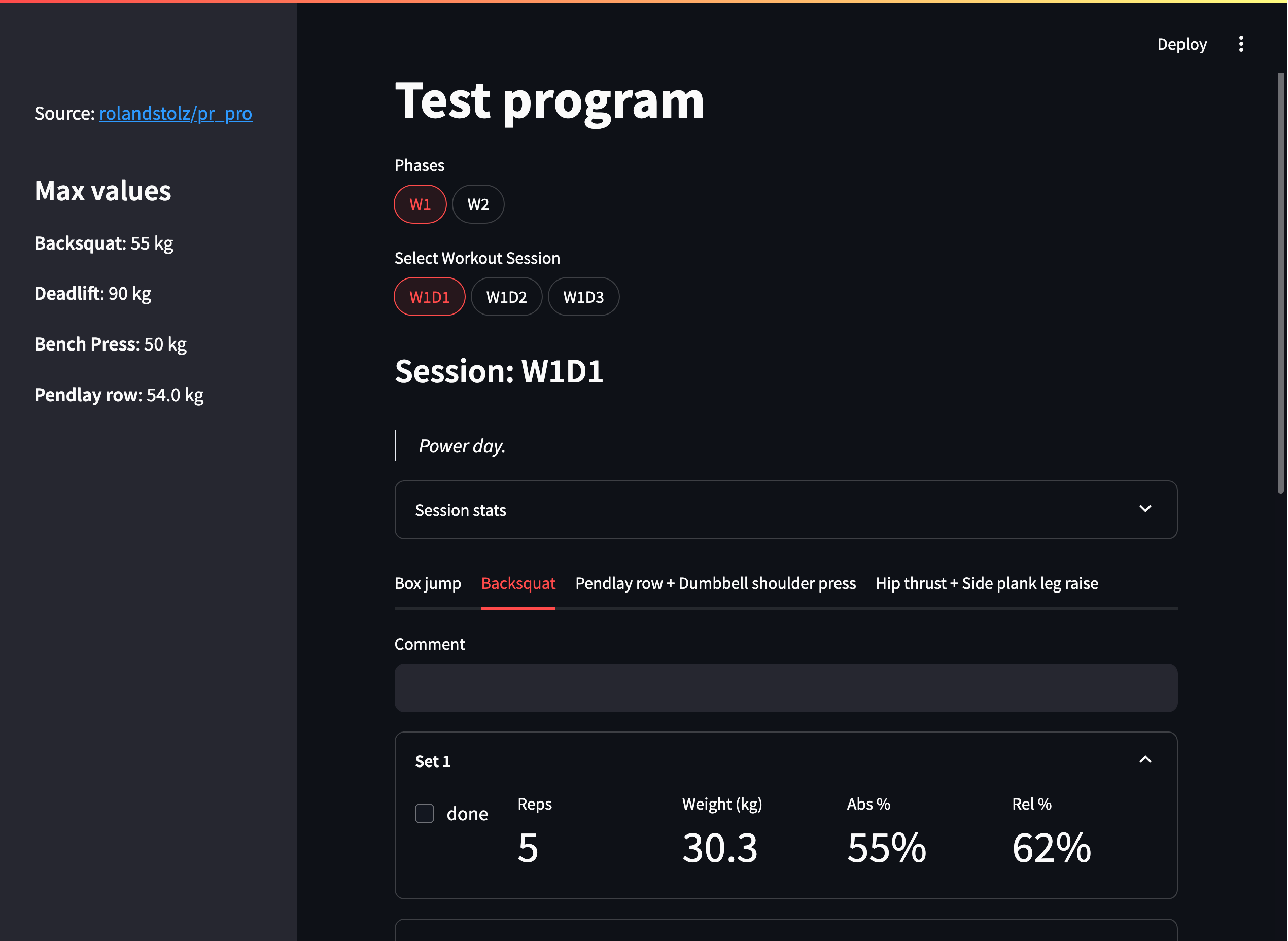
For a live demo go to https://pr-pro-demo.streamlit.app/
1 maintainer

Metadata
1 maintainer
Release files for pr-pro 1.3.0
For a detailed explanation of source distributions (sdists) and built distributions (wheels), please see the package formats documentation.
Source distribution (sdist)
| File | Size | Uploaded | Provenance | Actions |
|---|---|---|---|---|
| pr_pro-1.3.0.tar.gz | 91.0 kB | Without provenance | Details for pr_pro-1.3.0.tar.gz |
Built distribution (wheel)
| File | Interpreter | ABI | Platform | Actions Reset |
|---|---|---|---|---|
| pr_pro-1.3.0-py3-none-any.whl | Python 3 | none | any | Details for pr_pro-1.3.0-py3-none-any.whl |
Total release size: 128.1 kB
Release files / pr_pro-1.3.0.tar.gz
| Download URL | pr_pro-1.3.0.tar.gz |
|---|---|
| Size | 91.0 kB |
| Tags | Source |
|
SHA-256 checksum How to use checksums |
3de509ec8efef656358760b52baa32c0dd3a805c55398a876a07c5dd246007ee
|
|
BLAKE2b-256 checksum How to use checksums |
0cfb0b18d5e35d6c8c5839343e0c07e8b59baebeb1f5830b99f16c06848858e9
|
| Upload date | |
|
Uploaded using Trusted Publishing? What is trusted publishing? |
No |
| Uploaded via |
uv/0.13.8 {"installer":{"name":"uv","version":"0.13.8","subcommand":["publish"]},"python":null,"implementation":{"name":null,"version":null},"distro":{"name":"Ubuntu","version":"26.04","id":"resolute","libc":null},"system":{"name":null,"release":null},"cpu":null,"openssl_version":null,"setuptools_version":null,"rustc_version":null,"ci":true}
|
Release files / pr_pro-1.3.0-py3-none-any.whl
| Download URL | pr_pro-1.3.0-py3-none-any.whl |
|---|---|
| Size | 37.1 kB |
| Tags | Python 3 |
|
SHA-256 checksum How to use checksums |
8e5cd3ec279b9a688143e4c43e3a3206244654b3be67eeb6ee9a0e1ba22e84d2
|
|
BLAKE2b-256 checksum How to use checksums |
06e628c1012a7730fc1be8b224571661a27225011b0f29aebfdfad0d8c1c7624
|
| Upload date | |
|
Uploaded using Trusted Publishing? What is trusted publishing? |
No |
| Uploaded via |
uv/0.13.8 {"installer":{"name":"uv","version":"0.13.8","subcommand":["publish"]},"python":null,"implementation":{"name":null,"version":null},"distro":{"name":"Ubuntu","version":"26.04","id":"resolute","libc":null},"system":{"name":null,"release":null},"cpu":null,"openssl_version":null,"setuptools_version":null,"rustc_version":null,"ci":true}
|
Security for pr-pro 1.3.0
Provenance
Provenance describes where a file came from. On PyPI, provenance is shared via attestations, which provide a verifiable record of the build or publishing details. View details, limitations and caveats.
No provenance found
None of the files in this release were uploaded with provenance metadata.
A note on package security
PyPI is a repository for distributing packages, not a service for auditing them. While third-party security researchers and our staff do their best to detect and remove malicious packages, PyPI cannot guarantee the quality, security or suitability of any given package.
To learn more about protecting yourself from malicious actors, visit our package security documentation.














