
For interacting with the Guard API


Project description
Praetorian CLI and SDK





:link: Guard Platform :book: Documentation :bookmark: PyPI
Table of Contents
- Description
- Getting started
- Using the CLI
- Using scripts
- Developers
- Contributing
- Support
- License
- Backwards Compatibility
Description
Praetorian CLI and SDK are open-source tools for interacting with our products and services. Currently, they support
access to Guard, our
offensive security platform.
The SDK exposes the full set of APIs that the Guard UI uses.
The CLI is a fully-featured companion to the Guard UI.
Getting Started
Prerequisites
- Python v3.9 or above
- pip v23.0 or above
Installation
Install the Python package using this command:
pip install praetorian-cli
Signing up
Register for an account for Guard using the instructions in our documentation.
Authentication
Once you can properly access Guard through the UI, you can obtain API credentials by clicking the Praetorian icon in the top right corner -> User Profile -> API Keys. Be sure to carefully copy the API credentials you created as you will need to provide them to the CLI for interacting with Guard.
Note: SSO Organizations should provision access through API Keys as well.
Using API Keys
This is the authentication method for CLI. You can authenticate using either a keychain file or environment variables.
Using the keychain file
This method stores your API key in a keychain file.
- Run
guard configureand follow the prompts to set up authentication. Use the default values forprofile name,URL of backend API, andclient ID. - It creates
~/.praetorian/keychain.ini, which should read like this:
[United States]
name = guard
client_id = 795dnnr45so7m17cppta0b295o
api = https://d0qcl2e18h.execute-api.us-east-2.amazonaws.com/chariot
api_key_id = your-api-key-id-here
api_key_secret = your-api-key-here
Using environment variables
This method uses in-memory environment variables to pass your API key to the CLI. There is no need for a keychain file on disk. This enables you to choose a credential storage method suitable for your use cases. To use this method, set the following environment variables:
export PRAETORIAN_CLI_API_KEY_ID=your-api-key-id-here
export PRAETORIAN_CLI_API_KEY_SECRET=your-api-key-here
For more advanced configuration options or managing access in SSO organizations see the documentation on configuration.
Using the CLI
The CLI is a command and option utility for accessing the full suite of Guard's API. You can see the documentation for commands
using the help option:
guard --help
As an example, run the following command to retrieve the list of all assets in your account:
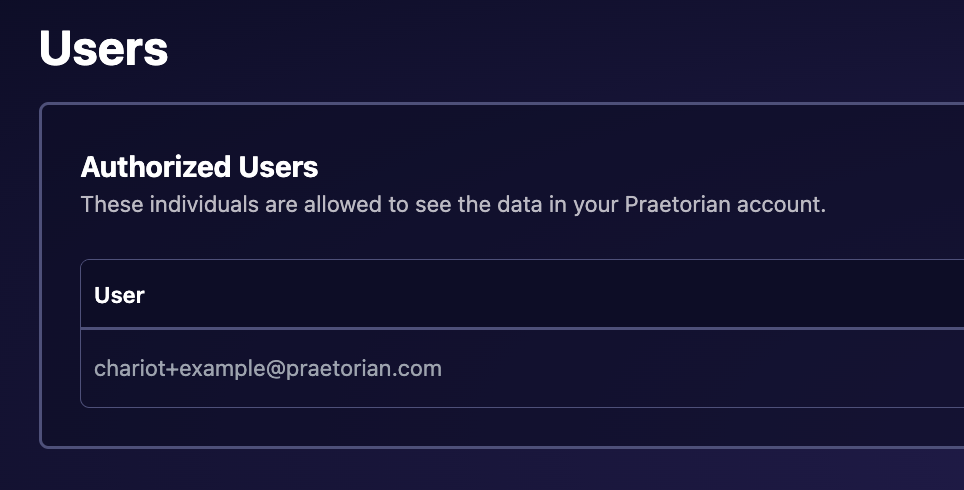
guard --account guard+example@praetorian.com list assets
You can obtain the account argument by viewing the email of the first user on the Users page in your Guard account, as shown below:
To get detailed information about a specific asset, run:
guard --account guard+example@praetorian.com get asset <ASSET_KEY>
Developers
Both CLI and SDK is open-source in this repository. The SDK is installed along with the praetorian-cli
package. You can extend Guard by creating scripts using the SDK.
SDK
Integrate the SDK into your own Python application with the following steps:
- Include the dependency
praetorian-cliin your project. - Import the Guard class
from praetorian_cli.sdk.guard import Guard. - Import the Keychain class
from praetorian_cli.sdk.keychain import Keychain. - Call any function of the Guard class, which expose the full backend API. See example below:
from praetorian_cli.sdk.guard import Guard
from praetorian_cli.sdk.keychain import Keychain

guard = Guard(Keychain(account='guard+example@praetorian.com'))
guard.add('asset', dict(name='example.com', dns='example.com'))
The best place to explore the SDK is the code of the CLI, especially the handlers of the CLI
You can inspect the handler code to see how each CLI command is implemented with the SDK.
Developing external scripts
The CLI has a scripting engine that allow external scripts to be executed within the CLI's framework, taking
advantage of the SDK, click, and authentication.
To add those external scripts to the CLI, set the PRAETORIAN_SCRIPTS_PATH
environment to point to directories where you store additional extension scripts.
Those external scripts are available under the script commands. To see a list of them:
guard --account guard+example@praetorian.com script --help
For developing scripts, you can refer to this readme file.
Contributing
We welcome contributions from the community, from scripts, to the core CLI and SDK. To contribute, fork this repository and following the GitHub instructions to create pull requests.
By contributing, you agree to our Code of Conduct.
Support
If you have any questions or need support, please open an issue here or reach out via support@praetorian.com.
License
This project is licensed under the MIT License - see the LICENSE file for details.
Backwards Compatibility
Guard is a rebrand of Chariot.
CLI
The guard command is the new primary CLI entry point. The legacy praetorian chariot command continues to work:
# New (preferred):
guard list assets
guard --account example@praetorian.com list assets
guard configure

# Legacy (still supported):
praetorian chariot list assets
praetorian configure
SDK
Both Guard and Chariot classes are available and interchangeable:
# New (preferred):
from praetorian_cli.sdk.guard import Guard
guard = Guard(Keychain())

# Legacy (still supported):
from praetorian_cli.sdk.chariot import Chariot
chariot = Chariot(Keychain())
Configuration
The keychain file and environment variables remain unchanged. Existing configurations will continue to work without modification.
Release history Release notifications | RSS feed


Download files
Download the file for your platform. If you're not sure which to choose, learn more about installing packages.
Source Distribution
Built Distribution
Filter files by name, interpreter, ABI, and platform.
If you're not sure about the file name format, learn more about wheel file names.
Copy a direct link to the current filters
File details
Details for the file praetorian_cli-2.3.1.tar.gz.
File metadata
- Download URL: praetorian_cli-2.3.1.tar.gz
- Upload date:
- Size: 114.6 kB
- Tags: Source
- Uploaded using Trusted Publishing? No
- Uploaded via: twine/6.1.0 CPython/3.13.9
File hashes
| Algorithm | Hash digest | |
|---|---|---|
| SHA256 |
417dfbebae5a2b835b94b640dfa770819c4ef5757d456e6de4454cade41740ea
|
|
| MD5 |
54717ff42d03414acb047c75121f7144
|
|
| BLAKE2b-256 |
4b83bca9a54f14d5555b585f85aac0e990bc41b1cf2e6cdc2ddcf3eebc5f0571
|
File details
Details for the file praetorian_cli-2.3.1-py3-none-any.whl.
File metadata
- Download URL: praetorian_cli-2.3.1-py3-none-any.whl
- Upload date:
- Size: 153.5 kB
- Tags: Python 3
- Uploaded using Trusted Publishing? No
- Uploaded via: twine/6.1.0 CPython/3.13.9
File hashes
| Algorithm | Hash digest | |
|---|---|---|
| SHA256 |
60dfc66d564e5a6f4a99609cbf160e7989d21351ad08bdb63c1abe0bed9ccbad
|
|
| MD5 |
d8ca8bd51ecaa3b546b0b2055bbda820
|
|
| BLAKE2b-256 |
0e0d7efb463cd66959c1ecf9fa81f089794ebd327ddf578103b67333ee306098
|






