
Prashna
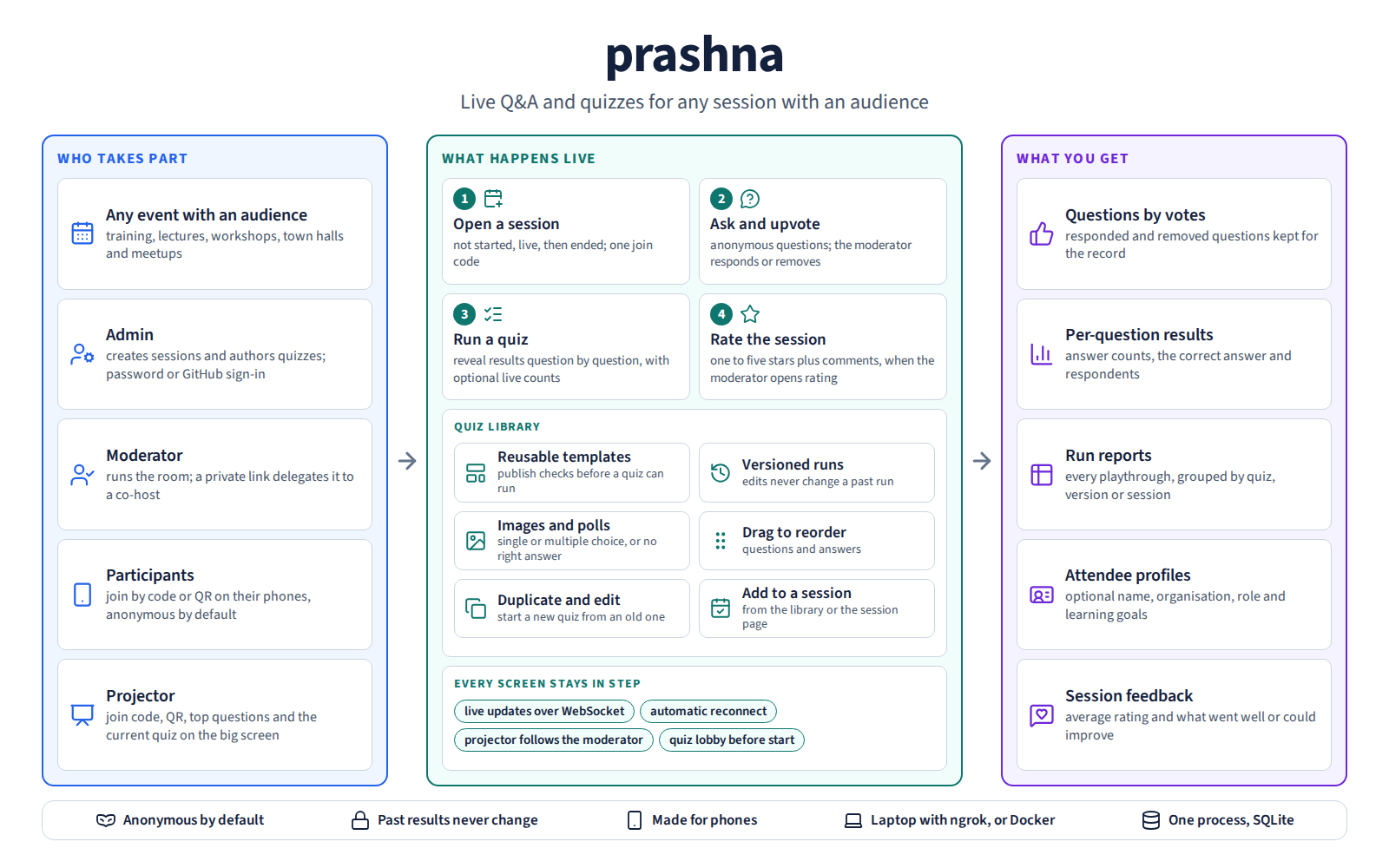
How prashna runs a session with an audience: an admin sets it up, a moderator runs the room, participants join on their phones and the projector shows the room the same state. Questions are asked and upvoted, versioned quizzes are run question by question, and the session ends with ranked questions, quiz results, run reports, attendee profiles and feedback. The infographic source is kept with the image.
A live Q&A and quiz tool for any session with an audience: training, lectures, workshops, town halls, meetups. Prashna (प्रश्न) is Sanskrit for question.
Two core features:
- Anonymous Q&A. Participants post questions and upvote each other's. The moderator responds in text or out loud. A removed question is hidden from participants and kept for the record.
- Moderator-run quizzes. Single- or multiple-choice questions, optional images, anonymous answers, results revealed one question at a time, a lobby screen on the projector, and optional live counts while people answer. Quizzes are versioned: editing a quiz never changes the report of a past run.
A projector view for the screen at the front of the room shows the join code, a QR code for the participant link, the top questions, and the current quiz question in step with the moderator.
Install
Choose one of these. Each installs the same prashna command.
One command, on macOS, Linux, or Windows. Works on a machine without Python; it installs uv, which fetches Python if needed.
curl -LsSf https://kvsankar.github.io/prashna/install.sh | sh                  # macOS / Linux
powershell -ExecutionPolicy ByPass -c "irm https://kvsankar.github.io/prashna/install.ps1 | iex"   # Windows
Already have Python 3.11 or newer? Install without uv, using pipx:
pipx install prashna
Or use pip inside a virtual environment:
python3 -m venv ~/.prashna
~/.prashna/bin/pip install prashna          # Windows: ~\.prashna\Scripts\pip install prashna
A plain pip install into the system Python is refused on Debian, Ubuntu,
and some other Linux distributions ("externally-managed-environment"); the
virtual environment avoids that.
Already have uv? uvx prashna installs and starts it in one step.
Then start it:
prashna # virtual environment: ~/.prashna/bin/prashna
Update with uv tool upgrade prashna, pipx upgrade prashna, or
~/.prashna/bin/pip install --upgrade prashna. prashna --help lists the
options: port, data folder, and backups.
First run
prashna serves on http://127.0.0.1:8000 and opens your browser on a
one-time page where you choose the admin's username and password. The page
works once. After that, sign in to create sessions and write quizzes.
Prashna keeps its data in your app-data folder.
Roles
| Role | Page | Who gets in |
|---|---|---|
| Admin | / |
The person who signed in with the admin password (or an allowed GitHub account). Creates sessions and quizzes. |
| Moderator | /m/<code> |
The admin who owns the session, or anyone the admin gives the moderator link to, such as a co-host. Runs the room. |
| Participant | /s/<code> |
Anyone with the session code or QR code. No account; an optional profile. |
| Projector | /p/<code> |
Anyone. Read-only, for the room's screen. |
| Quiz library | /quizzes |
The admin. Writes quizzes and reads run reports. |
The admin who owns a session can do everything a moderator can, on the same page, plus the session's settings. The moderator link is how the admin hands the room to someone without an admin account.
Documentation
- Behaviour specification: every use case and its tests.
- UX rules: the frontend design system.
- Architecture: components, data model, design decisions, and risks.
- Development guide: setup, environment variables, tests, checks, and releases.
- Engineering backlog.
- Performance measurement.
To run Prashna in Docker instead, see the container guide. The production deployment behind nginx is described in the deployment runbook.
License
MIT. See LICENSE.
Status
Prashna runs in production at prashna.sankara.net for a single operator. It
is released as a container image.
Product ideas that need a decision are listed in the
deferred appendix
of the specification.
1 maintainer

Metadata
1 maintainer
Release files for prashna 0.2.1
For a detailed explanation of source distributions (sdists) and built distributions (wheels), please see the package formats documentation.
Source distribution (sdist)
| File | Size | Uploaded | |
|---|---|---|---|
| prashna-0.2.1.tar.gz | 87.4 kB | Details |
Built distribution (wheel)
| File | Interpreter | ABI | Platform | Reset |
|---|---|---|---|---|
| prashna-0.2.1-py3-none-any.whl | Python 3 | none | any | Details |
Total release size: 181.2 kB
Release files / prashna-0.2.1.tar.gz
| Download URL | prashna-0.2.1.tar.gz |
|---|---|
| Size | 87.4 kB |
| Tags | Source |
|
SHA-256 checksum How to use checksums |
46eb7ea6ba88ff8e04449dcb5c8541552d14f2fdc3a45e33f797a5e9163bc9f6
|
|
BLAKE2b-256 checksum How to use checksums |
dcf3bc2dba9ec3f2c44228ff96e6980757426efc01d5c060383c65c00b0dc62b
|
| Upload date | |
|
Uploaded using Trusted Publishing? What is trusted publishing? |
Yes |
| Uploaded via |
uv/0.13.0 {"installer":{"name":"uv","version":"0.13.0","subcommand":["publish"]},"python":null,"implementation":{"name":null,"version":null},"distro":{"name":"Ubuntu","version":"24.04","id":"noble","libc":null},"system":{"name":null,"release":null},"cpu":null,"openssl_version":null,"setuptools_version":null,"rustc_version":null,"ci":true}
|
Release files / prashna-0.2.1-py3-none-any.whl
| Download URL | prashna-0.2.1-py3-none-any.whl |
|---|---|
| Size | 93.8 kB |
| Tags | Python 3 |
|
SHA-256 checksum How to use checksums |
e896517ebd6bb8ed2120315357260522cd4a005b2cf5ec56dd054a73cd65313f
|
|
BLAKE2b-256 checksum How to use checksums |
039d2a3dc357b8ec68875596a697c07b64769ea47b785d06b59f0c887b78d879
|
| Upload date | |
|
Uploaded using Trusted Publishing? What is trusted publishing? |
Yes |
| Uploaded via |
uv/0.13.0 {"installer":{"name":"uv","version":"0.13.0","subcommand":["publish"]},"python":null,"implementation":{"name":null,"version":null},"distro":{"name":"Ubuntu","version":"24.04","id":"noble","libc":null},"system":{"name":null,"release":null},"cpu":null,"openssl_version":null,"setuptools_version":null,"rustc_version":null,"ci":true}
|














