
preemptive_debugger
A simple method to interactively preempt a running script to run a debugger
Installing
Install:
pip install preemptive_debugger
Usage
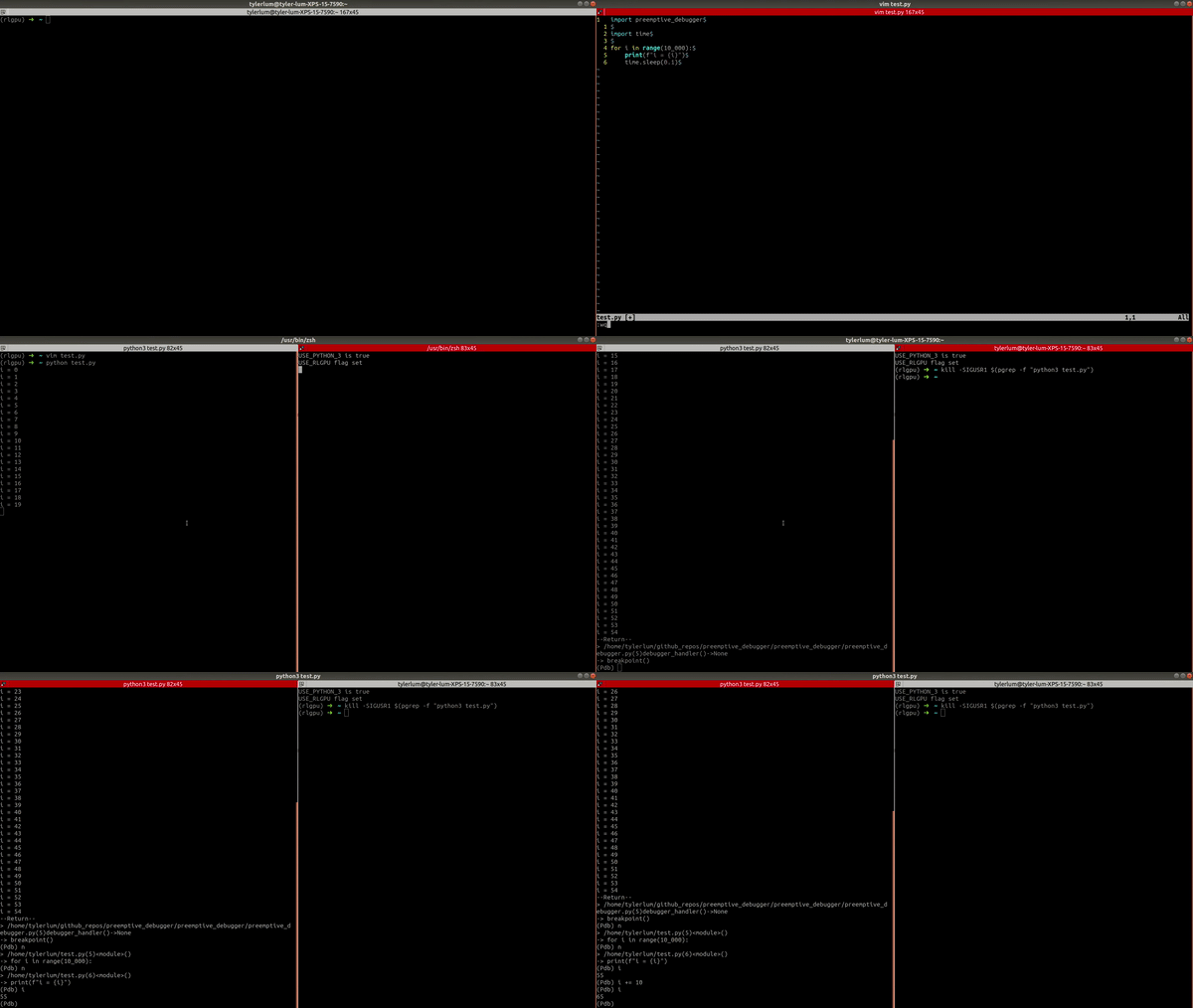
In one terminal, create a file called test.py with the following:
import preemptive_debugger

import time

for i in range(10_000):
    print(f"i = {i}")
    time.sleep(0.1)
Run this code with:
python3 test.py
In another terminal, run:
kill -SIGUSR1 $(pgrep -f "python3 test.py")
This will preempt the running script and start a debugger in the original terminal, which can be used to analyze what is happening. This is very useful when you have a script that is stuck or doing strange things. Without this package, if you want to see what is going on in the script, you would typically need to stop the script, modify the code, and try your best to reproduce the result (or wait a long time to have the issue come back up). With this package, adding just one line (import preemptive_debugger), you can easily start a debugger whenever you want to look into what is happening in a python program.
Notes
I have tried some alternative methods to interactively choose when to start a debugger, but they didn't work well. Some pip packages I have tried:
keyboard: Tried to start a debugger when a keyboard key was pressed, but I got this error which was very inconvenient:
ImportError: You must be root to use this library on linux.
-
pynput: Tried to start a debugger when a keyboard key was pressed, but I realized this starts a new thread to run the handler. This does not allow me to properly analyze the state of the program I am interested in. -
madbg: Tried attaching to the script withmadbg attach <pid>, but this only worked for very simple scripts. For any nontrivial script, I got this error:
pyinjector.api.LinuxInjectorPermissionError: Injector failed with -8 calling injector_attach: PTRACE_ATTACH error : Operation not permitted
Failed attaching to process due to permission error.
This is most likely due to ptrace scope limitations applied to the kernel for security purposes.
Possible solutions:
 - Rerun as root
 - Temporarily remove ptrace scope limitations usin
`echo 0 | sudo tee /proc/sys/kernel/yama/ptrace_scope`
 - Persistently remove ptrace scope limitations by editing /etc/sysctl.d/10-ptrace.conf
More details can be found here: https://stackoverflow.com/q/19215177/2907819')
Running with sudo, I got this error:
pyinjector.api.InjectorError: Injector failed with -5 calling injector_inject: dlopen failed
1 maintainer

Metadata
1 maintainer
Release files for preemptive-debugger 0.0.1
For a detailed explanation of source distributions (sdists) and built distributions (wheels), please see the package formats documentation.
Source distribution (sdist)
| File | Size | Uploaded | Provenance | |
|---|---|---|---|---|
| preemptive_debugger-0.0.1.tar.gz | 3.1 kB | Without provenance | Details |
Built distribution (wheel)
| File | Interpreter | ABI | Platform | Reset |
|---|---|---|---|---|
| preemptive_debugger-0.0.1-py3-none-any.whl | Python 3 | none | any | Details |
Total release size: 7.0 kB
Release files / preemptive_debugger-0.0.1.tar.gz
| Download URL | preemptive_debugger-0.0.1.tar.gz |
|---|---|
| Size | 3.1 kB |
| Tags | Source |
|
SHA-256 checksum How to use checksums |
d4f3d834070785ebbb9ad0feed9f0c627ab461966683d71e2d7c189929cbf493
|
|
BLAKE2b-256 checksum How to use checksums |
d97f1e43a0e96867de8e5678556230da2f4e836d3d19bf4c6236894767e56428
|
| Upload date | |
|
Uploaded using Trusted Publishing? What is trusted publishing? |
No |
| Uploaded via |
twine/4.0.2 CPython/3.7.12
|
Release files / preemptive_debugger-0.0.1-py3-none-any.whl
| Download URL | preemptive_debugger-0.0.1-py3-none-any.whl |
|---|---|
| Size | 3.9 kB |
| Tags | Python 3 |
|
SHA-256 checksum How to use checksums |
46a04ea4c9065dbcd682bb7c4535dd1122bd793409c3bdbfa0e9258e4227ac94
|
|
BLAKE2b-256 checksum How to use checksums |
74e9cb01c1ea0f8d04f84c253f6078e19a3374deabba103c45a733e5869ef38a
|
| Upload date | |
|
Uploaded using Trusted Publishing? What is trusted publishing? |
No |
| Uploaded via |
twine/4.0.2 CPython/3.7.12
|
Security for preemptive-debugger 0.0.1
Provenance
Provenance describes where a file came from. On PyPI, provenance is shared via attestations, which provide a verifiable record of the build or publishing details. View details, limitations and caveats.
No provenance found
None of the files in this release were uploaded with provenance metadata.
A note on package security
PyPI is a repository for distributing packages, not a service for auditing them. While third-party security researchers and our staff do their best to detect and remove malicious packages, PyPI cannot guarantee the quality, security or suitability of any given package.
To learn more about protecting yourself from malicious actors, visit our package security documentation.













