
The generative UI framework that even humans can use.
Verified details
These details have been verified by PyPIProject links
GitHub Statistics
Maintainers

Project description
Prefab 🎨
The generative UI framework that even humans can use.
🚧 Don't panic. Prefab is under very active development. 🚧



Docs · Playground · GitHub
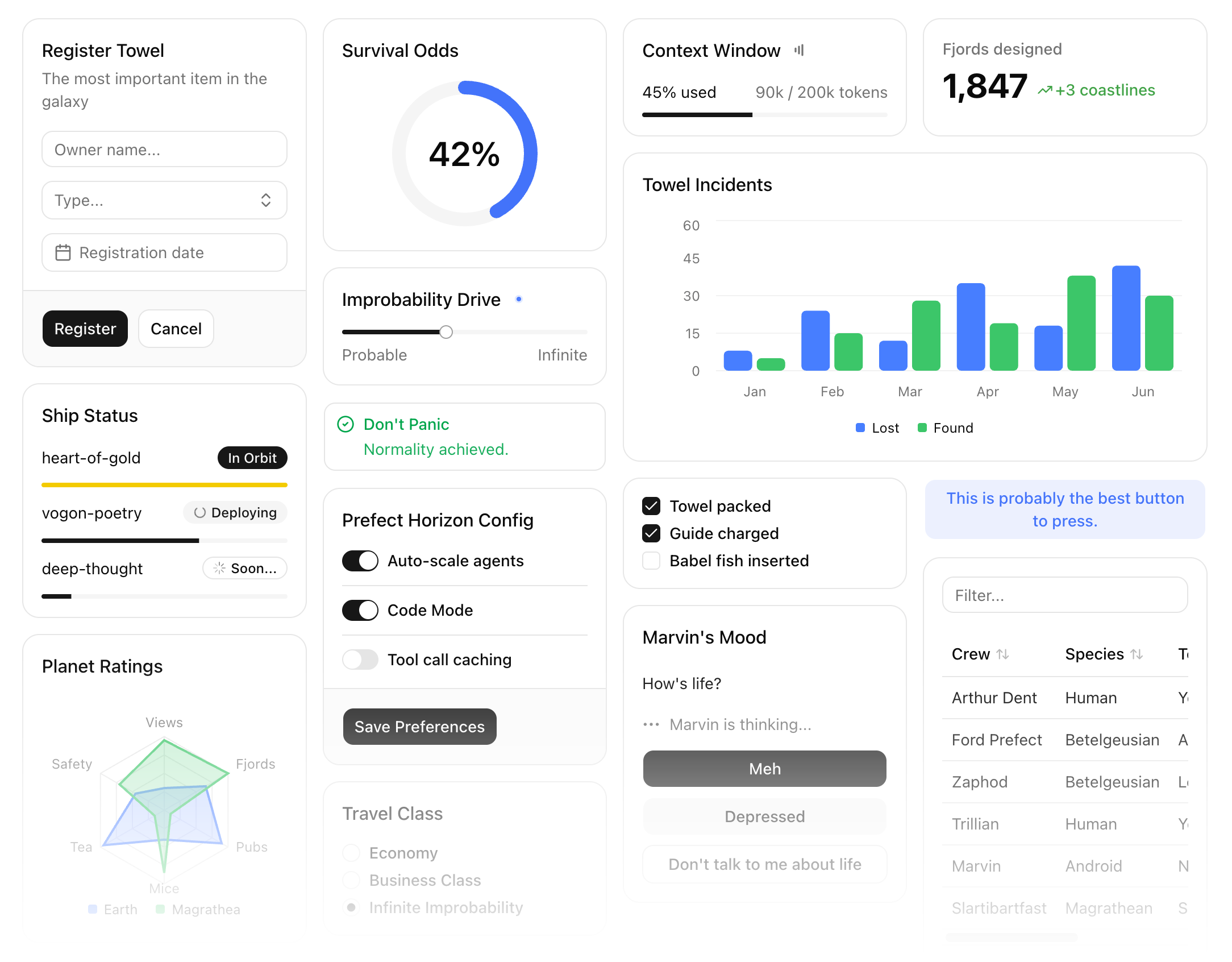
Prefab is a frontend framework with a Python DSL that compiles to JSON. Build MCP Apps, data dashboards, and interactive tools with layouts, forms, charts, data tables, and full interactivity. A bundled React renderer turns the JSON into a self-contained application.
Composing frontends in Python is blasphemous surprisingly natural. And because Prefab is a JSON protocol, any source can produce a UI: write one yourself and serve it from any backend, or have an agent generate it dynamically, no templates or predefined views required.
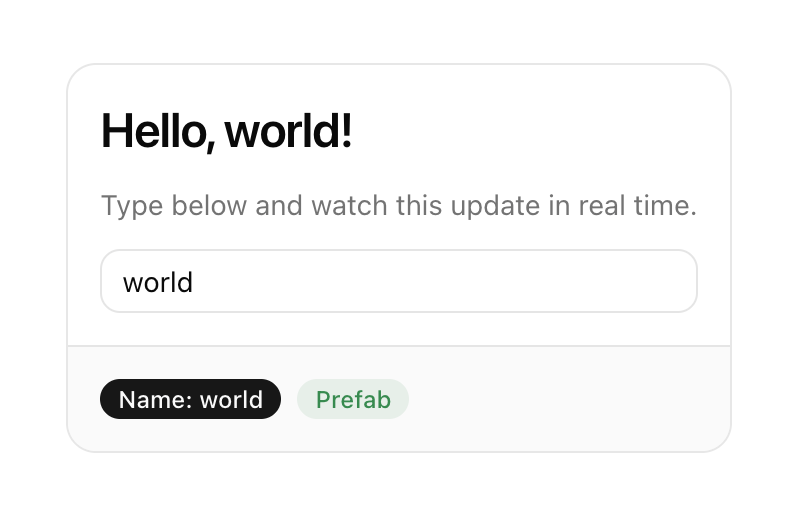
This card has a live-updating heading, a text input bound to client-side state, and badges — all from a few lines of Python. You can try an interactive version in the Prefab docs. In fact, every example in the Prefab docs is rendered with Prefab itself.
from prefab_ui.components import Card, CardContent, CardFooter, Column, H3, Muted, Input, Badge, Row

with Card():
    with CardContent():
        with Column(gap=3):
            H3("Hello, {{ name }}!")
            Muted("Type below and watch this update in real time.")
            Input(name="name", placeholder="Your name...")
    with CardFooter():
        with Row(gap=2):
            Badge("Name: {{ name }}", variant="default")
            Badge("Prefab", variant="success")
Since everything compiles to JSON, you can author a UI from a Python script, have an agent generate one on the fly, or serve one from any MCP server or REST API.
Made with 💙 by Prefect
Installation
pip install prefab-ui
Requires Python 3.10+.
How It Works
- Build a component tree in Python (or raw JSON from any source)
- The tree compiles to Prefab's JSON format
- A bundled React renderer turns the JSON into a live interface
State flows through {{ templates }}. When you write {{ query }}, the renderer interpolates the current value from client-side state. Named form controls sync automatically — Input(name="city") keeps {{ city }} up to date on every keystroke. Actions like CallTool and SetState drive interactivity without custom JavaScript.
Components
35+ components covering layout, typography, forms, data display, and interactive elements. Containers nest with Python context managers:
from prefab_ui.components import Card, CardHeader, CardTitle, CardContent, Column, Text, Badge

with Card():
    with CardHeader():
        CardTitle("User Profile")
    with CardContent():
        with Column():
            Text("{{ user.name }}")
            Badge("{{ user.role }}", variant="secondary")
Pydantic models generate forms automatically — constraints like min_length and ge become client-side validation:
from pydantic import BaseModel, Field
from prefab_ui.components import Form
from prefab_ui.actions.mcp import CallTool

class SignupForm(BaseModel):
    email: str = Field(description="Your email address")
    name: str = Field(min_length=2, max_length=50)
    age: int = Field(ge=18, le=120)

Form.from_model(SignupForm, on_submit=CallTool("create_user"))
Actions
Actions define what happens on interaction — state updates, server calls, navigation, notifications:
from prefab_ui.components import Button
from prefab_ui.actions import SetState, ShowToast
from prefab_ui.actions.mcp import CallTool

Button("Save", on_click=[
    SetState("saving", True),
    CallTool(
        "save_data",
        arguments={"item": "{{ item }}"},
        on_success=ShowToast(title="Saved"),
        on_error=ShowToast(title="Failed", variant="destructive"),
    ),
    SetState("saving", False),
])
Documentation
Full documentation at prefab.prefect.io, including an interactive playground where you can try components live.
Project details
Verified details
These details have been verified by PyPIProject links
GitHub Statistics
Maintainers
Release history Release notifications | RSS feed


Download files
Download the file for your platform. If you're not sure which to choose, learn more about installing packages.
Source Distribution
Built Distribution
Filter files by name, interpreter, ABI, and platform.
If you're not sure about the file name format, learn more about wheel file names.
Copy a direct link to the current filters
File details
Details for the file prefab_ui-0.18.0.tar.gz.
File metadata
- Download URL: prefab_ui-0.18.0.tar.gz
- Upload date:
- Size: 4.0 MB
- Tags: Source
- Uploaded using Trusted Publishing? Yes
- Uploaded via: uv/0.11.2 {"installer":{"name":"uv","version":"0.11.2","subcommand":["publish"]},"python":null,"implementation":{"name":null,"version":null},"distro":{"name":"Ubuntu","version":"24.04","id":"noble","libc":null},"system":{"name":null,"release":null},"cpu":null,"openssl_version":null,"setuptools_version":null,"rustc_version":null,"ci":true}
File hashes
| Algorithm | Hash digest | |
|---|---|---|
| SHA256 |
f72e241f52f4720baac670f8527c773e1c1f4b558bce4f77097441eecbb51b9e
|
|
| MD5 |
433c1d0f53ca10b6121a0a536abcdd2b
|
|
| BLAKE2b-256 |
2fa325fe72b9887d9c2daa0ec5e79a7971a67aad31a6f71d634e23da662343ad
|
File details
Details for the file prefab_ui-0.18.0-py3-none-any.whl.
File metadata
- Download URL: prefab_ui-0.18.0-py3-none-any.whl
- Upload date:
- Size: 1.8 MB
- Tags: Python 3
- Uploaded using Trusted Publishing? Yes
- Uploaded via: uv/0.11.2 {"installer":{"name":"uv","version":"0.11.2","subcommand":["publish"]},"python":null,"implementation":{"name":null,"version":null},"distro":{"name":"Ubuntu","version":"24.04","id":"noble","libc":null},"system":{"name":null,"release":null},"cpu":null,"openssl_version":null,"setuptools_version":null,"rustc_version":null,"ci":true}
File hashes
| Algorithm | Hash digest | |
|---|---|---|
| SHA256 |
c9d01bd423b0d5bf103d9a0e6cfac135bd973d416297c32a5bbccc182161cace
|
|
| MD5 |
88a6021ab54bbca2ff4978491f8845ce
|
|
| BLAKE2b-256 |
c0dd28be02a264c59d64086122c8b0f9fa99fc52e040682358e5e08219846961
|






