
preflight
Stop your AI analyst from silently answering the wrong question.
Static, cross-layer ambiguity detection for governed analytics. preflight reads your dbt, Cube, or
MetricFlow definitions and flags the pairs that read alike but resolve to different numbers, before
an agent (or a person) grounds a question on the wrong one. It runs on definitions alone, before any
query. No warehouse, no model.





Quickstart · Finding catalog · Library · CI / guardrail
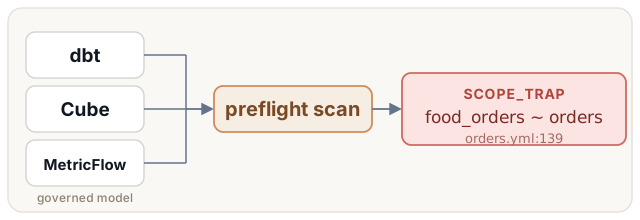
Point it at a dbt project and it finds real traps. Here is one in dbt-labs' own Semantic Layer template, found in seconds and cited to the line an analytics engineer edits:
$ preflight scan . --dialect dbt-manifest
14 findings — high 5, medium 0, low 9

HIGH (5)
  models/marts/customer360/orders.yml:139: [SCOPE_TRAP] food_orders[sem]  ~  large_order[sem]  ~  orders[sem]  ~  ...
      same measure; 'large_order' is 'orders' plus a filter — bare question silently scoped, swap invisible
  models/marts/customer360/order_items.yml:39: [CONCEPT_FORK] food_revenue[sem]  ~  drink_revenue[sem]  ~  revenue[sem]
      same entity/table aggregated the same way over different columns — a bare concept resolves to different numbers
  ...
food_orders is orders with a hidden filter, so a bare "how many orders?" silently under-counts, and
the number looks completely plausible. That is the failure preflight exists to catch.
Why it helps. When two plausible metrics exist for one question, an AI agent (or a hurried human)
can silently pick the wrong one, and the number looks fine. preflight finds those forks in CI, each
cited to the source .yml/.sql line, so you fix them before they ship. It covers the selection
half of grounding safety: two valid definitions exist and the wrong one gets picked. (Whether a single
definition is internally correct is a separate job.)
Install
uv tool install preflight-analytics                 # or: pip install preflight-analytics
uv tool install "preflight-analytics[embeddings]"   # + the sharper, validated gate (docs/gate.md)
The distribution is preflight-analytics (the bare preflight name was taken on PyPI); the import
package and the CLI command are both preflight.
Use
preflight scan . --dialect dbt-manifest            # scan a dbt project
preflight scan . --dialect dbt-manifest --detail   # + the offending source line
Every finding is cited to path:line. New here? docs/dbt-quickstart.md walks a real dbt
project (jaffle shop) end to end in a few commands.
What it finds
| type | one line |
|---|---|
| SCOPE_TRAP | a metric is another metric plus a hidden filter |
| CONCEPT_FORK | one concept, several metrics over different columns |
| GRAIN_MISMATCH | a number that should not be added up over time, offered per day |
| DEFINITION_DIVERGENCE | one term defined two ways, or a metric its docs never describe |
| NAME_COLLISION | two names read alike, or one column name reused across tables |
| DUPLICATE | the same thing under two names |
| VERSIONED_TWIN | users beside users_v2 or a dated backup: a version or leftover, and nothing marks which is current |
| FACT_TWIN | the same count over one process at two grains: a transaction fact and its own snapshot |
| SIBLING | the same measure under two incomparable scopes |
Each is a real confusion that returns a wrong number. A worked example and the recommended fix for every one: docs/catalog.md.
How it decides
preflight reads what each metric or column actually means (which rows it counts, which column it adds up, and how), not just its name. Then it looks for two definitions someone (or an AI agent) could reasonably mix up and asks one question: would they return different numbers? If yes, it flags the pair and points at the trap.
The idea in one line: it judges by meaning, not spelling. Two metrics with nearly the same name can be perfectly fine, and two with different names can quietly disagree. It's the second case that burns you.
- Read each definition into a plain shape: what it measures, how it's aggregated, from which table, over which rows.
- Pair up the ones worth comparing: names a reader could confuse.
- Judge from the shapes, not the names: same measure but one is a filtered slice of the other → a scope trap; same table and math over a different column → a forked concept; one term defined two ways → a divergent definition. One rule per kind of confusion.
- Report: grouped, worst first, each cited to the exact file and line.
What that looks like on real definitions:
SCOPE_TRAP: a metric that is secretly a filtered slice of another
    users         =  count of all users
    active_users  =  count of users active in the last 30 days
    → active_users is "users" plus a hidden filter, and smaller. Ask "how
      many users?" and you can silently get the active count instead.

CONCEPT_FORK: one name, but computed from different columns
    revenue        =  SUM(amount)
    net_revenue    =  SUM(net_amount)
    gross_revenue  =  SUM(gross_amount)
    → same table, same SUM, three different columns. "Revenue" is not one
      number. Which column did you mean?
It runs no model and no queries, so the same definitions always produce the same findings. (An optional
smarter matcher also catches synonyms like revenue ≈ sales, but it only widens what gets compared,
never the final call.)
dbt
dbt parse                                # your dbt, your profile -> target/manifest.json
preflight scan . --dialect dbt-manifest
Generating the manifest is your dbt project's job; preflight only reads it (if you already use dbt, CI has produced it). Full walkthrough, both jaffle projects, and the manifest details: docs/dbt-quickstart.md.
Not on dbt? preflight reads Cube models directly (no build step) with --dialect cube
(walkthrough: docs/cube-quickstart.md), plus raw dbt model SQL
(--dialect dbt), MetricFlow YAML (--dialect metricflow), and a native semantic/warehouse/docs
layout (--dialect env).
Library
from preflight import scan
for f in scan("path/to/environment"):
    print(f.danger, f.type, f.note)
Adapters, detect_collisions, DetectConfig, and JSON output: docs/library.md.
When both metrics are legitimate
Some forks are deliberate: Finance's marketing spend counts every channel, Growth's leaves out
partnerships, and both are right for their purpose. Declare which business words each metric answers,
and when, in the meta the semantic layer already has:
config:
  meta:
    owner: Growth
    terms:
      - term: marketing spend
        reading: acquisition channels only, partnerships left out
        when: always            # always | {for: [teams]} | on_request
preflight then reports the fork as resolved, with its decision, and fails only on forks nobody has
decided. An agent asks the same function what a bare word means for its user (preflight.readings).
Details: docs/catalog.md.
Guardrail (CI / pre-commit)
preflight scan . --dialect dbt-manifest --fail-on high # non-zero exit on a HIGH finding
Drops into GitHub Actions or a pre-commit hook. Setup in docs/ci.md.
1 maintainer

Metadata
1 maintainer
Release files for preflight-analytics 0.5.0
For a detailed explanation of source distributions (sdists) and built distributions (wheels), please see the package formats documentation.
Source distribution (sdist)
| File | Size | Uploaded | |
|---|---|---|---|
| preflight_analytics-0.5.0.tar.gz | 56.7 kB | Details |
Built distribution (wheel)
| File | Interpreter | ABI | Platform | Reset |
|---|---|---|---|---|
| preflight_analytics-0.5.0-py3-none-any.whl | Python 3 | none | any | Details |
Total release size: 106.7 kB
Release files / preflight_analytics-0.5.0.tar.gz
| Download URL | preflight_analytics-0.5.0.tar.gz |
|---|---|
| Size | 56.7 kB |
| Tags | Source |
|
SHA-256 checksum How to use checksums |
1c3e68443be0b09b78111a15063dee0d5bc6199a65a18d71633e9c1313c84152
|
|
BLAKE2b-256 checksum How to use checksums |
e90ab3180e4afb729ab5f4905b5b91cc0f7b03e109a48effc0fbc3ade2045df8
|
| Upload date | |
|
Uploaded using Trusted Publishing? What is trusted publishing? |
Yes |
| Uploaded via |
twine/7.0.0 CPython/3.13.14
|
Provenance
Provenance describes where a file came from. On PyPI, provenance is shared via attestations, which provide a verifiable record of the build or publishing details. View details, limitations and caveats.


PyPI Publish Attestation
PyPI verified that this artifact, at this checksum, originated from the publisher listed below.
Signed by GitHub Actions, verified by PyPI on Oct 7, 2026.
Transparency logRelease files / preflight_analytics-0.5.0-py3-none-any.whl
| Download URL | preflight_analytics-0.5.0-py3-none-any.whl |
|---|---|
| Size | 50.0 kB |
| Tags | Python 3 |
|
SHA-256 checksum How to use checksums |
598607c020ebb588e67299ff0af46bd4b8455cd9a2048176ae1da42cee4ee115
|
|
BLAKE2b-256 checksum How to use checksums |
6aa7621239578b6a19f2543238031e3339f2187ae065522153c12b935a7b6414
|
| Upload date | |
|
Uploaded using Trusted Publishing? What is trusted publishing? |
Yes |
| Uploaded via |
twine/7.0.0 CPython/3.13.14
|
Provenance
Provenance describes where a file came from. On PyPI, provenance is shared via attestations, which provide a verifiable record of the build or publishing details. View details, limitations and caveats.
PyPI Publish Attestation
PyPI verified that this artifact, at this checksum, originated from the publisher listed below.
Signed by GitHub Actions, verified by PyPI on Oct 7, 2026.
Transparency log













