
Preloop exposure and Agent Control plugin for Hermes

Project description
Govern your Hermes agent — approvals on your phone, spend you can see
Your agent decides to run kubectl delete deployment api. You are not at the
keyboard. Right now it just runs.
preloop-hermes-plugin connects
Hermes to
Preloop, the open-source AI agent control
plane. With it, that command pauses, the request lands on your phone, watch,
Slack, Mattermost, email, or the web console, and you tap Approve or
Deny. The agent continues or gets blocked with your reason. Everything it
did is recorded.
Two things to be clear about, because they install differently:
- The plugin gates the tools Hermes reaches for — shell commands, file writes, anything the model decides to run — and holds open a durable control channel, so you can message or interrupt an already-running session from anywhere, typed or dictated.
- Onboarding Hermes to Preloop (one extra CLI command, below) routes its MCP and model traffic through Preloop, which is what produces per-agent cost attribution, budgets, allowed-model lists, and session cost optimization. The plugin does not do this on its own.
Install the plugin and you get governance. Onboard the agent and you also get the bill, itemized — across every agent you run, not just Hermes.
It is Apache-2.0, and it works against either the open-source Preloop control plane you host yourself, or the hosted Preloop Cloud.
Watch it work — onboarding, tool governance, approvals, and cutting session cost, recorded end to end against a real stack:
Install
Python 3.11+ and Hermes v0.10.0 or newer required. The version floor is load-bearing for the approval gate — see Hermes version directly below before you rely on it.
pip install preloop-hermes-plugin
If your Hermes build wraps PyPI installs:
hermes plugins install preloop-hermes-plugin
Hermes discovers the plugin through the hermes_agent.plugins entry point after
install. Restart Hermes afterwards.
Hermes version
The gate works by returning {"action": "block", ...} from a pre_tool_call
plugin hook. Hermes only started acting on that return value in
v0.10.0
(tag v2026.4.16); before that, pre_tool_call callbacks were observer-only and
their return value was discarded.
So on Hermes v0.9.0 and older this plugin installs cleanly, connects to Preloop, and shows the agent as online — and gates nothing. Tool calls run unchecked while the console looks healthy. There is no error to notice.
Check what you are running:
hermes --version
If you need to confirm the enforcement path directly rather than trust the version string:
python3 -c "import hermes_cli.plugins as p; print(hasattr(p, 'get_pre_tool_call_block_message'))"
True means the build acts on block directives. Newer builds route the same
decision through resolve_pre_tool_block, which also carries the
{"action": "approve"} escalation Hermes added in
v0.18.1;
this plugin does not depend on that path, because approvals are decided in
Preloop and returned as a block, not handed to Hermes' local prompt.
You also need a Preloop control plane to approve against — either Preloop Cloud (nothing to run) or the open-source stack on your own machine:
curl -fsSL https://preloop.ai/install/oss | sh
Connect it
The plugin ships its own login helper, so you never hand-author a token:
preloop-hermes-plugin login --config ~/.hermes/config.yaml
preloop-hermes-plugin verify --config ~/.hermes/config.yaml
login opens Preloop's OAuth flow, mints a runtime bearer token, and writes the
preloop.control block into ~/.hermes/config.yaml (backing up the existing
file alongside it first). verify checks the config shape and that the plugin
loads.
Or let the Preloop CLI do all of it
If you have (or want) the Preloop CLI, it discovers your Hermes install, backs up the config, installs this plugin, and writes the credentials for you:
curl -fsSL https://preloop.ai/install/cli | sh
preloop signup                        # or: preloop login --url http://localhost:3000
preloop agents onboard hermes
preloop agents install-plugin hermes
preloop agents validate hermes
This is the path that also routes Hermes' MCP tool calls through the Preloop MCP firewall and its model traffic through the Preloop gateway — the budgets and per-agent cost attribution described above. The plugin alone covers native tool approvals and the control channel.
Undo anything with preloop agents restore hermes or
preloop agents offboard hermes.
What you get, and from which piece
| Without Preloop | Plugin installed | Agent also onboarded | |
|---|---|---|---|
| Risky native tool calls | rm -rf, terraform apply, git push --force run the moment the model decides to |
Your rules decide: run, block, or hold for a human | same |
| Approving | Means sitting in front of the terminal | Phone, watch, Slack, Mattermost, email, or console | same |
| Reaching a running agent | Unreachable once it starts | Message or interrupt it from console or mobile | same |
| Record of what happened | Terminal scrollback | Every governed call logged with matched rule, approver, outcome | plus model calls and MCP calls |
| MCP tool calls | Ungoverned | Ungoverned — the plugin does not see them | Governed by the MCP firewall |
| Model spend | Invisible | Still invisible | Attributed per agent, session, and model; budgets enforced |
| Wasted tokens | Unmeasured | Unmeasured | Evidence-grounded waste findings per session |
Concretely, for the approval path: the pre_tool_call hook intercepts the call
and asks Preloop for a decision. Preloop matches your policy, sees this needs a
human, and pushes a notification with the full command to your phone. The tool
call blocks for up to ~300 seconds while you decide. You deny it; Hermes gets
the block plus your reason, and the agent carries on with something else.
Configuration
The plugin reads the preloop.control block from ~/.hermes/config.yaml:
preloop:
  control:
    enabled: true
    protocol: preloop.agent_control.v1
    runtime: hermes
    control_ws_url: wss://app.preloop.ai/api/v1/agents/control/ws
    bearer_token: agt_...
    runtime_principal_id: hermes-...
    runtime_principal_name: Hermes
    tool_approval:
      enabled: true
      fail_open: false
| Setting | Default | What it does |
|---|---|---|
tool_approval.enabled |
true |
Set to false to turn the native tool-call gate off entirely |
tool_approval.fail_open |
false |
Fail-closed by default: if Preloop is unreachable, the tool call is blocked. Set true only if you accept ungoverned execution during an outage |
PRELOOP_TOOL_APPROVAL_FAIL_OPEN |
unset | Environment override for fail_open (1/true/yes/on) |
How a decision is made
Unlike some runtimes, Hermes has no local allow/deny lists for its native tools —
the pre_tool_call hook fires on every call, so the plugin escalates each one to
Preloop and lets your policy decide:
- Preloop evaluates your policy. Allow, deny, require approval, or require a written justification, expressed as YAML + CEL. Most calls resolve without ever bothering you.
- A human decides, if the policy says so. Notification to mobile, watch, Slack, Mattermost, email, or webhook; the tool call blocks up to ~300s.
- The result is recorded in the same audit trail as MCP tool calls.
A deny decision blocks the tool and hands Hermes the reason. Anything else
lets it run.
Manual Test Without Preloop CLI
The plugin does not need the Preloop CLI at runtime. To check an install by hand:
pip install preloop-hermes-plugin
preloop-hermes-plugin login --config ~/.hermes/config.yaml
preloop-hermes-plugin verify --config ~/.hermes/config.yaml
preloop-hermes-plugin run --config ~/.hermes/config.yaml
run opens the Agent Control WebSocket and advertises capabilities without
Hermes attached. In Preloop the agent should show as online, and Talk controls
should appear in the console and mobile apps. To test message delivery end to
end, run the plugin inside Hermes itself (not via run, which has no session
attached), then pick the Hermes agent in the console, click Talk, and send a
short message.
What the plugin actually does
Scoped honestly, so you know what you are installing:
- Maintains a WebSocket to Preloop's Agent Control endpoint, with reconnect backoff and heartbeat, so the channel survives laptop sleep and network changes.
- Advertises capabilities: new and existing sessions, text, voice transcripts, interrupt, tool approval.
- Delivers operator messages and voice transcripts into the running Hermes session, and relays interrupts.
- Gates every native tool call through
pre_tool_call, fail-closed.
What it does not do: it is not a content filter or a prompt-injection
defense. Preloop's protection against prompt injection is partial — policy and
approvals mean an injected instruction still has to get past your rules and, for
anything risky, past you. That is a meaningful barrier, not a guarantee. It also
does not itself route MCP or model traffic, and so it does not by itself produce
cost attribution, budgets, or optimization findings; those come from Preloop
onboarding. And it cannot enforce anything the host runtime does not enforce for
it: the gate is only as good as Hermes' pre_tool_call handling, which is why
the version floor above is a hard requirement rather than a
recommendation.
What onboarding unlocks
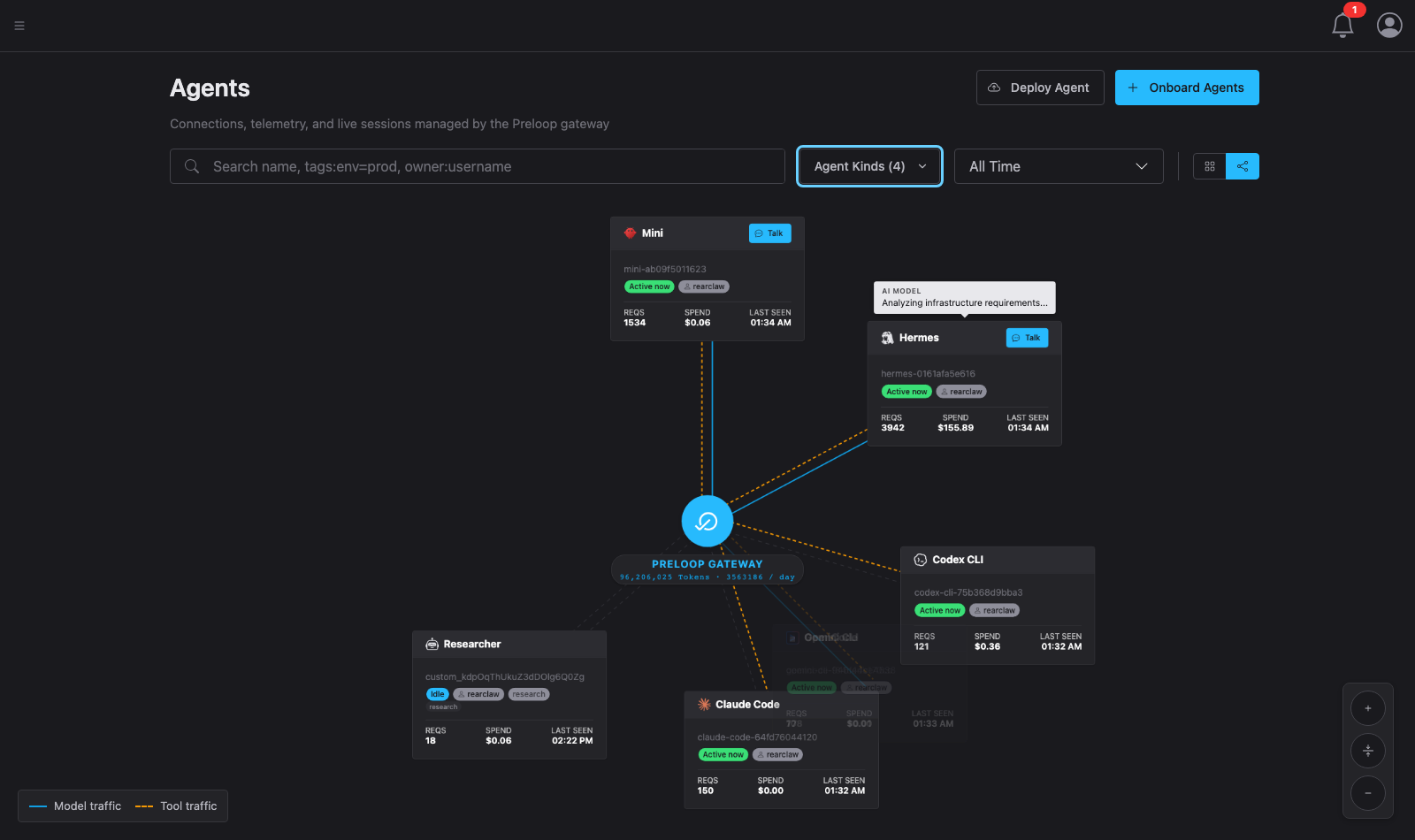
Preloop is the open-source AI agent control plane (Apache-2.0, self-hostable, with Preloop Cloud as a hosted option). Once an agent's traffic runs through it, alongside approvals you get:
- MCP firewall — allow / deny / require-approval / require-justification on every MCP tool call, as YAML + CEL policy.
- AI model gateway — OpenAI- and Anthropic-compatible, with per-agent budgets, allowed-model lists, and cost attribution. Provider keys stay with Preloop instead of inside agent containers.
- Cost analytics and budgets — spend explained by model, agent, session, API key, and user, with soft and hard budget ceilings and budget-health alerts.
- Session cost optimization — evidence-grounded waste findings per session, one-click apply, and consent-gated replay verification of the savings. This ships in the open-source core, using your own model keys.
- Runtime session observability — one timeline per session covering tool calls, model calls, policy decisions, approvals, and spend.
- Audit trails — durable records with the matched policy, approver, inputs, timestamps, and outcome.
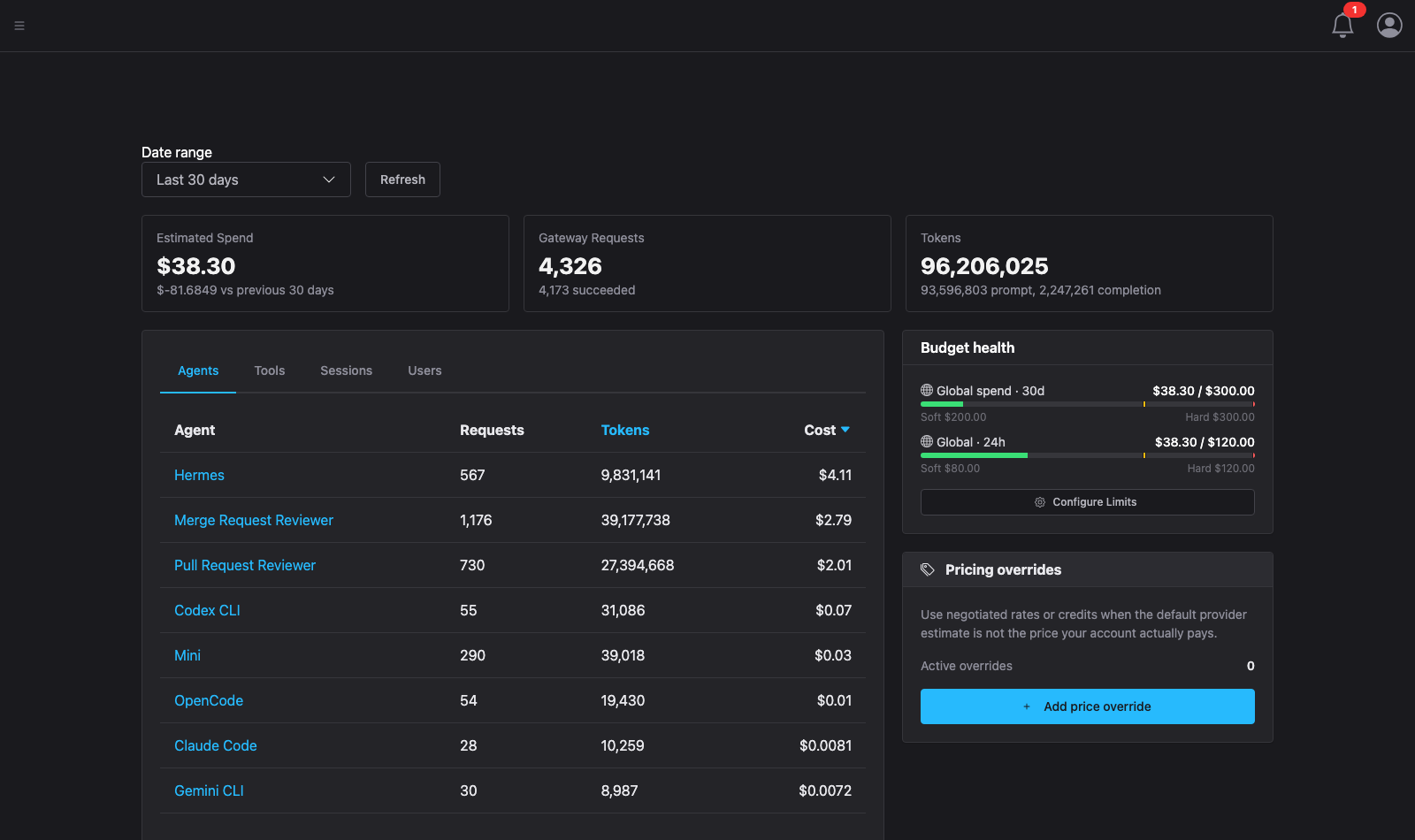
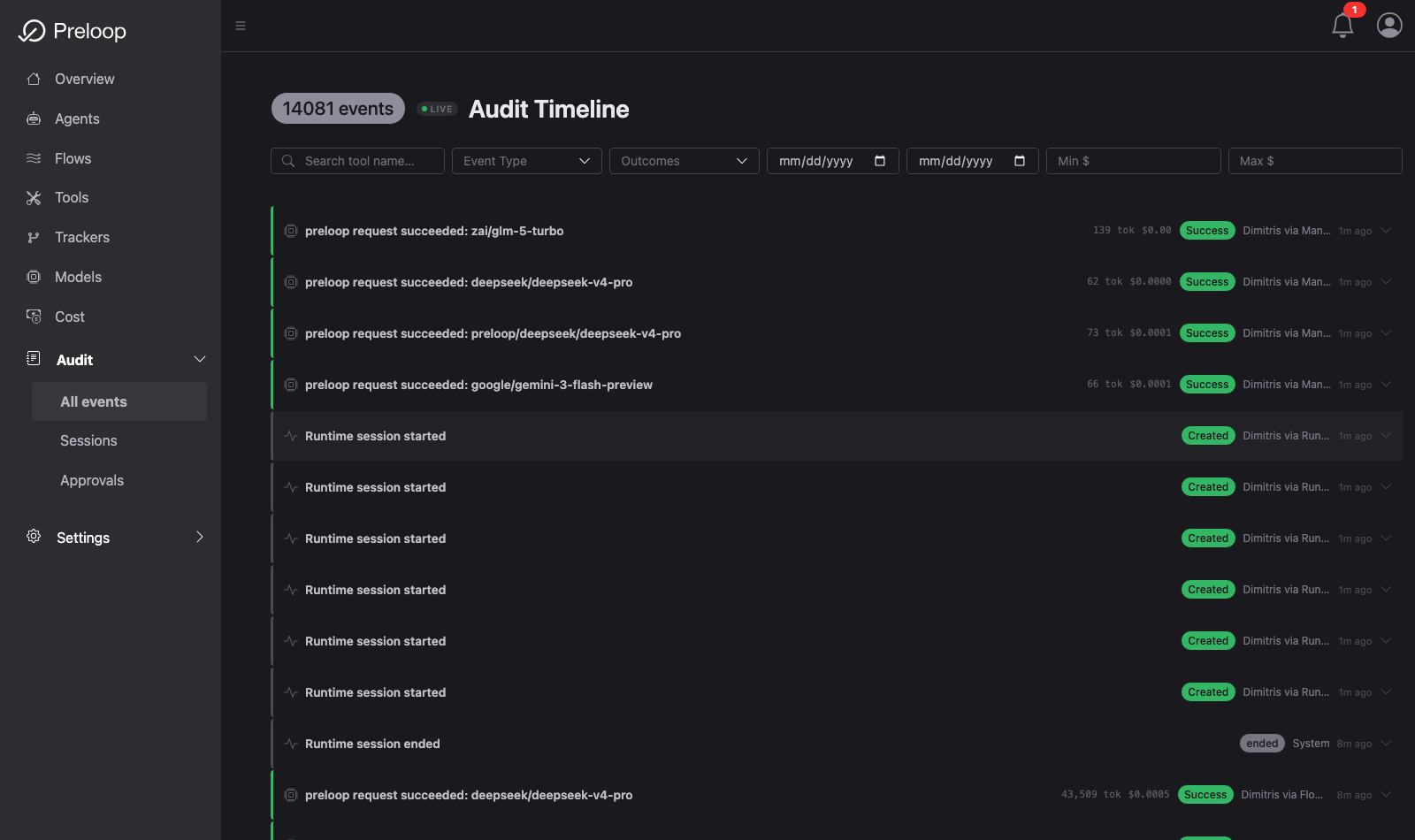
The point of the combination: one control plane over every agent you run, not a separate dashboard per runtime. Preloop works with any MCP-compatible agent — Hermes, OpenClaw, Claude Code, Codex CLI, Cursor, Gemini CLI, OpenCode, and others. The same Hermes, still running at full speed, but now something you can see while it works, stop before it does damage, talk to from anywhere, and account for afterwards.
Editions: Preloop is the open-source edition. Preloop Cloud is the hosted service. Preloop Enterprise is the commercial self-hosted edition.
Learn more
- Docs: docs.preloop.ai — Hermes reference
- Source: github.com/preloop/preloop —
this plugin lives in
runtime-plugins/hermes-preloop - Video series: Preloop on YouTube
- Issues: github.com/preloop/preloop/issues
Apache-2.0. Copyright (c) 2026 Spacecode AI Inc.
Release history Release notifications | RSS feed


Download files
Download the file for your platform. If you're not sure which to choose, learn more about installing packages.
Source Distribution
Built Distribution
Filter files by name, interpreter, ABI, and platform.
If you're not sure about the file name format, learn more about wheel file names.
Copy a direct link to the current filters
File details
Details for the file preloop_hermes_plugin-0.2.0.tar.gz.
File metadata
- Download URL: preloop_hermes_plugin-0.2.0.tar.gz
- Upload date:
- Size: 23.1 kB
- Tags: Source
- Uploaded using Trusted Publishing? No
- Uploaded via: twine/6.2.0 CPython/3.12.13
File hashes
| Algorithm | Hash digest | |
|---|---|---|
| SHA256 |
1146995409a72a8982baf22360440a916d54bee48fdb99b3cd54feb5b77d988e
|
|
| MD5 |
1eca3be527bfe072e693733579eceed9
|
|
| BLAKE2b-256 |
2376dd2ce1cdca19949b08396c125b50a3e7f1d3fea3577c95009bcdcfdb99c2
|
File details
Details for the file preloop_hermes_plugin-0.2.0-py3-none-any.whl.
File metadata
- Download URL: preloop_hermes_plugin-0.2.0-py3-none-any.whl
- Upload date:
- Size: 15.0 kB
- Tags: Python 3
- Uploaded using Trusted Publishing? No
- Uploaded via: twine/6.2.0 CPython/3.12.13
File hashes
| Algorithm | Hash digest | |
|---|---|---|
| SHA256 |
e6f43dc347bf13e9192b8a470b5277a1df0ecebff51d7ccb7fd7174f8c820163
|
|
| MD5 |
4456413fcb656eb06bd64f2b34ffe42e
|
|
| BLAKE2b-256 |
f6039f3c93958bfcf044efdcef1728d8995fef62cd5d4d0e48e3e2f7b6657a3d
|






