
PREP-IC: Pinout, Ring and Early floorplan Planner for ICs







(c) 2026 Maximilian Golser and Simon Dorrer
Institute for Integrated Circuits and Quantum Computing (IICQC), Johannes Kepler University (JKU), Linz, Austria
Description
PREP-IC is a PySide6 GUI and Python API that plans the pad ring and the pinout of an IC before its layout starts. You type the pads of each side, one line per pad, and the die grows with them (pad-limited), so pad count, pitch and die size never disagree. It is made for analog, mixed-signal and RF designers doing early floorplanning.
It works in three layers, each optional on top of the one before:
- Pad ring. Plain-text side editors with tags for the pad type, IO function, drive strength, bond pad size and pitch, RF ground-signal-ground groups (
[gsg], and[gsgsg]for a differential pair), spacers, and power splits that cut the IO ring into domains. - PDK and package. With a supported PDK chosen, the ring shows the real IO cells, corner cells, bondpads and seal ring spacing, and every pad gets its IO cell. A package from the EUROPRACTICE library gives every pad its package pin. See Supported PDKs and Packages.
- Chip view. Macros from LibreLane run directories (size and pins from their LEF) are placed in the core, with a flyline from every off-chip macro pin to its pad. Checks flag crossing flylines, split differential pairs, sensitive pads next to noisy ones, macros too close to each other and macros without a supply pad within reach. Pads and macros are dragged in the same picture, and Optimize Pad Order, Add Missing Pads and Suggest Supply Pads do the routine edits. See Chip view.
The plan goes straight into the chip flow: the pad ring part of the LibreLane config.yaml, a pad_cfg.tcl that places the IO cells exactly as planned, a chip_top.sv with the IO cell instances, the matching core template, macros.yaml and the bondplan PINOUT. A pin list (CSV) and the drawing (SVG, PNG) document it.
The code is split into a pure-Python, Qt-free model and exporters (prep_ic.model, prep_ic.formats) behind a scripting API, and a thin prep_ic.gui on PySide6-Essentials. The CLI exports without the GUI. How it is built and the rules it follows are in doc/architecture.md.
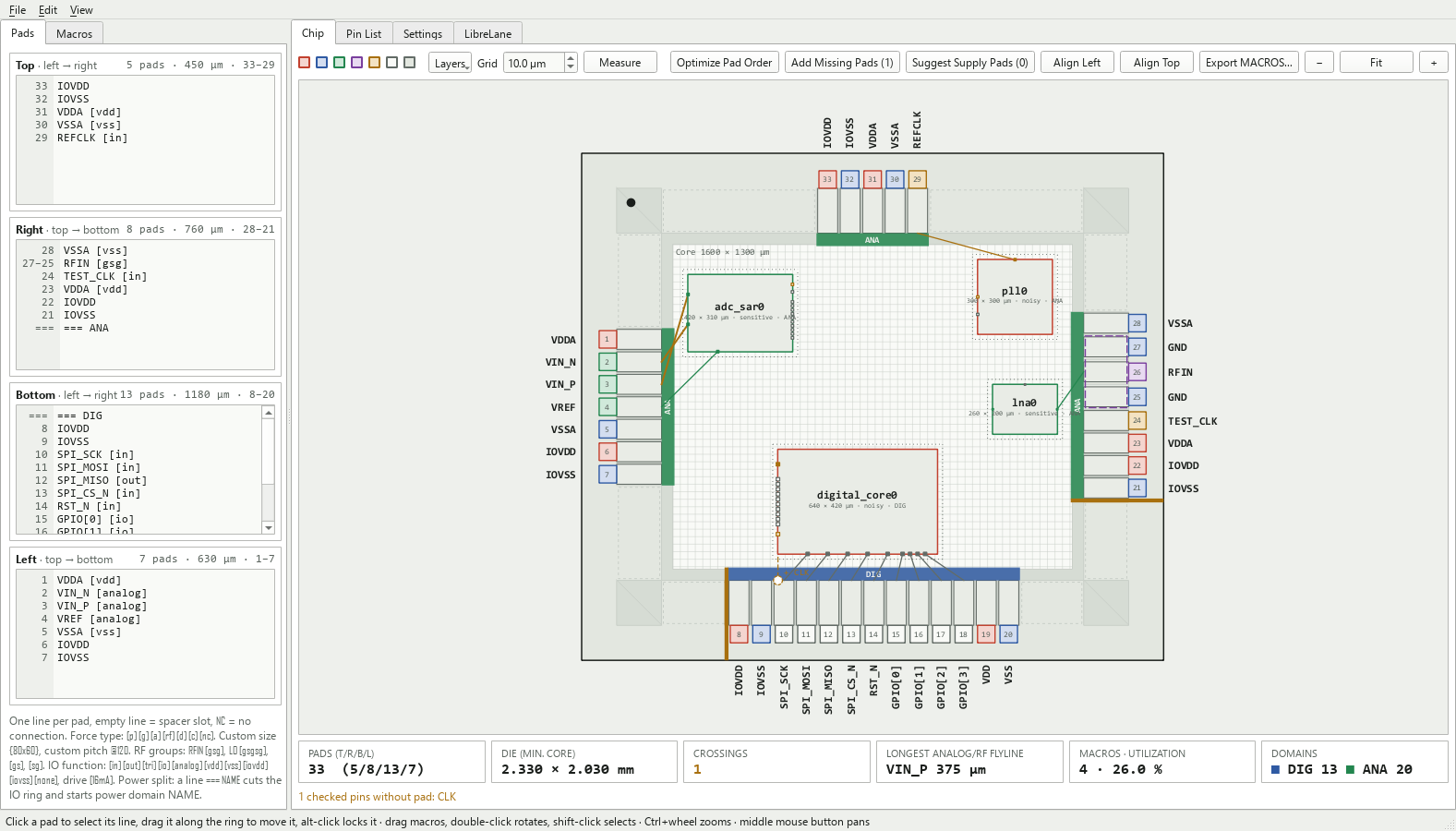
The chip view of examples/chip_demo.json: an IHP SG13G2 IO ring with the power domains ANA and DIG, four macros with their flylines, one crossing (orange) and one checked pin without a pad.
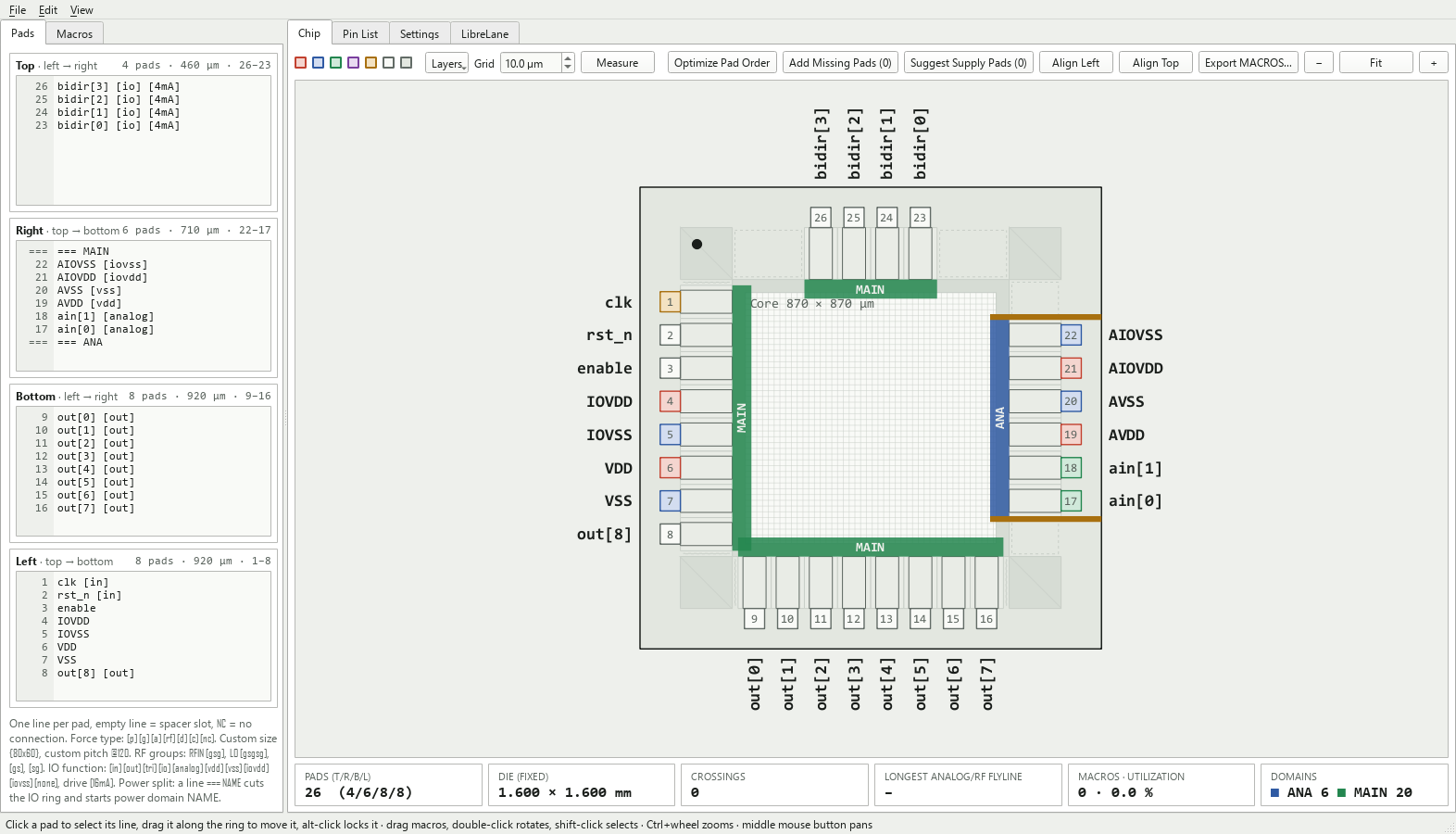
The IO ring of examples/ihp_sg13g2_domains.json: 26 IHP SG13G2 IO cells on a fixed 1.6 × 1.6 mm die, split into the power domains MAIN and ANA.
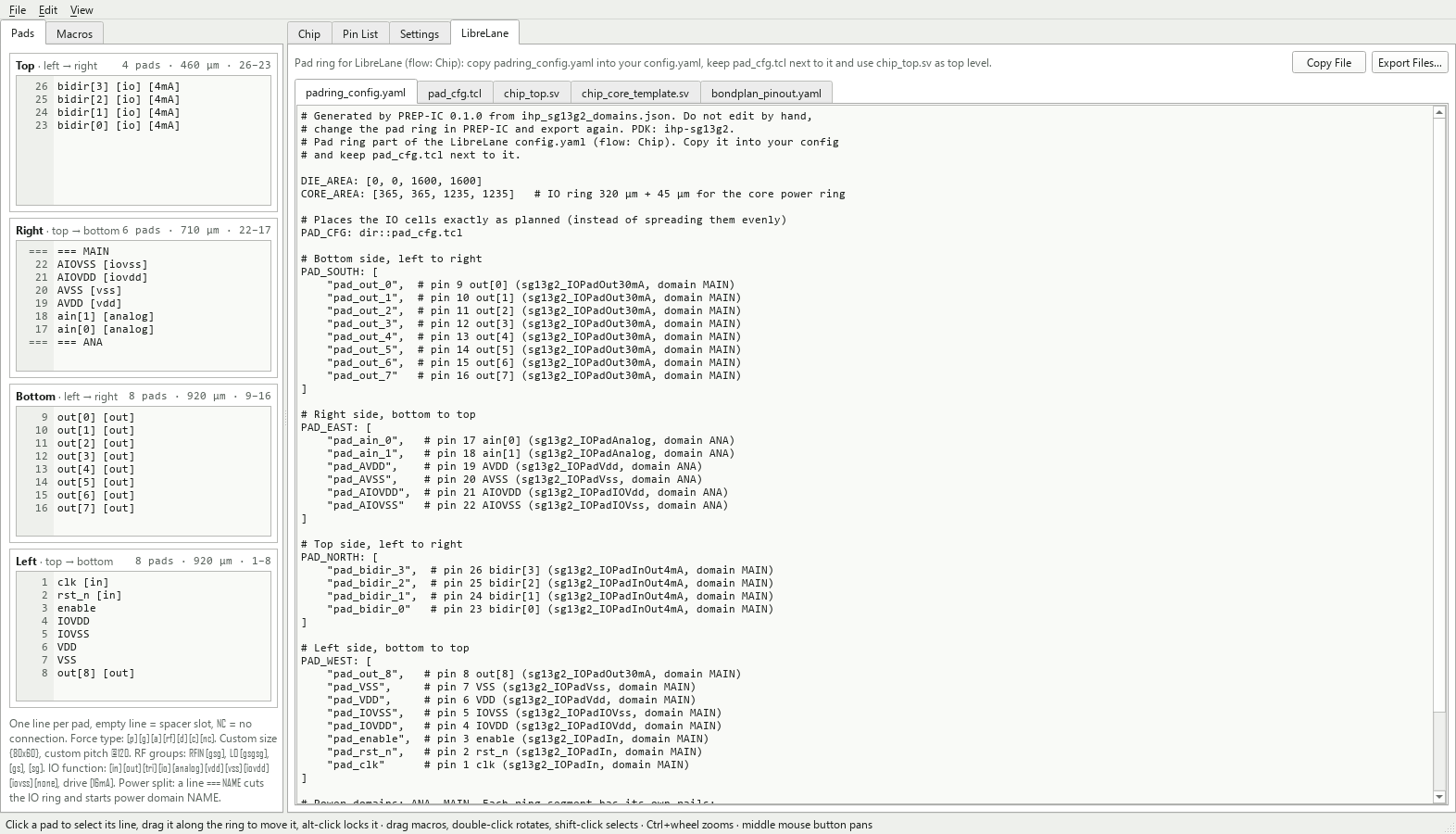
The LibreLane tab: the pad ring part of config.yaml, pad_cfg.tcl, chip_top.sv, the core template and the bondplan pinout, ready to copy or export.
Directory Structure
📁 prep-ic/
├─ 📁 doc/
│  ├─ 📁 fig/                    README screenshots and logos
│  └─ architecture.md            layers, conventions and the design rules of the chip view
├─ 📁 examples/
│  ├─ 📁 macros/                 abstract LEFs of four demo macros (ADC, PLL, LNA, digital core)
│  ├─ chip_demo.json             chip view demo: IHP SG13G2, two domains, four macros, an RF input
│  ├─ gf180mcud_demo.json        gf180mcuD ring
│  ├─ sky130a_demo.json          sky130A ring
│  ├─ wafer_space_slot_*.json    one project per wafer.space gf180mcuD slot
│  ├─ ihp_sg13g2_domains.json    IHP SG13G2 ring on a fixed die, two domains, QFN32 package
│  ├─ padring.json               pad ring without a PDK
│  └─ script_example.py          build, check and export a pad ring in code
├─ 📁 src/prep_ic/               the package (pip-installable)
│  ├─ 📁 data/                   PDK profiles (pdks/*.json) and the package library (packages.json)
│  ├─ 📁 formats/                project files and exports, no Qt
│  │  ├─ files.py                writes the files of an export all or none
│  │  ├─ lef.py                  minimal LEF reader: macro size and pins
│  │  ├─ librelane.py            pad ring config, pad_cfg.tcl, chip_top.sv, macros.yaml, bondplan PINOUT
│  │  ├─ pinlist.py              pin list as CSV or tab-separated text
│  │  ├─ project_file.py         project files (JSON)
│  │  └─ svg.py                  SVG drawing of the pad ring
│  ├─ 📁 gui/                    PySide6-Essentials, uses only the model and formats API
│  │  ├─ 📁 assets/              the logo
│  │  ├─ about_dialog.py         Help → About: version, authors, license and links
│  │  ├─ app.py                  the GUI launcher
│  │  ├─ chip_view.py            IO ring, core, draggable macros, flylines and markers
│  │  ├─ macro_panel.py          the macro list
│  │  ├─ main_window.py          side editors, tabs, settings and LibreLane output
│  │  ├─ qt.py                   Qt binding: PySide6, PyQt6 as fallback
│  │  ├─ scene.py                draws layout primitives into a QGraphicsScene
│  │  └─ widgets.py              side editor with pin number gutter, zoomable ring view
│  ├─ 📁 model/                  pure Python, no Qt
│  │  ├─ chip.py                 pads and macros together: flylines, crossings, analog and power checks
│  │  ├─ constants.py            constants shared by the model, the exporters and the GUI
│  │  ├─ floorplan.py            hard macros placed in the core
│  │  ├─ layout.py               pin numbering, die size, geometry and drawing primitives
│  │  ├─ parse.py                editor lines to pad entries
│  │  ├─ pdk.py                  PDK and package profiles
│  │  └─ project.py              ring settings and the entry lines of each side
│  ├─ __init__.py                scripting API and version
│  ├─ __main__.py                python -m prep_ic
│  ├─ cli.py                     command line: GUI, export or check
│  └─ style.py                   color palettes shared by the GUI and the SVG export
├─ 📁 tests/                     unittest suite, the GUI tests run offscreen
│  ├─ 📁 data/                   layout baseline and a test macro
│  ├─ test_chip.py               chip view model: analysis and edits of pads and macros
│  ├─ test_floorplan.py          LEF reading, macro placement and pad generation
│  ├─ test_formats.py            project files, CSV, SVG, the CLI, no Qt in the core
│  ├─ test_gui.py                GUI smoke tests
│  ├─ test_model.py              entry parser, settings, die and core sizing
│  ├─ test_pdk.py                PDK profiles, IO cells, LibreLane and bondplan exports
│  ├─ test_pdk_lef.py            every profile against the LEF of its IO library, needs PDK_ROOT (CI has no PDK)
│  └─ test_qt_essentials.py      guards the PySide6-Essentials-only dependency
├─ 📁 LICENSES/                  license texts the REUSE check resolves against
│  └─ Apache-2.0.txt
├─ 📁 .github/workflows/         CI
│  ├─ license-check.yml          reuse lint: every file carries copyright and license
│  └─ tests.yml                  the unittest suite on Linux, Windows and macOS, Python 3.10 and 3.15
├─ CITATION.cff
├─ LICENSE                       Apache-2.0
├─ MANIFEST.in                   sdist manifest (adds the REUSE files)
├─ pyproject.toml                packaging, dependency and the prep-ic entry point
├─ README.md
├─ REUSE.toml                    licensing of files that cannot carry an SPDX header
└─ ToDo.md                       planned work
How to Use
Install
From PyPI:
pip install prep-ic
# or, for an isolated install with its own command on PATH:
pipx install prep-ic
The development version from GitHub:
pip install git+https://github.com/iic-jku/prep-ic.git
From source (for development), an editable install:
git clone https://github.com/iic-jku/prep-ic.git
cd prep-ic

python -m venv .venv
# Windows:        .venv\Scripts\activate
# macOS / Linux:  source .venv/bin/activate

pip install -e .
The only dependency is PySide6-Essentials, which pip installs with it. On Linux with Python 3.10 or 3.11 it stays below 6.12, since a reference count bug in the 6.12.0 Linux wheels crashes these Python versions (see PYSIDE-3474, fixed for 6.12.1).
Run the GUI
prep-ic              # after installing
prep-ic chip.json    # the same, opened on that project
Without a file the GUI opens the project of the last session, or the built-in example on the first start. File → Load Example loads that example again, and more projects live in examples/.
From a source checkout without installing, put src on the Python path and start the package as a module:
PYTHONPATH=src python -m prep_ic                   # macOS / Linux
$env:PYTHONPATH = "src"; python -m prep_ic         # Windows PowerShell
Typical workflow
- Type the pads of each side in the Pads tab, one line per pad (see Entry syntax). The die grows with them, and the gutter shows each pad's pin number.
- Choose the technology in Settings → Technology: a PDK and optionally a package. The ring then shows the real IO cells, and the Pin List shows each pad's IO cell, power domain and package pin.
- Split the power domains with
=== NAMElines where the IO ring is cut. - Add the macros in the Macros tab from their LibreLane run directories, place them in the Chip view and check the pins that go off-chip.
- Fix the pinout with Optimize Pad Order, Add Missing Pads and Suggest Supply Pads, until the stat tiles and the warning line are clean.
- Export the LibreLane files (File → Export LibreLane Files…), the pin list (File → Export Pin List as CSV…) or the drawing (File → Export Padframe as SVG… or as PNG…), and save the project as JSON.
Entry syntax
One line per entry. Each side lists its pads as seen on the die: top and bottom from left to right, left and right from top to bottom. Empty lines, also at the end of a side, are spacers.
| Entry | Meaning |
|---|---|
VDDA |
pad, type guessed from the name |
| (empty line) | spacer slot of one standard pitch |
NC |
pad without connection |
NAME [p|g|a|rf|d|c|nc] |
force type: power, ground, analog, RF, digital, clock, NC |
NAME {80x60} |
custom bond pad size W × H in µm (W along the edge) |
NAME @120 |
custom pitch in µm |
RFIN [gsg], [gs], [sg] |
RF group, e.g. GND, RFIN, GND |
LO [gsgsg] |
differential: GND, LO_P, GND, LO_N, GND |
NAME [in|out|tri|io|analog|vdd|vss|iovdd|iovss|none] |
IO function, selects the IO cell (default guessed from name and type) |
NAME [16mA] |
drive strength of output, tristate and bidirectional cells |
NAME [schmitt], NAME [noesd], NAME [rfpad] |
another IO cell of the same function, where the PDK has one: a Schmitt trigger input, an analog pad without ESD clamp, the RF pad of the IHP chip templates |
NAME [lock] |
locked pad: it can no longer be dragged and Optimize Pad Order leaves it in place |
=== NAME |
power split: cuts the IO ring here and starts power domain NAME |
Options combine: RFOUT [gsg] {70x70} @125, DOUT[3] [out] [4mA]. An unknown tag or a malformed option stays in the pad name together with the options left of it, so A [in] [foo] is a pad named A [in] [foo] and A {60x} a pad named A {60x}. A size or pitch below 1 µm and [0mA] count as malformed. The warning line and prep-ic check report it.
PDK, package and LibreLane
In Settings → Technology choose a PDK (IHP SG13G2, IHP SG13CMOS5L, sky130A or gf180mcuD) and optionally a package from the EUROPRACTICE library.
- With a PDK the preview shows the real ring: the seal ring spacing, the IO cells, the corner cells and the bondpads (sizes in Supported PDKs and Packages). Function and drive of each pad are set in the Pin List or with tags in the editor. The rows of the Pin List also show the IO cell, the power domain and the package pin.
- Power splits: an
=== NAMEline leaves a 10 µm gap in the IO ring of an IHP PDK. sky130A and gf180mcuD have no split cell in their profile yet, so there the line stays in the editor and gets a warning. Every ring segment gets its own rails (VDD_NAME,VSS_NAME,IOVDD_NAME,IOVSS_NAME), and without splits they areVDD,VSS,IOVDDandIOVSS. PREP-IC warns when a domain has no supply pad for one of its rails. - The LibreLane tab and File → Export LibreLane Files… write:
padring_config.yaml:DIE_AREA,CORE_AREA,PAD_CFGand thePAD_SOUTH/EAST/NORTH/WESTlists, to copy into the LibreLaneconfig.yaml(flowChip),pad_cfg.tcl: places the IO cells exactly as planned (LibreLane's default script spreads them evenly), keeps the split gaps free and places a terminal on every pin thatPAD_PLACE_IO_TERMINALSlists for a cell, where LibreLane's script stops at the first,chip_top.sv: the IO cell instances with the same names, the top-level*_PADports and thechip_coreinstance,chip_core_template.sv: the matching core ports, and with macros the instances to create in the core,macros.yaml(with macros):MACROSwith LEF and GDS, thevh,nl,pnl,libandspefviews found in LibreLane's layout belowfinal/, and the instance locations (i_chip_core.<instance>),bondplan_pinout.yaml(with a package):PACKAGE_NAMEandPINOUTfor the bondplan config.
- An IHP design must still provide the bondpad cell (
PAD_BONDPAD_NAME, e.g.sg13g2_ip__bondpad_70x70withEXTRA_LEFSandEXTRA_GDS). The IO cells of sky130A and gf180mcuD carry their own bond pad. - On sky130A and gf180mcuD,
padring_config.yamlends with a comment naming the IO cells LibreLane's disconnected pin check has to skip (gf180mcuD output pads leaveYopen, the sky130A connect cells and analog pads mark no pin as a power pin). Add them toIGNORE_DISCONNECTED_MODULESin yourconfig.yaml. The export writes no key there, since it would replace your own list. - On sky130A, list the bus pin of each supply pad in
PAD_PLACE_IO_TERMINALSafter its bond pad pin, for examplesky130_ef_io__vccd_lvc_clamped_pad/VCCDaftersky130_ef_io__vccd_lvc_clamped_pad/VCCD_PAD. The supply terminal then sits on the bond pad and on the bus pin that the core ring reaches. The PDK's own list names the bond pad pins only.
See examples/ihp_sg13g2_domains.json. From the command line:
prep-ic export examples/ihp_sg13g2_domains.json --librelane flow/padring
Chip view
The Chip tab shows the whole chip: the IO ring with the pads, the core area inside it, the macros and a flyline from every checked macro pin to the pad with the same name. The left panel has two tabs, Pads (the side editors) and Macros (the macro list).
Macros
- Add Macro… (in the Macros tab or the File menu) takes a LibreLane run directory, e.g.
macros/adc_sar/. Size and pins come fromfinal/lef/adc_sar_top.lef, or from the only*.lefinfinal/lef/. The project stores the path, and the LEF is read again when the project opens and with File → Reload Macros (F5). One macro can be placed several times (adc_sar0,adc_sar1, …). Add Placeholder… adds a box without a LEF. - Drag a macro to move it. It snaps to the grid (default 10 µm) and to the edges of other macros, and a dashed guide shows the edge it snapped to. Double-click or Rotate turns it by 90°, and Auto-rotate picks the rotation with the shortest flylines. Shift-click selects macros for Align Left and Align Top.
- Per macro: the pins that go off-chip, the class (
normal,sensitivefor analog and RF,noisyfor digital or clocks), the power domain and the halo.
Pads
- Drag a pad (or a
=== NAMEsplit marker) along the ring to move it, also to another side, and the side editors follow. Dropped on another pad it is sorted in. Dropped on an empty part of a side (or on a spacer) it stays exactly there and no other pad moves, because empty lines fill the distance. - Alt-click locks a pad (tag
[lock]). - Add Missing Pads adds a pad for every checked pin without one, where its dashed line points. Suggest Supply Pads adds VDD and VSS pads (named after the macro's LEF power pins) next to the macros that have none of their domain within reach.
- Optimize Pad Order sorts the connected pads of each side by the positions of their macro pins, so the flylines no longer cross. Differential pairs (
VIN_PandVIN_N) stay together.
Checks (thresholds in Settings → Checks)
- Crossing flylines (orange, counted in the stat tiles) and the longest analog or RF flyline.
- Differential pairs that are not adjacent.
- A sensitive pad next to a noisy one. A connected pad takes the class of its macro, the others their type.
- Overlapping macros, macros outside the core, overlapping halos, and sensitive and noisy macros closer than the minimum distance.
- A macro without a VDD and a VSS pad of its domain within the distance. IO supplies don't count.
Layers hides the grid, pads, macros, halos, flylines, power domains or pad names, and Measure shows distances. Edit → Undo and Redo (Ctrl+Z, Ctrl+Shift+Z) cover all chip view and macro list actions. Typing in a side editor keeps its own undo while the editor has the focus.
In the Fixed core size (minimum) mode, which is set when the first macro is added, the die follows the core size: it is at least the core plus the IO ring (plus the PDK core margin) and still grows with the pads.
Demo: examples/chip_demo.json uses the demo macros in examples/macros/, abstract LEFs of an ADC, a PLL, an LNA and a digital core in the LibreLane run layout final/lef/<name>_top.lef. It starts with one crossing and one missing pad, so try Optimize Pad Order and Add Missing Pads. Export MACROS… shows the macros.yaml it exports.
Scripting
The package works without Qt:
import prep_ic as prep

project = prep.load("chip.json")
project.sides["L"].append("VDDA [p]")
project.settings.std.pitch = 90
layout = project.layout()
print(layout.die_width, layout.die_height, layout.warnings)
for pin in layout.pins:
    print(pin.no, pin.name, pin.x, pin.y)
prep.export_csv(project, "pins.csv")
prep.export_svg(project, "ring.svg")
prep.save(project, "chip.json")

macro = prep.Macro.from_dir("macros/adc_sar", "adc0")  # reads final/lef/adc_sar_top.lef
macro.io = ["VIN_P", "VIN_N"]
project.floorplan.macros.append(macro)
prep.add_missing_pads(project)                         # adds VIN_P/VIN_N pads, fixed core mode
print(prep.analyse(project).warnings)                  # crossings, tags, pairs, analog and power checks
print(prep.findings(project))                          # the same plus layout and macro LEF warnings

project.settings.pdk = "ihp-sg13g2"                    # see prep.pdk_names()
project.settings.package = "OP_QFN32_A4_FIT"           # see prep.package_names()
prep.export_librelane(project, "flow/padring")         # padring_config.yaml, pad_cfg.tcl, chip_top.sv, ...
project.sides holds each side in numbering order. project.physical_lines(side) and project.set_physical_lines(side, lines) use the order as seen on the die, like the GUI.
See examples/script_example.py.
Run the tests
python -m unittest discover -s tests -t . # from the repo root
The GUI tests run offscreen and are skipped when Qt is not installed.
CLI Overview
| Command | Does |
|---|---|
prep-ic |
start the GUI on the last project |
prep-ic chip.json |
start the GUI on chip.json |
prep-ic --version |
print the version |
prep-ic export chip.json --csv pins.csv |
write the pin list as CSV |
prep-ic export chip.json --svg ring.svg |
write the drawing as SVG |
prep-ic export chip.json --librelane DIR |
write the LibreLane files into DIR (needs a PDK in the project) |
prep-ic check chip.json |
list the findings of the project |
The export options combine, e.g. prep-ic export chip.json --csv pins.csv --svg ring.svg. Each written LibreLane file is printed, and all findings go to stderr. export builds every output before it writes the first and writes all files or none, so a failure leaves the files as they were. Exit code 0 from export says only that the files were written, so gate a script on check: it prints one finding per line or no findings, and exits 0 when clean, 1 with findings and 2 when the check did not run. A finding is a layout warning, an entry of the project file that could not be read, a macro LEF that is gone, a marked pin no longer in the LEF, or what prep.analyse reports: unknown tags and options, bad power domain names, crossings, long analog flylines, pins without a pad, split differential pairs, sensitive pads next to noisy ones, macro and supply checks. Both commands run without Qt. From a source checkout without installing, use python -m prep_ic with src on the Python path in place of prep-ic.
Supported PDKs and Packages
The PDK profiles are taken from the IO cell LEF and the LibreLane IO config of each PDK (libs.ref/<library>/lef/<io_library>*.lef, for sky130A libs.ref/sky130_fd_io/lef/sky130_ef_io.lef, and libs.tech/librelane/<io_library>/config.tcl).
| IHP SG13G2 | IHP SG13CMOS5L | sky130A | gf180mcuD | |
|---|---|---|---|---|
| Profile name | ihp-sg13g2 |
ihp-sg13cmos5l |
sky130A |
gf180mcuD |
| IO library | sg13g2_io |
sg13cmos5l_io |
sky130_ef_io |
gf180mcu_fd_io |
| IO cell (width × depth) | 80 × 180 µm | 80 × 180 µm | 80 × 198 µm GPIO, 75 × 198 µm supply, 75 × 200 µm analog | 75 × 350 µm |
| Corner cell | 180 × 180 µm | 180 × 180 µm | 200 × 204 µm | 355 × 355 µm |
| Bond pad | 70 × 70 µm, a separate cell | 70 × 70 µm, a separate cell | in the IO cell, 62.6 × 62.45 µm GPIO | in the IO cell, 60 × 60 µm |
| Seal ring spacing | 140 µm | 140 µm | 0 (added after the ring) | 26 µm |
| Minimum pad pitch (IO cell width) | 80 µm | 80 µm | 80 µm | 75 µm |
| Core margin (core power ring) | 45 µm | 45 µm | 100 µm | 61 µm |
| Power split gap and filler | 10 µm, sg13g2_Filler2000 |
10 µm, sg13cmos5l_Filler2000 |
none, a split gets a warning | none, a split gets a warning |
A new project starts standard pads at 80 µm, the minimum pitch of the IHP PDKs and sky130A, and RF pads at 100 µm. Selecting a PDK in the GUI raises a pitch below its minimum to 100 µm.
The IO function of a pad selects its cell (<lib> is sg13g2 or sg13cmos5l, the sky130A cells start with sky130_ef_io__, the gf180mcuD ones with gf180mcu_fd_io__):
| Function | IHP | sky130A | gf180mcuD |
|---|---|---|---|
[in] |
<lib>_IOPadIn |
gpiov2_pad |
in_c, with [schmitt] in_s |
[out] |
<lib>_IOPadOut<drive>mA |
gpiov2_pad |
bi_24t |
[tri] |
<lib>_IOPadTriOut<drive>mA |
gpiov2_pad |
bi_24t |
[io] |
<lib>_IOPadInOut<drive>mA |
gpiov2_pad |
bi_24t |
[analog] |
<lib>_IOPadAnalog, with [rfpad] <lib>_ip__rfpad_70x70 |
analog_esd_pad, with [noesd] analog_noesd_pad |
asig_5p0 |
[vdd], [vss] |
<lib>_IOPadVdd, <lib>_IOPadVss |
vccd_lvc_clamped_pad, vssd_lvc_clamped_pad |
dvdd, dvss |
[iovdd], [iovss] |
<lib>_IOPadIOVdd, <lib>_IOPadIOVss |
vddio_hvc_clamped_pad, vssio_hvc_clamped_pad |
dvdd, dvss |
[none] |
no IO cell | no IO cell | no IO cell |
| Drive | 4, 16 or 30 mA, default 30 mA | none, a drive tag gets a warning | 24 mA, another drive gets a warning |
The control pins of the sky130A and gf180mcuD cells are tied per function in chip_top.sv, so the core ports are the same as for IHP.
On IHP, [rfpad] picks the RF pad of the chip templates instead of IOPadAnalog, for an [analog] pad or the signal pad of a group (RF [gsg] [rfpad]): ip/sg13g2_ip__rfpad_70x70 of ihp-sg13g2-ams-chip-template and ip/sg13cmos5l_ip__rfpad_70x70 of ihp-sg13cmos5l-ams-chip-template. It is one 80 × 250 µm cell with its own bond pad, ESD and shield, and no series resistor, so the core is wired to padbare instead of padres. Its bond pad sits where the bondpads of the other cells go, and pad_cfg.tcl moves the cell outward by the bondpad depth, checks that its supplies are on nets, places its top-level terminal and gives it no bondpad. padring_config.yaml names the four views to add to your config.yaml, in PAD_LEFS, PAD_VERILOG_MODELS, EXTRA_GDS and every corner of LIB. The README of the IP has the details.
On sky130A, PREP-IC adds two 20 µm connect cells in front of the first IO supply pad. They tie VCCHIB to VCCD, VSWITCH and VDDA to VDDIO, and VSSA to VSSIO, and that side grows by 40 µm. On gf180mcuD, the dvdd and dvss pads short their two supply rings, so the IO supply and the core supply are one net (VDD, VSS). A [vdd] and an [iovdd] pad are then the same cell, and both count for the core supply of a macro and for a complete ring.
examples/ has one project per wafer.space gf180mcuD slot (wafer_space_slot_*.json) with the die of the slot, its pad order and positions, and the supply pads locked. Name your signals and save it under a new name. Three slots put an analog pad next to a digital one, which prep-ic check reports as Sensitive pad next to noisy pad.
The 25 packages are named after the cells of the EUROPRACTICE package library (EP_PACKAGES_08022018.gds). Their pins are numbered counter-clockwise, seen from the top. The pads of a side bond to the leads of that side, centred. Pads beyond its last lead take the free leads at the start of the next side, as a bondplan bonds across a corner, and bondplan_pinout.yaml names their side. The 17 pads of each long side of the wafer.space slot 0p5x0p5 bond that way to the 14 leads per side of OP_QFN56_A4_FIT, and its pad numbers are then the package pins.
| Family | Pins | Pin 1 |
|---|---|---|
| QFN | 16, 24, 32, 40, 48, 56, 64, 80, 88, 100 | top of the left side |
| JLCC | 44, 68, 84 | centre of the top side |
| CLCC | 44, 68, 84 | centre of the top side |
| SOIC | 16, 20, 24, 28 | top of the left side |
| DIL | 16, 24, 28, 40, 48 | top of the left side |
A further PDK is one more JSON file in src/prep_ic/data/pdks/, with the fields of model/pdk.py, a further package one more entry in src/prep_ic/data/packages.json.
Cite This Work
@misc{2026_prep_ic,
  author = {Golser, Maximilian and Dorrer, Simon},
  month = nov,
  year = {2026},
  title = {{GitHub Repository of PREP-IC: Pinout, Ring and Early floorplan Planner for ICs}},
  url = {https://github.com/iic-jku/prep-ic},
  doi = {10.5281/zenodo.23963620}
}
Acknowledgements
- The IO cell profiles and the LibreLane pad ring files follow the IO libraries and the LibreLane integration of the IHP Open PDK, sky130A and gf180mcuD, and the ring wiring of the public chip templates sky130A-ams-chip-template and gf180mcuD-ams-chip-template.
- The exports are made for the
Chipflow of LibreLane. - The package names and pin counts come from the EUROPRACTICE package library.

License
Licensed under the Apache License 2.0, see LICENSE.


Release files for prep-ic 0.2.2
For a detailed explanation of source distributions (sdists) and built distributions (wheels), please see the package formats documentation.
Source distribution (sdist)
| File | Size | Uploaded | Provenance | Actions |
|---|---|---|---|---|
| prep_ic-0.2.2.tar.gz | 159.5 kB | Without provenance | Details for prep_ic-0.2.2.tar.gz |
Built distribution (wheel)
| File | Interpreter | ABI | Platform | Actions Reset |
|---|---|---|---|---|
| prep_ic-0.2.2-py3-none-any.whl | Python 3 | none | any | Details for prep_ic-0.2.2-py3-none-any.whl |
Total release size: 272.1 kB
Release files / prep_ic-0.2.2.tar.gz
| Download URL | prep_ic-0.2.2.tar.gz |
|---|---|
| Size | 159.5 kB |
| Tags | Source |
|
SHA-256 checksum How to use checksums |
e6d59ce679444c7e2ea3c599a56e51c99c18bfe3bc5e220e111dcdb4febb08ec
|
|
BLAKE2b-256 checksum How to use checksums |
4c703083ed61413483e98ab0db896eeebd9becf3f5d552d0aaa0a3fe501e13af
|
| Upload date | |
|
Uploaded using Trusted Publishing? What is trusted publishing? |
No |
| Uploaded via |
twine/7.0.0 CPython/3.14.2
|
Release files / prep_ic-0.2.2-py3-none-any.whl
| Download URL | prep_ic-0.2.2-py3-none-any.whl |
|---|---|
| Size | 112.6 kB |
| Tags | Python 3 |
|
SHA-256 checksum How to use checksums |
555a731100a3a98f6ffe80be6831ff2c67cb0fca140ae128b01da80f3bab0d9f
|
|
BLAKE2b-256 checksum How to use checksums |
11c319fcadfed55f3bd0326f4a4878df531bacc1388cc8ca80c9069c1d23902b
|
| Upload date | |
|
Uploaded using Trusted Publishing? What is trusted publishing? |
No |
| Uploaded via |
twine/7.0.0 CPython/3.14.2
|
Security for prep-ic 0.2.2
Provenance
Provenance describes where a file came from. On PyPI, provenance is shared via attestations, which provide a verifiable record of the build or publishing details. View details, limitations and caveats.
No provenance found
None of the files in this release were uploaded with provenance metadata.
A note on package security
PyPI is a repository for distributing packages, not a service for auditing them. While third-party security researchers and our staff do their best to detect and remove malicious packages, PyPI cannot guarantee the quality, security or suitability of any given package.
To learn more about protecting yourself from malicious actors, visit our package security documentation.














