
PrePro Auto





AI-assisted tabular data preprocessing with human-in-the-loop control.
Profile, clean, transform, and export any tabular dataset — from a Jupyter notebook or a local web UI — with every step undoable, auditable, and reproducible. The same engine drives both interfaces, so results are identical wherever you call it from.
pip install prepro-auto
Author: Shivanshu Pandey · Package: pypi.org/project/prepro-auto
About this repo.
pip install prepro-autois the supported way to get PrePro Auto — that's where the working code ships from and stays up to date. This repository hosts the documentation, the full user guide, screenshots, and a runnable example notebook.
See it in action
Watch a dataset go from messy to model-ready — review each fix, approve it, and watch the issue count drop to 0.

▶ Click the GIF to watch the full walkthrough in HD on GitHub.
📦 GitHub Repository: https://github.com/Chilliflex/prepro_auto
🎥 Demo Video: https://github.com/Chilliflex/prepro_auto/blob/main/examples/Bengaluru_House_Prices_Workflow.mp4
Demo results: the walkthrough illustrates review and cleaning. Model performance depends on the dataset, preparation, split and metric; evaluate your own held-out results.
Contents
- Quickstart — get going in 30 seconds
- Ways to give PrePro Auto your data — four workflows
- 1. Input functions (notebook) — how to load data into a session
- 2. Preprocessing functions — clean, transform, visualize
- 3. Output functions — DataFrames, files, audit PDFs, pipelines
- 4. Train functions (optional ML layer) — fit, compare, predict, export models
- AI providers — optional, 5 providers supported
- REST API reference
- Documentation
Quickstart
1. Launch the UI only from Command Prompt (CMD):
prepro_auto
This starts the UI server. Open http://127.0.0.1:8000/workbench and drag-drop a file.
2. Open a dataset through a notebook:
import prepro_auto

session = prepro_auto.launch_file(r"path\to\data", open_browser=True)
3. Apply Quickclean:
result = prepro_auto.quickclean(session, apply_all=True, verbose=False)

display(result.df.head())
print(result)
4. Keep notebook and UI changes in sync:
df = session.current()  # Get the latest UI-edited data

# Make your notebook edits to df here.
session.update(df)      # Push notebook edits to the UI
Use the exact session.url printed by the notebook. Each launch_file(path) call or UI upload creates a separate dataset job, even for the same file. Quickclean with session updates that job; Quickclean with a path creates another job. current() reads committed changes from its own job, and update() refreshes UI tabs connected to that same job within a few seconds.
To resume a dataset already edited in the UI, click Copy notebook connection in the sidebar, or copy its full browser URL:
session = prepro_auto.connect("http://127.0.0.1:8721/workbench?job=YOUR_JOB_ID")
df = session.current()
print(df.shape)
display(df.head())
The UI server and notebook must use the same database/storage configuration. Reconnect instead of rerunning launch_file() to resume an existing dataset. If a kernel restart stopped its local server, connect() starts a server again and prints the URL for the preserved job. Pull again before editing if the UI changed since your last pull; update() rejects an older frame returned by current() to prevent overwriting intervening edits. No import os or os.environ["DEBUG"] setup is needed: debug logging is off by default, and inherited DEBUG=release is accepted. Restart the notebook kernel after updating the package so it loads the new code.
Screenshots
The screenshots illustrate the workflow; labels and controls may differ from older captures. The current workbench also provides real-row evidence, an editable AI model name, separate notebook/expression code, and a searchable custom estimator picker.
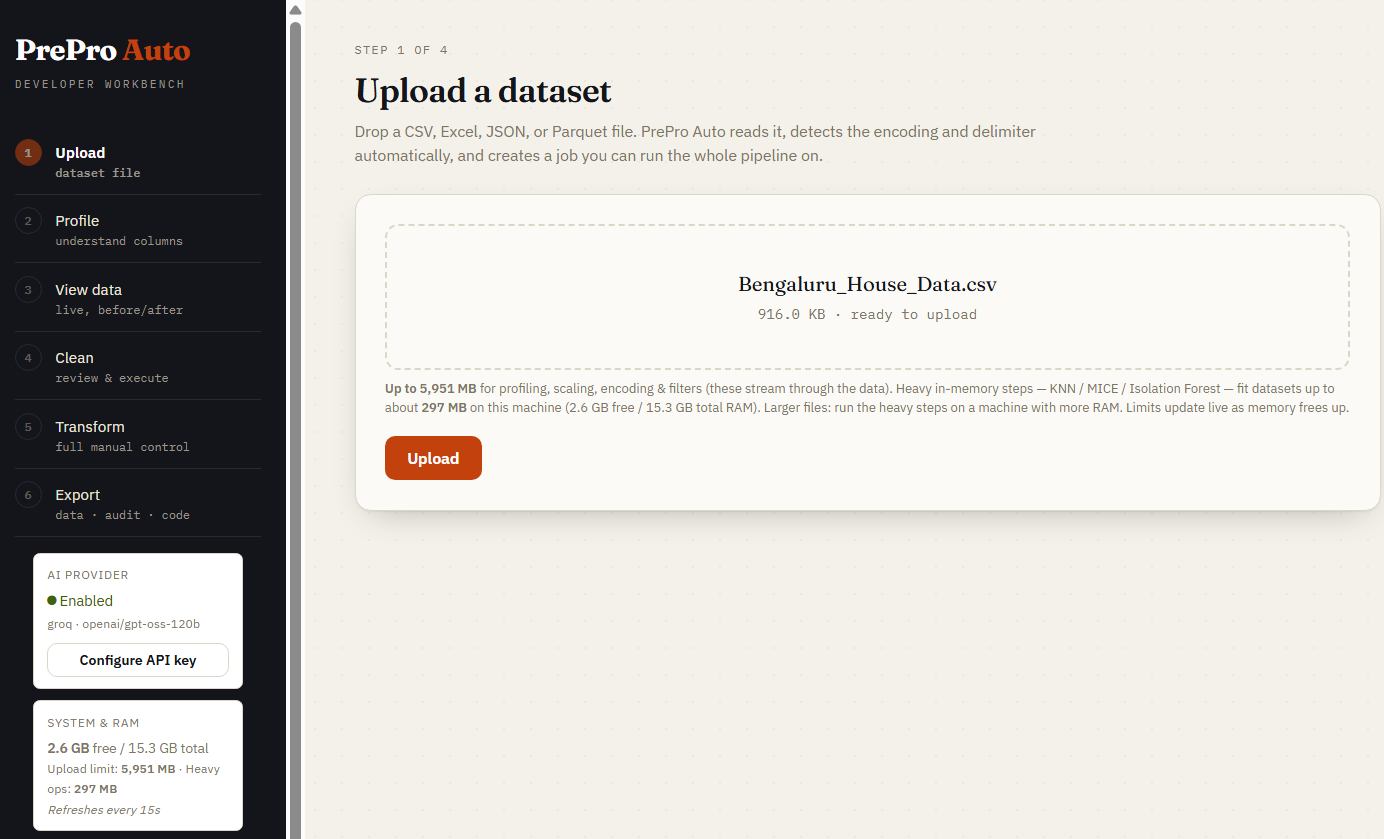
Step 1 - Upload
Upload a supported tabular file or open the exact URL printed by launch_file(). Notebook-launched datasets are already registered and need no second upload. CSV-family files have encoding/delimiter detection; real Excel workbooks use the included readers. The sidebar reports memory-based upload limits.
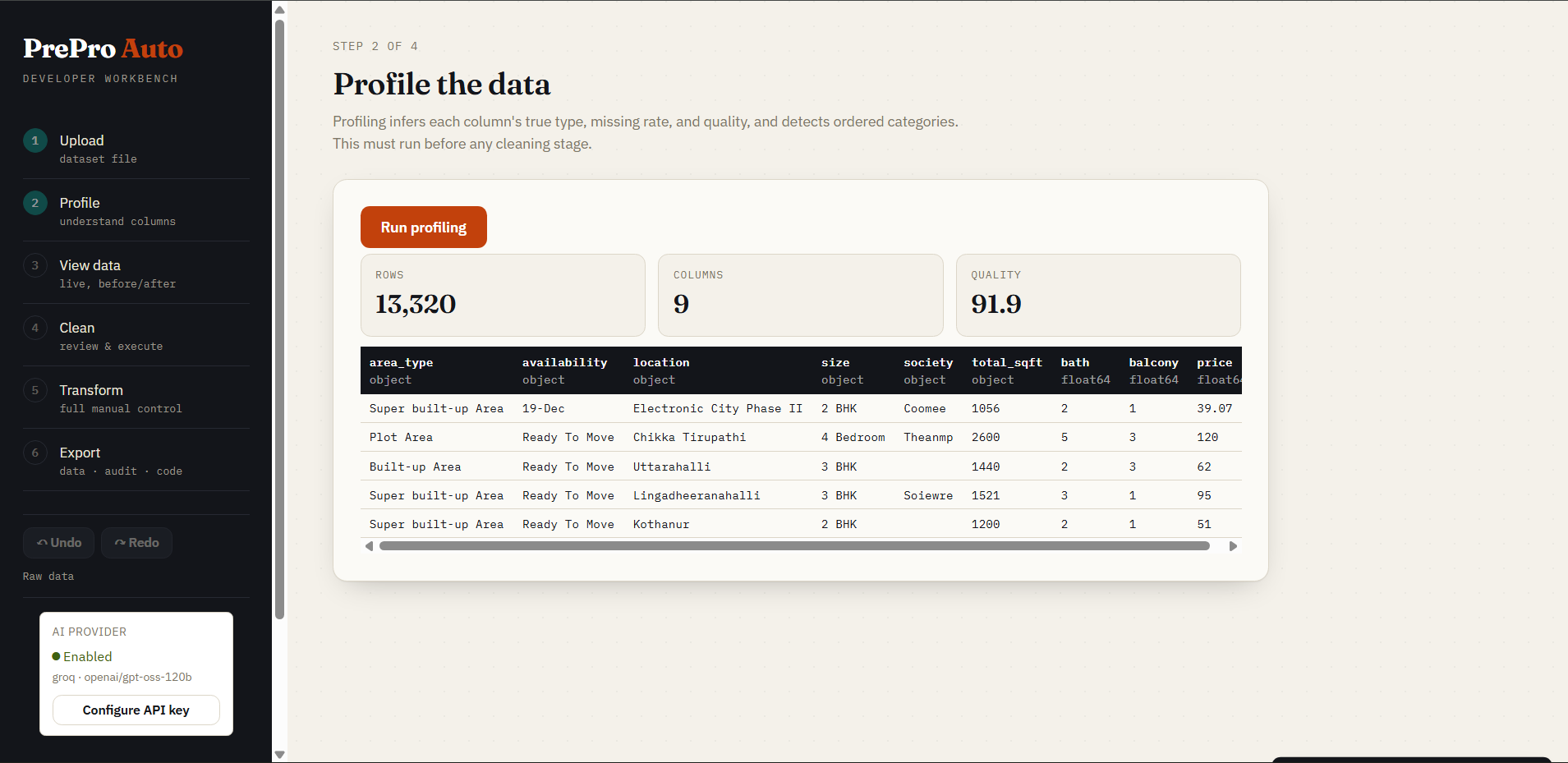
Step 2 - Profile
Profiling starts automatically when you open this step. Review inferred types, missing values, distinct counts and the quality breakdown before cleaning. Profile describes the raw upload; View data -> Current displays committed edits.
The quality score starts at 100 and subtracts capped penalties for completeness, validity, consistency, uniqueness, distribution and sufficiency. These weights are heuristics. Use the measured findings to decide what to change; the score is not a model-performance estimate or a calibrated comparison between unrelated datasets.
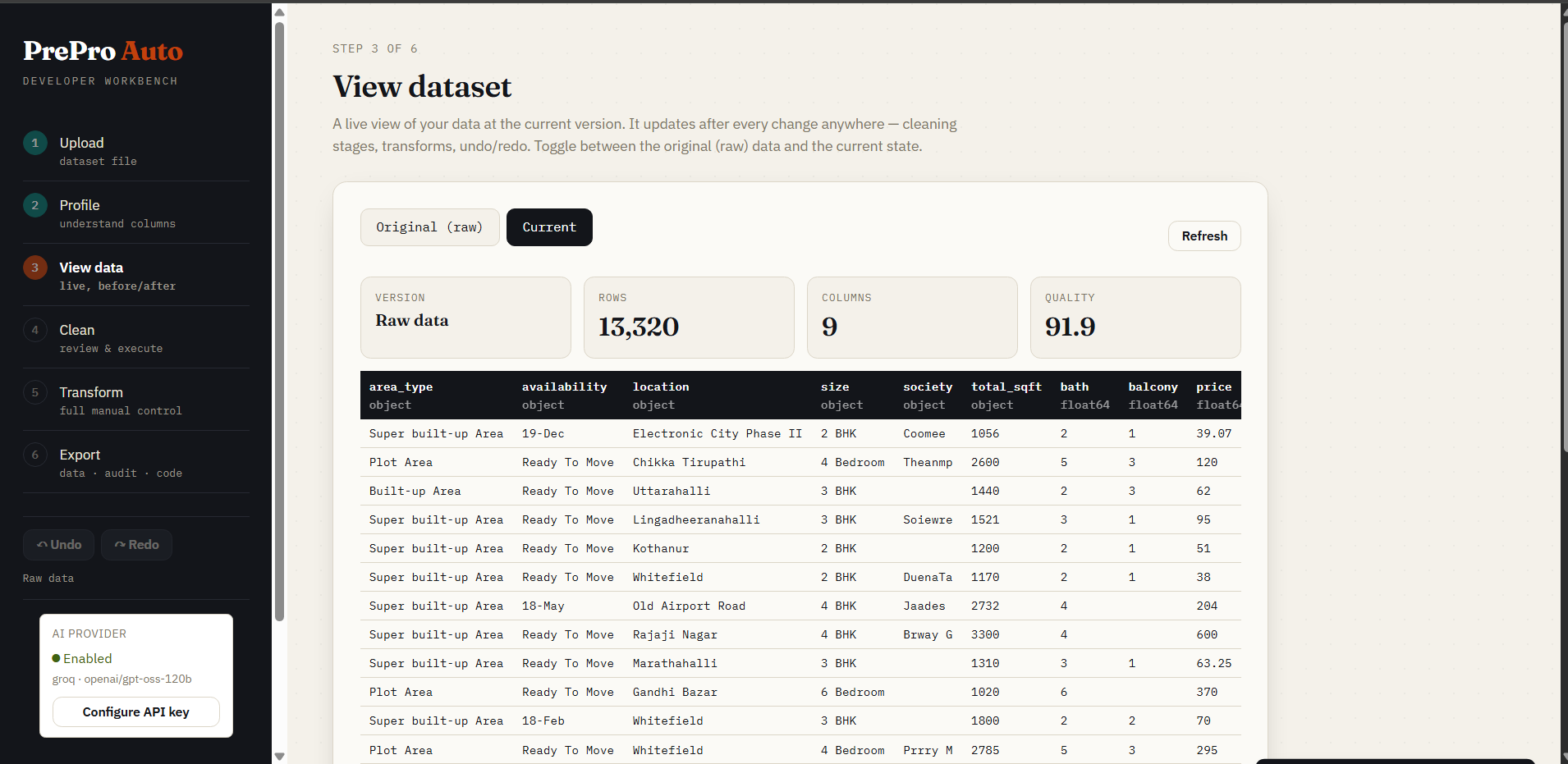
Step 3 - View data
Switch between Original and Current. Current follows the active version, including executed cleaning, approved transforms, notebook updates, undo and redo. Notebook edits refresh connected visible tabs through revision polling, normally within a few seconds.
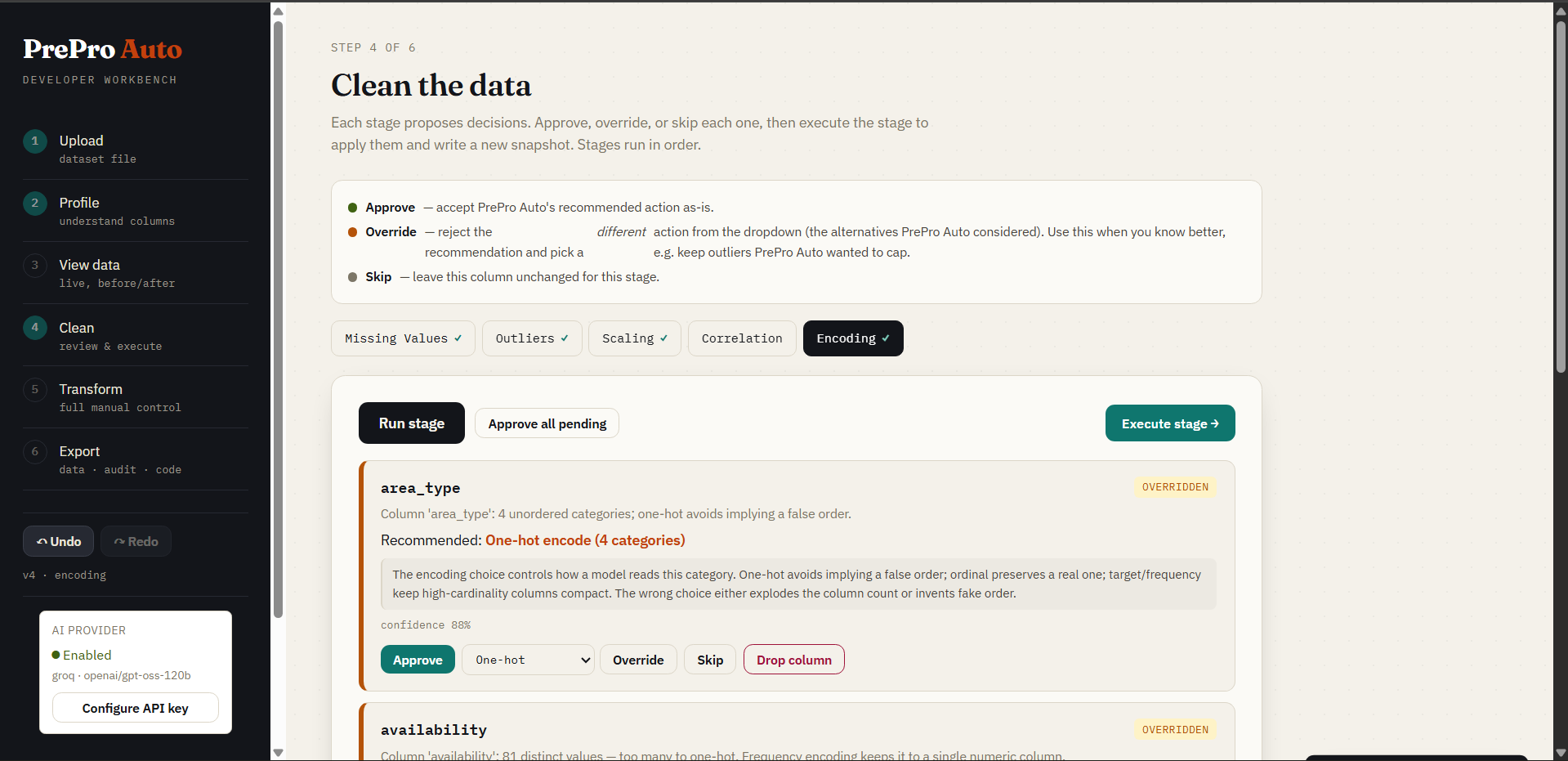
Step 4 - Clean and inspect the evidence
Tabular stages cover Missing Values, Outliers, Scaling, Correlation and Encoding. Opening a stage analyses the current data and generates decision cards with a recommendation, alternatives, confidence and reasons. Approve, override, skip or drop a column, then execute the stage to commit its changes. Approved decisions alone do not change session.current().
Click Show actual rows to expand up to five real rows captured from the version analysed. Missing-value and outlier findings show matching rows. Findings about whole-column structure show labelled context plus aggregate statistics. Each row includes its 1-based position in that dataset version and its index label. Positions exclude the header and are not guaranteed original CSV/Excel line numbers after transformations. Fewer matches produce fewer rows; older cards without saved evidence ask you to rerun analysis.
Quick clean applies recommendations across the cleaning stages. In a notebook, session.quickclean(apply_all=True, verbose=False) cleans that same session. Default apply_all=False applies recommendations meeting the confidence threshold and leaves the rest for review. Applying every recommendation still requires checking its meaning for your dataset.
Step 5a - Preset operations
Use the 18 presets to rename/drop columns, cast, fill, filter rows, merge columns, perform arithmetic, map values, manipulate strings, extract numbers, replace by regex, aggregate by group, sort or remove duplicates. A batch commits as one undoable version.
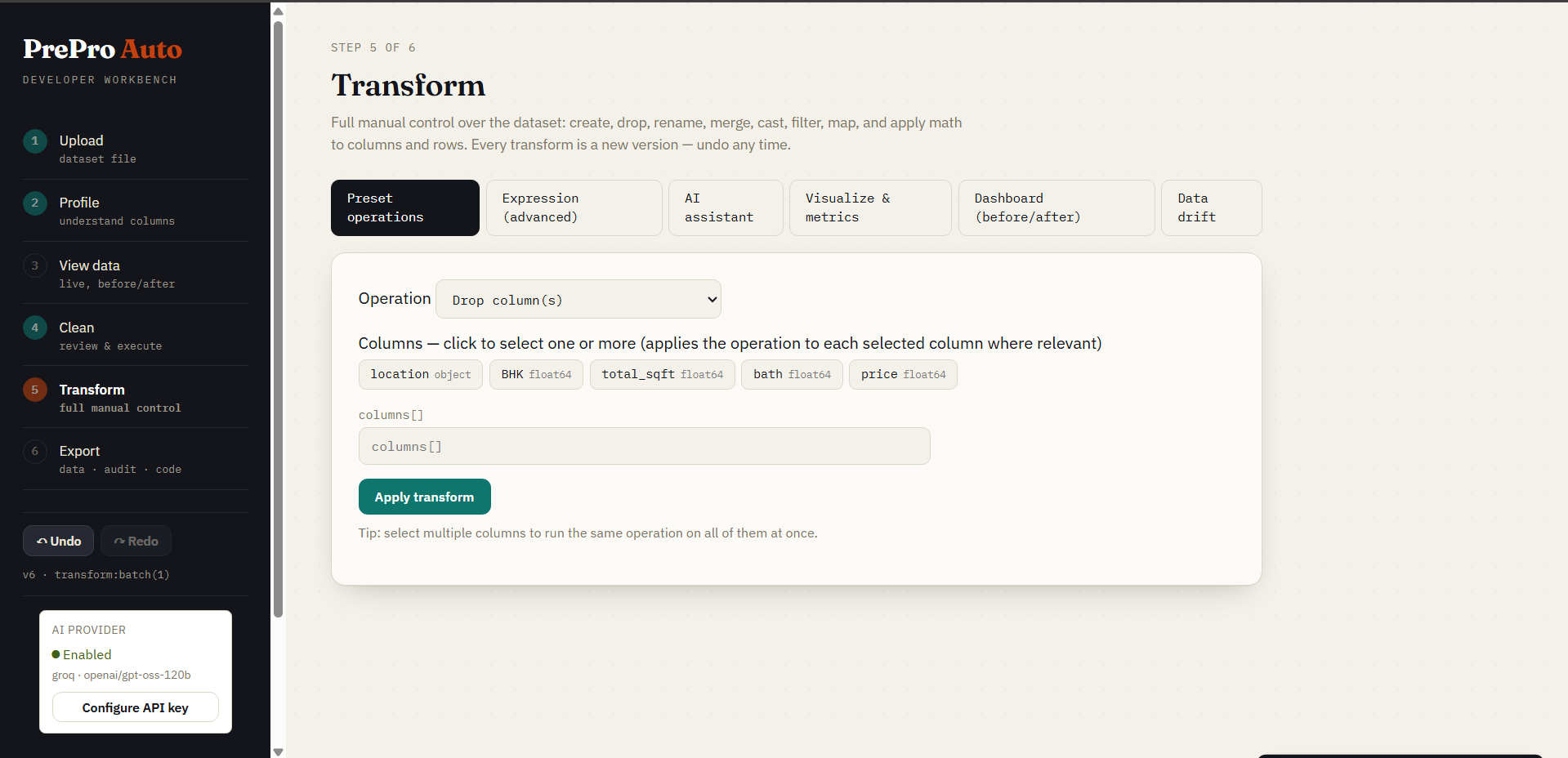
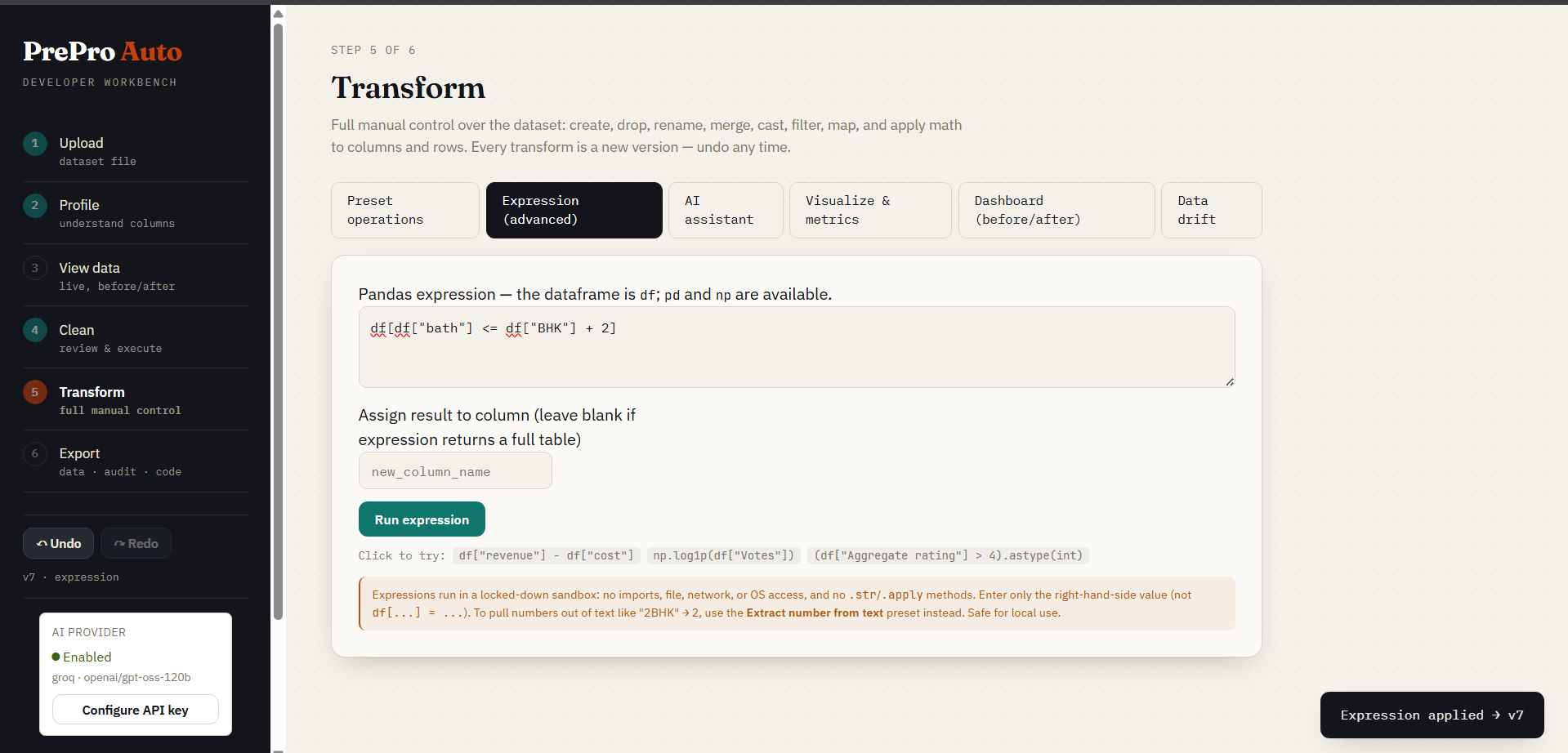
Step 5b - Expression editor
The dataframe is df; pd and np are available. Enter one expression. Leave the target blank for a full-table result, or provide a target column for a Series result.
For numeric bath and size, removing rows where bath > size + 1 means:
df[df['bath'] <= df['size'] + 1]
Evaluate - answer only inspects a result without changing data. Preview change computes a dry run, including shape changes and actual before/after samples. Approve the preview to commit one version, or decline it. An assigned notebook df remains a snapshot until you fetch again.
Expressions are checked using parsed syntax and evaluated with restricted operations. Imports, arbitrary callbacks, file I/O, lambdas, comprehensions, .eval() and .query() are rejected. Read SECURITY.md for the local single-user trust boundary.
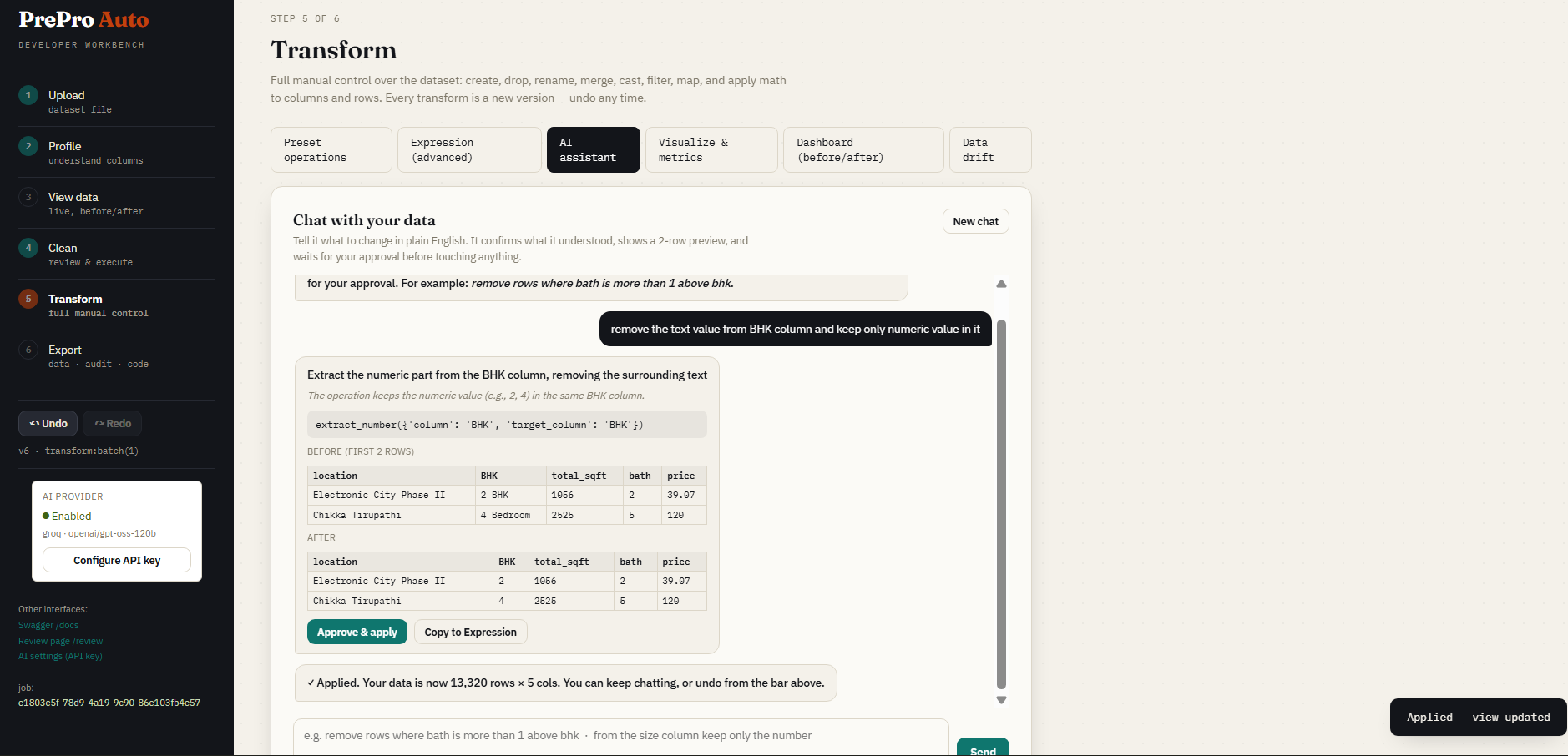
Step 5c - AI assistant
Describe the change, including exact column names and a boundary example. The assistant returns a proposal, runnable notebook statements, a compatible single expression and a preview computed locally from the actual dataset. Copy notebook code includes assignments; Copy expression contains only the expression. Send to Expression tab fills the editor for review. A failed preview cannot be approved or copied.
Supported numeric offset rules are checked against explicit examples. For example, size = 2 allowing bath up to 3 means bath <= size + 1. Numeric columns do not need an extra cast for that comparison. Text such as "2 BHK" requires number extraction; unknown values can require a longer expression to preserve the proposed missing-value behaviour. Other requests still depend on model interpretation: inspect the confirmation and preview before approving.
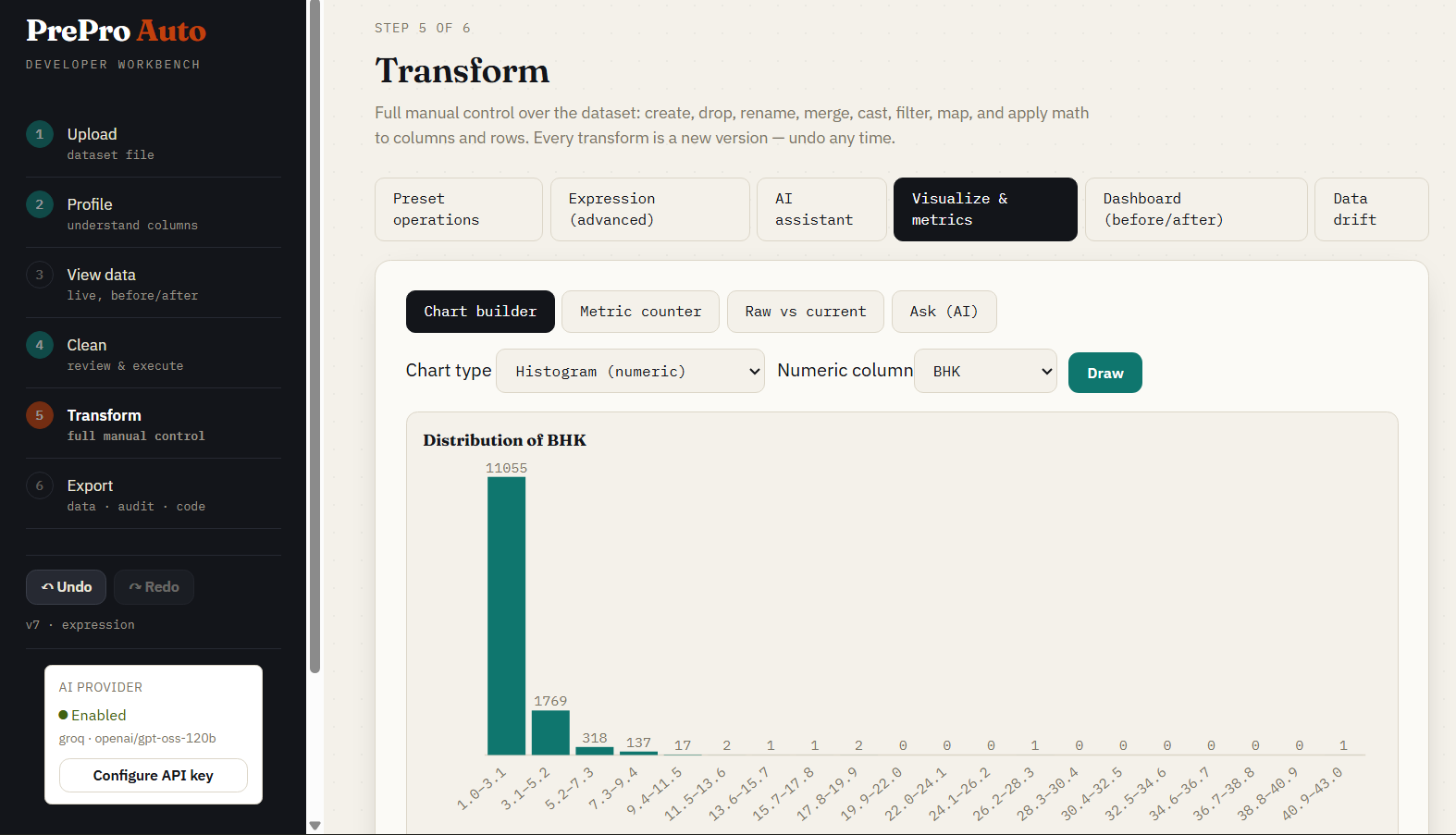
Step 5d - Visualization
Inspect distributions, grouped summaries, relationships, missing values and condition-based metrics against the current version. Counts and chart values are computed by the engine.
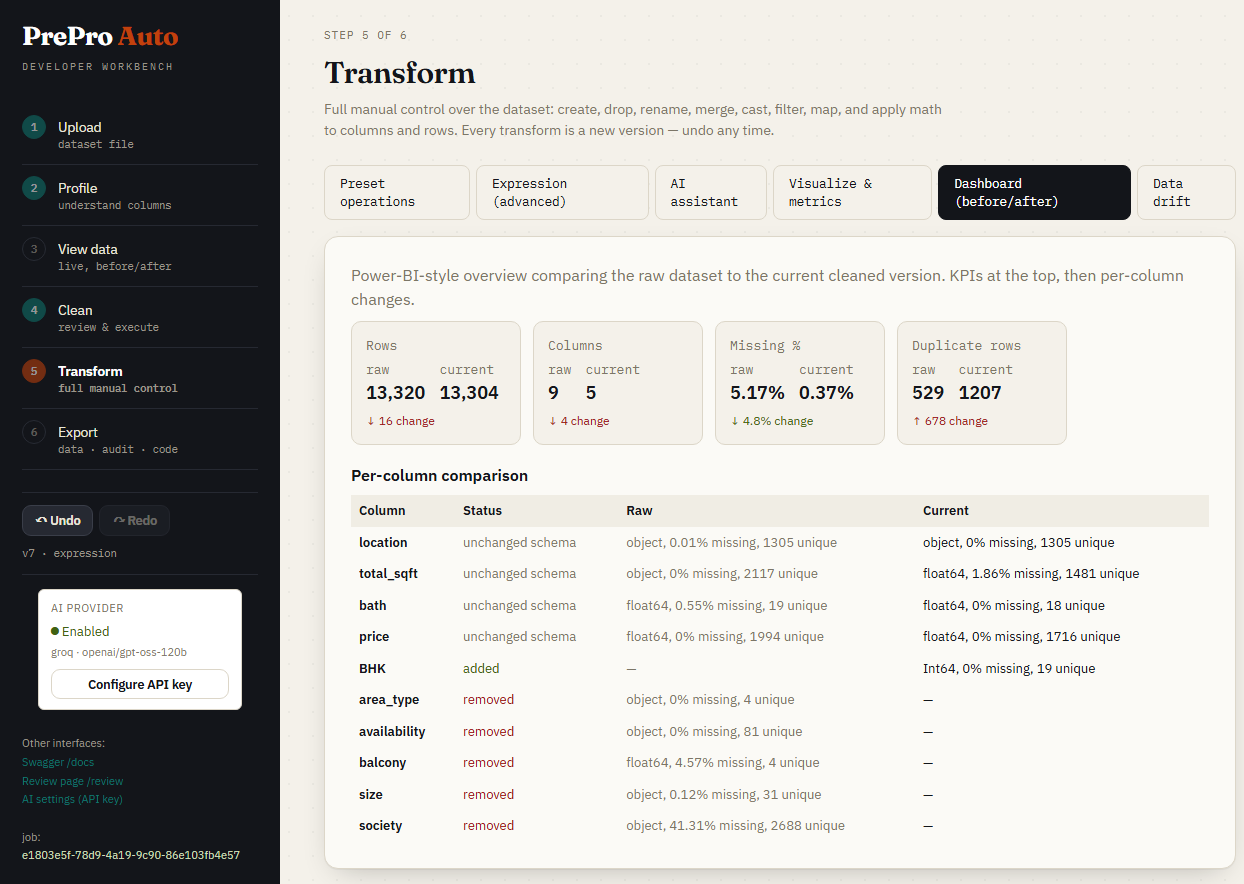
Step 5e - Before and after dashboard
Compare original/current shapes, missingness, quality deductions, column changes and distributions. Use a shared-axis comparison when checking how a transform changed a distribution.
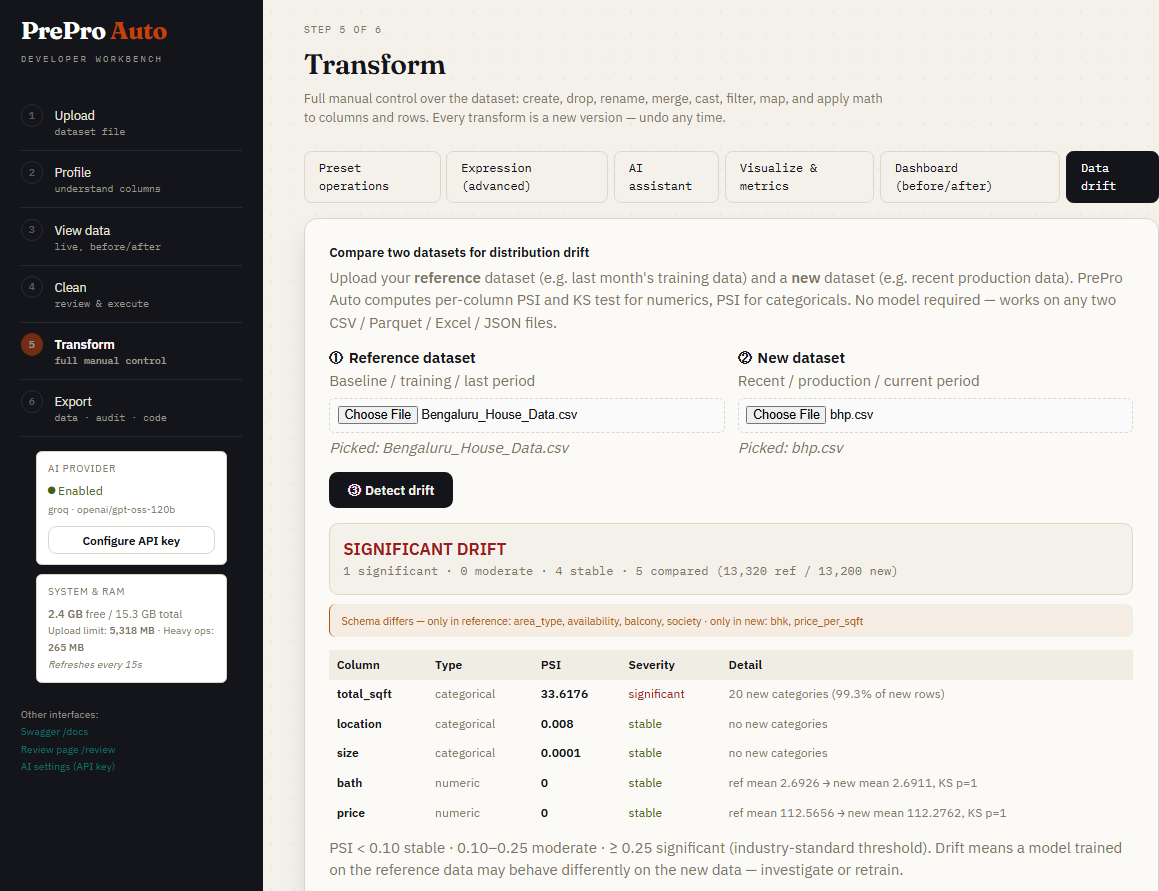
Step 5f - Data drift
Compare two uploaded datasets with per-column PSI and KS results and the implemented severity bands. Investigate the affected columns; a drift flag alone does not measure a deployed model's accuracy.
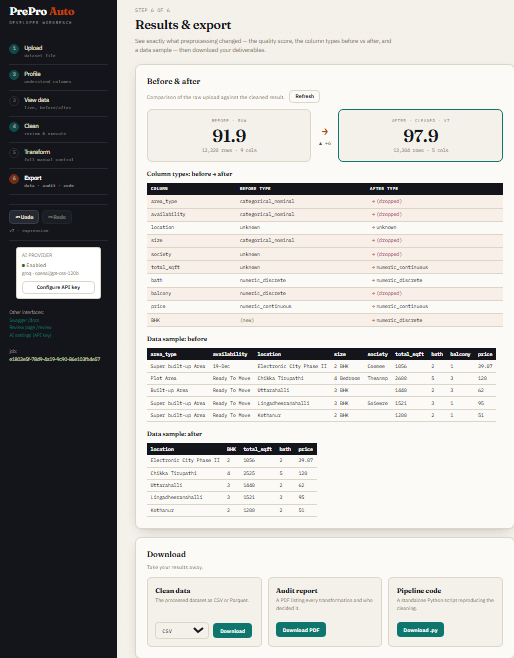
Step 6 - Results and export
Download the current dataset as CSV/Parquet, the audit PDF or the cleaning reproduction script. Supported cleaning operations reuse their fitted statistics and maps. Unsupported manual edits and network-dependent steps can produce export warnings/gaps. Review these before relying on reproduction. A cleaning export does not undo leakage from preprocessing already fitted before a model split.
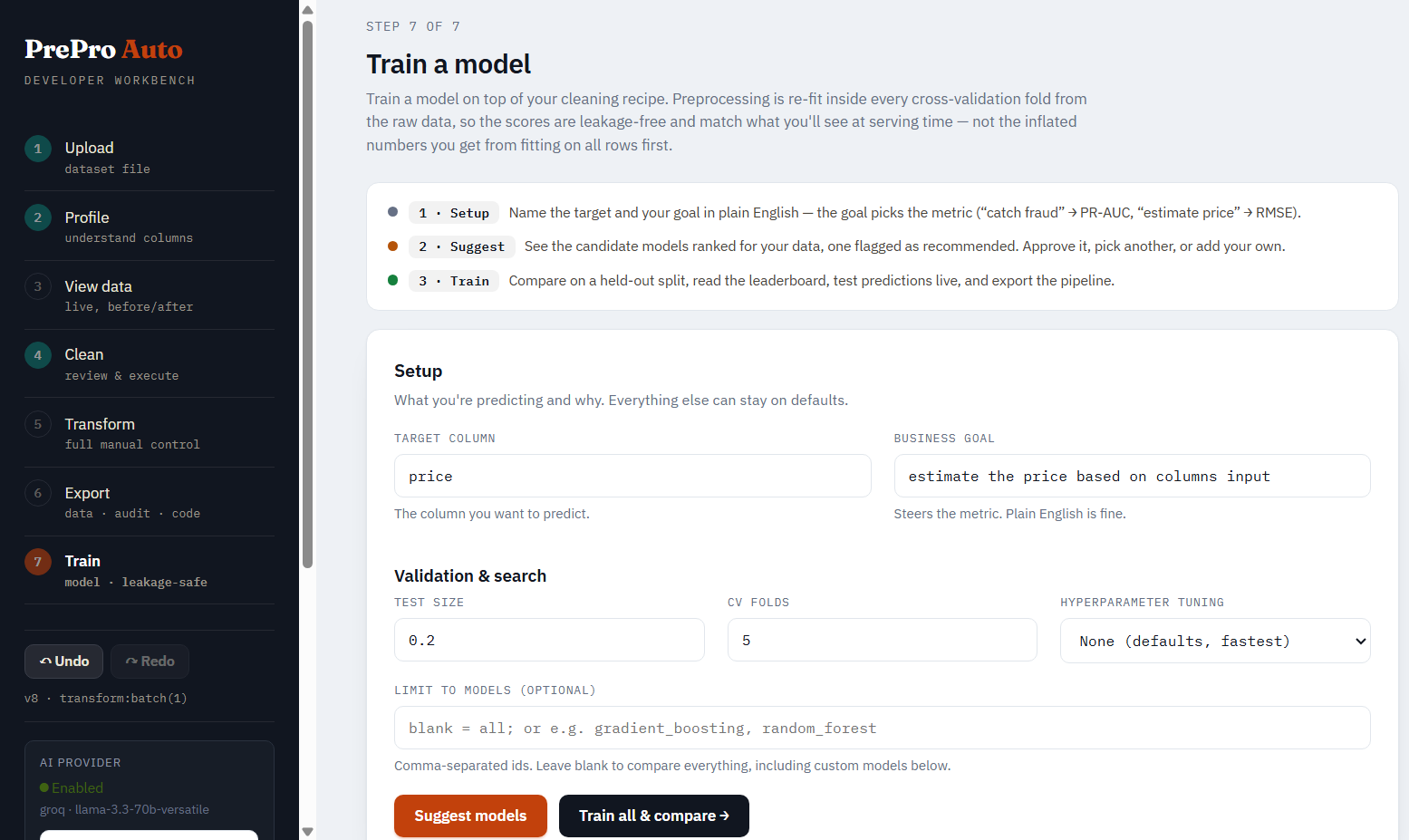
Step 7 - Train a model
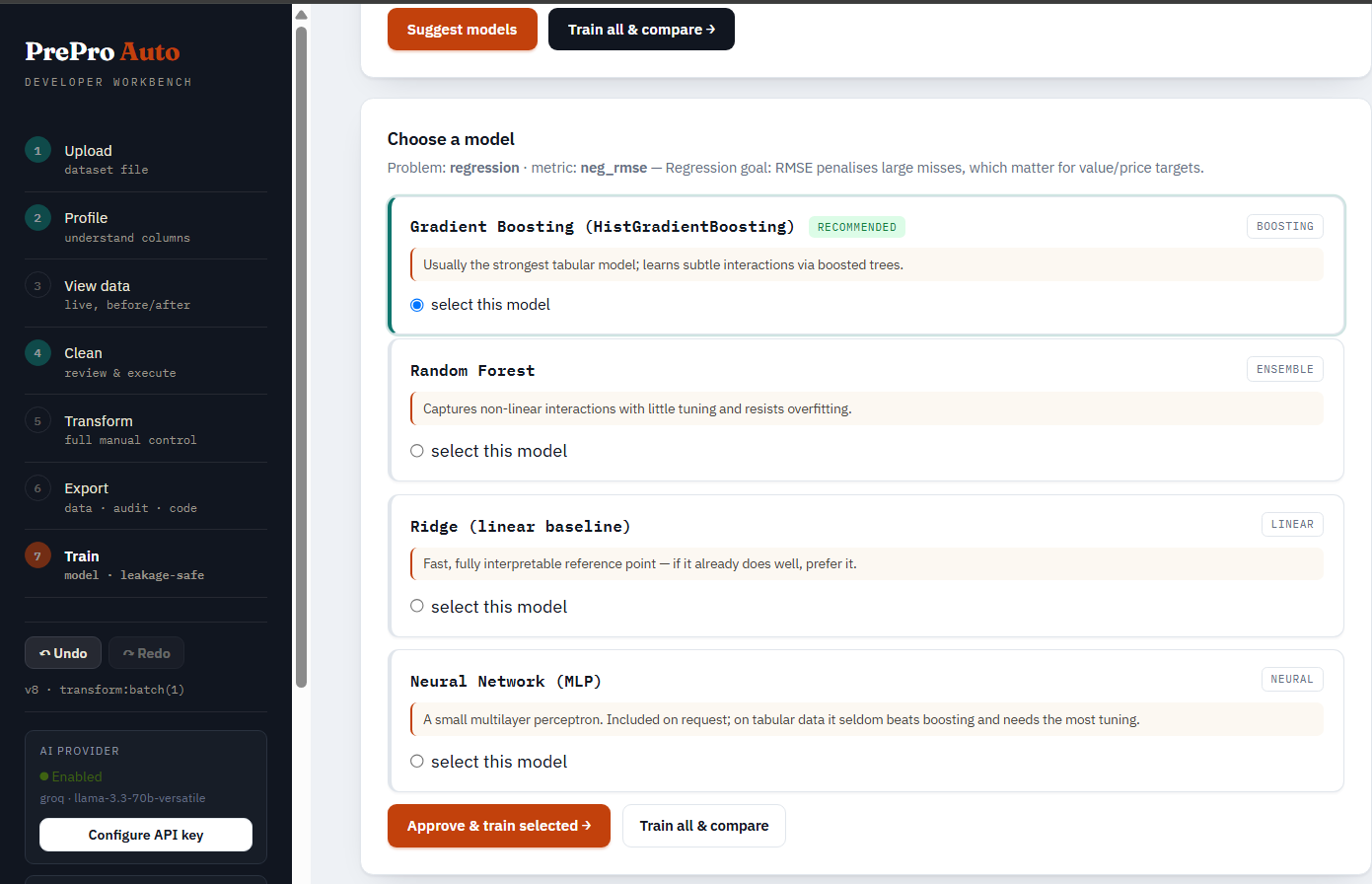
Train from a session or a prepared upload. Choose the target, training mode and random/time/group split, inspect candidate recommendations and tuning cost, then compare models on training-fold CV. Select one champion for the run's single held-out test evaluation. /train?job=... redirects to the workbench; open its Train section.
AI planning explains the split, model choices and setting tradeoffs. The server validates the plan and the engine supplies the actual tuning ranges. Search the model catalog or choose a supported custom estimator from the searchable dropdown; enter init parameters as JSON and validate them before comparison.
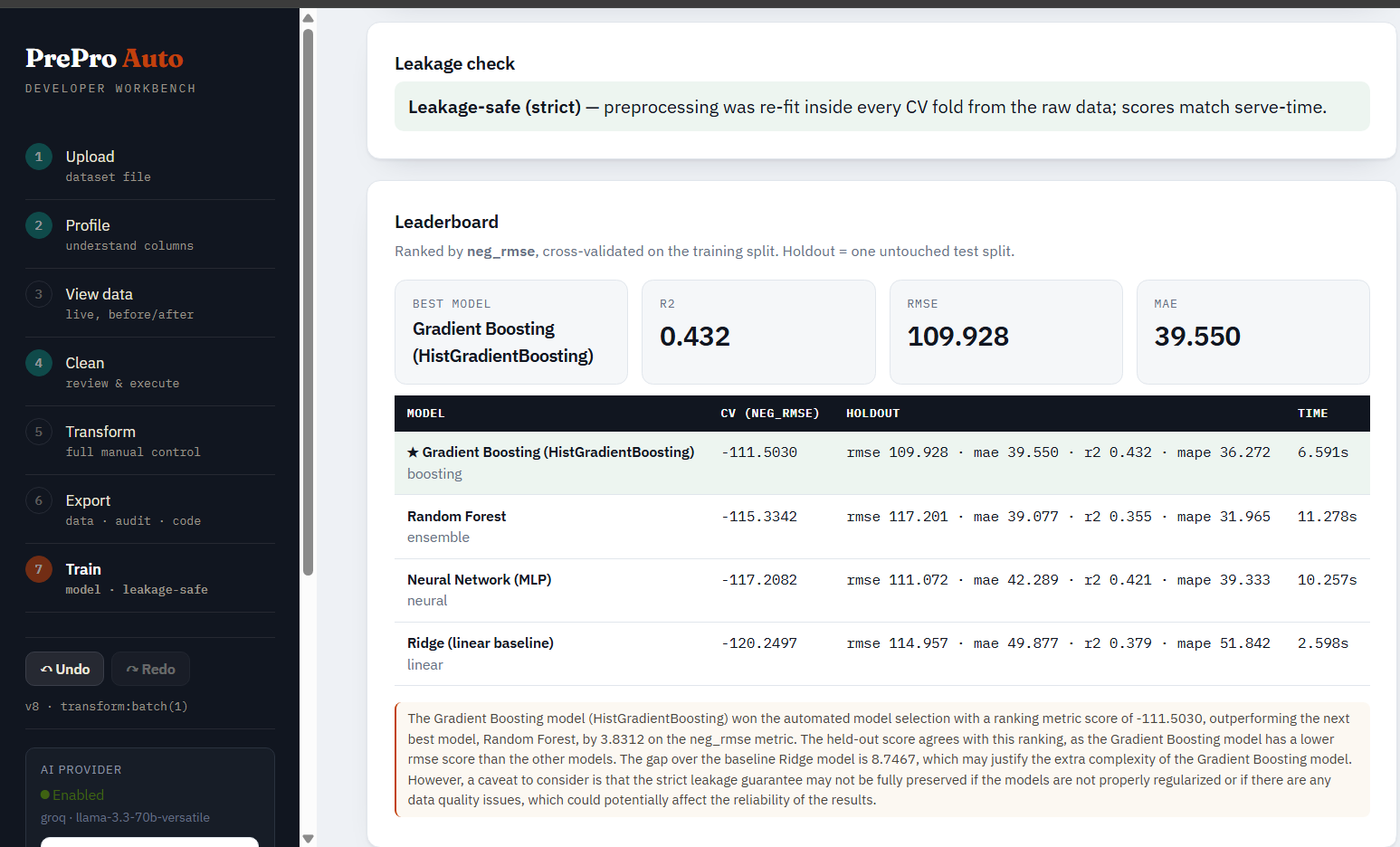
The CV leaderboard includes score variability, fit time, parameters and failures. Other candidates have no held-out test scores. Regression reports R-squared and errors in target units; ordinary row charts use points rather than connecting unordered observations.
Use the model's input contract and prediction form to send the raw features expected by its fitted pipeline.
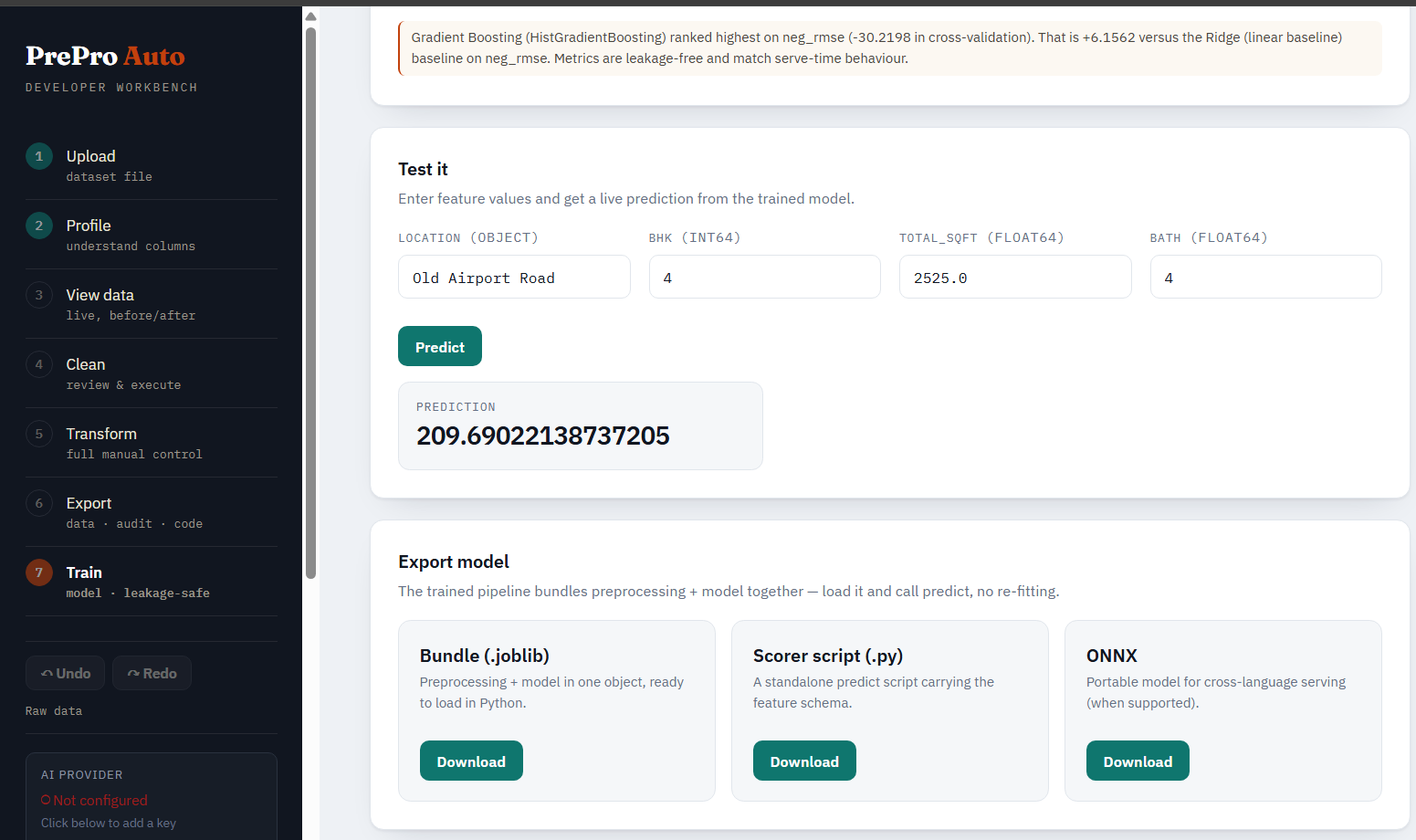
Export the fitted bundle, scorer plus companion bundle, supported ONNX conversion or training reproduction script. Finished session/UI runs persist; pending CV comparisons are held in memory.
Time-series jobs
dataset_type="time_series" enables time-index validation and time-aware cleaning/features. Optional farm/weather tools and forecast-store comparisons support forecasting workflows. TimesFM has its own forecast card: it uses pretrained TimesFM 2.5 weights, checks held-back windows against baselines, and exports predictions separately from the dataset. Install prepro-auto[timesfm] for that optional path; readiness checks do not download/load the model. See the time-series API below.
Ways to give PrePro Auto your data
Use these four workflows from the Quickstart:
| # | Method | What it does |
|---|---|---|
| 1 | Run prepro_auto in CMD |
Starts the UI server. Open http://127.0.0.1:8000/workbench and drag-drop a file. |
| 2 | session = prepro_auto.launch_file(path, open_browser=True) |
Reads the file from a notebook and opens its dataset session in the UI. |
| 3 | result = prepro_auto.quickclean(path, apply_all=True, verbose=False) |
Applies all recommendations and returns result.df. Use session.update(result.df) to show the result in an existing UI session. |
| 4 | df = session.current() and session.update(df) |
Pulls the latest UI-edited data into the notebook, then pushes notebook edits back to the UI. |
Supported file formats
The readers below are core dependencies of PrePro Auto and install automatically with pip install prepro-auto; no separate file-format extras are needed.
| Format | Extensions | Included reader packages | Notes |
|---|---|---|---|
| CSV | .csv, .tsv, .txt |
pandas>=2.0 |
Auto-detects encoding (utf-8 / utf-8-sig / latin-1 / cp1252) and delimiter (comma, tab, semicolon, pipe) |
| Excel | .xlsx, .xlsm, .xls |
pandas>=2.0, openpyxl>=3.1 (modern workbooks), xlrd>=2.0.1 (legacy .xls) |
Reads the first sheet by default |
| Parquet | .parquet, .pq |
pandas>=2.0, pyarrow>=14.0 |
Preserves column dtypes |
| JSON | .json, .jsonl, .ndjson |
pandas>=2.0, Python's built-in json |
JSON-records and JSON-lines both supported |
| Feather | .feather |
pandas>=2.0, pyarrow>=14.0 |
Apache Arrow's columnar format |
Excel files must contain a real workbook: an empty file or a CSV renamed to .xlsx cannot be opened as Excel. Restart the notebook kernel after installing or upgrading PrePro Auto to load the updated readers.
Not supported: PDF, DOCX, HTML, images. PrePro Auto is a tabular-data tool — these formats need a dedicated extraction step first (Camelot or pdfplumber for PDFs, BeautifulSoup for HTML).
Have a PDF with a table?
Extract it to a DataFrame first, then hand it to PrePro Auto:
import pdfplumber, pandas as pd, prepro_auto

with pdfplumber.open("report.pdf") as pdf:
    rows = pdf.pages[0].extract_table()        # pick the right page
df = pd.DataFrame(rows[1:], columns=rows[0])    # first row is the header
session = prepro_auto.launch(df)                # now clean it like any DataFrame
For PDFs with merged cells or complex layouts, try camelot-py (better for bordered tables) or tabula-py (requires Java). PrePro Auto deliberately leaves PDF extraction to specialised tools because generic PDF-to-table conversion succeeds only ~30–70% of the time depending on the document — bundling it would mean silent extraction errors hidden under PrePro Auto's name.
1. Input functions (notebook)
| Function | Returns | What it does |
|---|---|---|
prepro_auto.quickclean(r"path\to\data", target=None, threshold=0.90, apply_all=False, stages=None, dataset_type="tabular") |
CleanResult (.df, .report, .review, .job_id) |
Reads and cleans a file without a browser. Applies confident recommendations by default; apply_all=True applies all recommendations. |
prepro_auto.launch_file(r"path\to\data", domain="general", dataset_type="tabular", port=None, open_browser=False) |
Session |
Reads a supported file, starts the local workbench, and prints its session URL. Set open_browser=True to open it automatically. |
prepro_auto.launch(df, domain="general", dataset_type="tabular", port=None, open_browser=False) |
Session |
Opens a pandas DataFrame in the workbench and returns its session. |
Use the file's actual extension in r"path\to\data", such as .csv, .xlsx, or .parquet.
Notebook and UI synchronization
The link is the job ID, not the filename. Every launch_file() call, UI upload or path-based quickclean() creates an independent job. Reuse session to keep one dataset and history. Use the full session.url, including its port and ?job=....
To resume the dataset currently open in the UI, click Copy notebook connection in the sidebar and paste the code into your notebook. Equivalently:
import prepro_auto

# Replace this URL with the full address of your edited UI dataset.
session = prepro_auto.connect("http://127.0.0.1:8721/workbench?job=YOUR_JOB_ID")
df = session.current()
print(session.job_id, session.version, df.shape)
display(df.head())
connect() preserves the existing dataset and history. If a kernel restart stopped its local server, it starts a server and prints the preserved job's URL. Both interfaces must use the same database/storage configuration; the helper checks the server revision rather than silently attaching to a different store. CLI defaults to port 8000; notebook launch prefers 8721 and can choose another free port. Use the printed URL.
# Same job, no separate file upload or result push required:
result = prepro_auto.quickclean(session, apply_all=True, verbose=False)

# Pull again before editing after UI changes:
df = session.current()
df = df.drop(columns=["column_to_remove"])  # Replace with a current column name.
session.update(df)
current() returns a normal pandas snapshot. Later UI edits cannot change that Python variable; call current() again. A frame fetched through the session carries its source revision. update() rejects it if a UI commit has since replaced that revision or it belongs to another job. Pull fresh data and redo the edit. Independently created DataFrames can still be deliberately pushed as replacements.
No DEBUG workaround is required. Logging defaults to debug-off and inherited DEBUG=release is accepted. After upgrading, restart the kernel/server once to load the updated code. If data appears unchanged, compare job IDs, ensure the change was actually applied/executed, and check View data -> Current, rather than the raw Profile or Original view.
2. Preprocessing functions
The browser, notebook bridge and REST routes use the same services. Routes below are relative to /api/v1; /docs provides request schemas and live examples.
Cleaning stages and evidence
| Endpoint | Behaviour |
|---|---|
POST /datasets/upload |
Register a supported file and return a new job ID. |
GET /datasets/{job_id} |
Read job metadata. |
GET /datasets/{job_id}/preview |
Preview the raw upload. |
POST /datasets/{job_id}/profile |
Profile the raw upload. |
POST /datasets/{job_id}/stages/missing_values |
Recommend missing-value handling. |
POST /datasets/{job_id}/stages/outliers |
Recommend outlier handling using tabular or time-aware detectors. |
POST /datasets/{job_id}/stages/scaling |
Recommend numeric scaling/transforms. |
POST /datasets/{job_id}/stages/correlation |
Identify correlated features and possible leakage. |
POST /datasets/{job_id}/stages/encoding |
Recommend categorical encodings. |
GET /datasets/{job_id}/decisions?stage=missing_values |
Inspect cards, recommendations, alternatives and statuses. |
GET /decisions/{decision_id}/evidence |
Read saved source rows, row positions, index labels, analysis version and statistics. Notebook: session.evidence(decision_id). |
POST /decisions/{decision_id}/approve |
Approve the recommendation. |
POST /decisions/{decision_id}/override |
Choose an alternative action and reason. |
POST /decisions/{decision_id}/skip |
Skip the recommendation. |
POST /decisions/{decision_id}/drop-column |
Mark the column for removal. |
POST /datasets/{job_id}/stages/{stage_name}/execute |
Apply settled decisions and commit a version. |
Analysis and approval are separate from execution. Quickclean automates the same sequence according to threshold/apply_all. Review result.review and result.report when no changes were applied. Confidence is a recommendation score, not a guarantee of better model performance.
Evidence is stored when analysis runs. After subsequent edits, a card's sample still describes its source version; the payload identifies both source and current versions. Global findings show context rather than asserting that every displayed row is invalid.
Manual and AI transforms
| Endpoint | Behaviour |
|---|---|
GET /datasets/{job_id}/transform/operations |
The 18 preset contracts and accepted parameters. |
POST /datasets/{job_id}/transform/preset |
Apply one preset. |
POST /datasets/{job_id}/transform/batch |
Apply an ordered sequence of presets as one version. |
POST /datasets/{job_id}/transform/expression/evaluate |
Return a scalar, mask summary, Series summary or table preview without applying it. |
POST /datasets/{job_id}/transform/expression/preview |
Dry-run an expression and show its effects. |
POST /datasets/{job_id}/transform/expression |
Commit the expression after approval in the UI. |
POST /datasets/{job_id}/transform/ai-propose |
Propose a validated transform plan without applying it. |
POST /datasets/{job_id}/transform/ai-advise |
Request preparation advice. |
POST /datasets/{job_id}/transform/assistant |
Route a request to transform, count, chart, advice or answer handling. |
POST /datasets/{job_id}/transform/chat |
Conversational proposal with real preview and compatible code exports. |
GET /datasets/{job_id}/transformations |
Read applied operations and their audit records. |
Preset cast_type accepts to_type (int, float, string, category, datetime, bool). filter_expr accepts condition and mode (keep/drop). extract_number handles formatted values such as "2 BHK". AI compatibility aliases are normalized, but direct API clients should use the documented names.
{
  "steps": [
    {"operation": "filter_expr", "params": {"condition": "df['bath'] > df['size'] + 1", "mode": "drop"}}
  ]
}
This drops matching rows. Its simple inverse expression is df[df['bath'] <= df['size'] + 1] when values are known numeric values. Missing-value semantics can require a longer inverse; inspect the preview rather than shortening generated code by hand.
Versioning, charts and drift
| Endpoint | Behaviour |
|---|---|
GET /datasets/{job_id}/view |
Page through the active dataframe with shape, columns and revision. |
GET /datasets/{job_id}/state |
Lightweight version/revision token used by live synchronization. |
GET /datasets/{job_id}/history |
Snapshot history and the active pointer. |
GET /datasets/{job_id}/snapshots |
List committed snapshots. |
POST /datasets/{job_id}/undo / redo |
Move the active pointer; subsequent edits replace forward history. |
POST /datasets/{job_id}/viz/chart |
Build charts using a validated chart spec. |
POST /datasets/{job_id}/viz/metric |
Evaluate a boolean condition and return its count/share. |
POST /datasets/{job_id}/viz/compare |
Compare raw/current distributions with shared categories or bin edges. |
GET /datasets/{job_id}/viz/dashboard |
Before/after dataset and column summaries. |
POST /datasets/{job_id}/viz/ask |
Optional AI interpretation of a metric/chart question. |
POST /drift/compare |
Compare two uploaded datasets using PSI/KS. |
Time-series and forecasting tools
Time-series jobs maintain time-axis metadata through the time_index stage and additionally support ts_physics, ts_features, farm layout, weather inputs and a forecast store. Rolling features use shifted history. Check the temporal split and whether each input is available at prediction time.
| Endpoint or notebook method | Behaviour |
|---|---|
POST /datasets/{job_id}/stages/time_index?time_column=timestamp |
Inspect parsing, order, duplicates, frequency and gaps; the time-column override is optional. |
POST /datasets/{job_id}/stages/ts_physics |
Propose wind/solar physics features using the supplied site facts and column mapping. |
POST /datasets/{job_id}/stages/ts_features |
Propose supported lag, rolling and calendar features. |
session.farm(assets) / GET /datasets/{job_id}/farm |
Store/read the per-asset layout. |
POST /datasets/{job_id}/weather/fetch |
Fetch and merge configured weather inputs as an audited version. |
POST /datasets/{job_id}/foundation/timesfm/check |
Check zero-shot forecasting readiness without loading weights. |
POST /datasets/{job_id}/foundation/timesfm/runs |
Start an asynchronous TimesFM run; read its run endpoint for completion. |
GET /datasets/{job_id}/foundation/timesfm/runs/{run_id} |
Read the forecast, held-back-window metrics, baseline skill and measured interval coverage. |
GET .../foundation/timesfm/runs/{run_id}/export?fmt=csv |
Export explicitly marked predicted values; fmt=html provides the chart. |
POST .../foundation/timesfm/runs/{run_id}/issue |
Issue predictions into the forecast store. |
GET /datasets/{job_id}/forecasts/series / series/export.html |
Compare issued runs with actuals and baselines on aligned rows. |
Optional packages: prepro-auto[timeseries] for additional statistical methods, prepro-auto[timesfm] for TimesFM 2.5, and prepro-auto[cfsv2] for GRIB weather extraction. Weather requests and uncached model weights need network access. Fetched weather and arbitrary notebook edits can leave explicit gaps in cleaning reproduction scripts.
3. Output functions
The artifacts you take away from a session. Notebook methods return Python objects; REST endpoints return downloadable files.
From the notebook (Python objects)
| Method | Returns | Where to use it |
|---|---|---|
prepro_auto.quickclean(data) |
CleanResult — .df (cleaned DataFrame), .report (per-stage summary), .job_id |
Headless one-call clean. result.df drops straight into model.fit(X, y); print(result) shows what was applied vs. left for review. |
session.current() |
pandas DataFrame | The current (active-version) DataFrame as it stands in the UI right now. Drop straight into model.fit(X, y). Warns if the UI holds approved decisions whose stage has not been executed — those are not in the data yet. |
session.update(df) |
the same Session |
Pushes a notebook-edited DataFrame as a new undoable version; an open workbench tab refreshes itself within ~2s. Decision cards computed against the replaced data are cleared so the UI re-analyses (reanalyze=False keeps them). |
session.evidence(decision_id) |
dict | Up to five real rows captured when a cleaning card was analysed, with source version, row positions, index labels and selection statistics. |
session.df |
pandas DataFrame | The live dataset, re-read on every access — session.df.head() is never stale. session.current() by contrast returns a snapshot you can hold onto. |
session.state() / session.status() |
dict / dict + printout | Live version, shape, undo/redo availability, decisions still open, and anything approved in the UI but not yet executed. |
session.version |
int | The active version number (0 = the raw data you launched with). |
session.url |
str | The workbench URL for this session — useful for re-opening after closing the tab. |
session.job_id |
str | The internal job ID — use it for raw REST API calls. |
session.port |
int | The local port the server is running on. |
From the REST API or web UI (downloadable files)
| Endpoint | File | Where to use it |
|---|---|---|
GET /datasets/{job_id}/export/data?format=csv |
Cleaned CSV | Share with teammates, load into BI tools (Tableau, Power BI, Looker), commit to a versioned data repo. |
GET /datasets/{job_id}/export/data?format=parquet |
Cleaned Parquet | Faster and smaller than CSV for large datasets; preserves dtypes exactly. |
GET /datasets/{job_id}/export/audit |
Audit PDF | Compliance trail listing every transformation with parameters, before/after stats, who approved. Attach to a model-card or hand to a data-governance reviewer. |
GET /datasets/{job_id}/export/pipeline |
Runnable .py script |
Transform-only reproduction of the exact cleaning (no re-fitting; uses the statistics fitted at clean time), with no PrePro Auto dependency. Auto-detects CSV/Parquet/Excel/JSON input. Drop into Airflow / Prefect / GitHub Actions. Run with python pipeline.py raw.csv ready.csv. |
POST /drift/compare (returns JSON) |
Drift report | Per-column PSI / KS verdicts with severity bands. Plug into a monitoring dashboard, alert on overall_verdict == "significant_drift". |
Two typical workflows end-to-end
# Workflow 1 — notebook to model, no file I/O:
session = prepro_auto.launch_file(r"C:\data\sales.csv")
# ...clean visually in the browser, then:
X = session.current().drop(columns=["target"])
y = session.current()["target"]
model.fit(X, y)

# Workflow 2 — clean once, productionize the pipeline:
# 1) Download pipeline.py from the workbench's Export step
# 2) Commit it to your model repo
# 3) In production:
#    subprocess.run(["python", "pipeline.py", "incoming.csv", "ready.csv"])
4. Train functions (optional ML layer)
The workflow is split preview -> candidate selection -> tuning plan -> CV comparison -> champion evaluation. Candidates compete on training-fold scores. Only the selected champion receives the final held-out test evaluation.
Manual training
Continue with the session opened in Quickstart. Use the exact target name in your current dataset; this house-price example uses price.
models = ["linear_regression", "lasso", "decision_tree"]

session.plan_split("price", mode="trusted", test_size=0.2, cv_folds=5, seed=42)
session.candidates("price", mode="trusted")
session.plan_tuning("price", models=models, mode="trusted", tuning="auto", budget=25)

comparison = session.compare(
    "price",
    models=models,
    mode="trusted",
    goal="Predict house prices for homes in known Bengaluru locations",
    test_size=0.2,
    cv_folds=5,
    seed=42,
    tuning="auto",
    tuning_iter=25,
)
display(comparison.leaderboard)  # CV scores; the test partition is still unread

result = comparison.select()   # Evaluate the CV winner once on the test set
# result = comparison.select("lasso")  # Alternatively select a candidate explicitly
print(result)
Use random splits for independent observations, time splits for forward prediction, and group splits when the same entity must not appear on both sides. Holding out entire neighborhoods evaluates unseen-location predictions; repeated neighborhood categories alone do not require a group split. Set time_column or group_column consistently across preview, candidates, tuning and comparison. The UI uses Phase 1's target, split key, test fraction, folds, seed and training mode for the final training request.
AI planning
plan = session.ai_plan(
    "Predict price for homes in known Bengaluru locations. Explain the split, "
    "models and tuning, including when to increase or decrease settings.",
    target="price",
)
print(plan)
if plan.ok:
    comparison = plan.compare()
    display(comparison.leaderboard)
    result = comparison.select()
In the UI, enter the project goal and choose a Target column, then click Plan the training with AI. The provider receives dataset shape, schema, computed facts and up to five aligned sample rows, subject to LLM_SEND_VALUES and LLM_MASK_PII. The plan explains individual models and when to adjust split, CV and search settings. The engine validates the plan and supplies the actual hyperparameter ranges and search fit counts. Preparation advice is shown for review in Transform; approving a training plan does not apply those suggestions. The AI does not compute performance scores.
Training modes and preparation
| Mode | Data used | What to check |
|---|---|---|
trusted |
Current prepared dataset, including notebook edits and engineered columns | Finishing steps re-fit in each CV fold. Earlier all-row preprocessing or target-based filtering may already have introduced leakage. |
strict |
Raw upload and the supported cleaning recipe, replayed inside each fold | Targets and feature columns must exist in the raw upload. Arbitrary notebook edits and unsupported Transform operations are not replayed; inspect the available features and recipe. |
Notebook training defaults to mode="trusted"; the UI initially selects Strict. Bare DataFrames and paths use trusted input because they have no recipe to replay. Missing group keys form one separate group; the preview reports this, and a large missing group can change the actual held-out row share.
Trusted training parses predominantly numeric text and imputes invalid values from each training fold. Review units and ranges first: "1000-1200" is not automatically converted to a midpoint. Repeated categories use bounded one-hot encoding (up to 256 outputs per column, subject to an expansion budget). Near-unique text or columns exceeding the budget use frequency encoding. Check identifiers, leakage and whether each feature will be available at prediction time.
Models and tuning
display(prepro_auto.list_models("regression")) # IDs, categories and install requirements
Candidate recommendation scores measure suitability from dataset traits; they are not fitted CV performance. Phase 4 performs the actual CV comparison.
Phase 2 provides Search models and a family filter. Search examines the full scored catalog, including models outside the shortlist, and preserves selected candidates.
The Custom model panel has a searchable estimator dropdown with task filtering. It discovers supervised estimators in the installed scikit-learn version and lists supported XGBoost, LightGBM and CatBoost wrappers with install requirements. Choose a model, optionally enter init parameters as a JSON object, and add it. The server checks its constructor and task without fitting data. Models requiring estimator objects must be configured in Python. An advanced import-path override remains available for the allowed libraries. The dropdown covers supported supervised estimators, not every research model or framework.
Added custom configurations are compared alongside selected catalog models. They use the supplied parameters and have no automatic tuning grid; the tuning preview states this explicitly. Unsupported parameters and incompatible tasks are reported.
| Category | Classification IDs | Regression IDs |
|---|---|---|
| Recommended defaults | logistic, random_forest, gradient_boosting, neural_net |
linear (Ridge), random_forest, gradient_boosting, neural_net |
| Linear | ridge_classifier, sgd_classifier |
linear_regression, lasso, elasticnet |
| Tree and ensemble | decision_tree, extra_trees, hist_gradient_boosting, adaboost, bagging |
same |
| Neighbors and SVM | knn, svc, linear_svc |
knn, svr, linear_svr |
| Naive Bayes | gaussian_nb, bernoulli_nb |
- |
| Optional boosting | xgboost, lightgbm, catboost |
same |
tuning accepts "none", "auto", "random", "grid", "halving" or "optuna". Auto uses a grid when the space fits the budget and randomized search otherwise. tuning_iter is the settings budget for budgeted searches; an explicit grid is exhaustive and can exceed that budget. Inspect the Phase 3 fit estimate before training. Custom configurations use fixed supplied parameters.
pip install "prepro-auto[ml]"  # LightGBM, XGBoost, CatBoost and ONNX tooling
pip install optuna            # Optional Optuna search
Evaluation, prediction and export
For regression, R-squared (R2) measures performance relative to predicting the mean and can be negative. MAE measures typical absolute error; RMSE emphasizes larger errors. Both error metrics use the target's units. CV scores select the model; the champion's held-out scores estimate final performance. Classification reports accuracy and task-appropriate metrics. Scores from different cleaned populations or splits are not directly comparable. Ordinary regression row charts show points because random row order has no chronological meaning; inspect actual-versus-predicted and residual plots to understand errors.
print(result.best.holdout)
print(result.leakage)
print(result.contract())

# Adjust feature names and values to the schema of your trained model.
predictions = result.predict({"location": "Whitefield", "size": 2, "total_sqft": 1200, "bath": 2})
result.export("house_model.joblib")
result.export("house_scorer.py", fmt="pipeline")  # Scorer plus companion .joblib bundle
The scorer performs inference using its companion fitted bundle. The UI's training reproduction script (train_script) reruns the saved champion configuration, split and preprocessing, then checks its metrics against the recorded run. The reproduction script records the preprocessing used by that run. It checks the recorded metrics when rerun; changing input data, dependencies or environment can change the result. With full-data refitting enabled, the shipped estimator is refit after evaluation, so its in-sample predictions are not another held-out score. ONNX conversion requires support for the complete fitted pipeline; installing the tooling does not guarantee every custom encoder or model is convertible.
Finished UI/session runs are persisted and can be reloaded by run ID. A CV comparison awaiting champion selection is held in memory; a server restart requires running that comparison again. Notebook-only prepro_auto.train() returns an artifact wrapper; export it to retain the model.
Developing a production training workflow
The current workflow separates CV selection from the final test evaluation, supports time/group splits, exposes input contracts and preserves fitted artifacts. It remains a local training workbench. Before extending it into a team production service, prioritize dataset-version pinning across planning and execution, background training jobs with progress and cancellation, saved-run comparison with model/version registration, and monitoring by business segment after deployment. These are development priorities, not features provided by the current UI.
For each experiment, retain the dataset/preparation version, split seed and keys, goal and primary metric, CV variability, chosen hyperparameters, target units, fitted artifact and deployment input schema. Fit learned preparation on training folds; avoid tuning or selecting features using final test results. See scikit-learn's guidance on leakage and pipelines.
Notebook function reference
| Function | Returns | Use |
|---|---|---|
prepro_auto.list_models(task="classification") |
DataFrame | Discover catalog IDs and dependencies. |
session.plan_split(target, mode="trusted", test_size=0.2, cv_folds=5, seed=42, time_column=None, group_column=None, goal=None) |
SplitPlan |
Preview the partition and fold sizes without fitting. |
session.candidates(target, mode="trusted", goal=None, time_column=None, group_column=None, test_size=0.2, cv_folds=5, seed=42) |
Candidates |
Score catalog models on training-partition traits; .df gives the table. |
session.plan_tuning(target, models=None, tuning="auto", budget=25, mode="trusted", goal=None, time_column=None, group_column=None, test_size=0.2, cv_folds=5, seed=42) |
TuningPlan |
Show search ranges and fit costs. |
session.compare(target, models=None, mode="trusted", goal=None, test_size=0.2, cv_folds=5, seed=42, tuning="none", tuning_iter=25, ...) |
Comparison |
Fit candidates and compare CV scores. .select(model_id=None) evaluates the champion once. |
session.ai_plan(instruction, target=None) |
AIPlan |
Validate an AI proposal; .compare() runs the phased comparison and .train() auto-selects its CV winner. |
session.train(target, business_goal=None, models=None, test_size=0.2, cv=5, tuning="none", tuning_iter=25, mode="trusted", ...) |
TrainResult |
One-shot CV comparison, winner selection and final test evaluation. |
prepro_auto.train(data, target, **kwargs) |
TrainResult |
Accept a Session, CleanResult, DataFrame or supported path. Job-backed inputs can use strict or trusted mode. |
One-shot training also accepts features, problem, metric, time_column, group_column, calibrate, tune_threshold, importance, explain and refit_on_full. Phased comparison uses goal/cv_folds/seed; one-shot training uses business_goal/cv. TrainResult exposes .report, .best, .leaderboard, .leakage, .contract(), .predict() and .export(). Non-champions have CV results and no held-out metrics.
Training API
Routes below are under /api/v1.
| Endpoint | What it does |
|---|---|
GET /ml/catalog |
Catalog candidates, tuning strategies and install hints. |
GET /ml/estimators |
Search metadata for supported supervised custom estimators. |
POST /ml/estimators/validate |
Check an estimator path, init params and optional task without fitting. |
GET /ml/columns/{job_id} |
Current columns for target selection. |
POST /ml/split/{job_id} |
Preview the partition in the requested training mode. |
POST /ml/candidates/{job_id} |
Score candidates using the training partition only. |
POST /ml/tuning/{job_id} |
Plan tuning ranges and costs, including fixed custom configurations. |
POST /ml/ai/plan/{job_id} |
Validate an AI plan; accepts instruction and optional target. |
POST /ml/train/session/{job_id} |
Train in the chosen mode. selection="manual" returns a CV-only comparison; selection="cv" auto-selects its winner. |
POST /ml/train/upload |
Train on an uploaded prepared dataset in trusted mode. |
POST /ml/runs/{run_id}/select |
Select a champion and evaluate the test partition once. |
GET /ml/runs/{run_id} |
Stored report, metrics, evaluation and warnings. |
POST /ml/runs/{run_id}/predict |
Predict through the fitted pipeline. |
GET /ml/runs/{run_id}/contract |
Required schema and fitted preprocessing. |
GET /ml/runs/{run_id}/export?fmt=joblib|pipeline|onnx|train_script|forecast_html |
Bundle, scorer, supported ONNX conversion, reproduction script or evaluation chart. |
POST /ml/runs/{run_id}/drift |
Compare new model inputs against the stored reference. |
Capabilities and limits
PrePro Auto combines raw-data profiling, guided cleaning, manual transforms, optional AI proposals, version history, evidence, charts, drift checks and optional training. Every committed dataframe edit uses the active-version history; analysis, previews and read-only evaluation do not commit edits.
Available cleaning methods include statistical imputation, tabular/time-series outlier detection, scaling/power transforms and categorical encoding. Availability depends on the column and installed optional libraries. Review the actual observations and domain meaning before approving recommendations.
The workbench is intended for local developer use. It is not a hosted team model registry or an authentication layer. Background model-training cancellation, dataset-version pinning across the complete planning workflow and deployment monitoring remain development work. See SECURITY.md before exposing the service beyond your machine.
AI providers (optional)
Core profiling, cleaning, transforms and scikit-learn training work without an AI key. Install the SDK for the provider you choose:
| Provider | Provider ID | Install extra |
|---|---|---|
| Groq | groq |
pip install "prepro-auto[groq]" |
| OpenAI | openai |
pip install "prepro-auto[openai]" |
| Anthropic Claude | anthropic |
pip install "prepro-auto[anthropic]" |
| Google Gemini | gemini |
pip install "prepro-auto[gemini]" |
| Mistral | mistral |
pip install "prepro-auto[mistral]" |
pip install "prepro-auto[ai]" installs all provider SDKs.
In the sidebar, open Configure API key, select the provider, enter its exact Model name and API key, then click Test & apply. A blank model uses the displayed default. Runtime changes need no .env edit. Also save to .env is optional, off by default, and writes to an existing local .env after successful verification. Model availability and account permissions are controlled by the provider; update the model name in this dialog when needed. A failed JSON check can reflect output formatting, token limits or provider errors as well as an invalid model.
Notebook keys can be set in memory:
prepro_auto.set_api_key("openai", "YOUR_API_KEY")
For startup configuration, use .env.example as the list of supported settings. For example:
LLM_PROVIDER=groq
GROQ_API_KEY=YOUR_API_KEY
GROQ_MODEL=YOUR_EXACT_MODEL_ID
PREPRO_AUTO_DEBUG=false
Debug logging defaults to off. Legacy boolean DEBUG and conventional mode labels such as release/production remain accepted. Prefer PREPRO_AUTO_DEBUG for an app-specific override. Environment settings take precedence over .env; settings are loaded once per process, so restart the kernel/server after changing startup configuration.
Privacy and data sent to providers
AI is disabled by default. When enabled, requests can contain the user's goal/chat, column names and types, dataset shape, computed statistics and small samples. The training planner can include up to five aligned sample rows. Local code computes transform previews, evidence, chart values and training metrics; the displayed two-row before/after preview is not sent as a separate AI verification request.
| Setting | Default | Effect |
|---|---|---|
LLM_SEND_VALUES |
True |
False suppresses sampled raw values. Schema, computed facts and user-entered instructions can still be sent. |
LLM_MASK_PII |
True |
Heuristically masks sampled values from PII-named columns and matching value patterns. Review column names and your own prompt for sensitive information. |
Evidence samples stay in the configured storage backend; expanding a card does not call an LLM. Storage defaults to local files and SQLite. S3/MinIO, weather connectors and uncached pretrained weights use the network when configured. Provider retention and training policies are governed by your provider agreement; masking is a heuristic. Leave AI disabled when you do not want provider requests. Do not save API keys into a shared .env.
REST API reference
Start the server and open /docs for generated request/response schemas. /api/v1 is the default API prefix. The preprocessing tables above, preserved output reference and training API table describe the main routes.
| Endpoint | Purpose |
|---|---|
GET / |
App/version metadata and useful URLs. |
GET /api/v1/health |
Database/storage health check. |
GET /api/v1/system/limits |
Memory-aware upload and heavy-operation limits. |
GET /api/v1/system/llm |
Supported providers, active provider/model and configuration status. |
POST /api/v1/system/llm/configure |
Verify and apply provider/model/key; optionally persist to an existing .env. |
Use the exact job ID from the UI or session.job_id for dataset routes. Re-uploading a filename does not attach an API client to its earlier job.
Updating to 3.0.0
python -m pip install --upgrade "prepro-auto==3.0.0"
After installing a published release, restart existing notebook kernels and app servers. Copy the edited dataset's connection URL before restarting, then use prepro_auto.connect(...) to resume its stored history. Keep the same database/storage configuration. Pending CV comparisons must be rerun after a restart; completed saved model runs remain available.
For maintainers preparing this release, see PUBLISHING.md for build checks, TestPyPI verification and the explicit 3.0.0 upload commands. The distribution remains prepro-auto; the Python import and command remain prepro_auto.
Documentation
- Security and expression trust boundary
- Configuration example
- Complete Guide (PDF) - companion guide; older screenshots/examples may predate the current code.
- Interactive API documentation at
http://127.0.0.1:8000/docsfor the default CLI server; usesession.base + "/docs"for a notebook server.
License
MIT
1 maintainer

Metadata
1 maintainer
Release files for prepro-auto 3.0.0
For a detailed explanation of source distributions (sdists) and built distributions (wheels), please see the package formats documentation.
Source distribution (sdist)
| File | Size | Uploaded | |
|---|---|---|---|
| prepro_auto-3.0.0.tar.gz | 877.3 kB | Details |
Built distribution (wheel)
| File | Interpreter | ABI | Platform | Reset |
|---|---|---|---|---|
| prepro_auto-3.0.0-py3-none-any.whl | Python 3 | none | any | Details |
Total release size: 1.8 MB
Release files / prepro_auto-3.0.0.tar.gz
| Download URL | prepro_auto-3.0.0.tar.gz |
|---|---|
| Size | 877.3 kB |
| Tags | Source |
|
SHA-256 checksum How to use checksums |
23bd8f30f9458c636efd0045e43a052258fac3d91c894f68e8074c35e5d302a5
|
|
BLAKE2b-256 checksum How to use checksums |
9c9cd6b192ec9cea4955f73be5cc125da0005fe28385da32a1dd3fb3ed8736fa
|
| Upload date | |
|
Uploaded using Trusted Publishing? What is trusted publishing? |
No |
| Uploaded via |
twine/7.0.0 CPython/3.11.0
|
Release files / prepro_auto-3.0.0-py3-none-any.whl
| Download URL | prepro_auto-3.0.0-py3-none-any.whl |
|---|---|
| Size | 894.2 kB |
| Tags | Python 3 |
|
SHA-256 checksum How to use checksums |
df0393cb82c54d39852a6c251621239de83b80a007726894aa8a946dcd6d749f
|
|
BLAKE2b-256 checksum How to use checksums |
395ba0430e131353c295946d4b0b5a147c20dd44c3c0eb2ca7017e538ee50446
|
| Upload date | |
|
Uploaded using Trusted Publishing? What is trusted publishing? |
No |
| Uploaded via |
twine/7.0.0 CPython/3.11.0
|














