

prepush-ci







Run the full CI check in the pre-push hook of an AI agent's cloud session (or any machine that opts in), and let pull request CI skip commits that provably went through it. The default branch always runs CI in full.
The full check can run on any machine that opts in, for example on the VM of a Claude Code cloud session, which has no separate VM charge; pull request CI then does not repeat it on billed runners.
Status: under construction. The tool is being built by a small fleet of AI coding loops from the intent in issue #1. Nothing here is released yet.
How it works (in one paragraph)
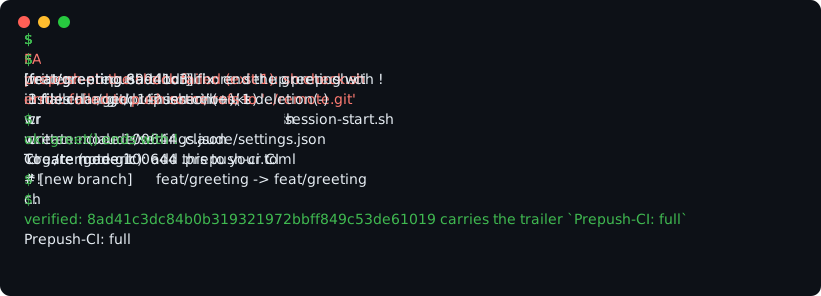
When PREPUSH_CI=full is set, a commit-msg hook writes the trailer Prepush-CI: full into each commit. The pre-push hook refuses to push a tip commit that carries the trailer unless the full check passes on it. A small gate in pull request CI reads the trailer of the head commit and skips the remaining jobs. The default branch ignores the trailer and runs CI in full. See issue #1 for the full design.
Usage
1. Let an agent set it up
The quickest way is to hand the job to a coding agent such as Claude Code, with the skill this package ships. Give it this prompt:
Run uvx prepush-ci skill and follow what it prints to set this repository up with prepush-ci.
Until the first release is on PyPI, run the command from the repository instead: uvx --from git+https://github.com/CapeOfGoodCode/prepush-ci prepush-ci skill. In Claude Code you can add the skill as a plugin instead: /plugin marketplace add CapeOfGoodCode/prepush-ci, then /plugin install prepush-ci@prepush-ci.
To keep the skill with a project, run prepush-ci skill --write; it writes the skill to .claude/skills/prepush-ci-setup/SKILL.md of the repository, where the agent finds it by itself.
The agent needs a git repository with a remote it can push branches to, and a package index it can reach to install prepush-ci. It works on a branch and opens a pull request with the result; it does not push to the default branch.
The agent always stops to ask you two things: to confirm the command that runs the full check, and what pre-push should do on your own machines. It asks more only where the repository leaves something open: which hook manager to use when there are two, the default branch when origin is missing, cannot be reached, has no default branch, or the clone does not fetch it (a single-branch clone of another branch), and a yes before it removes a hook.
The steps below are the manual core. On top of them the skill finds or writes the command that runs the full check, sets up the services and the preflight so that a missing service fails the check, extends the SessionStart script with dependencies and services, and proves the setup with doctor.
2. Install
uv tool install prepush-ci
# or: pipx install prepush-ci
# until the first release is on PyPI:
uv tool install git+https://github.com/CapeOfGoodCode/prepush-ci
uvx prepush-ci runs it without installing. It needs Python 3.11 or newer and git, and nothing else.
3. Set a repository up with init
cd your-repo
prepush-ci init
init asks for the command that runs your full CI check, then writes .prepush-ci.toml, installs the git hooks (it finds pre-commit, husky and lefthook and edits their files instead of fighting them), writes a Claude Code SessionStart script that exports PREPUSH_CI=full in cloud sessions, and prints the CI gate snippet. Commit .prepush-ci.toml and the hook files you want shared. In a script, give it flags: prepush-ci init --non-interactive --check "sh scripts/ci".
4. Opt in with PREPUSH_CI=full
Nothing happens until a machine opts in: set PREPUSH_CI=full in its environment (the SessionStart script does it in a cloud session; on your own machine, export it in your shell profile or leave it unset). The values are described below.
5. What a commit and a push do
A commit made with PREPUSH_CI=full gets the trailer Prepush-CI: full from the commit-msg hook. A push whose tip commit carries the trailer runs the pre-push hook, which refuses the push unless your check passes on exactly that commit; a pass is remembered, so a retried push does not run the check twice. A push of a tip without the trailer goes through untouched.
6. Skip CI on verified commits: the CI gate
Add a first job to pull request CI that reads the trailer of the head commit with prepush-ci verify <sha>, and let the other jobs skip when it is verified. init prints the snippet for GitHub Actions, GitLab CI or any other CI (--ci github|gitlab|generic), and the same files are in docs/ci/. The default branch always runs CI in full, and pull requests from forks never skip.
7. When a push is refused
prepush-ci runruns the preflight and the check onHEADthe way the hook does, so you can see why it fails.prepush-ci doctorfinds a setup fault: a missing hook, a broken config, a variable that is not set.prepush-ci stripremoves the trailer from the commits of your branch since the default branch, for a push that must go without the check; push them withgit push --force-with-lease.
Command reference
A command line the parser rejects makes init, install, run, doctor and hook exit 2; verify and strip check their own arguments and exit 1.
init
Sets a repository up: config, hooks, SessionStart script and CI gate snippet. Run it once per repository.
prepush-ci init [--non-interactive] [--check CMD] [--preflight CMD] [--require-env NAME]
                [--require-up-to-date REF] [--default-branch BRANCH]
                [--hooks native|pre-commit|husky|lefthook|none] [--no-session-hook]
                [--ci github|gitlab|generic|none] [--ci-gate-file FILE]
prepush-ci init --non-interactive --check "sh scripts/ci" --hooks native
Running it again changes nothing. Exit status: 0 means it did its work, 1 means it refused or failed, and 2 means --check is missing and no config exists.
install
Points git at the hooks that run this tool. Run it to install the hooks again without touching the config.
prepush-ci install [--hooks native|pre-commit|husky|lefthook]
prepush-ci install --hooks husky
hook commit-msg
Writes the trailer into the commit message when PREPUSH_CI=full. Git runs this hook, not a person.
prepush-ci hook commit-msg FILE
prepush-ci hook commit-msg .git/COMMIT_EDITMSG
hook pre-push
Refuses a push whose tip carries the trailer unless the check passes. Git runs this hook, not a person.
prepush-ci hook pre-push [GIT_ARGS ...]
prepush-ci hook pre-push origin
run
Runs the preflight and the check on HEAD as the pre-push hook would. Run it to see why a push is refused.
prepush-ci run
prepush-ci run
Exit status: 0 means it did its work (the check passed), 1 means it refused or failed.
verify
Says whether a commit carries the trailer and was not made by a server. The CI gate calls it.
prepush-ci verify SHA
prepush-ci verify HEAD
Exit status: 0 means the commit is verified, 1 means it is not.
strip
Removes the trailer from the commits since a base (the merge base with the default branch unless you name one), so a push needs no check. It rewrites commits, so the next push needs git push --force-with-lease.
prepush-ci strip [BASE]
prepush-ci strip origin/main
Exit status: 0 means it did its work, 1 means it refused or failed.
doctor
Checks that the hooks and the config will do their job. Run it when a hook does not seem to fire.
prepush-ci doctor [--hooks native|pre-commit|husky|lefthook|none] [--mode full|off|unset]
prepush-ci doctor --mode full
Exit status: 0 means every check passed, 1 means at least one did not.
skill
Prints the setup skill of the installed version, for an agent to follow; with --write it saves it as the project skill. Run it to have an agent set a repository up with the skill that matches your version.
prepush-ci skill [--write]
prepush-ci skill --write
Exit status: 0 means it printed or wrote the skill, 1 means it could not (the skill is not part of this installation, --write ran outside a git repository, or the project skill file cannot be written).
PREPUSH_CI
The environment variable PREPUSH_CI decides what commits get:
PREPUSH_CI=full: commits get the trailer, and a push of such a tip is checked.- unset or empty: a commit writes no trailer, but a pushed tip that already carries one is still checked.
PREPUSH_CI=off: a commit writes no trailer, and the push of a tip that carries one is refused; runprepush-ci stripto take the trailer off,offis no way past the check.
Configuration
.prepush-ci.toml at the repository root; check is the only key you must set.
| key | default | meaning |
|---|---|---|
check |
required |
the command that runs your full CI check |
preflight |
none |
a command to run before the check |
require_env |
[] |
environment variables the check needs |
require_up_to_date |
origin/<default_branch> |
a ref the branch must contain, or true or false |
default_branch |
main |
the repository's default branch |
trailer.key |
Prepush-CI |
the trailer's key |
trailer.value |
full |
the trailer's value |
legacy_keys |
[] |
trailer keys of an older setup that still count as verified |
cache |
true |
remember a passed check, so a retried push does not run it again |
How this repository is built
This repository is also an example of agentic engineering:
AGENTS.mdis the rulebook for every contributor, human or agent (CLAUDE.mdimports it).LOOP.mddescribes the loops that build the tool: their roles, the label state machine they share, what each may touch, and where a human decides.openspec/holds the specifications. Every feature starts as an OpenSpec change.scripts/ciis the one entry point for the full check CI runs; the pre-push hook runs its--fastpart, everything but the tests.docs/agentic-engineering.mdmaps the practices from loop-engineering this repository adopts, and where it deviates.
Development
uv sync && npm ci          # Python tooling, OpenSpec CLI
uv run pre-commit install  # commit-msg, pre-commit and pre-push hooks
sh scripts/ci              # the full check, exactly as CI runs it (--fast: without the tests)
License
1 maintainer

Metadata
1 maintainer
Release files for prepush-ci 0.1.0
For a detailed explanation of source distributions (sdists) and built distributions (wheels), please see the package formats documentation.
Source distribution (sdist)
| File | Size | Uploaded | |
|---|---|---|---|
| prepush_ci-0.1.0.tar.gz | 62.0 kB | Details |
Built distribution (wheel)
| File | Interpreter | ABI | Platform | Reset |
|---|---|---|---|---|
| prepush_ci-0.1.0-py3-none-any.whl | Python 3 | none | any | Details |
Total release size: 140.4 kB
Release files / prepush_ci-0.1.0.tar.gz
| Download URL | prepush_ci-0.1.0.tar.gz |
|---|---|
| Size | 62.0 kB |
| Tags | Source |
|
SHA-256 checksum How to use checksums |
70d1f6f5835bb425c9fbd5c5d0bb3829394d88cb428a3ac680d01fa591a1c583
|
|
BLAKE2b-256 checksum How to use checksums |
9daa97ad19fc5e6c5ff978c621311a9335b6e9e0aca3f38d11a5af289be28705
|
| Upload date | |
|
Uploaded using Trusted Publishing? What is trusted publishing? |
Yes |
| Uploaded via |
twine/7.0.0 CPython/3.13.14
|
Provenance
Provenance describes where a file came from. On PyPI, provenance is shared via attestations, which provide a verifiable record of the build or publishing details. View details, limitations and caveats.


PyPI Publish Attestation
PyPI verified that this artifact, at this checksum, originated from the publisher listed below.
Signed by GitHub Actions, verified by PyPI on Oct 14, 2026.
Transparency logRelease files / prepush_ci-0.1.0-py3-none-any.whl
| Download URL | prepush_ci-0.1.0-py3-none-any.whl |
|---|---|
| Size | 78.3 kB |
| Tags | Python 3 |
|
SHA-256 checksum How to use checksums |
d3f01d794689776c26f6f3b7a080633a2471eb6cae2b6ac50d3455ab03530d3d
|
|
BLAKE2b-256 checksum How to use checksums |
099754f0153a125f46b3b3bf6c17465288fba9d1c24986c827f9d334d288752f
|
| Upload date | |
|
Uploaded using Trusted Publishing? What is trusted publishing? |
Yes |
| Uploaded via |
twine/7.0.0 CPython/3.13.14
|
Provenance
Provenance describes where a file came from. On PyPI, provenance is shared via attestations, which provide a verifiable record of the build or publishing details. View details, limitations and caveats.
PyPI Publish Attestation
PyPI verified that this artifact, at this checksum, originated from the publisher listed below.
Signed by GitHub Actions, verified by PyPI on Oct 14, 2026.
Transparency log













