
Pretix Event Analytics




Analytics suite for Pretix: sales over time and against previous editions, first-timers and returning people across every edition of a recurring event, audience, tickets, check-in and refunds — without storing personal data.
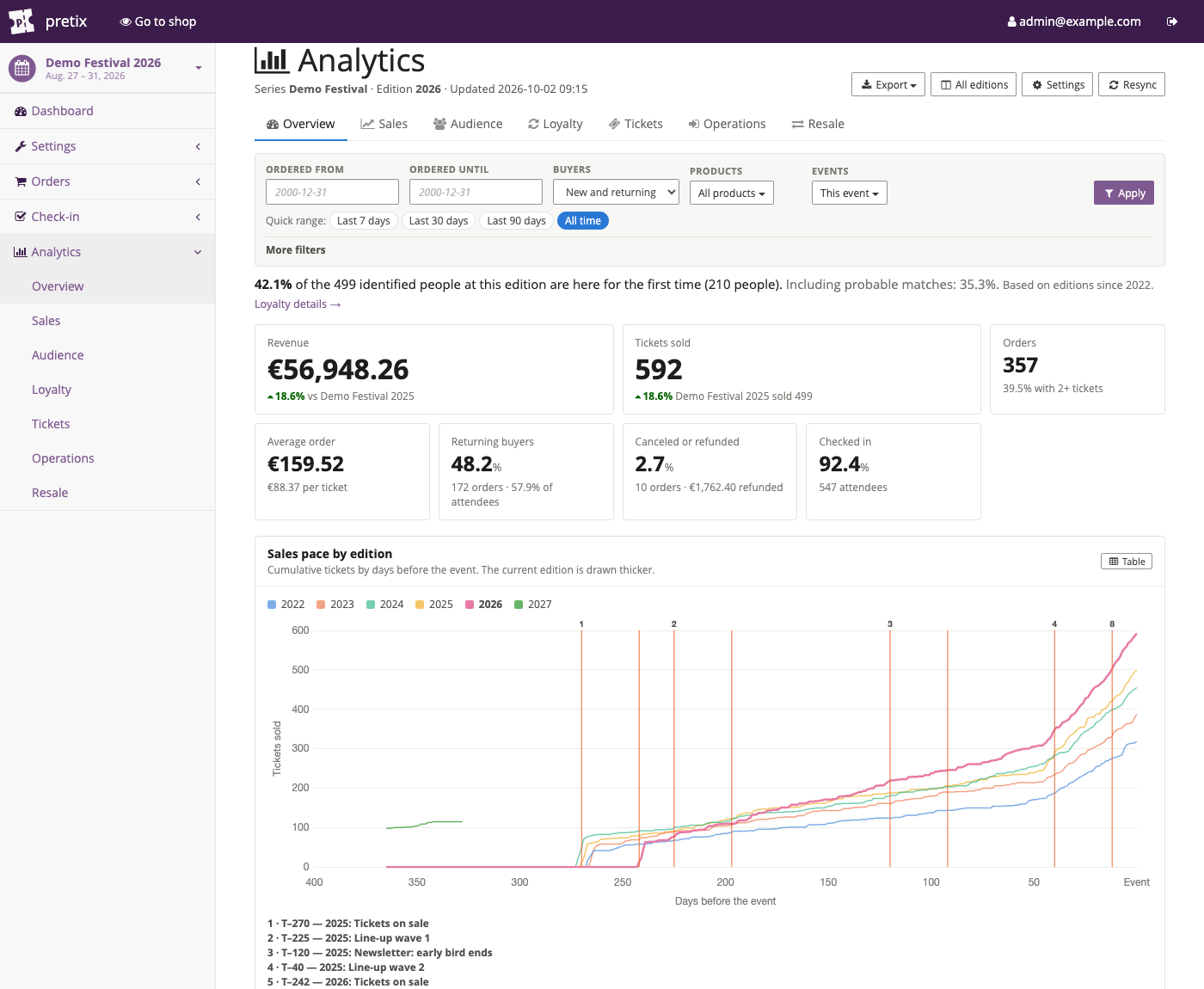
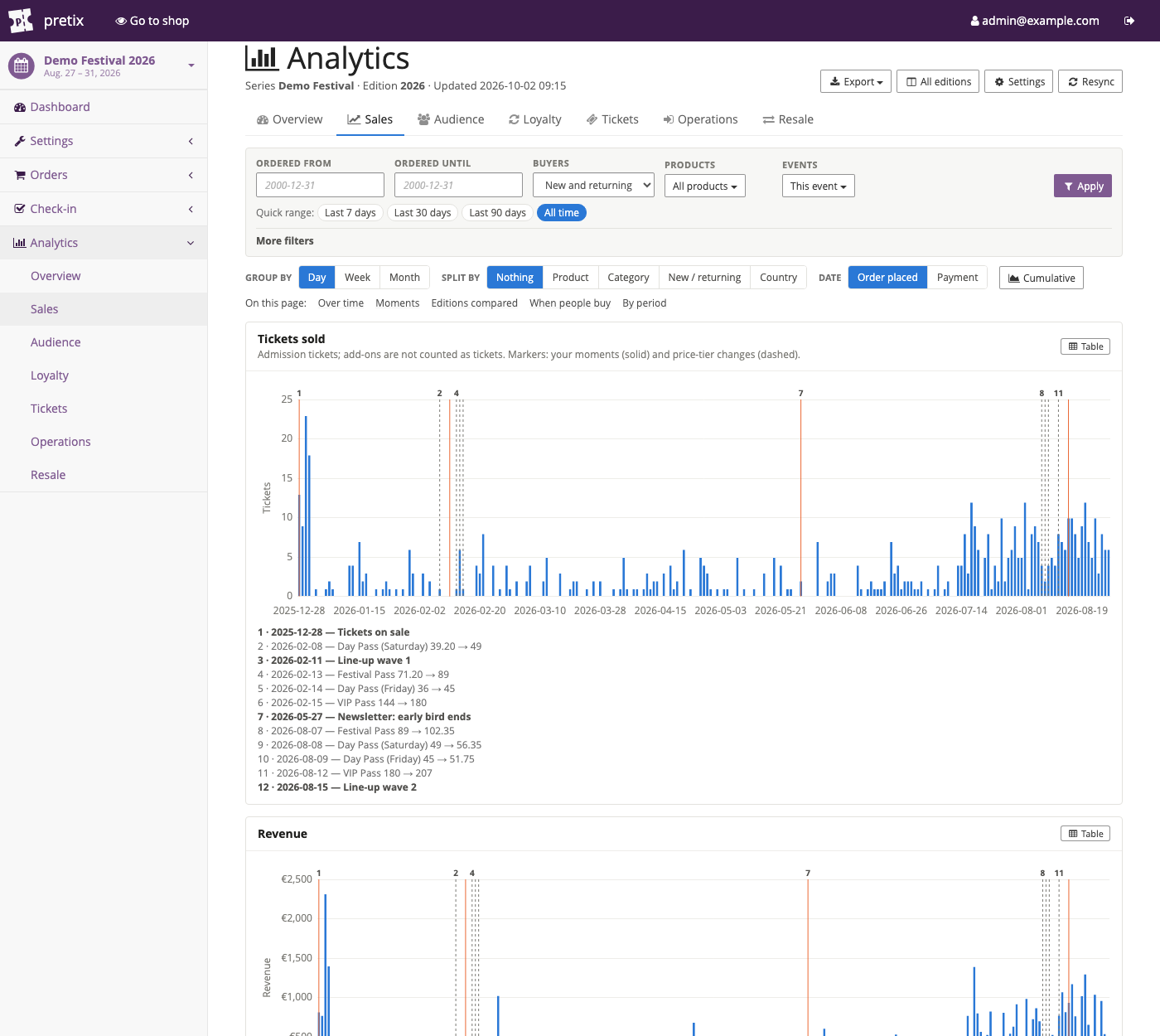
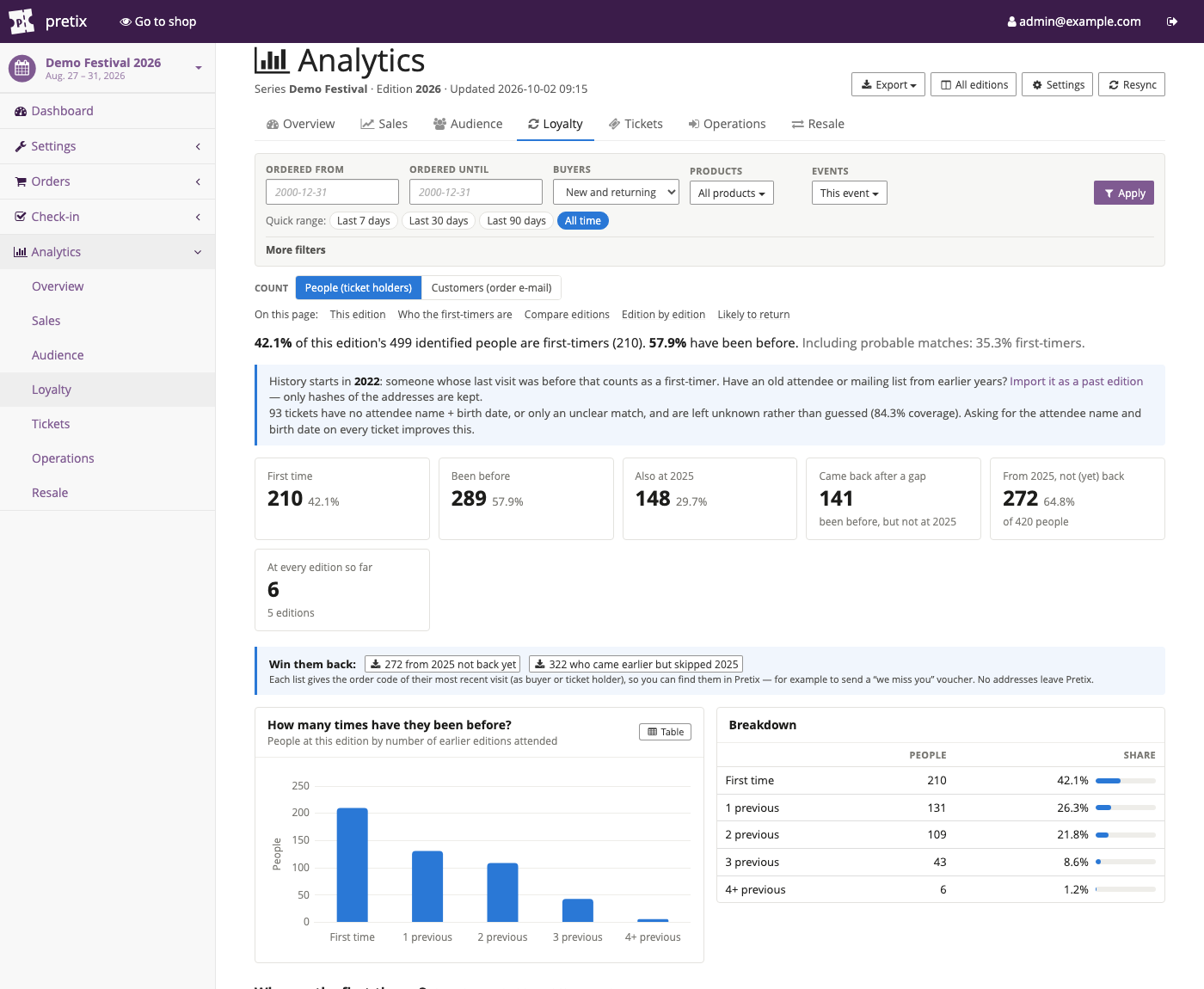
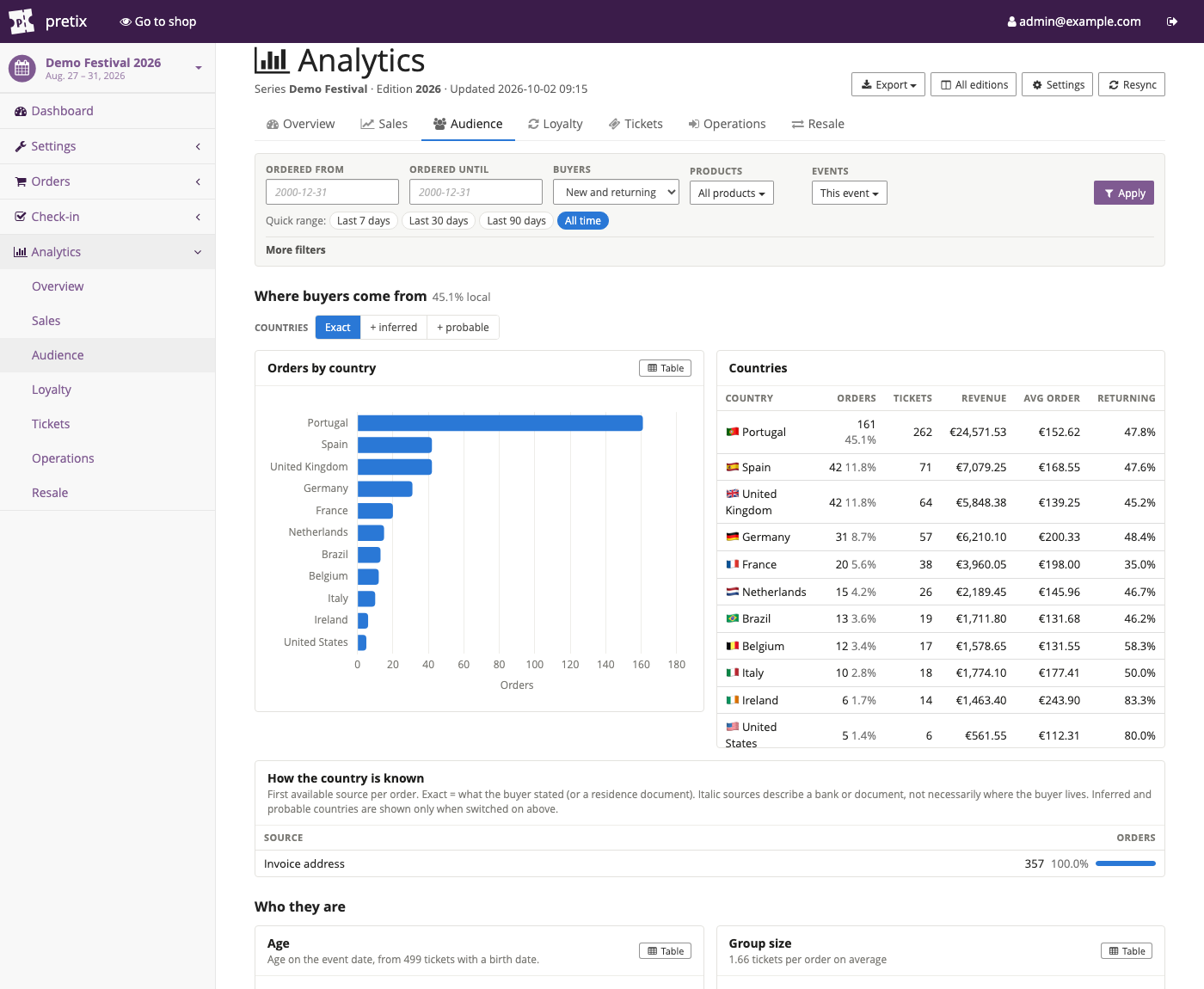
| Sales | Loyalty | Audience |
|---|---|---|
 |
 |
 |
Screenshots show generated demo data.
Features
Seven dashboard pages (Overview · Sales · Audience · Loyalty · Tickets · Operations · Resale) share one filter bar: order date range, country, age, first-time vs returning buyers, payment method, products, merged editions and canceled/refunded orders.
- Overview — revenue, tickets, orders, average order, returning buyers, refunds and check-in, each compared like-for-like with the previous edition at the same number of days before the event; first-timer headline; sales pace of every edition; forecast.
- Sales — tickets sold and revenue as two aligned charts (day / week / month, daily or cumulative), split by product, category, new vs returning or country, by order or payment date. Price-tier changes and your own moments ("line-up announced") are marked on the timeline and on the edition comparison. Editions compared on a days-before-event axis with a same-point table and a forecast (with range and optional ticket/revenue targets). Weekday × hour heatmap and how far ahead people buy.
- Loyalty — win-back lists (people from the last edition not back yet, and lapsed visitors, as order codes), the share of first-timers, how many times people have been before, who came back after a gap, who from the last edition has not (yet) returned, who has been to every edition. Pick any set of editions to see how many people attended once, twice, three times…, an overlap matrix, the most common attendance patterns, edition-by-edition flow and whether first-timers come back. Counts people (buyers and ticket holders) or buyers only. Segments show who the first-timers are (product, country, age, purchase timing).
- Audience — countries (with how each country is known), "travelling from" and ID-document countries when available, and top cities (orders, revenue, average order, returning share), age on the event date, checkout language, payment methods, buyer personas (early bird / regular / last minute), group size, caravans.
- Tickets — capacity per quota, product performance (returning share, check-in rate), categories, variations, price tiers, add-on attach rates and who buys them, voucher and discount-code usage.
- Operations — payment completion by method (paid vs expired unpaid), check-in rate, no-shows, arrival curve, check-in by product and by first-time/returning; cancellations and refunds over time and by product; opt-in breakdowns of yes/no and multiple-choice questions (e.g. "How did you hear about us?") split by first-time and returning attendees.
- Pretix dashboard widgets — returning buyers and first-time attendees on each event's main dashboard.
- Resale — one "changed hands" figure combining TicketSwap resales (read from the TicketSwap plugin, when installed) and manual name changes, counted once per ticket; breakdown by channel, product and current holder; per month and per edition; order codes as CSV.
- Series overview (organizer level) — every edition side by side, edition flow and first-timer cohorts, plus import of past attendee lists — a CSV with name + birth date (people) or any file with e-mail addresses (customers) — so visitors from before Pretix count as returning. Only hashes are kept.
- Exports — orders, tickets and "returning buyers by order code" as CSV (respecting filters), a full PDF report, and two exporters in Pretix's own Export menu (CSV/Excel).
How returning people are detected
A person is a ticket holder, matched across editions on name + date of birth (accents, letter case, word order, middle names and added second surnames are ignored; different birth dates are always different people). Paying with the same card or buying from the same e-mail never makes two ticket holders the same person — people buy for friends. Everything is stored only as HMAC-SHA256 hashes.
- Certain matches drive every figure.
- Probable matches — a ticket without a birth date whose name matches exactly one known person and shares an e-mail or card with them — are shown only as a secondary "including probable" figure.
- When in doubt, unknown: tickets without a usable name + birth date, ambiguous names and placeholder data (the same name + birth date on many tickets of one edition) are left out of returning-people figures and shown as coverage — never guessed.
- Customers (the order e-mail) are a separate view: "returning customers" on the Loyalty page and in the Overview tiles.
A group order for five friends counts as five people, and the result is the same no matter in which order editions were synced.
Where people come from
Residence (per order) and nationality (per ticket holder) are kept apart.
Residence, exact — the first available of: a "Country of residence" question → invoice address → PayPal address / account → card billing address → an ID document that proves residence (Spanish NIE, UK driving licence, Belgian national number). The source is stored with the country and shown on the Audience page; only exact countries are used by filters and other pages. A "travelling from" question is reported separately.
Residence, derived — kept in separate fields and switched on on the Audience page:
inferred (the same customer's exact country on their other orders, only when they all agree), then
probable: the buyer's nationality → the card's issuing bank → the IBAN country → the e-mail's country
domain (.pt; generic domains say nothing). Banks and nationality describe the account or the passport, not
where someone lives — on SUTI 2026 the card issuer matched the ID document only 79% of the time.
Nationality — per ticket holder: a nationality question (country names and common demonyms such as "Portuguese"), else an ID document that proves citizenship (Spanish DNI, Portuguese Cartão de Cidadão / civil number, Italian codice fiscale when born in Italy). Shown in its own panel on the Audience page and in the CSV exports.
The most accurate data comes from asking: add "Country of residence", "Nationality" and "Which country are you travelling from?" (question type Country) at checkout, and mention the purpose in your privacy notice.
ID documents (opt-in): if checkout asks for an ID number, the issuing country is derived only from national
formats with a valid check digit; each format declares whether it proves nationality or residence
(id_country.PROVES). Ambiguous formats and placeholders ("00000000") yield nothing. The number is read in
memory and never stored. Reusing ID numbers for statistics is a new purpose under the GDPR — update your privacy
notice first.
Requirements
| Component | Version |
|---|---|
| Pretix | 2026.2 or later (tested on 2026.2.0, 2026.3.1 and 2026.7.0) |
| Python | 3.10, 3.11, or 3.12 |
| Django | 4.2 LTS (ships with Pretix) |
| Redis | Recommended (for caching and Celery task queue) |
Installation
From source
git clone https://github.com/h3x4d3x4/Pretix-Event-Analytics.git
cd Pretix-Event-Analytics

# Install into your Pretix virtualenv
pip install -e .

# Run database migrations
python -m pretix migrate
From pip
pip install pretix-event-analytics
python -m pretix migrate
Enable the plugin
The plugin works at two levels (Pretix "event + organizer" plugin):
- Organizer → Settings → Plugins → enable Event Analytics (unlocks the series pages).
- Each event → Settings → Plugins → enable Event Analytics (dashboards and order processing).
Orders are only processed for events where it is enabled at both levels.
The plugin is auto-discovered via its entry point — no changes to INSTALLED_APPS are needed.
Quick Start
1. Create an Event Series
Navigate to your organizer sidebar → Analytics Series → Create series.
A series groups your recurring editions (e.g. "My Festival" containing 2022, 2023, 2024 editions).
2. Configure each Event
Go to Settings → Analytics on each event:
- Assign the event to a series
- Set the edition year
- Optionally set the event country for local-buyer scoring
3. Sync existing data
For events with existing orders, trigger a resync — Resync on the dashboard, Resync all editions on the series page, or from the command line:
# Every configured event (returning people are resolved once per series at the end)
python -m pretix analytics_resync --all

# One event / one series
python -m pretix analytics_resync --event <organizer>/<event>
python -m pretix analytics_resync --series <organizer>/<series-slug>

# Preview without processing
python -m pretix analytics_resync --all --dry-run
Check-ins are always included; the old --checkin flag is accepted but no longer needed.
4. Optional
- Past editions: on the series page, import attendee lists of editions that predate Pretix (a CSV with name + birth date, or a list of e-mail addresses).
- Questions: in the event's Analytics settings, choose yes/no or multiple-choice questions to analyse, then resync.
- Targets & pace alert: under Goals & alerts, set a ticket and/or revenue target to see progress next to the forecast, and optionally have e-mails sent when sales fall a chosen percentage behind the previous edition.
Theming
The dashboards follow Pretix's own admin look out of the box. Every colour comes from a CSS variable
(--pa-surface, --pa-text, --pa-accent, the chart series --pa-s1 … --pa-s7, the heatmap ramp
--pa-seq-0 … --pa-seq-6, …; the full list with defaults is at the top of
dashboard.css). A theme plugin can
restyle the analytics pages by overriding them on :root, e.g. from Pretix's html_head control signal:
:root {
  --pa-surface: #1c1917;
  --pa-text: #f5f5f4;
  --pa-accent: #a36e39;
}
Variable names are treated as public API: they are not renamed or removed within a major version. Keep the chart series colour-blind safe and in a fixed order when you change them.
Architecture
Pretix signals (order paid / canceled / changed / modified / reactivated / split, check-in)
        │   thin handlers → Celery tasks (retry + backoff; resync lock respected)
        ▼
services/ingest.write_order ── normalizer (hashing, bucketing) ──► AnalyticsOrderFact
        │                                                         AnalyticsTicketFact (one per position)
        │                                                         AnalyticsIdentity (buyer / attendee)
        │                                                         AnalyticsAnswerFact (opt-in questions)
        ▼
services/people  (debounced, series-wide)  → person keys + exact repeat fields
        ▼
services/attendance  (cached sets per edition)   services/reports/*  (cached per data version)
        ▼
Dashboard pages · series overview · CSV / PDF / Pretix exporters
Resync upserts every paid or refunded order through the same write_order path and removes stale rows; the table is never emptied, so dashboards keep working during a resync.
Access Control
| Permission | Access |
|---|---|
can_view_orders |
View every analytics page of an event, export CSV/PDF |
can_change_event_settings |
Configure analytics (series, targets, questions), trigger a resync |
can_change_organizer_settings |
Manage series, series overview, import past attendee lists, resync a whole series |
These are standard Pretix team permissions.
Safety Guarantee: Read-Only Against the Ticketing Database
This plugin is an analytics overlay. It reads Pretix orders, positions,
answers, payments, refunds and check-ins — it never writes to any
Pretix core table. All persistence happens in the plugin's own analytics
tables (AnalyticsOrderFact, AnalyticsTicketFact, AnalyticsIdentity,
AnalyticsAnswerFact, EventSeries, EventAnalyticsConfig,
LegacyEdition, LegacyIdentity).
The invariant is enforced two ways:
- Static check —
scripts/check_isolation.pygreps the plugin source for any.save(),.delete(),.create(),.update(),.bulk_create(),.bulk_update(), or.raw()call targeting a Pretix core model and exits non-zero if it finds one. Run it any time; it requires no database and no Django setup. - Signal-path discipline — signal handlers do zero DB work inline;
they dispatch a Celery task. All task code is read-only against
pretix.base.models.*. Failures in analytics never block, delay, or roll back a ticket checkout or payment.
Privacy & GDPR
- Email addresses, card fingerprints, and other identity signals are converted to HMAC-SHA256 hashes — never stored in plain text and not reversible.
- Names and birth dates are only kept inside those hashes (for matching
returning people) and as age buckets (e.g.
25-34) — never in plain text. - ID-document numbers (opt-in) are read in memory; only the derived country is stored.
- Question answers are only collected for questions an organiser opts in to, only for yes/no and multiple-choice questions, and only as the chosen option — free text never reaches the analytics tables.
- Imported past attendee lists are hashed in memory; the uploaded file and the plain addresses are discarded immediately.
- Exports contain order codes and pseudonymous fields only — never names or e-mail addresses.
- The HMAC salt is required in production; the plugin refuses to
operate without it (see Configuration). In
DEBUG=Truedevelopment environments the salt falls back to aSECRET_KEY-derived value, with a clear log warning. - A data shredder is registered, so organisers can delete all analytics data for an event through Pretix's built-in GDPR data export / deletion interface.
Important: the salt must be set once and never changed. Rotating it invalidates every historical repeat-buyer hash — repeat detection silently starts over from scratch. If you have to rotate (e.g. after a security incident), run a full resync (
analytics_resync --all) immediately after.
Configuration
Set the HMAC salt once, before the first sync, in pretix.cfg:
[pretix_event_analytics]
; 32+ random characters. Never change it once data exists.
secret_salt = your-long-random-string-here-32-chars-minimum
Alternatives: the environment variable PRETIX_ANALYTICS_SECRET_SALT, or a Django setting of the same name in a custom settings module. Without a salt the plugin refuses to process orders in production (DEBUG=False).
After upgrading, run python -m pretix migrate, python -m pretix rebuild (static files) and a resync of all events (analytics_resync --all) so existing data gets the new fields.
Data Model
EventSeries (organizer)
  ├─ EventAnalyticsConfig (per event: edition year, home country, active, targets, tracked questions)
  │    └─ AnalyticsOrderFact (per order; all dashboards query facts only)
  │         ├─ AnalyticsTicketFact (per position: product, price, voucher, check-in, attendee status)
  │         │    ├─ AnalyticsIdentity (attendee-level hashes)
  │         │    └─ AnalyticsAnswerFact (opt-in question answers)
  │         └─ AnalyticsIdentity (buyer-level hashes)
  └─ LegacyEdition (imported past edition)
       └─ LegacyIdentity (hashed people / e-mails)
Development
.venv/bin/pip install pytest pytest-django
.venv/bin/python -m pytest            # real Pretix objects, ~180 tests

# Local demo data: real orders for six editions (local SQLite dev DB only)
PRETIX_CONFIG_FILE=pretix.cfg .venv/bin/python scripts/dev_seed_orders.py --organizer <org> --i-understand-this-writes-orders
PRETIX_CONFIG_FILE=pretix.cfg .venv/bin/python -m pretix analytics_resync --organizer <org> --all
Verifying a build
Before deploying, a couple of quick sanity checks never hurt:
# 1. Confirm the plugin has not grown any writes to Pretix core tables.
python scripts/check_isolation.py

# 2. Run Django's standard system checks against your Pretix install.
python -m pretix check
Both should complete silently with no warnings.
Roadmap
See ROADMAP.md.
Versioning & Changelog
Releases follow Semantic Versioning. See CHANGELOG.md for the history of user-visible changes.
License
Apache License 2.0. See LICENSE for the full text.
1 maintainer

Metadata
1 maintainer
Release files for pretix-event-analytics 2.2.1
For a detailed explanation of source distributions (sdists) and built distributions (wheels), please see the package formats documentation.
Source distribution (sdist)
| File | Size | Uploaded | |
|---|---|---|---|
| pretix_event_analytics-2.2.1.tar.gz | 260.5 kB | Details |
Built distribution (wheel)
| File | Interpreter | ABI | Platform | Reset |
|---|---|---|---|---|
| pretix_event_analytics-2.2.1-py3-none-any.whl | Python 3 | none | any | Details |
Total release size: 523.1 kB
Release files / pretix_event_analytics-2.2.1.tar.gz
| Download URL | pretix_event_analytics-2.2.1.tar.gz |
|---|---|
| Size | 260.5 kB |
| Tags | Source |
|
SHA-256 checksum How to use checksums |
192881c6749d7d59e829324d85850c3d546aa4e38ada6482b72bab14036c1de0
|
|
BLAKE2b-256 checksum How to use checksums |
47f1bb3b05408d373edcbac22f1592ce82b386ab37da619fcce992a4cce30db6
|
| Upload date | |
|
Uploaded using Trusted Publishing? What is trusted publishing? |
No |
| Uploaded via |
twine/7.0.0 CPython/3.12.14
|
Release files / pretix_event_analytics-2.2.1-py3-none-any.whl
| Download URL | pretix_event_analytics-2.2.1-py3-none-any.whl |
|---|---|
| Size | 262.6 kB |
| Tags | Python 3 |
|
SHA-256 checksum How to use checksums |
152a923d1a898a939f40c411fa53799868ba2581d81420388346542b7ae3be46
|
|
BLAKE2b-256 checksum How to use checksums |
b31d012b148fc738a50795057e2df61bac5e2e81ba932b1641a2dd056d996f87
|
| Upload date | |
|
Uploaded using Trusted Publishing? What is trusted publishing? |
No |
| Uploaded via |
twine/7.0.0 CPython/3.12.14
|














