
Prettier_prints
Lightweight library for prettier terminal outputs similar to chalk for JavaScript. Helping make Python outputs easier to read and styled to your desires.
Install
pip install prettier-prints
Examples: out()
    from prettier_prints.prettier_prints import PrettierPrints
    pp = PrettierPrints()
    pp.style = 'red;underline'  # <-- Can optionally predefine styling and can be overwritten

    # Old style (v1)
    print(pp.out(msg="Lets test the output"))
    print(pp.out(msg="Lets override the styling here", style="blue;bold"))
    print(pp.out(json_out={'msg': 'For those who prefer a JSON object param, this works too'}))
    print(pp.out(json_out={'msg': 'Can also overwrite this way', 'style': 'yellow;highlight'}))
    print(f'Works great for output messages as well -> {pp.out(msg="See :)", style="magenta")}')

    # New v2 style
    from prettier_prints.prettier_printsv2 import Output
    pp = Output()
    print(f"\n{pp.msg('Hello').red().bold().underline()}")
    print(f"{pp.msg('Hello').green().bold().out()}")

json()
    from prettier_prints.prettier_prints import PrettierPrints
    pp = PrettierPrints()
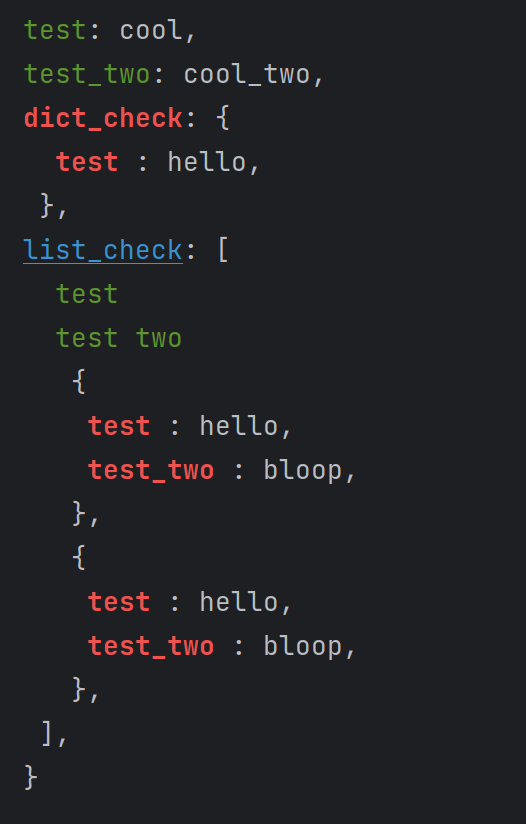
    json_obj = {'test': 'cool', 'test_two': 'cool_two', 'dict_check': {'test': 'hello'},
                'list_check': [
                    'test',
                    'test two',
                    {
                        'test': 'hello',
                        'test_two': 'bloop'
                    },
                    {
                        'test': 'hello',
                        'test_two': 'bloop'
                    }
                ]}
    print(prettier_prints.json(json_obj=json_obj, style='list=blue;underline&dict=red;bold&string=green;'))
Current functions:
- out()
- json()
Function parameters:
 - out()
   - msg: str           Output / display message[required]
   - style: str         Styling to apply to the message[optional]
   - json_out: dict     JSON object containing the message and styling[optional]

 - json()
   - style: str         Styling to apply to the message[optional]
   - json_obj: dict     JSON object containing the message and styling[required]
Styling Examples By Function (v1 style):
- out()
    - style: 'red;underline'
    - json_out: {'msg': 'Lets test the output', 'style': 'blue;bold'}
- json()
    - style: 'list=red;underline&dict=blue;bold&str=yellow;highlight' # <- Break up the styling by type (list, dict, str)
Current available styling:
| Modifiers | Colors / Background Colors |
|---|---|
| Bold | Red |
| Underline | Green |
| Highlight | Yellow |
| Blue | |
| Magenta | |
| Cyan | |
| White | |
| Bright Red | |
| Bright Green | |
| Bright Yellow | |
| Bright Blue | |
| Bright Magenta | |
| Bright Cyan | |
| Bright White |
Contributors / Thanks:
1 maintainer

Metadata
1 maintainer
Release files for prettier-prints 3.0.0
For a detailed explanation of source distributions (sdists) and built distributions (wheels), please see the package formats documentation.
Source distribution (sdist)
| File | Size | Uploaded | |
|---|---|---|---|
| prettier_prints-3.0.0.tar.gz | 5.2 kB | Details |
Built distribution (wheel)
| File | Interpreter | ABI | Platform | Reset |
|---|---|---|---|---|
| prettier_prints-3.0.0-py3-none-any.whl | Python 3 | none | any | Details |
Total release size: 11.3 kB
Release files / prettier_prints-3.0.0.tar.gz
| Download URL | prettier_prints-3.0.0.tar.gz |
|---|---|
| Size | 5.2 kB |
| Tags | Source |
|
SHA-256 checksum How to use checksums |
5715fb52d2e876ba768cb4116729f3e65e79a3d0ec7cbac7a3b4a355cf4a3f93
|
|
BLAKE2b-256 checksum How to use checksums |
b468181b5c02552bc6f0d43f5db2dc2846acdfbd42e7dce82d95f0a5958f8b33
|
| Upload date | |
|
Uploaded using Trusted Publishing? What is trusted publishing? |
No |
| Uploaded via |
twine/5.1.1 CPython/3.9.6
|
Release files / prettier_prints-3.0.0-py3-none-any.whl
| Download URL | prettier_prints-3.0.0-py3-none-any.whl |
|---|---|
| Size | 6.1 kB |
| Tags | Python 3 |
|
SHA-256 checksum How to use checksums |
551700d6e495419e5be081d80747bbca5889ccafd015d3b7e3446a4b0d63dfe8
|
|
BLAKE2b-256 checksum How to use checksums |
08f9299191548623ce782f25aca1cfc6ebf5f9a69014cef98bd5d6f2d6ec3c5f
|
| Upload date | |
|
Uploaded using Trusted Publishing? What is trusted publishing? |
No |
| Uploaded via |
twine/5.1.1 CPython/3.9.19
|














