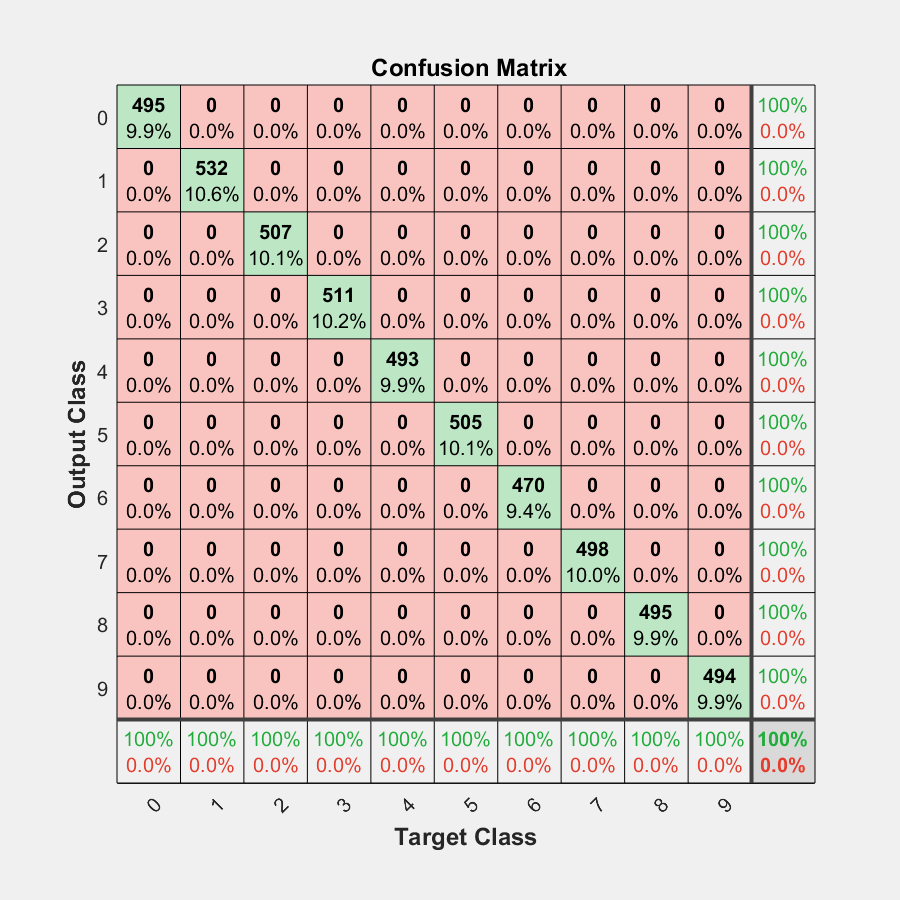
Confusion Matrix in Python
Plot a pretty confusion matrix (like Matlab) in python using seaborn and matplotlib.
This module get a pretty print confusion matrix from a NumPy matrix or from 2 NumPy arrays (y_test and predictions).
Become a sponsor
Please, consider contributing it to the project. Support the developers who power open source! Invest in open source. It powers your world. Become a sponsor now!
If my open source projects could bring you closer to your goals and you want to say thank you, and you can contribute, feel free to do Buy me a ☕ !
Or Become a sponsor directly on GitHub sponsors page ! You will receive a sponsor badge on your profile.
I will be really thankfull for anything even if it is a coffee or just a kind comment towards my work, because that helps me a lot.
See my projects and my contacts in my Linktree if you want to stay connected!
Installation
pip install pretty-confusion-matrix
Get Started
Plotting from DataFrame:
import numpy as np
import pandas as pd
from pretty_confusion_matrix import pp_matrix

array = np.array([[13,  0,  1,  0,  2,  0],
                  [0, 50,  2,  0, 10,  0],
                  [0, 13, 16,  0,  0,  3],
                  [0,  0,  0, 13,  1,  0],
                  [0, 40,  0,  1, 15,  0],
                  [0,  0,  0,  0,  0, 20]])

# get pandas dataframe
df_cm = pd.DataFrame(array, index=range(1, 7), columns=range(1, 7))
# colormap: see this and choose your more dear
cmap = 'PuRd'
pp_matrix(df_cm, cmap=cmap)
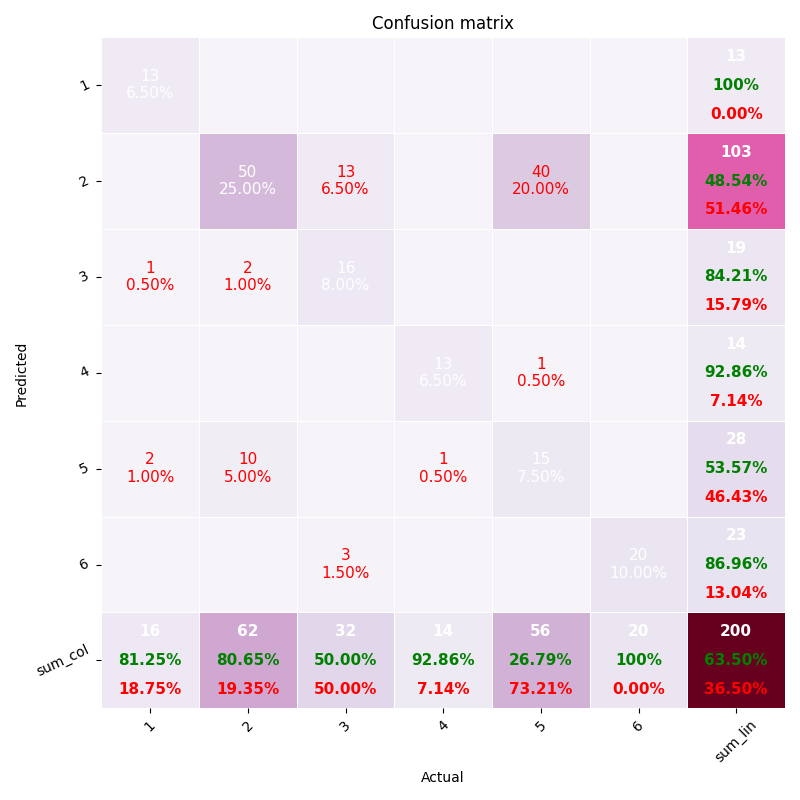
Plotting from vectors
import numpy as np
from pretty_confusion_matrix import pp_matrix_from_data

y_test = np.array([1, 2, 3, 4, 5, 1, 2, 3, 4, 5, 1, 2, 3, 4, 5, 1, 2, 3, 4, 5, 1, 2, 3, 4, 5, 1, 2, 3, 4, 5, 1, 2, 3, 4, 5, 1, 2, 3, 4, 5, 1, 2, 3, 4, 5, 1, 2, 3, 4, 5, 1, 2,
                  3, 4, 5, 1, 2, 3, 4, 5, 1, 2, 3, 4, 5, 1, 2, 3, 4, 5, 1, 2, 3, 4, 5, 1, 2, 3, 4, 5, 1, 2, 3, 4, 5, 1, 2, 3, 4, 5, 1, 2, 3, 4, 5, 1, 2, 3, 4, 5, 1, 2, 3, 4, 5, 1, 2, 3, 4, 5])
predic = np.array([1, 2, 4, 3, 5, 1, 2, 4, 3, 5, 1, 2, 3, 4, 4, 1, 4, 3, 4, 5, 1, 2, 4, 4, 5, 1, 2, 4, 4, 5, 1, 2, 4, 4, 5, 1, 2, 4, 4, 5, 1, 2, 3, 3, 5, 1, 2, 3, 3, 5, 1, 2,
                  3, 4, 4, 1, 2, 3, 4, 1, 1, 2, 3, 4, 1, 1, 2, 3, 4, 1, 1, 2, 4, 4, 5, 1, 2, 4, 4, 5, 1, 2, 4, 4, 5, 1, 2, 4, 4, 5, 1, 2, 3, 4, 5, 1, 2, 3, 4, 5, 1, 2, 3, 4, 5, 1, 2, 3, 4, 5])

pp_matrix_from_data(y_test, predic)
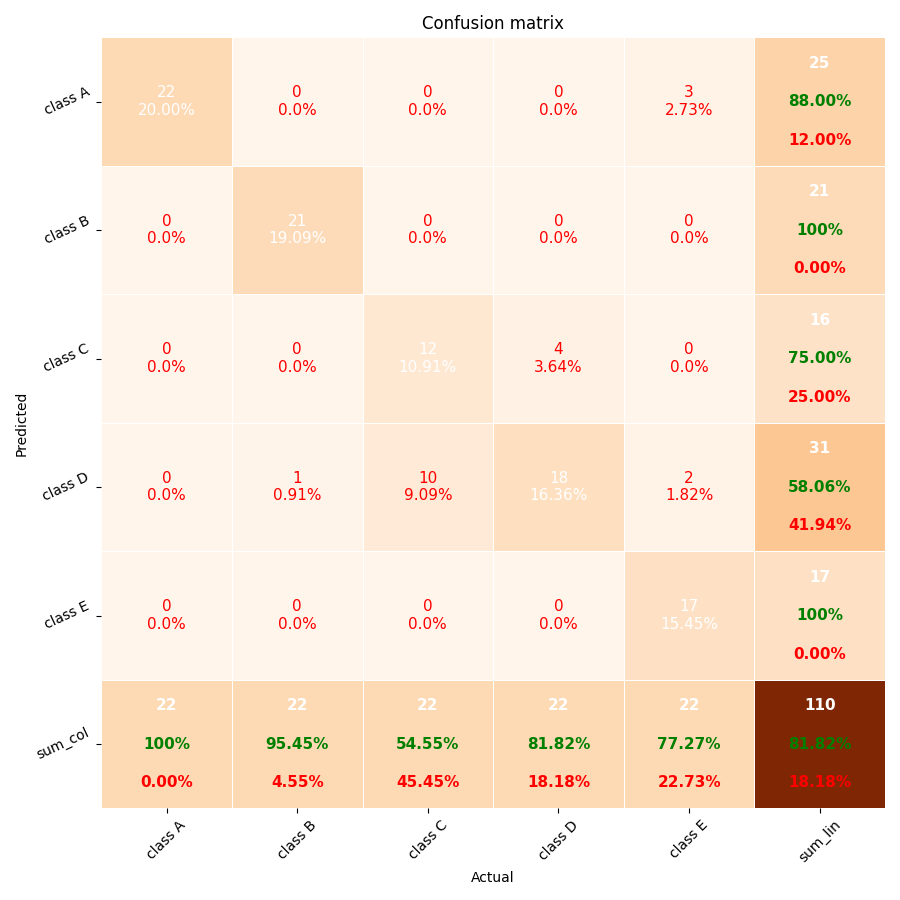
Using custom labels in axis
You can customize the labels in axis, whether by DataFrame or vectors.
From DataFrame
To plot the matrix with text labels in axis rather than integer, change the params index and columns of your dataframe.
Getting the example one above, just change the line df_cm = pd.DataFrame(array, index=range(1, 7), columns=range(1, 7)) by
col = ['Dog', 'Cat', 'Mouse', 'Fox', 'Bird', 'Chicken']
df_cm = pd.DataFrame(array, index=col, columns=col)
It'll replace the integer labels (1...6) in the axis, by Dog, Cat, Mouse, and so on..
From vectors
It's very similar, in this case you just need to use the columns param like the example below.
This param is a positional array, i.e., the order must be the same of the data representation.
In this example Dog will be assigned to the class 0, Cat will be assigned to the class 1, and so on and so forth.
Getting the example two above, just change the line pp_matrix_from_data(y_test, predic), by
columns = ['Dog', 'Cat', 'Mouse', 'Fox', 'Bird']
pp_matrix_from_data(y_test, predic, columns)
It'll replace "class A, ..., class E" in the axis, by Dog, Cat, ..., Bird.
More information about "How to plot confusion matrix with string axis rather than integer in python" in this Stackoverflow answer.
Choosing Colormaps
You can choose the layout of the your matrix by a lot of colors options like PuRd, Oranges and more... To customizer your color scheme, use the param cmap of funcion pp_matrix. To see all the colormap available, please do this:
from matplotlib import colormaps
list(colormaps)
More information about Choosing Colormaps in Matplotlib is available here.
References:
1. MATLAB confusion matrix:
b) Plot Confusion Matrix Using Categorical Labels
2. Examples and more on Python:
a) How to plot confusion matrix with string axis rather than integer in python
b) Plot-scikit-learn-classification-report
c) Plot-confusion-matrix-with-string-axis-rather-than-integer-in-Python
2 maintainers


Metadata
2 maintainers
Release files for pretty-confusion-matrix 0.8.1
For a detailed explanation of source distributions (sdists) and built distributions (wheels), please see the package formats documentation.
Source distribution (sdist)
| File | Size | Uploaded | Provenance | |
|---|---|---|---|---|
| pretty_confusion_matrix-0.8.1.tar.gz | 10.4 kB | With provenance | Details |
Built distribution (wheel)
| File | Interpreter | ABI | Platform | Reset |
|---|---|---|---|---|
| pretty_confusion_matrix-0.8.1-py3-none-any.whl | Python 3 | none | any | Details |
Total release size: 21.8 kB
Release files / pretty_confusion_matrix-0.8.1.tar.gz
| Download URL | pretty_confusion_matrix-0.8.1.tar.gz |
|---|---|
| Size | 10.4 kB |
| Tags | Source |
|
SHA-256 checksum How to use checksums |
c535b62554c36fb664145ca7fadfb9fd81cb801894e1350d040fa8c8260307cd
|
|
BLAKE2b-256 checksum How to use checksums |
06509c7d5876f276ef19fa6803976b03388c02589773c532ea537b269e962cf4
|
| Upload date | |
|
Uploaded using Trusted Publishing? What is trusted publishing? |
Yes |
| Uploaded via |
twine/6.1.0 CPython/3.13.12
|
Provenance
Provenance describes where a file came from. On PyPI, provenance is shared via attestations, which provide a verifiable record of the build or publishing details. View details, limitations and caveats.


PyPI Publish Attestation
PyPI verified that this artifact, at this checksum, originated from the publisher listed below.
Signed by GitHub Actions, verified by PyPI on May 14, 2026.
Transparency logRelease files / pretty_confusion_matrix-0.8.1-py3-none-any.whl
| Download URL | pretty_confusion_matrix-0.8.1-py3-none-any.whl |
|---|---|
| Size | 11.4 kB |
| Tags | Python 3 |
|
SHA-256 checksum How to use checksums |
9296c9544201a1e563c775ce03d0d250649e8b568de0c969b8a02694cd9976bd
|
|
BLAKE2b-256 checksum How to use checksums |
785425e4504f9df74de6e7b09b78b6483ff6540b4a88c19d0daedfef6565e284
|
| Upload date | |
|
Uploaded using Trusted Publishing? What is trusted publishing? |
Yes |
| Uploaded via |
twine/6.1.0 CPython/3.13.12
|
Provenance
Provenance describes where a file came from. On PyPI, provenance is shared via attestations, which provide a verifiable record of the build or publishing details. View details, limitations and caveats.
PyPI Publish Attestation
PyPI verified that this artifact, at this checksum, originated from the publisher listed below.
Signed by GitHub Actions, verified by PyPI on May 14, 2026.
Transparency logSecurity for pretty-confusion-matrix 0.8.1
Provenance
Provenance describes where a file came from. On PyPI, provenance is shared via attestations, which provide a verifiable record of the build or publishing details. View details, limitations and caveats.
Full provenance
All 2 files in this release have been uploaded with provenance metadata.
Attestation for pretty_confusion_matrix-0.8.1.tar.gz
PyPI Publish Attestation
PyPI verified that this artifact, at this checksum, originated from the publisher listed below.
Signed by GitHub Actions, verified by PyPI on May 14, 2026.
Transparency logA note on package security
PyPI is a repository for distributing packages, not a service for auditing them. While third-party security researchers and our staff do their best to detect and remove malicious packages, PyPI cannot guarantee the quality, security or suitability of any given package.
To learn more about protecting yourself from malicious actors, visit our package security documentation.