
Overview
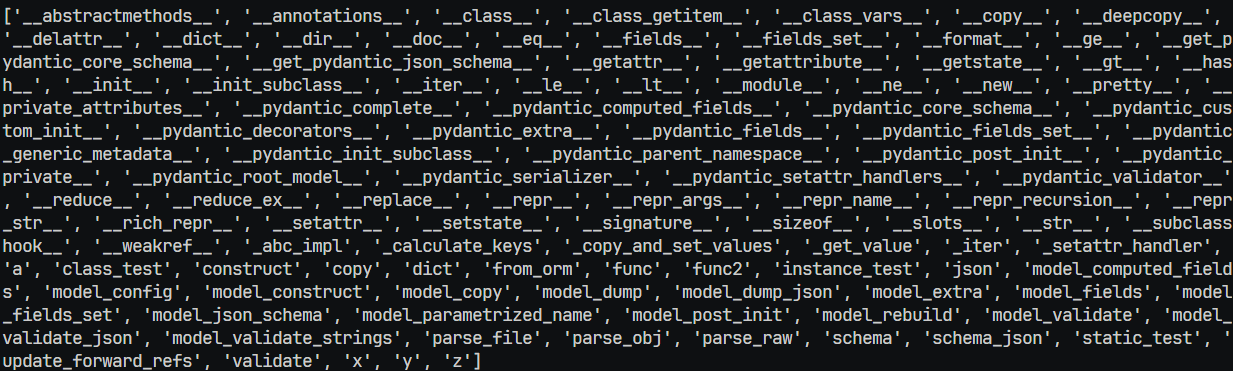
How often have you wished for a more well organized output from Python's built-in dir function when looking through a deeply nested pydantic model after seeing page due to tens of private methods? Running dir on a pandas DataFrame produces a list of 443 entries!
The goal of this library is to create a more useful debugging tool than the built-in function dir(<class>). The issues with the built-in dir(<class>) addressed by this library are:
- Inclusion of dunder methods that are very rarely useful
- No differentiation between attributes/methods
- No docstring display
- No grouping of similar functionality together, only alphabetical sorting
- No way to jump to the source code of the
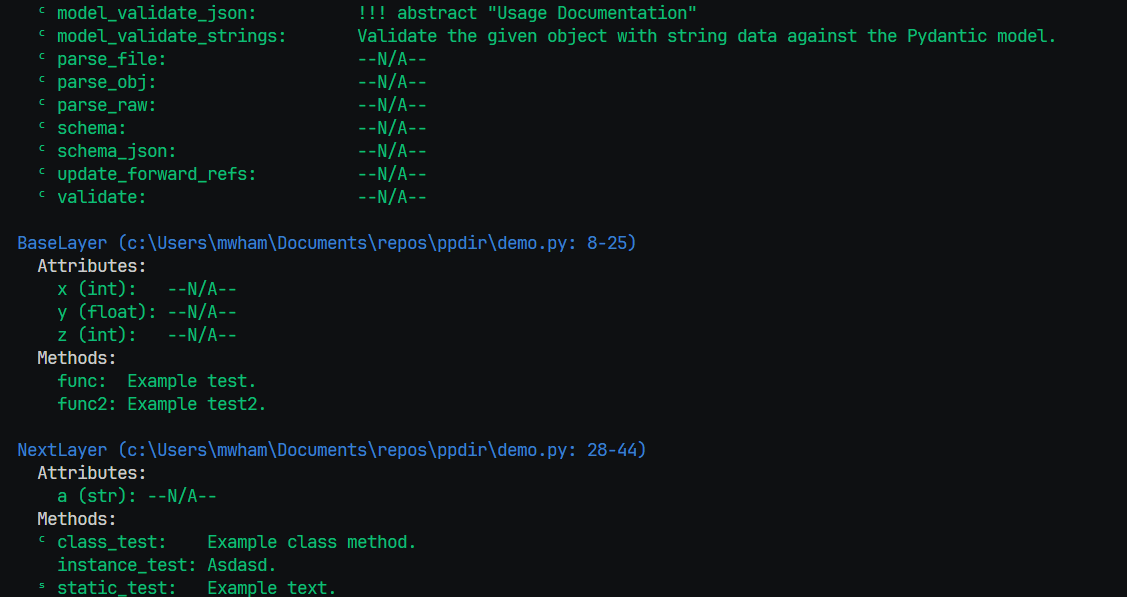
This library takes the output of dir and runs the following steps:
- Groups the attributes and methods by the class they are defined by
- Identifies the source code location of the class, allowing you to quickly jump to them for a deeper dive in IDEs like VS Code.
- Prints the docstring summary of the class.
- Identifies if it is a dunder method, non-dunder method, or attribute
- Within non-dunder methods, adds a "ᶜ" or "ˢ" to indicate if it is a classmethod or staticmethod rather than a standard instance method.
- Pulls the summary of the docstring for each attribute/method, if it exists
- For attributes, there is no
__doc__attribute, but we follow the convention of PEP-258 and most autocompletion tools of the next literal expression if it exists
- For attributes, there is no
- Colorizes the output to visually differentiate the classes, attributes, methods, and dunder methods
Limitations
Currently, this library only works with classes. For all other entities - functions, modules, etc - it falls back to the built-in dir implementation.
Installation
You can install the library using pip:
pip install pretty-dir
Auto-loading in PDB (Breakpoint)
PDB is the built-in Python debugger that you can invoke with the breakpoint() function (or import pdb; pdb.set_trace() in Python versions before 3.7). To make ppdir automatically available in every PDB session, you can include it in a PDB configuration file.
To make and add ppdir to your global PDB configuration, create a file named ~/.pdbrc if it doesn't already exist, and add the following lines to it:
from ppdir import ppdir, defaults
defaults(include_docs=True)  # remember to set your preferred defaults!
Now ppdir will be automatically available whenever you call breakpoint() in your code.
Basic Usage Example
from ppdir import ppdir

class BaseClass:
    base: int

class MyClass(BaseClass):
    a: int
    "example attr docstring"
    b: str

    def my_method(self):
        """This is my method."""
        pass

ppdir(MyClass)
Demo
Running the code in demo.py, you should see the difference between the built-in dir and ppdir like the following images:
Before:
After:
1 maintainer

Metadata
1 maintainer
Release files for pretty-dir 0.9.13
For a detailed explanation of source distributions (sdists) and built distributions (wheels), please see the package formats documentation.
Source distribution (sdist)
| File | Size | Uploaded | Provenance | Actions |
|---|---|---|---|---|
| pretty_dir-0.9.13.tar.gz | 6.5 kB | With provenance | Details for pretty_dir-0.9.13.tar.gz |
Built distribution (wheel)
| File | Interpreter | ABI | Platform | Actions Reset |
|---|---|---|---|---|
| pretty_dir-0.9.13-py3-none-any.whl | Python 3 | none | any | Details for pretty_dir-0.9.13-py3-none-any.whl |
Total release size: 14.1 kB
Release files / pretty_dir-0.9.13.tar.gz
| Download URL | pretty_dir-0.9.13.tar.gz |
|---|---|
| Size | 6.5 kB |
| Tags | Source |
|
SHA-256 checksum How to use checksums |
e54a2999289229aa6205b3276efe29a5da632680e28408840c35ea9e065f41a5
|
|
BLAKE2b-256 checksum How to use checksums |
be24aff09da970bf5e18bbde6498aa6f6af9ecbae2e7969b57c8b48f9ae66d2c
|
| Upload date | |
|
Uploaded using Trusted Publishing? What is trusted publishing? |
Yes |
| Uploaded via |
twine/6.1.0 CPython/3.13.7
|
Provenance
Provenance describes where a file came from. On PyPI, provenance is shared via attestations, which provide a verifiable record of the build or publishing details. View details, limitations and caveats.


PyPI Publish Attestation
PyPI verified that this artifact, at this checksum, originated from the publisher listed below.
Signed by GitHub Actions, verified by PyPI on Sep 10, 2025.
Transparency logRelease files / pretty_dir-0.9.13-py3-none-any.whl
| Download URL | pretty_dir-0.9.13-py3-none-any.whl |
|---|---|
| Size | 7.6 kB |
| Tags | Python 3 |
|
SHA-256 checksum How to use checksums |
420c71115f28ab36658bda14ca695a5d10af9a0c2649f8ff87cb333bf4af24f9
|
|
BLAKE2b-256 checksum How to use checksums |
7f13f7a5b07d950de72c9cfd91edceb38ffa87b03f61557e6eb3e049492fdb6a
|
| Upload date | |
|
Uploaded using Trusted Publishing? What is trusted publishing? |
Yes |
| Uploaded via |
twine/6.1.0 CPython/3.13.7
|
Provenance
Provenance describes where a file came from. On PyPI, provenance is shared via attestations, which provide a verifiable record of the build or publishing details. View details, limitations and caveats.
PyPI Publish Attestation
PyPI verified that this artifact, at this checksum, originated from the publisher listed below.
Signed by GitHub Actions, verified by PyPI on Sep 10, 2025.
Transparency logSecurity for pretty-dir 0.9.13
Provenance
Provenance describes where a file came from. On PyPI, provenance is shared via attestations, which provide a verifiable record of the build or publishing details. View details, limitations and caveats.
Full provenance
All 2 files in this release have been uploaded with provenance metadata.
Attestation for pretty_dir-0.9.13.tar.gz
PyPI Publish Attestation
PyPI verified that this artifact, at this checksum, originated from the publisher listed below.
Signed by GitHub Actions, verified by PyPI on Sep 10, 2025.
Transparency logA note on package security
PyPI is a repository for distributing packages, not a service for auditing them. While third-party security researchers and our staff do their best to detect and remove malicious packages, PyPI cannot guarantee the quality, security or suitability of any given package.
To learn more about protecting yourself from malicious actors, visit our package security documentation.














